linkedin
Formbricks logo
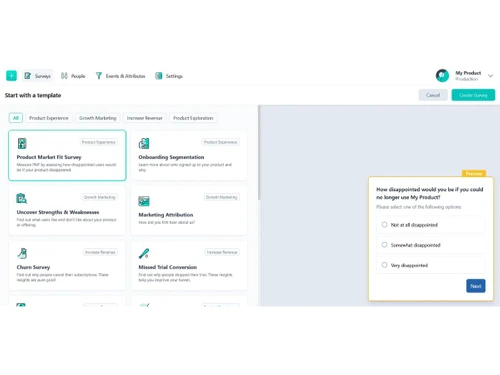
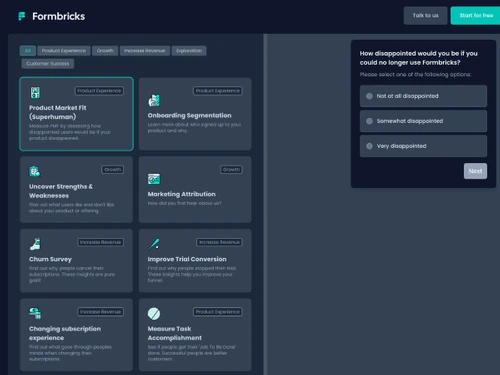
formbricks-templates
formbricks-surveys
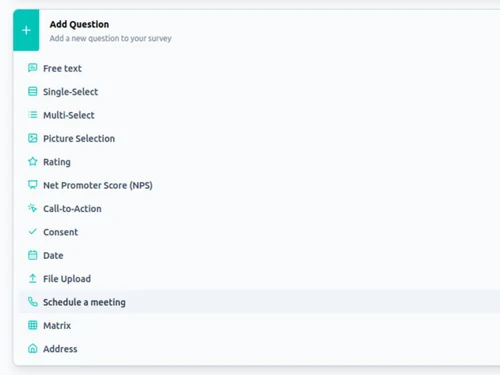
formbricks-questions

Formbricks

Brand: Formbricks

  • 3.9

  • 4 Ratings

Formbricks is an open-source experience management platform that helps businesses collect customer feedback across websites, apps, and emails.

See More

Have you used Formbricks before?

Share your insights for better experience

Add a Review

Price Available on Request

Questions about pricing or customization? We’re here to help, just a click away.

100% Genuine
Products
Best Price
Guaranteed
Safe & Secure
Payment
  • Description

  • Pricing

  • Features

  • Specification

  • Review

  • Compare

  • Alternatives

Formbricks Software Overview

What is Formbricks?

Formbricks is a privacy-first, open-source Experience Management (XM) suite designed to help businesses understand their customers on a deeper level. It functions as a comprehensive experience data hub, enabling organizations to create, deploy, and analyze surveys across multiple digital touchpoints. By gathering contextual feedback directly from websites, in-app environments, and emails, Formbricks provides actionable insights into the user journey.

The platform is built with data privacy at its core, offering both a GDPR-compliant cloud solution and the option for self-hosting. This flexibility makes it an ideal choice for companies that require full control over their data. Whether measuring customer satisfaction, conducting user research, or optimizing product onboarding, Formbricks equips teams with the tools to capture valuable feedback precisely when it matters most.

Why Choose Formbricks?

  • Open Source and Self-Hostable: As an open-source platform, Formbricks offers complete transparency and independence. Organizations can self-host the entire solution, ensuring full ownership and control over sensitive customer data while avoiding vendor lock-in.
  • Privacy-Centric by Design: With a strong focus on data privacy, Formbricks helps businesses comply with regulations like GDPR with ease. The choice between a secure European cloud and self-hosting caters to a wide range of compliance requirements.
  • Contextual In-Product Feedback: The platform excels at capturing feedback at the most relevant moments. By triggering surveys based on user actions within a website or app, it achieves significantly higher conversion rates and gathers more accurate insights than traditional email-based surveys.
  • Granular Audience Targeting: Move beyond generic feedback collection. Formbricks allows you to pre-segment users based on custom attributes, ensuring that your surveys reach the right audience. This targeted approach minimizes noise and maximizes the quality of the data collected.
  • Full Customizability: The open-source nature allows for deep customization and extendability. You can easily integrate Formbricks into your existing technology stack and adapt it to meet the specific needs of your organization.

Advanced Features of Formbricks

  • Conditional Logic: Create dynamic and interactive surveys that adapt in real-time based on a respondent's previous answers, leading to a more personalized and relevant user experience.
  • Attribute-Based Segmentation: Leverage user data to build custom audience segments. Target surveys to specific user cohorts, such as new sign-ups, power users, or those at risk of churning, to gather highly specific feedback.
  • Automation and Webhooks: Automate your feedback workflows by connecting Formbricks with your other tools. Use custom webhooks and a full API to trigger actions, sync data, and integrate survey insights into your business processes.
  • AI-Powered Feedback Analysis: Formbricks offers AI-driven feedback management capabilities as an Enterprise add-on. These features can unify feedback from multiple sources and apply topic and subtopic labels to identify trends and key themes.
  • Multi-Channel Deployment: Reach your users wherever they are. Deploy surveys as simple links, embed them in emails, or trigger them as pop-ups and widgets directly within your web and native mobile applications (iOS & Android).
  • Comprehensive Security: For enterprise needs, Formbricks offers robust security features, including two-factor authentication (2FA), multi-factor authentication, role-based access controls, and audit logging, to safeguard data and support security requirements.

Key Capabilities of Formbricks

  • Survey Creation and Customization: Build any type of survey using a wide range of question types. Customize the look and feel with multimedia backgrounds and, on paid plans, remove Formbricks branding for a fully white-labeled experience.
  • Targeting and Triggering Engine: Define precise conditions for when and to whom a survey should be displayed. Triggers can be based on user actions, time spent on a page, or custom attributes passed to the platform.
  • Unified Data Collection: Consolidate all feedback into a single, accessible hub. The platform captures everything from complete submissions to partial responses, providing a complete picture of user sentiment.
  • Respondent and Audience Management: Go beyond anonymous responses by identifying respondents and managing them as contacts. Build and maintain detailed user segments for ongoing research and targeted communication.
  • Flexible Deployment Options: Choose the deployment model that best fits your organization's needs. Opt for the hassle-free, managed Formbricks Cloud hosted in Germany, or deploy the entire platform on your own infrastructure for maximum control.

How to Use Formbricks?

  1. Set Up Your Environment: Begin by signing up for a Formbricks Cloud account or, for full control, deploy the open-source solution on your own servers. The initial setup is designed to be completed in minutes.
  2. Design Your Survey: Navigate to the survey editor to build your questionnaire. Select from various question types, apply conditional logic, and customize the design to match your brand.
  3. Define Your Target Audience: Specify who should see your survey. Use the segmentation engine to target users based on their attributes, behavior, or journey stage.
  4. Deploy Across Channels: Choose how to distribute your survey. Embed it directly into your website or application, send it via a shareable link, or trigger it based on user actions for in-context feedback.
  5. Analyze and Act on Insights: As responses come in, use the central dashboard to monitor results. Zoom in on individual feedback trails or analyze aggregated data to identify trends and inform your product strategy.

Formbricks Pricing

Formbricks pricing details are available on request on techjockey.com.

The pricing model is based on different parameters, including extra features, deployment type, and the total number of users. For further queries related to the product, you can contact our product team and learn more about the pricing and offers.

Read more

Formbricks Company Details

Founded Year:  2022

Formbricks is an open-source Experience Management platform built of the fastest growing survey platform worldwide. Understand what your customers need. Privacy-first by design.

Director/Founders Johannes Dancker, Matthias Nannt
Company Size 1-100 Employees

Formbricks Pricing & Plans

Looking for The Right Pricing?

Share your requirements and get a plan built around your business.

  • Define your business needs
  • Get customised pricing
  • Choose features that fit your workflow

Price Available on Request

Get personalised Formbricks pricing that fits your needs. Our team will connect with you.

Formbricks Features

  • icon_check Multi Channel Support
    Support for surveys via web, in‑app, link or email channels to reach users in any environment seamlessly.
  • icon_check No Code Editor
    Create and customize surveys using no‑code visual editor with multiple question types and best‑practice templates.
  • icon_check Template Library
    Access a variety of best‑practice survey templates (e.g. PMF, onboarding, feedback, trial conversion).
  • icon_check User Segmentation
    Segment survey audiences with fine‑grained attributes or behavior filters to capture relevant feedback.
  • icon_check Conditional Logic
    Show or hide questions dynamically based on previous inputs or variable values to tailor the flow.
  • icon_check Real Time Analytics
    Instant analytics and visual reporting on responses, filters, charts update automatically with new data.
  • icon_check Partial Submissions
    Collect incomplete form responses to maximize data capture from users who don’t finish the survey.
  • icon_check Multi Language Support
    Support multiple languages in surveys so you can localize questions and reach broader audiences.
  • icon_check Spam Protection
    Protect surveys using Google reCAPTCHA v3 to prevent bot submissions (paid feature or enterprise only).
  • icon_check Sandbox / Test Environments
    Separate test and production environments with distinct API keys, configs, and ability to copy surveys.

Formbricks Specifications

Supported Platforms
Ubuntu Ubuntu Windows Windows MacOS MacOS Linux Linux
Devices
Desktop Desktop
Deployment
Cloud-Based Cloud-Based
Suitable For
All Industries
Business Specific
All Businesses
Business Size
Startups Medium Business Enterprises
Customer Support
Email Communities
Language
English
Integration
API Integration
Training Resources
Videos
Compliance Regulation
CCPA GDPR

Explore the Best Alternative Solutions Similar to Your Business Size and Needs

Formbricks Review

3.9

Out of 5

img

Overall Rating

Based on
4 Verified Ratings

Rating Breakdown

  • Features 4
  • Value for Money 3.8
  • Ease of Use 4.2
  • Customer Support 3.7

80% Recommend this Product

Add Review

Techjockey Trusted Reviews from Verified Users

No reviews are currently available for Formbricks. Discover similar Survey Software reviews

  • QS Plus Quantity surveying software

    4.9

    Whats great - Jon from Techjockey was very in tune with our requirements, and after a good discussion recommended some good products/vendor... read more

  • SurveySparrow

    4.3

    Whats great - Perfectly planned front and back end. Exceptionally simple to set up a study, send it by means of email by their administrati... read more

  • Zoho Survey

    4.8

    Whats great - Zoho Survey is really clear to utilize in the event that you know about making studies. Some overviews can get very intricate... read more

Compare Formbricks With other Survey Software

Products
Ratings
Pricing
Device Supported
Deployment
Supported Platforms
  • img

    Formbricks

  • 3.9

  • Price On Request

  • Desktop

    Mobile

  • Web based

    On Premises

  • Windows

    Mac OS

  • img

    Zoho Survey

  • 4.5

  • ₹ 4992

  • Desktop

    Mobile

  • Web based

    On Premises

  • Windows

    Mac OS

  • img

    Zoho Forms

  • 4.4

  • Price On Request

  • Desktop

    Mobile

  • Web based

    On Premises

  • Windows

    Mac OS

  • img

    SogoCore

  • 4.3

  • Price On Request

  • Desktop

    Mobile

  • Web based

    On Premises

  • Windows

    Mac OS

  • img

    Formsite

  • 4.4

  • Price On Request

  • Desktop

    Mobile

  • Web based

    On Premises

  • Windows

    Mac OS

  • img

    Alchemer

  • 4.2

  • Price On Request

  • Desktop

    Mobile

  • Web based

    On Premises

  • Windows

    Mac OS

  • img

    User Interviews

  • 4.2

  • Price On Request

  • Desktop

    Mobile

  • Web based

    On Premises

  • Windows

    Mac OS

  • img

    Formly

  • 4.3

  • Price On Request

  • Desktop

    Mobile

  • Web based

    On Premises

  • Windows

    Mac OS

  • img

    Microsoft Forms

  • 4.1

  • Price On Request

  • Desktop

    Mobile

  • Web based

    On Premises

  • Windows

    Mac OS

  • img

    SurveySparrow

  • 4.3

  • ₹ 2397

  • Desktop

    Mobile

  • Web based

    On Premises

  • Windows

    Mac OS

(0) Product(s) selected

Formbricks Alternatives

See All Formbricks Alternatives

Starting Price:

$25 /Month

Starting Price:

$55 /User/Month

Starting Price:

$19 /User/Month

Starting Price:

$19 /Month

Starting Price:

$10 /Month

Starting Price:

$83 /User/Month

Available

Price on Request

Starting Price:

$25 /Month

Articles for Formbricks

See All Related Articles

20,000+ Software Listed

Best Price Guranteed

Free Expert Consultation

2M+ Happy Customers

Terms and Condtions

close

Users with registered businesses can purchase goods from merchants on the platform to satisfy their business needs. Users are not permitted to utilize any products acquired through the platform for resale, advertising, business, or further distribution.

For each purchase made, users will receive a Tax Invoice (or 'GST invoice') that includes specific details such as:

  • the GSTIN of the user associated with their registered business, and

  • the specified Entity Name for their business.

It should be noted that not all products are eligible for GST Invoice. Only the products displayed by participating sellers with the 'GST-based Invoice Available' callout on the product description page would qualify.

Certain goods and services are not eligible to get a GST Invoice, including items with VAS, i.e., Value Added Services (e.g., Total Mobile Protection/Assured Buyback) and those involving an exchange offer at the time of purchase.

Users must ensure the accuracy of the GSTIN, and business entity name provided for the GST Invoice. Requests for corrections into GST Invoice would not be accommodated by Techjockey.com or any Seller, and any issues arising from user-provided information are the sole responsibility of users.

Techjockey.com is not liable for the GST Invoice or any associated input tax credit. To efficiently claim an input tax credit, users should select the registered place of business address as per the GST authority's data and follow the provisions of the GST Act and rules.

To claim an input tax credit, the delivery and billing addresses must match. Furthermore, input tax credits will not be granted if the delivery address and GSTIN on the invoice are from different states. In case of incorrect GST details provided during the order placement, the order will be canceled automatically.