linkedin
Froged logo
play Get to know FROGED: How to use our Onboarding Features to improve Product Adoption
Froged Dashboard
Froged Integrations

Froged

Brand: Froged

  • 4.3

  • 3 Ratings

Have you used Froged before?

Share your insights for better experience

Add a Review
Starting Price
$39

View plans

100% Genuine
Products
Best Price
Guaranteed
Safe & Secure
Payment
  • Description

  • Pricing

  • Features

  • Specification

  • Review

  • Compare

  • Alternatives

Starting at $39

FrogedSoftware Overview

Froged Company Details

Founded Year:  2019

FROGED is a tool that offers to scale business and business development services.

Director/Founders Angel Romero Astorga, Emily González Cebrián-Lombán, Juan José Rojano
Company Size 1-100 Employees

Froged Pricing & Plans

Basic
Starting at $39
    • Licenses

      Licenses
      Licenses
    • Monthly

      Monthly
      Monthly

Key Features

  • 1 seat

  • Collaborative inbox

  • All channels

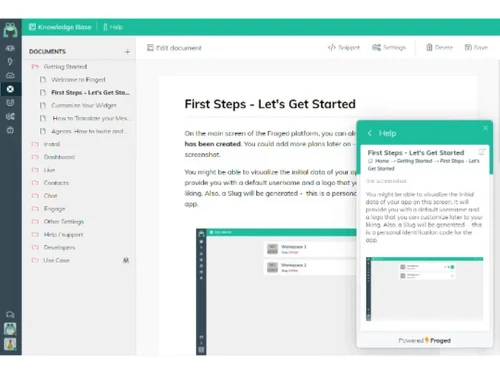
  • Knowledge Base

  • Preconfigured metrics

Starter
Starting at $106
    • Licenses

      Licenses
      Licenses
    • Monthly

      Monthly
      Monthly

Key Features

  • Everything in Basic, plus:

  • 2 more seats (3 total)

  • Real time collaboration

  • Team performance analytics

  • Customer Satisfaction Survey

  • Knowledge Base PRO

Professional
Starting at $422
    • Licenses

      Licenses
      Licenses
    • Monthly

      Monthly
      Monthly

Key Features

  • Everything in Starter, plus:

  • 4 more seats (7 total)

  • Groups and conversation historic

  • Conversation Routing

  • Multiple business hours

  • Inbox groups

Froged Features

  • icon_check Customer Management
    Organize customer data—contacts, segments & history—enabling personalized experiences and lifecycle tracking.
  • icon_check API Access
    Connect Froged with 1,600+ tools via REST API or no‑code integrations for streamlined data flow and automation.
  • icon_check Audience Targeting
    Use behavioral and event-based data to segment and tailor in-app campaigns, emails, and messages.
  • icon_check Feedback Management
    Collect customer feedback via NPS, surveys, and in-app forms; centralize and analyze insights easily.
  • icon_check Dashboards
    Monitor agent performance, CSAT, conversation volume & event tracking with real-time analytics.
  • icon_check Customer Engagement
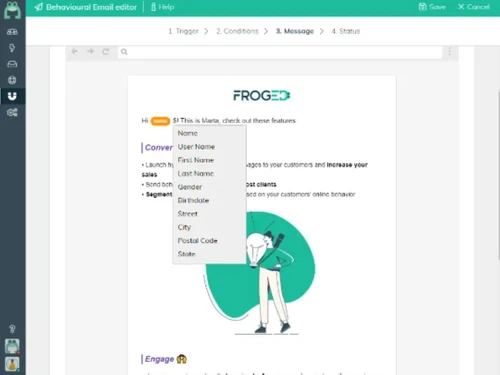
    Drive adoption with in-app messaging, product flows, tooltips & automated behavioral emails.
  • icon_check Integrations
    Seamlessly sync with 1,600+ apps (e.g. Jira, CRM tools) via prebuilt or custom API connectors.
  • icon_check Surveys & Feedback
    Launch dynamic surveys and NPS campaigns, then analyze responses to inform retention strategies.
  • icon_check Customizable Branding
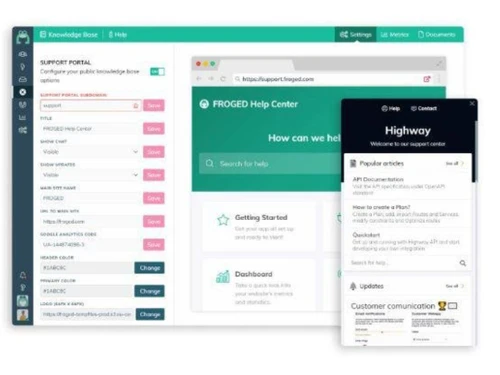
    Tailor chat widgets, emails, and interfaces with your logos, colors, and brand identity.
  • icon_check User Behavior Tracking
    Track in-app events, usage flows, and behavior to fuel segmentation and personalization.
  • icon_check A/B Testing
    Test variations in messages, flows, and campaigns to optimize onboarding and engagement outcomes.
Froged Demo Video play icon

Get Froged Demo

Watch the demo video to explore key features, real workflows, and how the software fits your business needs.

Understand
Key Features
Personal
Demo Insights
Interactive
Demo Support

Froged Specification

Supported Platforms
Ubuntu Ubuntu Windows Windows MacOS MacOS Linux Linux
Devices
Desktop Desktop Mobile Mobile
Deployment
Web-Based Web-Based
Suitable For
All Industries
Business Specific
All Businesses
Business Size
Small Business Medium Business Enterprises
Customer Support
Email Communities
Language
English
Integration
API Integration
Training Resources
Videos
AI Features
AI Integrated

Explore the Best Alternative Solutions Similar to Your Business Size and Needs

Small Business

Designed for startups and growing businesses

Aide

4.3

Redapto

4.0

BizChat

4.1

See More

Medium Business

Built for business growth and flexibility

LiveAgent

4.6

Ada

4.3

Yuma AI

4.3

See More

Froged Review

4.3

Out of 5

img

Overall Rating

Based on
3 Verified Ratings

Rating Breakdown

  • Features 4.3
  • Value for Money 4.3
  • Ease of Use 4.3
  • Customer Support 4.3

80% Recommend this Product

Add Review

Techjockey Trusted Reviews from Verified Users

No reviews are currently available for Froged. Discover similar Customer Support Software reviews

  • LiveAgent

    4.6

    Whats great - Techjockey helped our company match up with the best software to fulfill our needs. Now we are able to better manage our bu... read more

  • Kapture CX

    4.2

    Whats great - Its user friendly interface ,easy accessibility read more

  • HubSpot CRM

    4.9

    Whats great - The software offers engaging dashboards, where you can see all your notifications and monitor your progress regularly. We can... read more

Compare Froged With other Customer Support Software

Products
Ratings
Pricing
Device Supported
Deployment
Supported Platforms
  • img

    Froged

  • 4.3

  • Price On Request

  • Desktop

    Mobile

  • Web based

    On Premises

  • Windows

    Mac OS

  • img

    LiveAgent

  • 4.6

  • Price On Request

  • Desktop

    Mobile

  • Web based

    On Premises

  • Windows

    Mac OS

  • img

    BizChat

  • 4.1

  • Price On Request

  • Desktop

    Mobile

  • Web based

    On Premises

  • Windows

    Mac OS

  • img

    Yuma AI

  • 4.3

  • Price On Request

  • Desktop

    Mobile

  • Web based

    On Premises

  • Windows

    Mac OS

  • img

    Redapto

  • 4.0

  • Price On Request

  • Desktop

    Mobile

  • Web based

    On Premises

  • Windows

    Mac OS

  • img

    Ada

  • 4.3

  • Price On Request

  • Desktop

    Mobile

  • Web based

    On Premises

  • Windows

    Mac OS

  • img

    Aide

  • 4.3

  • Price On Request

  • Desktop

    Mobile

  • Web based

    On Premises

  • Windows

    Mac OS

  • img

    DevRev

  • 4.3

  • Price On Request

  • Desktop

    Mobile

  • Web based

    On Premises

  • Windows

    Mac OS

  • img

    ServiceKart

  • 4.3

  • Price On Request

  • Desktop

    Mobile

  • Web based

    On Premises

  • Windows

    Mac OS

  • img

    AIhelp

  • Price On Request

  • Desktop

    Mobile

  • Web based

    On Premises

  • Windows

    Mac OS

  • img

    BoldDesk

  • 4.1

  • Price On Request

  • Desktop

    Mobile

  • Web based

    On Premises

  • Windows

    Mac OS

(0) Product(s) selected

Froged Alternatives

See All Froged Alternatives

Starting Price:

$59 /Month

Starting Price:

$18 /Agent/Month

Available

Price on Request

Starting Price:

$45 /Workspace/Month

Starting Price:

$2,499 /Month

Starting Price:

$12

Available

Price on Request

Starting Price:

$39 /Agent/Month

Articles for Froged

See All Related Articles

20,000+ Software Listed

Best Price Guranteed

Free Expert Consultation

2M+ Happy Customers

Terms and Condtions

close

Users with registered businesses can purchase goods from merchants on the platform to satisfy their business needs. Users are not permitted to utilize any products acquired through the platform for resale, advertising, business, or further distribution.

For each purchase made, users will receive a Tax Invoice (or 'GST invoice') that includes specific details such as:

  • the GSTIN of the user associated with their registered business, and

  • the specified Entity Name for their business.

It should be noted that not all products are eligible for GST Invoice. Only the products displayed by participating sellers with the 'GST-based Invoice Available' callout on the product description page would qualify.

Certain goods and services are not eligible to get a GST Invoice, including items with VAS, i.e., Value Added Services (e.g., Total Mobile Protection/Assured Buyback) and those involving an exchange offer at the time of purchase.

Users must ensure the accuracy of the GSTIN, and business entity name provided for the GST Invoice. Requests for corrections into GST Invoice would not be accommodated by Techjockey.com or any Seller, and any issues arising from user-provided information are the sole responsibility of users.

Techjockey.com is not liable for the GST Invoice or any associated input tax credit. To efficiently claim an input tax credit, users should select the registered place of business address as per the GST authority's data and follow the provisions of the GST Act and rules.

To claim an input tax credit, the delivery and billing addresses must match. Furthermore, input tax credits will not be granted if the delivery address and GSTIN on the invoice are from different states. In case of incorrect GST details provided during the order placement, the order will be canceled automatically.