linkedin
BoldDesk logo
play Streamline Your Support - An Introduction to BoldDesk
bolddesk-tickets
bolddesk-chats

BoldDesk

Brand: Syncfusion

  • 4.1

  • 5 Ratings

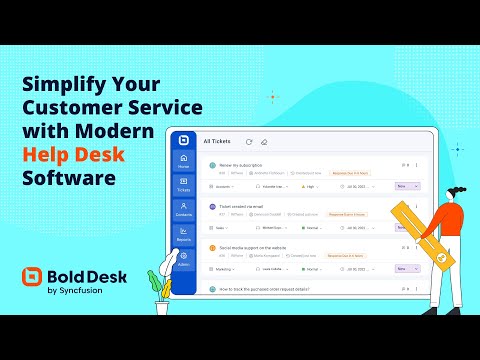
BoldDesk is an AI-powered customer support platform that helps businesses manage customer inquiries and support operations across multiple channels.

See More

Have you used BoldDesk before?

Share your insights for better experience

Add a Review
Starting Price
$58

View plans

100% Genuine
Products
Best Price
Guaranteed
Safe & Secure
Payment
  • Description

  • Pricing

  • Features

  • Specification

  • Review

  • Compare

  • Alternatives

Starting at $58

BoldDesk Software Overview

What is BoldDesk?

BoldDesk is a modern, AI-powered customer support software designed to streamline and enhance help desk operations. Developed by Syncfusion, a company with over 25 years of experience, it serves as a complete, unified platform for managing customer interactions. The software integrates ticketing, live chat, omnichannel communication, and a knowledge base into a single, cohesive system. Its core philosophy is to provide a comprehensive feature set under a simple, flat-pricing model, positioning itself as a cost-effective alternative to platforms like Zendesk and Freshdesk. By leveraging autonomous AI agents and an AI copilot, BoldDesk aims not just to deflect inquiries but to actively resolve them, improving both agent productivity and customer satisfaction.

Why Choose BoldDesk?

  • Transparent, All-Inclusive Pricing: Unlike competitors that gate essential features behind expensive tiers and add-ons, BoldDesk includes every feature in one plan. This predictable, flat-rate pricing model can lead to savings of up to 70%, making advanced capabilities accessible to teams of all sizes.
  • Powerful AI Integration: The platform's AI is designed for resolution. Autonomous AI agents can handle and resolve up to 70% of common inquiries without human intervention, while the AI Copilot assists agents by drafting replies and summarizing tickets.
  • Unified Omnichannel Support: Agents can manage conversations from over 10 channels, including email, live chat, WhatsApp, Instagram, and Facebook, from a single, unified inbox. This ensures a consistent and efficient customer experience.
  • Free Migration and Onboarding: To ease the transition, BoldDesk provides free, expert-led migration and guided onboarding for every customer, significantly reducing the friction and cost of switching systems.
  • Enterprise-Grade Security and Reliability: The platform is SOC 2, GDPR, and HIPAA compliant, offering robust security features like custom roles and SSO/SAML without requiring an "enterprise tier" upgrade. It also guarantees a 99.9% uptime SLA.

Advanced Features of BoldDesk

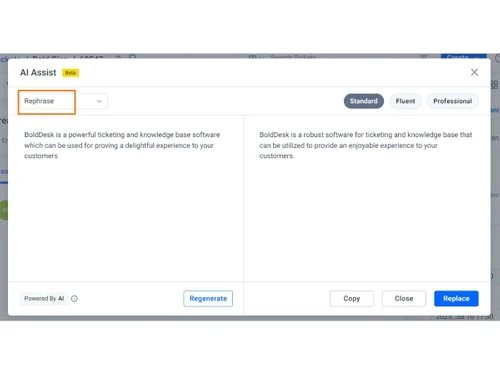
  • AI Agent & Copilot: The AI Agent autonomously resolves customer chats and tickets, while the AI Copilot acts as an intelligent assistant for human agents, suggesting replies and summarizing complex issues to speed up resolution times.
  • No-Code Workflow Automation: Teams can easily automate repetitive tasks without writing any code. This includes creating rules for ticket routing, escalations, approvals, and follow-ups, freeing agents to focus on more complex customer needs.
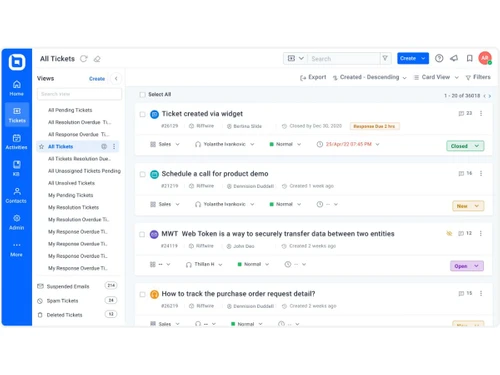
  • Omnichannel Ticketing: This feature centralizes all customer requests from various channels into one organized queue. It allows for automatic routing, prioritization, and tracking of every ticket against predefined Service Level Agreements (SLAs).
  • Customizable Reporting & Dashboards: Gain real-time insights into your support operations. Track key metrics like resolution times, Customer Satisfaction (CSAT) scores, ticket volume trends, and individual agent performance through powerful, customizable dashboards.
  • Integrated Knowledge Base: Build a comprehensive self-service portal for customers. The knowledge base helps reduce ticket volume by allowing users to find answers to common questions on their own, 24/7.

Modules of BoldDesk

  • Ticketing System: The core of the platform, it captures every customer request from any channel and organizes them into a unified queue. It includes robust tools for routing, prioritizing, and managing SLAs.
  • AI Agent: An intelligent automation module that can understand and resolve a high percentage of customer inquiries automatically, operating across both live chat and ticket-based interactions.
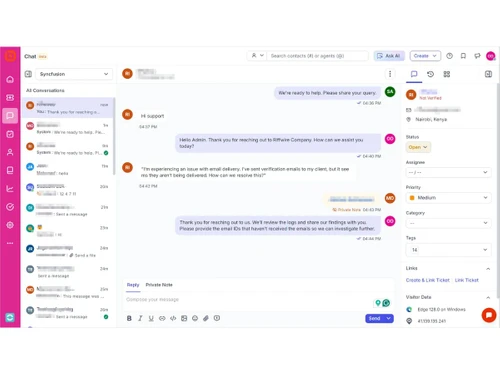
  • Live Chat: Enables real-time engagement with customers on your website or application. The AI agent can handle initial queries and seamlessly hand off more complex conversations to a human agent when needed.
  • Omnichannel Inbox: Consolidates communications from email, chat, WhatsApp, social media, and SMS into a single interface, allowing agents to manage all conversations from one place.
  • Workflow Automation: A powerful, rule-based engine that automates routine processes. It handles everything from ticket assignment and escalations to sending automated follow-ups and managing approval workflows.
  • Reporting and Analytics: This module provides the tools to measure and analyze support performance. It turns raw support data into actionable insights through real-time reports and visual dashboards.

How to Use BoldDesk?

  1. Capture and Centralize: First, connect all your support channels (email, social media, chat widgets, etc.) to BoldDesk. All incoming customer requests are automatically converted into tickets and organized in a central queue.
  2. Automate and Route: Configure the AI Agent to handle common questions and set up no-code workflow rules. These rules can automatically assign tickets to the correct agent or department based on priority, channel, or keywords.
  3. Engage and Resolve: Agents use the unified omnichannel inbox to interact with customers. They can leverage the AI Copilot for assistance, collaborate with team members, and track every interaction until it reaches a successful resolution.
  4. Analyze and Optimize: Utilize the reporting module to monitor performance. Track SLAs, agent productivity, and customer satisfaction scores. Use these insights to identify bottlenecks and continuously improve your support processes.

BoldDesk Pricing

BoldDesk price starts at USD 58 at techjockey.com.

The pricing model is based on different parameters, including extra features, deployment type, and the total number of users. For further queries related to the product, you can contact our product team and learn more about the pricing and offers.

Read more

Syncfusion Company Details

Founded Year:  2001

Syncfusion empowers developers with over 1,900 UI components and frameworks to build modern, high-performance web, mobile, and desktop applications.

Director/Founders Stefan Hoenig
Company Size 1000+ Employees

BoldDesk Pricing & Plans

Starter (AI credits / month-500)
Key Features
  • AI Agent on all channels
  • AI actions (orders, refunds, API calls)
  • Custom AI skills and MCP
  • Shared inbox and ticketing
  • SLAs and automation rules
  • SSO and audit logs
Starting at $58
    • Credits

      Credits
      Credits
    • Monthly

      Monthly
      Monthly

Key Features

  • AI Agent on all channels

  • AI actions (orders, refunds, API calls)

  • Custom AI skills and MCP

  • Shared inbox and ticketing

  • SLAs and automation rules

  • SSO and audit logs

BoldDesk Features

  • icon_check Ticket Management
    Handles high-volume tickets with AI for categorization, routing, and prioritization to streamline customer service operations
  • icon_check Omnichannel Support
    Unifies email, chat, social, and phone into one platform for seamless customer interaction management and response.
  • icon_check Workflow Automation
    Configures rules, triggers, and actions to automate support processes, cutting manual work and boosting efficiency.
  • icon_check Live Chat Support
    Delivers real-time customer assistance via integrated chat tools within the helpdesk for instant query handling.
  • icon_check Knowledge Base Management
    Offers searchable articles and FAQs for 24/7 customer self-service and quick issue resolutions independently.
  • icon_check Automated Workflows
    Uses rule-based automation to resolve routine inquiries without agents, speeding up overall support delivery.
  • icon_check Enterprise Security
    Employs encryption, access controls, and audit logs to secure sensitive customer data in support environments.
  • icon_check GDPR Compliant
    Ensures data protection and privacy compliance for EU customer personal information processing requirements.
  • icon_check Self Service Portal
    Allows ticket submission, knowledge base access, and status tracking for customer independent use.
  • icon_check Appointment Management
    Schedules and manages customer appointments integrated into ticketing and workflow systems.
  • icon_check Task Assignment
    Auto-assigns tasks to agents by rules, skills, or workload for even distribution and tracking.
  • icon_check Communication Centralization
    Consolidates channels into a dashboard for unified management and quick responses.
  • icon_check Team Productivity Tools
    Includes collaboration, macros, and analytics to enhance agent performance daily.
BoldDesk Demo Video play icon

Get BoldDesk Demo

Watch the demo video to explore key features, real workflows, and how the software fits your business needs.

Understand
Key Features
Personal
Demo Insights
Interactive
Demo Support

BoldDesk Specifications

Supported Platforms
Windows Windows iOS iOS Android Android MacOS MacOS
Devices
Desktop Desktop Mobile Mobile Tablet Tablet iPad iPad
Deployment
Cloud-Based Cloud-Based
Suitable For
All Industries
Business Specific
All Businesses
Business Size
Small Business Startups Medium Business Enterprises
Customer Support
Email Communities
Language
English
Integration
API Integration
Training Resources
Webinars Documentation Videos
AI Features
AI Integrated
Compliance Regulation
HIPAA GDPR

Explore the Best Alternative Solutions Similar to Your Business Size and Needs

Small Business

Designed for startups and growing businesses

Aide

4.3

Froged

4.3

Redapto

4.0

See More

Medium Business

Built for business growth and flexibility

LiveAgent

4.6

Ada

4.3

Yuma AI

4.3

See More

BoldDesk Review

4.1

Out of 5

img

Overall Rating

Based on
5 Verified Ratings

Rating Breakdown

  • Features 3.9
  • Value for Money 4.4
  • Ease of Use 3.9
  • Customer Support 4.4

80% Recommend this Product

Add Review

Techjockey Trusted Reviews from Verified Users

No reviews are currently available for BoldDesk. Discover similar Customer Support Software reviews

  • LiveAgent

    4.6

    Whats great - Techjockey helped our company match up with the best software to fulfill our needs. Now we are able to better manage our bu... read more

  • Kapture CX

    4.2

    Whats great - Its user friendly interface ,easy accessibility read more

  • HubSpot CRM

    4.9

    Whats great - The software offers engaging dashboards, where you can see all your notifications and monitor your progress regularly. We can... read more

Compare BoldDesk With other Customer Support Software

Products
Ratings
Pricing
Device Supported
Deployment
Supported Platforms
  • img

    BoldDesk

  • 4.1

  • Price On Request

  • Desktop

    Mobile

  • Web based

    On Premises

  • Windows

    Mac OS

  • img

    LiveAgent

  • 4.6

  • Price On Request

  • Desktop

    Mobile

  • Web based

    On Premises

  • Windows

    Mac OS

  • img

    BizChat

  • 4.1

  • Price On Request

  • Desktop

    Mobile

  • Web based

    On Premises

  • Windows

    Mac OS

  • img

    Yuma AI

  • 4.3

  • Price On Request

  • Desktop

    Mobile

  • Web based

    On Premises

  • Windows

    Mac OS

  • img

    Redapto

  • 4.0

  • Price On Request

  • Desktop

    Mobile

  • Web based

    On Premises

  • Windows

    Mac OS

  • img

    Froged

  • 4.3

  • Price On Request

  • Desktop

    Mobile

  • Web based

    On Premises

  • Windows

    Mac OS

  • img

    Ada

  • 4.3

  • Price On Request

  • Desktop

    Mobile

  • Web based

    On Premises

  • Windows

    Mac OS

  • img

    Aide

  • 4.3

  • Price On Request

  • Desktop

    Mobile

  • Web based

    On Premises

  • Windows

    Mac OS

  • img

    DevRev

  • 4.3

  • Price On Request

  • Desktop

    Mobile

  • Web based

    On Premises

  • Windows

    Mac OS

  • img

    ServiceKart

  • 4.3

  • Price On Request

  • Desktop

    Mobile

  • Web based

    On Premises

  • Windows

    Mac OS

  • img

    AIhelp

  • Price On Request

  • Desktop

    Mobile

  • Web based

    On Premises

  • Windows

    Mac OS

(0) Product(s) selected

BoldDesk Alternatives

See All BoldDesk Alternatives

Starting Price:

$25

Starting Price:

$59 /Month

Starting Price:

$45 /Workspace/Month

Available

Price on Request

Starting Price:

$2,499 /Month

Starting Price:

$12

Available

Price on Request

Starting Price:

$39 /Agent/Month

Articles for BoldDesk

See All Related Articles

20,000+ Software Listed

Best Price Guranteed

Free Expert Consultation

2M+ Happy Customers

Terms and Condtions

close

Users with registered businesses can purchase goods from merchants on the platform to satisfy their business needs. Users are not permitted to utilize any products acquired through the platform for resale, advertising, business, or further distribution.

For each purchase made, users will receive a Tax Invoice (or 'GST invoice') that includes specific details such as:

  • the GSTIN of the user associated with their registered business, and

  • the specified Entity Name for their business.

It should be noted that not all products are eligible for GST Invoice. Only the products displayed by participating sellers with the 'GST-based Invoice Available' callout on the product description page would qualify.

Certain goods and services are not eligible to get a GST Invoice, including items with VAS, i.e., Value Added Services (e.g., Total Mobile Protection/Assured Buyback) and those involving an exchange offer at the time of purchase.

Users must ensure the accuracy of the GSTIN, and business entity name provided for the GST Invoice. Requests for corrections into GST Invoice would not be accommodated by Techjockey.com or any Seller, and any issues arising from user-provided information are the sole responsibility of users.

Techjockey.com is not liable for the GST Invoice or any associated input tax credit. To efficiently claim an input tax credit, users should select the registered place of business address as per the GST authority's data and follow the provisions of the GST Act and rules.

To claim an input tax credit, the delivery and billing addresses must match. Furthermore, input tax credits will not be granted if the delivery address and GSTIN on the invoice are from different states. In case of incorrect GST details provided during the order placement, the order will be canceled automatically.