linkedin
Comm100 logo
play Live Chat Product Tour Agent Side
comm100-comments
comm100-settings

Comm100

Brand: Comm100

  • No Ratings & Reviews

A customer support software that helps businesses manage and automate customer interactions across channels like chat, email, and messaging from one platform.

See More

Have you used Comm100 before?

Share your insights for better experience

Add a Review
Starting Price
$39

View plans

100% Genuine
Products
Best Price
Guaranteed
Safe & Secure
Payment
  • Description

  • Pricing

  • Features

  • Specification

  • Review

  • Compare

  • Alternatives

  • FAQ

Starting at $39

Comm100 Software Overview

What is Comm100?

Comm100 is an AI-powered customer support software that helps businesses manage communication with customers across multiple channels in one place.

It combines live chat, email, social media, and messaging into a single dashboard, making it easier for teams to respond quickly.

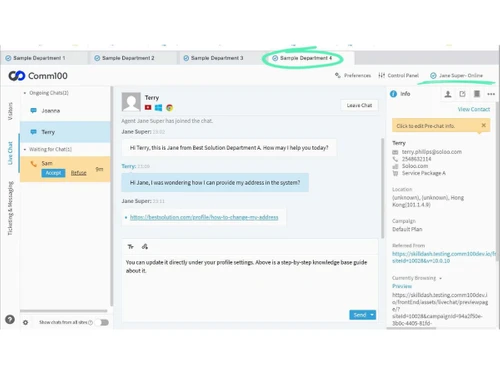
The platform uses AI chatbots to answer common questions automatically and provides 24/7 support. It also includes features like ticketing, voice calls, and a knowledge base to handle different types of customer queries.

Comm100 allows human agents and AI to work together efficiently while offering real-time data and analytics to improve service quality.

Why Choose Comm100 Software?

  • Omnichannel Support: Manage chat, email, social media, and messaging from a single platform.
  • AI-Powered Chatbots: Automate responses and handle repetitive queries efficiently.
  • Real-Time Live Chat: Engage website visitors instantly to boost conversions.
  • Unified Inbox: Centralize all customer conversations in one place.
  • Advanced Ticketing System: Track, prioritize, and resolve customer issues.
  • Customizable Workflows: Adapt processes according to your business needs.
  • Knowledge Base Integration: Provide self-service options to customers.
  • Detailed Analytics & Reports: Gain insights into performance and customer behavior.
  • High Security Standards: Enterprise-grade security for data protection.
  • Scalable Solution: Suitable for small businesses to large enterprises.
  • Multilingual Support: Serve customers in multiple languages.

Benefits of Comm100 Software

  • CRM Integration: Connect easily with existing CRM tools.
  • Automation Features: Reduce manual work with smart automation.
  • Cloud-Based Platform: Access from anywhere without installation hassles.
  • Improved Agent Productivity: Tools designed to help support teams work faster.
  • Customer Journey Tracking: Understand user behavior across touchpoints.
  • Easy Implementation: Quick setup with minimal technical effort.
  • 24/7 Customer Engagement: Always-on support with bots and automation.
  • Custom Branding Options: Match the platform with your brand identity.
  • Enhanced Customer Experience: Deliver fast, consistent, and personalized support.

Comm100 Pricing

Comm100 price starts at USD 39 at techjockey.com. The pricing model is based on different parameters, including extra features, deployment type, and the total number of users. For further queries related to the product, you can contact our product team and learn more about the pricing and offers.

Read more

Comm100 Company Details

Founded Year:  2009

Comm100 is a global provider of digital omnichannel customer engagement software for education, government and commercial organizations of all sizes.

Director/Founders Kevin Gao
Company Size 101-500 Employees

Comm100 Pricing & Plans

Live Chat Startup
Starting at $39
    • Agent

      Agent
      Agent
    • Monthly

      Monthly
      Monthly

Key Features

  • Full widget customization

  • Multi-language chat

  • Canned messages

  • 1 chat campaign

  • Basic reporting

Live Chat Plus
Starting at $69
    • Agent

      Agent
      Agent
    • Monthly

      Monthly
      Monthly

Key Features

  • Everything in Startup, plus:

  • Chat routing

  • Audio-video chat

  • Chat wrap-ups

  • Unlimited campaigns

Comm100 Features

  • icon_check Omnichannel Inbox
    Consolidates customer messages from email, SMS, social media, and messaging apps into a unified workspace for agents to manage
  • icon_check Live Chat Support
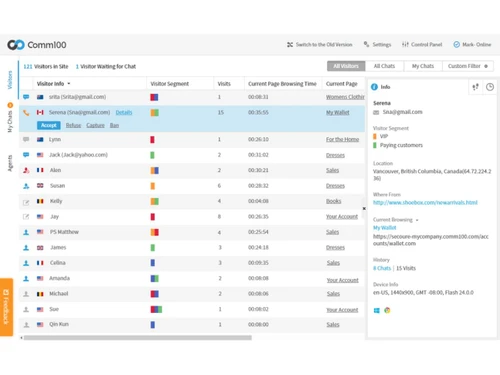
    Enables real-time conversations between visitors and support agents through chat with options for text, audio, video, and screen
  • icon_check Ticket Management
    Converts customer inquiries into trackable tickets, allowing teams to categorize, assign, and resolve support requests
  • icon_check Automated Ticket Routing
    Routes tickets automatically to appropriate agents or queues based on predefined rules, workload conditions, or request
  • icon_check Knowledge Base
    Provides a centralized repository for help articles and FAQs used by customers, agents, and AI tools to deliver consistent
  • icon_check Agent Copilot Suggestions
    Provides real-time response suggestions and context-aware guidance to agents during conversations to improve consistency.
  • icon_check Queue Management
    Organizes incoming chats and requests into queues, controlling distribution and wait times based on configured priorities.
  • icon_check SLA Tracking
    Tracks response and resolution deadlines for support tickets to ensure service commitments are monitored and enforced.
  • icon_check Workflow Automation
    Automates support processes through triggers and rules that perform actions like notifications, updates, or follow-up messages.
  • icon_check Multi Channel Messaging
    Enables agents to respond to customer interactions across messaging platforms without switching between systems.
  • icon_check Notes Management
    Enables agents to add internal comments to conversations or tickets to share context and collaborate without exposing notes to
  • icon_check Customer Interaction History
    Stores conversation records and contact details so agents can review previous interactions before responding to new inquiries.
  • icon_check Automated Follow-Ups
    Sends automated follow-up responses or notifications triggered by workflow rules or unresolved ticket conditions.
  • icon_check Voice Support Integration
    Supports inbound and outbound voice interactions integrated with the support platform for handling calls alongside other channels.
Comm100 Demo Video play icon

Get Comm100 Demo

Watch the demo video to explore key features, real workflows, and how the software fits your business needs.

Understand
Key Features
Personal
Demo Insights
Interactive
Demo Support

Comm100 Specifications

Supported Platforms
Windows Windows iOS iOS Android Android MacOS MacOS
Devices
Desktop Desktop Mobile Mobile Tablet Tablet iPad iPad
Deployment
Cloud-Based Cloud-Based Perpetual Perpetual
Suitable For
All Industries
Business Specific
All Businesses
Business Size
Small Business Startups Medium Business Enterprises SMBs SMEs MSMBs MSMEs
Customer Support
Email Communities
Language
English
Integration
API Integration
Training Resources
Webinars Videos
AI Features
AI Integrated
Compliance Regulation
HIPAA PCI DSS

Explore the Best Alternative Solutions Similar to Your Business Size and Needs

Small Business

Designed for startups and growing businesses

Aide

4.3

Froged

4.3

Redapto

4.0

See More

Medium Business

Built for business growth and flexibility

LiveAgent

4.6

Ada

4.3

Yuma AI

4.3

See More

Comm100 Review

Techjockey Trusted Reviews from Verified Users

No reviews are currently available for Comm100. Discover similar Customer Support Software reviews

  • LiveAgent

    4.6

    Whats great - Techjockey helped our company match up with the best software to fulfill our needs. Now we are able to better manage our bu... read more

  • Kapture CX

    4.2

    Whats great - Its user friendly interface ,easy accessibility read more

  • HubSpot CRM

    4.9

    Whats great - The software offers engaging dashboards, where you can see all your notifications and monitor your progress regularly. We can... read more

Compare Comm100 With other Customer Support Software

Products
Ratings
Pricing
Device Supported
Deployment
Supported Platforms
  • img

    Comm100

  • Price On Request

  • Desktop

    Mobile

  • Web based

    On Premises

  • Windows

    Mac OS

  • img

    LiveAgent

  • 4.6

  • Price On Request

  • Desktop

    Mobile

  • Web based

    On Premises

  • Windows

    Mac OS

  • img

    BizChat

  • 4.1

  • Price On Request

  • Desktop

    Mobile

  • Web based

    On Premises

  • Windows

    Mac OS

  • img

    Yuma AI

  • 4.3

  • Price On Request

  • Desktop

    Mobile

  • Web based

    On Premises

  • Windows

    Mac OS

  • img

    Redapto

  • 4.0

  • Price On Request

  • Desktop

    Mobile

  • Web based

    On Premises

  • Windows

    Mac OS

  • img

    Froged

  • 4.3

  • Price On Request

  • Desktop

    Mobile

  • Web based

    On Premises

  • Windows

    Mac OS

  • img

    Ada

  • 4.3

  • Price On Request

  • Desktop

    Mobile

  • Web based

    On Premises

  • Windows

    Mac OS

  • img

    Aide

  • 4.3

  • Price On Request

  • Desktop

    Mobile

  • Web based

    On Premises

  • Windows

    Mac OS

  • img

    DevRev

  • 4.3

  • Price On Request

  • Desktop

    Mobile

  • Web based

    On Premises

  • Windows

    Mac OS

  • img

    ServiceKart

  • 4.3

  • Price On Request

  • Desktop

    Mobile

  • Web based

    On Premises

  • Windows

    Mac OS

  • img

    AIhelp

  • Price On Request

  • Desktop

    Mobile

  • Web based

    On Premises

  • Windows

    Mac OS

(2) Product(s) selected

Comm100 Alternatives

See All Comm100 Alternatives

Starting Price:

$25

Starting Price:

$59 /Month

Starting Price:

$18 /Agent/Month

Available

Price on Request

Starting Price:

$45 /Workspace/Month

Starting Price:

$2,499 /Month

Starting Price:

$12

Available

Price on Request

Articles for Comm100

See All Related Articles

How much does Comm100 cost?

The pricing of Comm100 starts at USD 39, as listed on techjockey.com.

Is there a mobile app available for Comm100 Software?

Yes, Comm100 offers mobile apps for both Android and iOS devices.

Which operating systems are compatible with Comm100 Software?

Comm100 is a cloud-based platform that works on web browsers across Windows, MacOS, iOS and Android operating systems.

Does Comm100 Software offer a free trial?

Yes, Comm100 provides a free trial for users to explore its features before purchasing.

How does Comm100 Software function?

Comm100 works by integrating multiple communication channels into one platform and using AI tools to automate and manage customer interactions.

Who uses Comm100 Software?

Comm100 is used by businesses, government organizations, and enterprises for customer support and engagement.

Is a free demo available for Comm100 Software?

Yes, Comm100 offers a free demo to help users understand the platform's capabilities.

Is Comm100 Software available for free?

No, Comm100 is a paid software.

20,000+ Software Listed

Best Price Guranteed

Free Expert Consultation

2M+ Happy Customers

Terms and Condtions

close

Users with registered businesses can purchase goods from merchants on the platform to satisfy their business needs. Users are not permitted to utilize any products acquired through the platform for resale, advertising, business, or further distribution.

For each purchase made, users will receive a Tax Invoice (or 'GST invoice') that includes specific details such as:

  • the GSTIN of the user associated with their registered business, and

  • the specified Entity Name for their business.

It should be noted that not all products are eligible for GST Invoice. Only the products displayed by participating sellers with the 'GST-based Invoice Available' callout on the product description page would qualify.

Certain goods and services are not eligible to get a GST Invoice, including items with VAS, i.e., Value Added Services (e.g., Total Mobile Protection/Assured Buyback) and those involving an exchange offer at the time of purchase.

Users must ensure the accuracy of the GSTIN, and business entity name provided for the GST Invoice. Requests for corrections into GST Invoice would not be accommodated by Techjockey.com or any Seller, and any issues arising from user-provided information are the sole responsibility of users.

Techjockey.com is not liable for the GST Invoice or any associated input tax credit. To efficiently claim an input tax credit, users should select the registered place of business address as per the GST authority's data and follow the provisions of the GST Act and rules.

To claim an input tax credit, the delivery and billing addresses must match. Furthermore, input tax credits will not be granted if the delivery address and GSTIN on the invoice are from different states. In case of incorrect GST details provided during the order placement, the order will be canceled automatically.