linkedin
Osticket logo
play osTicket Features to Check Out - OsTicket Demo
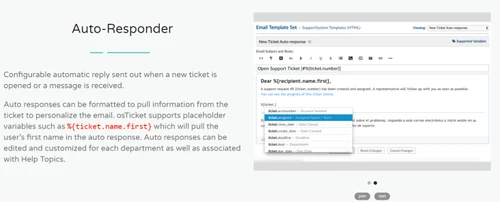
osticket auto responders
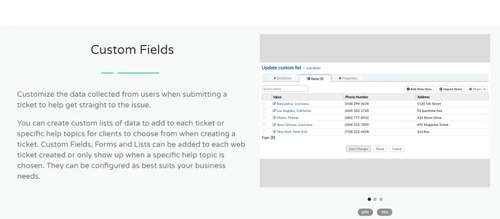
osticket custom fields

Osticket

Brand: Osticket

  • 4.0

  • 4 Ratings

osTicket is an open-source support ticket system that helps businesses manage customer inquiries and service requests efficiently.

See More

Have you used Osticket before?

Share your insights for better experience

Add a Review
Starting Price
$12

View plans

100% Genuine
Products
Best Price
Guaranteed
Safe & Secure
Payment
  • Description

  • Pricing

  • Features

  • Specification

  • Review

  • Compare

  • Alternatives

  • FAQ

Starting at $12

Osticket Software Overview

What is osTicket?

osTicket is a customer support software that helps organizations manage customer support requests efficiently. It organizes and tracks inquiries coming from email, web forms, and phone calls in one easy-to-use dashboard.

With features like automated ticket routing, customizable fields, canned responses, and reporting tools, osTicket improves service delivery and helps teams resolve issues faster.

Why Choose osTicket?

  • Open Source and Cost-Effective: osTicket is completely open-source, which means you get a powerful ticket management system without expensive licensing fees. Ideal for businesses looking for budget-friendly support solutions.
  • Centralized Support Management: It consolidates all customer inquiries, from emails, web forms, and phone calls, into a single, organized dashboard, making it easier to track and respond to every request without missing anything.
  • Highly Customizable: osTicket offers flexible options to customize ticket fields, forms, workflows, and help topics. You can easily adapt the system to match your unique business processes and customer support needs.
  • Automated Workflows and Ticket Routing: Automate ticket assignments, priorities, and actions based on specific rules. This reduces manual work, speeds up response times, and ensures that each issue reaches the right department or agent.
  • User-Friendly Interface: Both customers and support agents enjoy a clean, intuitive interface that simplifies submitting, managing, and resolving support tickets.
  • Advanced Reporting and Analytics: Generate detailed reports to monitor support performance, analyze response times, track ticket volumes, and identify areas for improvement, helping you deliver better service.

Benefits of osTicket Customer Support Software

  • Easy Integration with Existing Systems: osTicket can integrate with other tools like CRM, email servers, and authentication systems (LDAP, Active Directory), helping you create a seamless workflow.
  • Internal Notes and Collaboration: Support agents can add private notes to tickets, making it easier for multiple team members to collaborate on complex customer issues without confusing the customer.
  • Service Level Agreements (SLAs): You can set up SLAs to define response and resolution times, ensuring timely support and meeting customer expectations.
  • Customer Self-Service Portal: Customers can track their own ticket status, access FAQs, and find solutions without always needing to contact support, reducing the workload on agents.
  • Custom Ticket Filters: Automatically organize and sort incoming tickets based on specific rules, making ticket management even faster and more efficient.
  • Task Management: Besides handling tickets, you can create and assign internal tasks to agents, helping teams stay organized and proactive.
  • Multilingual Support: osTicket supports multiple languages, making it a great choice for businesses that serve international customers.
  • Security and Access Control: Assign different roles and permissions to staff members, ensuring sensitive information is only accessible to authorized users.

osTicket Pricing

osTicket pricing starts at $12 per agent per month at Techjockey.com.

The pricing model is based on different parameters, including the amount of bandwidth you need, the number of servers you need, and the features you need. For further queries related to the product, you can contact our product team and learn more about the pricing and offers.

Read more

Osticket Pricing & Plans

Cloud-hosted
Key Features
  • Email Integration Supported
  • Email & phone ongoing support
  • Free Walk-through Session
  • Managed Upgrades & Maintenance
  • Rock-solid infrastructure, guaranteed uptime
  • Daily Backups, Redundant Platform
Starting at $12
    • Agent

      Agent
      Agent
    • Monthly

      Monthly
      Monthly

Key Features

  • Email Integration Supported

  • Email & phone ongoing support

  • Free Walk-through Session

  • Managed Upgrades & Maintenance

  • Rock-solid infrastructure, guaranteed uptime

  • Daily Backups, Redundant Platform

Osticket Features

  • icon_check Custom Fields
    Customize a ticket by adding only required data provided by users or any help topics for faster response.
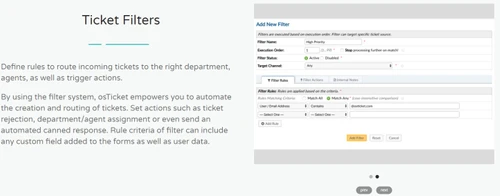
  • icon_check Ticket Filters
    Add filters to send a ticket to the right department or agents. Define actions like assignment, rejection, and auto-respond.
  • icon_check Custom Columns & Queues
    Personalize view of tickets by creating custom columns and queues. It adds an additional column to the original ticket view.
  • icon_check Ticket Management
    Convert user queries from multiple sources like mail, forms, or phone into tickets automatically & provide faster resolution.
  • icon_check Auto - Responders
    Configure an automated message reply when a new ticket is opened, rejected, or opened.
  • icon_check Thread Action
    Create a separate ticket or task for an in-process ticket thread keeping it in the original ticket.
  • icon_check Service Level Agreement
    Track tickets and get alerts when a ticket is overdue or a priority by creating infinite service-level agreements.
  • icon_check Customer Portal
    Customers can create a profile and login to view status of all the tickets they are associated with.
  • icon_check Advance Search
    Customize your search by saving a selected criterion. View results in separate queues and export them to a CSV file.
  • icon_check Task Management
    Create and assign tasks for a specific ticket to agents and close tickets after completion of all the tasks.
Osticket Demo Video play icon

Get Osticket Demo

Watch the demo video to explore key features, real workflows, and how the software fits your business needs.

Understand
Key Features
Personal
Demo Insights
Interactive
Demo Support

Osticket Specifications

Supported Platforms
Windows Windows
Devices
Desktop Desktop
Deployment
Cloud-Based Cloud-Based
Suitable For
All Industries
Business Specific
All Businesses
Language
English

Explore the Best Alternative Solutions Similar to Your Business Size and Needs

Small Business

Designed for startups and growing businesses

Aide

4.3

Froged

4.3

Redapto

4.0

See More

Medium Business

Built for business growth and flexibility

LiveAgent

4.6

Ada

4.3

Yuma AI

4.3

See More

Osticket Review

4.0

Out of 5

img

Overall Rating

Based on
4 Verified Ratings

Rating Breakdown

  • Features 4.1
  • Value for Money 3.5
  • Ease of Use 4.3
  • Customer Support 4.2

90% Recommend this Product

Add Review

Techjockey Trusted Reviews from Verified Users

No reviews are currently available for Osticket. Discover similar Customer Support Software reviews

  • LiveAgent

    4.6

    Whats great - Techjockey helped our company match up with the best software to fulfill our needs. Now we are able to better manage our bu... read more

  • Kapture CX

    4.2

    Whats great - Its user friendly interface ,easy accessibility read more

  • HubSpot CRM

    4.9

    Whats great - The software offers engaging dashboards, where you can see all your notifications and monitor your progress regularly. We can... read more

Compare Osticket With other Customer Support Software

Products
Ratings
Pricing
Device Supported
Deployment
Supported Platforms
  • img

    Osticket

  • 4.0

  • Price On Request

  • Desktop

    Mobile

  • Web based

    On Premises

  • Windows

    Mac OS

  • img

    LiveAgent

  • 4.6

  • Price On Request

  • Desktop

    Mobile

  • Web based

    On Premises

  • Windows

    Mac OS

  • img

    BizChat

  • 4.1

  • Price On Request

  • Desktop

    Mobile

  • Web based

    On Premises

  • Windows

    Mac OS

  • img

    Yuma AI

  • 4.3

  • Price On Request

  • Desktop

    Mobile

  • Web based

    On Premises

  • Windows

    Mac OS

  • img

    Redapto

  • 4.0

  • Price On Request

  • Desktop

    Mobile

  • Web based

    On Premises

  • Windows

    Mac OS

  • img

    Froged

  • 4.3

  • Price On Request

  • Desktop

    Mobile

  • Web based

    On Premises

  • Windows

    Mac OS

  • img

    Ada

  • 4.3

  • Price On Request

  • Desktop

    Mobile

  • Web based

    On Premises

  • Windows

    Mac OS

  • img

    Aide

  • 4.3

  • Price On Request

  • Desktop

    Mobile

  • Web based

    On Premises

  • Windows

    Mac OS

  • img

    DevRev

  • 4.3

  • Price On Request

  • Desktop

    Mobile

  • Web based

    On Premises

  • Windows

    Mac OS

  • img

    ServiceKart

  • 4.3

  • Price On Request

  • Desktop

    Mobile

  • Web based

    On Premises

  • Windows

    Mac OS

  • img

    AIhelp

  • Price On Request

  • Desktop

    Mobile

  • Web based

    On Premises

  • Windows

    Mac OS

(2) Product(s) selected

Osticket Alternatives

See All Osticket Alternatives

Starting Price:

$25

Starting Price:

$59 /Month

Starting Price:

$18 /Agent/Month

Available

Price on Request

Starting Price:

$45 /Workspace/Month

Starting Price:

$2,499 /Month

Available

Price on Request

Starting Price:

$39 /Agent/Month

Articles for Osticket

See All Related Articles

How much does osTicket cost?

The open-source version of osTicket is free to download and use. However, the paid plan costs $12 per agent per month and the pricing is customized for specific requirements.

Does osTicket Customer Support Software provide a demo?

Yes, Techjockey provides a free demo of osTicket to guide users.

How does osTicket work?

osTicket lets users create tickets with queries received via mail, phone, or website. The tickets are then assigned to support agents, and they help users by resolving their queries.

How do I deploy osTicket Customer Support Software?

osTicket is an open-source support ticketing system that provides web-based deployment.

How much does osTicket cost?

osTicket pricing starts at $12 per agent per month at Techjockey.com. Pricing is customized based on specific business needs.

Which operating system does osTicket support?

osTicket customer support software is a web-based application that works on any operating system (Windows, Linux, macOS) as long as it runs a web server like Apache/Nginx with PHP and MySQL.

How does osTicket work?

osTicket collects customer support requests from email, web forms, and phone calls, turning them into manageable tickets that agents can track, prioritize, and resolve through a centralized dashboard.

Is osTicket suitable for small businesses?

Yes, osTicket is highly suitable for small businesses due to its low cost (open-source version), flexibility, and easy customization for growing support needs.

Does osTicket offer a free trial or a demo?

osTicket itself is free to download and use; however, its cloud-hosted version (osTicket Cloud) offers a free trial and live demo access on their website.

What features does osTicket offer?

osTicket offers features like custom fields, ticket filters, SLA management, auto-responders, advanced search, customer portals, task management, and reporting tools.

Is there any osTicket App?

osTicket does not have an official mobile app, but the web interface is mobile-friendly and can be accessed through any mobile browser.

Who are the potential users of osTicket Customer Support Software?

Potential users include small to large businesses, IT support teams, educational institutions, healthcare providers, and customer service departments.

How secure is osTicket?

osTicket provides solid security features like role-based access control, CAPTCHA protection, and supports HTTPS; however, users must properly configure their servers for optimal security.

20,000+ Software Listed

Best Price Guranteed

Free Expert Consultation

2M+ Happy Customers

Terms and Condtions

close

Users with registered businesses can purchase goods from merchants on the platform to satisfy their business needs. Users are not permitted to utilize any products acquired through the platform for resale, advertising, business, or further distribution.

For each purchase made, users will receive a Tax Invoice (or 'GST invoice') that includes specific details such as:

  • the GSTIN of the user associated with their registered business, and

  • the specified Entity Name for their business.

It should be noted that not all products are eligible for GST Invoice. Only the products displayed by participating sellers with the 'GST-based Invoice Available' callout on the product description page would qualify.

Certain goods and services are not eligible to get a GST Invoice, including items with VAS, i.e., Value Added Services (e.g., Total Mobile Protection/Assured Buyback) and those involving an exchange offer at the time of purchase.

Users must ensure the accuracy of the GSTIN, and business entity name provided for the GST Invoice. Requests for corrections into GST Invoice would not be accommodated by Techjockey.com or any Seller, and any issues arising from user-provided information are the sole responsibility of users.

Techjockey.com is not liable for the GST Invoice or any associated input tax credit. To efficiently claim an input tax credit, users should select the registered place of business address as per the GST authority's data and follow the provisions of the GST Act and rules.

To claim an input tax credit, the delivery and billing addresses must match. Furthermore, input tax credits will not be granted if the delivery address and GSTIN on the invoice are from different states. In case of incorrect GST details provided during the order placement, the order will be canceled automatically.