linkedin
BoldSign logo
play An Overview of BoldSign eSignatures
bolsign-folder
bolsign-homepage

BoldSign

Brand: Syncfusion

  • No Ratings & Reviews

BoldSign enables users to send, sign, and manage documents securely online.

See More

Have you used BoldSign before?

Share your insights for better experience

Add a Review
Starting Price
$15

View plans

100% Genuine
Products
Best Price
Guaranteed
Safe & Secure
Payment
  • Description

  • Pricing

  • Features

  • Specification

  • Review

  • FAQ

Starting at $15

BoldSignSoftware Overview

What is BoldSign?

BoldSign is a digital signature software that helps businesses send, sign, and manage documents online. It allows users to collect legally binding digital signatures without printing or scanning papers. The software supports signature requests, document templates, and automated workflows to save time. Users can track the status of documents in real time until they are signed. BoldSign also provides secure document storage and audit trails for compliance.

It integrates with popular business applications and offers APIs for custom integrations. The platform supports multiple signers and works on desktop and mobile devices. It uses encryption and security features to protect sensitive documents. BoldSign is suitable for contracts, agreements, HR forms, and other business paperwork.

Why Choose BoldSign Software?

  • Legally Binding eSignatures: Collects secure and legally valid digital signatures.
  • Easy Document Signing: Sends and signs documents in just a few clicks.
  • Fast Approval Process: Speeds up document approvals and workflows.
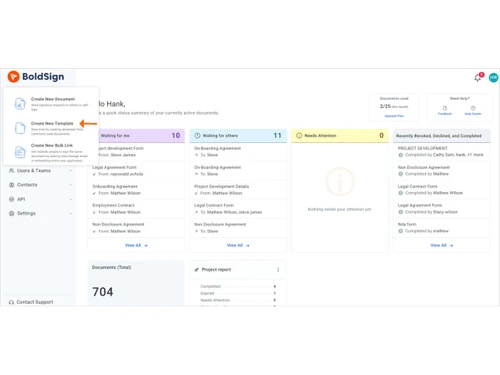
  • Reusable Templates: Creates templates for frequently used documents.
  • Multiple Signers Support: Allows several people to sign the same document.
  • Real-Time Tracking: Monitors document status from sending to signing.
  • Automated Reminders: Sends reminders to pending signers automatically.
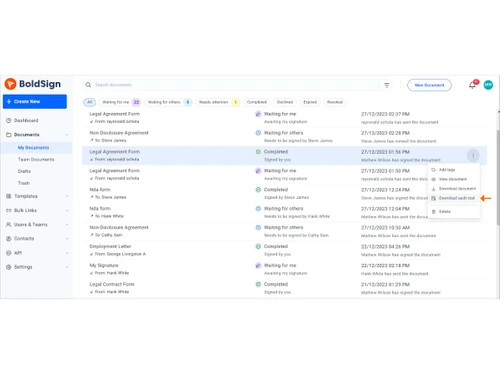
  • Audit Trail: Maintains a complete history of document activities.
  • Secure Encryption: Protects documents with advanced security measures.
  • Cloud-Based Access: Access documents anytime from anywhere.
  • Mobile-Friendly: Sign and manage documents on mobile devices.
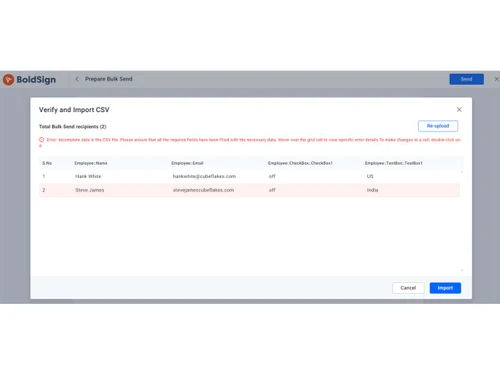
  • Bulk Sending: Sends documents to multiple recipients at once.
  • Custom Branding: Personalizes emails and signing pages with your brand.
  • Document Templates: Saves time with reusable document templates.

Benefits of BoldSign Software

  • Role-Based Signing: Assigns signing roles to different recipients.
  • Workflow Automation: Automates document approval processes.
  • Third-Party Integrations: Connects with popular business applications.
  • Developer API: Integrates eSignature features into custom applications.
  • Easy User Interface: Simple and intuitive platform for all users.
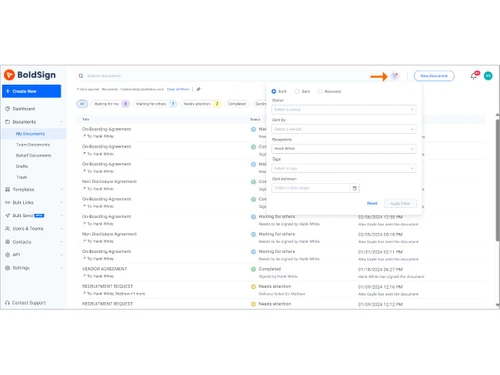
  • Document Management: Organizes signed and pending documents efficiently.
  • Compliance Support: Meets industry-standard security and compliance requirements.
  • Email Notifications: Keeps users informed about document progress.
  • Multi-Device Compatibility: Works across desktops, tablets, and smartphones.
  • Time Saving: Eliminates printing, scanning, and manual paperwork.
  • Cost Effective: Reduces paper, courier, and administrative costs.
  • Global Accessibility: Enables document signing from anywhere in the world.
  • Secure Storage: Safely stores signed documents online.
  • Improved Productivity: Simplifies document workflows and boosts efficiency.
  • Reliable Digital Signature Platform: Provides a secure and dependable document signing experience.

BoldSign Pricing

BoldSign price starts at USD 15 at techjockey.com.

The pricing model is based on different parameters, including extra features, deployment type, and the total number of users. For further queries related to the product, you can contact our product team and learn more about the pricing and offers.

Read more

Syncfusion Company Details

Founded Year:  2001

Syncfusion empowers developers with over 1,900 UI components and frameworks to build modern, high-performance web, mobile, and desktop applications.

Director/Founders Stefan Hoenig
Company Size 1000+ Employees

BoldSign Pricing & Plans

Growth
Starting at $15
    • Users

      Users
      Users
    • Monthly

      Monthly
      Monthly

Key Features

  • 50 envelopes/month/user

  • 10 templates

  • Template sharing

  • Dynamic field placement

  • Collaborative document status tracking

  • In-person signing

  • Print, sign, and upload

  • Team management

Business
Starting at $25
    • Users

      Users
      Users
    • Monthly

      Monthly
      Monthly

Key Features

  • Unlimited envelopes

  • Unlimited templates

  • All Growth features, plus

  • Single sign-on (SSO)

  • Custom roles and permissions

  • AI-powered field detection

  • Custom fields

  • Scheduled send

Premium
Starting at $138
    • Licenses

      Licenses
      Licenses
    • Monthly

      Monthly
      Monthly

Key Features

  • 250 envelopes/month

  • Unlimited templates

  • Unlimited users

  • Includes all Business features

BoldSign Features

  • icon_check Templates
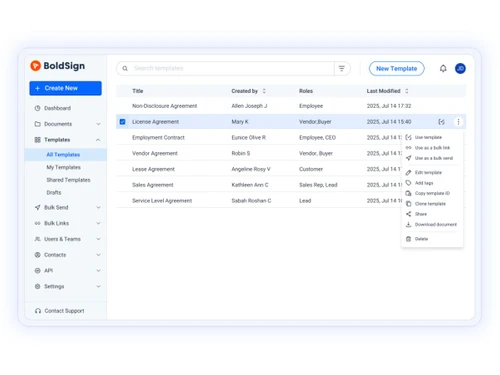
    Enables users to save frequently used documents as reusable templates to accelerate the preparation and sending of new contracts.
  • icon_check Audit Trail
    Generates a detailed digital log capturing signer IP addresses, timestamps, and specific actions to ensure legal defensibility.
  • icon_check Alerts & Reminders
    Dispatches scheduled notifications to recipients who have not yet signed, ensuring document completion without manual follow-up.
  • icon_check Identity Verification
    Enhances security by requiring signers to verify their identity via SMS, email OTP, or manual access codes before document entry.
  • icon_check Custom Branding
    Provides options to add company logos, brand colors, and custom legal disclosures to maintain a professional signing experience.
  • icon_check Team Management
    Permits account administrators to organize users into teams, assign specific roles, and manage collective document permissions.
  • icon_check Real Time Tracking
    Offers a centralized dashboard to monitor the progress of all sent documents, including viewed, signed, and declined statuses.
  • icon_check Drag and Drop Functionality
    Includes an intuitive editor for placing signature, initial, date, and text fields onto any uploaded document with high precision.
  • icon_check Collaboration
    Supports workflows where multiple signers can input data into shared fields before final execution for accurate data collection.
  • icon_check SMS Delivery Service
    Enables the delivery of signature requests via text message to increase recipient response rates and speed up the signing cycle.
  • icon_check Role-Based Access Control (RBAC)
    Restricts document visibility to authorized parties only and enforces security protocols like IP address whitelisting access.
  • icon_check Customizable Email Content
    Allows senders to modify the subject lines and body text of invitation emails to provide clear instructions to their recipients.
  • icon_check API Integration
    Features a robust API and webhooks to embed e-signature capabilities directly into third-party business software and workflows.
  • icon_check File Attachment
    Empowers senders to require signers to upload specific supporting files, such as ID copies, during the document signing flow.
  • icon_check Conditional Logic Fields
    Implements smart fields that appear or disappear based on the signer's previous responses to ensure data relevancy and clarity.
  • icon_check Self Signing Functionality
    Provides a streamlined interface for users to sign their own documents quickly without needing to initiate a formal request.
BoldSign Demo Video play icon

Get BoldSign Demo

Watch the demo video to explore key features, real workflows, and how the software fits your business needs.

Understand
Key Features
Personal
Demo Insights
Interactive
Demo Support

BoldSign Specification

Supported Platforms
Ubuntu Ubuntu Windows Windows iOS iOS Android Android MacOS MacOS Linux Linux
Devices
Desktop Desktop Mobile Mobile Tablet Tablet iPad iPad
Deployment
Web-Based Web-Based
Suitable For
All Industries
Business Specific
All Businesses
Business Size
Individual Small Business Startups Medium Business Enterprises SMBs SMEs MSMBs MSMEs Freelancers
Customer Support
Email Live Chat
Language
English
Integration
API Integration
Training Resources
Documentation Videos
AI Features
AI Integrated
Compliance Regulation
HIPAA CCPA CPRA

BoldSign Review

Techjockey Trusted Reviews from Verified Users

No reviews are currently available for BoldSign. Discover similar Digital Signature Software reviews
  • Adobe Acrobat Sign

    4.3

    Whats great - Professional, widely accepted. read more
  • Cygnature

    4.9

    Whats great - It is excellent software and very easy to use. It works great to create E-signatures for your documents. So I have recommend... read more

  • DocuSign

    4.6

    Whats great - Easy-to-use interface with robust functionality. read more

Articles for BoldSign

See All Related Articles

How much does BoldSign Software cost?

BoldSign pricing starts at USD 15 at techjockey.com.

Is there a mobile app available for BoldSign Software?

Yes, BoldSign offers an Android and iOS mobile app for signing and managing documents on mobile devices.

Which operating systems are compatible with BoldSign Software?

BoldSign is compatible with web-based access across Ubuntu, Linux, Windows, macOS, Android, and iOS.

Does BoldSign Software offer a free trial?

Yes, BoldSign provides a free trial for users to explore its features before purchasing.

How does BoldSign Software function?

BoldSign enables users to upload, send, sign, track, and manage documents digitally through a secure cloud platform.

Who uses BoldSign Software?

BoldSign is used by businesses, teams, freelancers, and organizations for electronic document signing and workflow management.

Is a free demo available for BoldSign Software?

Yes, BoldSign offers a free demo.

Is BoldSign Software available for free?

Yes, BoldSign offers a free plan with limited features along with paid subscription options.

20,000+ Software Listed

Best Price Guranteed

Free Expert Consultation

2M+ Happy Customers

Terms and Condtions

close

Users with registered businesses can purchase goods from merchants on the platform to satisfy their business needs. Users are not permitted to utilize any products acquired through the platform for resale, advertising, business, or further distribution.

For each purchase made, users will receive a Tax Invoice (or 'GST invoice') that includes specific details such as:

  • the GSTIN of the user associated with their registered business, and

  • the specified Entity Name for their business.

It should be noted that not all products are eligible for GST Invoice. Only the products displayed by participating sellers with the 'GST-based Invoice Available' callout on the product description page would qualify.

Certain goods and services are not eligible to get a GST Invoice, including items with VAS, i.e., Value Added Services (e.g., Total Mobile Protection/Assured Buyback) and those involving an exchange offer at the time of purchase.

Users must ensure the accuracy of the GSTIN, and business entity name provided for the GST Invoice. Requests for corrections into GST Invoice would not be accommodated by Techjockey.com or any Seller, and any issues arising from user-provided information are the sole responsibility of users.

Techjockey.com is not liable for the GST Invoice or any associated input tax credit. To efficiently claim an input tax credit, users should select the registered place of business address as per the GST authority's data and follow the provisions of the GST Act and rules.

To claim an input tax credit, the delivery and billing addresses must match. Furthermore, input tax credits will not be granted if the delivery address and GSTIN on the invoice are from different states. In case of incorrect GST details provided during the order placement, the order will be canceled automatically.