linkedin
ByteSIGNER logo
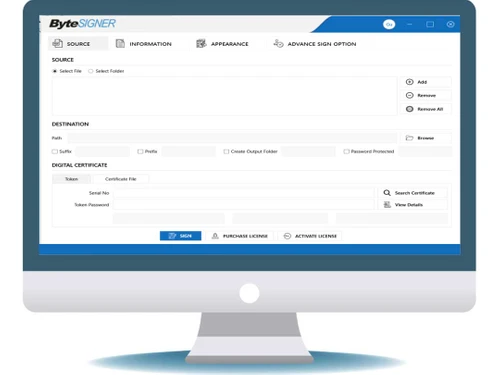
bytesigner files
bytesigner pdf
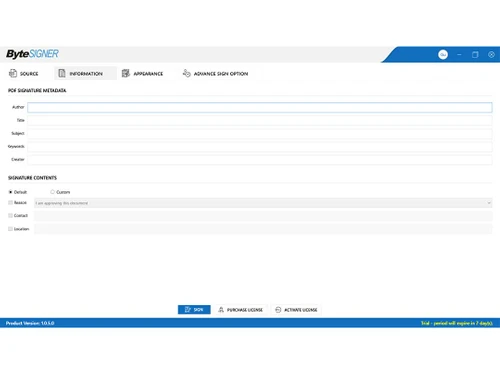
bytesigner information

ByteSIGNER

Brand: Dev Information Technology

  • 4.4

  • 5 Ratings

ByteSIGER is a utility software designed to create and manage digital signatures, ensuring secure and authentic electronic document signing. It streamlines the process of digitally signing documents with high encryption standards.

See More

Have you used ByteSIGNER before?

Share your insights for better experience

Add a Review

Price Available on Request

Questions about pricing or customization? We’re here to help, just a click away.

100% Genuine
Products
Best Price
Guaranteed
Safe & Secure
Payment
  • Description

  • Pricing

  • Features

  • Specification

  • Review

  • Compare

  • Alternatives

  • FAQ

ByteSIGNER Software Overview

What is ByteSIGER?

ByteSIGER is digital signing software designed to automate the signing of PDF documents. It enables users to efficiently sign invoices, legal documents, contracts, and more in bulk. It features a user-friendly dashboard that allows easy document uploads and signature placement, making it accessible for users without technical expertise.

The software ensures that all digitally signed documents are legally valid, providing compliance with legal standards. ByteSIGER supports signing password-protected documents and offers bulk signing capabilities, significantly reducing the time required for manual signing. Additionally, it allows users to insert timestamps for long-term validation and provides robust security features to protect sensitive information.

Why Choose ByteSIGER Software?

  • Bulk Signing Capability: It allows users to digitally sign multiple PDF documents simultaneously, significantly reducing the time spent on manual signing.
  • User-Friendly Interface: The software features an intuitive dashboard that simplifies the signing process, making it accessible for users of all technical levels.
  • Legally Valid Signatures: Documents signed with it are legally valid in court, ensuring compliance with legal standards.
  • Cost and Time Efficiency: Eliminating the need for paper and manual signing helps organizations cut operational costs and save valuable time.
  • Secure Document Handling: The software supports signing password-protected documents and provides security features to protect sensitive information.
  • Automated Workflow: It automates the signing process, allowing quicker turnaround times and improved organizational efficiency.
  • Environmentally Friendly: Promoting a paperless office contributes to sustainability efforts, helping to save trees and reduce waste.
  • Excellent Customer Support: Users benefit from responsive support to assist with any configurations or issues that may arise.
  • Flexible Deployment: The software can be tailored to fit various organizational needs, making it suitable for businesses of all sizes.
  • Positive User Feedback: Many users report significant reductions in document signing time, enhancing overall productivity and satisfaction with the software.

Benefits of ByteSIGER Platform

  • Organized Signing: Automatically categorizes signed and unsigned documents, simplifying management.
  • Batch Processing: The software supports batch processing, enabling users to sign multiple documents simultaneously, saving time and effort.
  • Audit Trails: It provides detailed audit trails for every signed document, offering transparency and traceability in the signing process.
  • Customizable Signature Options: Users can customize their digital signatures with different styles, fonts, and placement options, ensuring a personalized touch.
  • Integration with Cloud Services: It integrates with popular cloud storage services, allowing users to sign and store documents directly in the cloud for easy access and sharing.
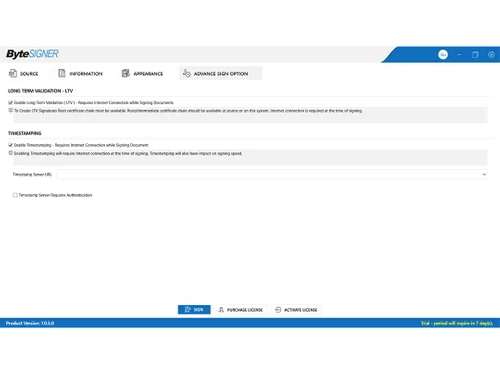
  • Timestamping: Timestamping ensures documents have lifetime validity, providing proof of signing beyond the expiration of the signer’s digital signature.
  • Cost-Effective Solution: It offers a cost-effective alternative to traditional paper-based signing processes, reducing the need for printing, scanning, and mailing documents.

Pricing of ByteSIGER

ByteSIGER price details are available on request at techjockey.com.

The pricing model is based on different parameters, including extra features, deployment type, and the total number of users. If you have further queries related to the product, you can contact our product team to learn more about the pricing and offers.

Read more

Dev Information Technology Company Details

Founded Year:  1997

Dev Information Technology Ltd. (DEV IT) is a company listed on National stock exchange & Bombay stock exchange.

Director/Founders Dev
Company Size 1000+ Employees

ByteSIGNER Pricing & Plans

Looking for The Right Pricing?

Share your requirements and get a plan built around your business.

  • Define your business needs
  • Get customised pricing
  • Choose features that fit your workflow

Price Available on Request

Get personalised ByteSIGNER pricing that fits your needs. Our team will connect with you.

ByteSIGNER Features

  • icon_check File Storage
    Stores signed documents in a separate folder while keeping original PDF files unchanged for record keeping and document control.
  • icon_check Signature Verification
    Allows verification of digitally signed PDF documents to confirm signer identity, document integrity, and signature validity
  • icon_check Audit Trail
    Maintains logs of signing activities including success, failure, and status messages for tracking and audit purposes.
  • icon_check Long Term Validation Support
    Supports long-term validation of digital signatures to maintain signature validity even after certificate expiration or
  • icon_check Automated Bulk Signing
    Automatically signs large volumes of PDF documents without manual intervention using predefined signing profiles and certificate
  • icon_check Predefined Signature Placement
    Allows signatures to be automatically placed at predefined coordinates or locations in PDF documents during signing workflows.
  • icon_check Customization
    Enables users to place digital signatures at custom positions on any page of the PDF document during the signing process.
  • icon_check Timestamping
    Adds a trusted timestamp to digitally signed documents to record the exact date and time of signing for compliance and validation
  • icon_check Signing Progress Tracking
    Displays progress tracking for bulk signing processes to monitor signing status and ensure all documents are processed
  • icon_check Password Protection
    Enables password protection for signed PDF documents to restrict unauthorized access after digital signing is completed.
  • icon_check Timestamping
    Includes a timestamp with the digital signature to verify the exact time the document was signed, enhancing its authenticity.

ByteSIGNER Specifications

Supported Platforms
Ubuntu Ubuntu Windows Windows MacOS MacOS Linux Linux
Devices
Desktop Desktop
Deployment
Cloud-Based Cloud-Based
Suitable For
All Industries
Business Specific
All Businesses
Business Size
Small Business Medium Business Enterprises SMBs SMEs MSMEs
Customer Support
Phone Email
Language
English

Explore the Best Alternative Solutions Similar to Your Business Size and Needs

ByteSIGNER Review

4.4

Out of 5

img

Overall Rating

Based on
5 Verified Ratings

Rating Breakdown

  • Features 4.7
  • Value for Money 4.3
  • Ease of Use 4.3
  • Customer Support 4.3

88% Recommend this Product

Add Review

Techjockey Trusted Reviews from Verified Users

No reviews are currently available for ByteSIGNER. Discover similar Digital Signature Software reviews
  • Adobe Acrobat Sign

    4.3

    Whats great - Professional, widely accepted. read more
  • Cygnature

    4.9

    Whats great - It is excellent software and very easy to use. It works great to create E-signatures for your documents. So I have recommend... read more

  • DocuSign

    4.6

    Whats great - Easy-to-use interface with robust functionality. read more

Compare ByteSIGNER With other Digital Signature Software

Products
Ratings
Pricing
Device Supported
Deployment
Supported Platforms
  • img

    ByteSIGNER

  • 4.4

  • Price On Request

  • Desktop

    Mobile

  • Web based

    On Premises

  • Windows

    Mac OS

  • img

    RSign

  • 4.5

  • Price On Request

  • Desktop

    Mobile

  • Web based

    On Premises

  • Windows

    Mac OS

  • img

    Dropbox Sign

  • 4.3

  • Price On Request

  • Desktop

    Mobile

  • Web based

    On Premises

  • Windows

    Mac OS

  • img

    Cygnature

  • 4.8

  • Price On Request

  • Desktop

    Mobile

  • Web based

    On Premises

  • Windows

    Mac OS

  • img

    Zoho Sign

  • 4.2

  • ₹ 800

  • Desktop

    Mobile

  • Web based

    On Premises

  • Windows

    Mac OS

  • img

    InstaSigner

  • 4.5

  • Price On Request

  • Desktop

    Mobile

  • Web based

    On Premises

  • Windows

    Mac OS

  • img

    BulkSigner

  • 4.4

  • ₹ 3500

  • Desktop

    Mobile

  • Web based

    On Premises

  • Windows

    Mac OS

  • img

    Certinal eSign

  • 4.4

  • Price On Request

  • Desktop

    Mobile

  • Web based

    On Premises

  • Windows

    Mac OS

  • img

    GreenSign

  • 4.1

  • Price On Request

  • Desktop

    Mobile

  • Web based

    On Premises

  • Windows

    Mac OS

  • img

    eSignly

  • 4.2

  • Price On Request

  • Desktop

    Mobile

  • Web based

    On Premises

  • Windows

    Mac OS

(0) Product(s) selected

ByteSIGNER Alternatives

See All ByteSIGNER Alternatives

Starting Price:

$1 /Envelope

Starting Price:

$15 /User/Month

Starting Price:

₹799 /Month

Starting Price:

€11 /User/Month

Available

Price on Request

Articles for ByteSIGNER

See All Related Articles

What is the cost of ByteSIGER Software?

ByteSIGER pricing details can be requested on techjockey.com.

Is there a mobile app available for ByteSIGER Software?

No, ByteSIGER does not currently offer a mobile app.

Which operating systems are supported by ByteSIGER Software?

ByteSIGER supports Windows only.

Does ByteSIGER Software offer a free trial?

ByteSIGER offers a free trial period for users to evaluate the software.

How does ByteSIGER Software function?

ByteSIGER uses advanced encryption to digitally sign documents and manage digital signatures securely.

Who can benefit from using ByteSIGER Software?

Individuals and organizations needing secure, efficient digital signing and document management can use ByteSIGER.

Is there a free demo available for ByteSIGER Software?

Yes, ByteSIGER free demo is available on request.

Is ByteSIGER available for free?

No, ByteSIGER is not available for free; it requires a purchase or subscription.

Is ByteSIGER compatible with cloud storage services?

Yes, ByteSIGER integrates with popular cloud storage services like Google Drive, Dropbox, and OneDrive.

20,000+ Software Listed

Best Price Guranteed

Free Expert Consultation

2M+ Happy Customers

Terms and Condtions

close

Users with registered businesses can purchase goods from merchants on the platform to satisfy their business needs. Users are not permitted to utilize any products acquired through the platform for resale, advertising, business, or further distribution.

For each purchase made, users will receive a Tax Invoice (or 'GST invoice') that includes specific details such as:

  • the GSTIN of the user associated with their registered business, and

  • the specified Entity Name for their business.

It should be noted that not all products are eligible for GST Invoice. Only the products displayed by participating sellers with the 'GST-based Invoice Available' callout on the product description page would qualify.

Certain goods and services are not eligible to get a GST Invoice, including items with VAS, i.e., Value Added Services (e.g., Total Mobile Protection/Assured Buyback) and those involving an exchange offer at the time of purchase.

Users must ensure the accuracy of the GSTIN, and business entity name provided for the GST Invoice. Requests for corrections into GST Invoice would not be accommodated by Techjockey.com or any Seller, and any issues arising from user-provided information are the sole responsibility of users.

Techjockey.com is not liable for the GST Invoice or any associated input tax credit. To efficiently claim an input tax credit, users should select the registered place of business address as per the GST authority's data and follow the provisions of the GST Act and rules.

To claim an input tax credit, the delivery and billing addresses must match. Furthermore, input tax credits will not be granted if the delivery address and GSTIN on the invoice are from different states. In case of incorrect GST details provided during the order placement, the order will be canceled automatically.