USA
USA UAE
UAESmall Business
Designed for startups and growing businesses

See More


Brand: Pinnacle Finserve
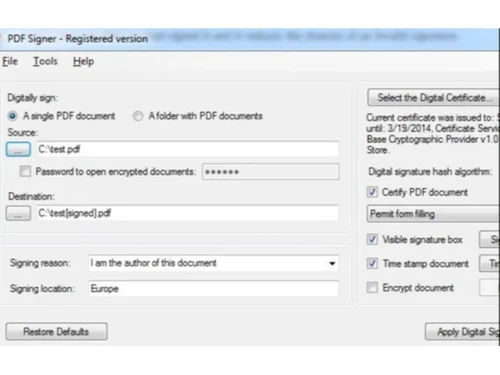
OptiPDFsigner is a software for digital signature to sign PDF documents using X.509 digital signature. Using this product you can quickly sign multiple PDF files (bulk sign) by selecting input and output directory. This is ideal for bulk signing of a large number of corporate documents rather than s...
See MoreHave you used OptiPDFsigner before?
Share your insights for better experience
Brand: Pinnacle Finserve
Founded Year: 2009
MyGSTcafe is brand owned by Pinnacle Finserv Advisors Pvt Ltd, a GSP licensed by GSTN. MyGSTcafe offer complete GST Compliance Package Including GST Compliance Software, AI Powered ITC Reconciliations, E-Invoicing Software and all GST Related APIs for GST
Looking for The Right Pricing?
Share your requirements and get a plan built around your business.
Price Available on Request
Get personalised OptiPDFsigner pricing that fits your needs. Our team will connect with you.
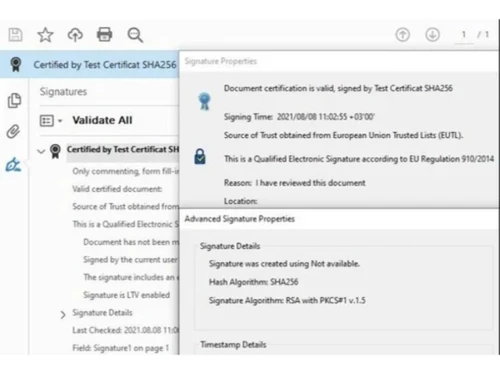
 X.509 Certificate Support Folder Watcher Custom Signature Positioning Document Locking LTV Enablement Timestamping Integration Multi-Layered Signing Hardware Token Support Watermarking Audit Trail
  Windows
  Desktop
  Perpetual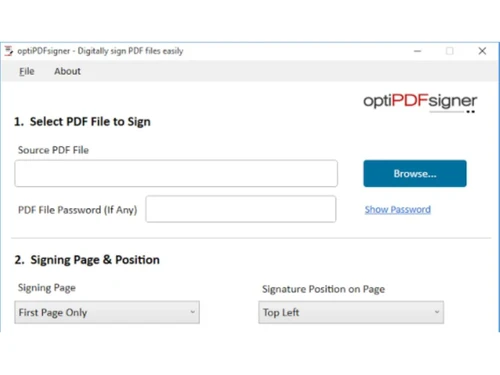
Small Business
Designed for startups and growing businesses
Medium Business
Built for business growth and flexibility
Enterprises
Designed for complex and large-scale business needs
4.5
Out of 5

Overall Rating
Based on
4 Verified Reviews
Rating Breakdown
85% Recommend this Product
Add ReviewUsers generally express high satisfaction with OptiPDFsigner, highlighting its user-friendly interface and efficiency in bulk signing corporate documents. The software is praised for its accessibility and reliable results, with many appreciating the knowledgeable customer support available. While there are no significant complaints noted, the overall positive sentiment is reinforced by the strong recommendations from users, indicating a solid choice for businesses looking to streamline their document signing processes.

Jan 14, 2019
Techjockey Verified
“Staff is so supportive”
Pros
I found this software perfect for bulk signing of an enormous number of corporate documents rather than signing each one individually. This is very user friendly and supportive software.
Cons
NO CONS
Nov 10, 2018
Techjockey Verified
“Best access”
Pros
With this product we can sign multiple files & get a good result from the software. Its easy to get an access to the best result from the software.
Cons
NO CONS
Aug 23, 2018
Techjockey Verified
“give best advice”
Pros
Best price online, and an actual knowledgeable person to talk to with on telephone support, my question was answered immediately.?
Cons
N/A
OptiPDFsigner
Price On Request
Desktop
Mobile
Web based
On Premises
Windows
Mac OS
Adobe Acrobat Sign
₹ 1484
Desktop
Mobile
Web based
On Premises
Windows
Mac OS

RSign
Price On Request
Desktop
Mobile
Web based
On Premises
Windows
Mac OS

Dropbox Sign
Price On Request
Desktop
Mobile
Web based
On Premises
Windows
Mac OS

Cygnature
Price On Request
Desktop
Mobile
Web based
On Premises
Windows
Mac OS

Zoho Sign
₹ 800
Desktop
Mobile
Web based
On Premises
Windows
Mac OS

InstaSigner
Price On Request
Desktop
Mobile
Web based
On Premises
Windows
Mac OS
BulkSigner
₹ 3500
Desktop
Mobile
Web based
On Premises
Windows
Mac OS

Certinal eSign
Price On Request
Desktop
Mobile
Web based
On Premises
Windows
Mac OS

GreenSign
Price On Request
Desktop
Mobile
Web based
On Premises
Windows
Mac OS

eSignly
Price On Request
Desktop
Mobile
Web based
On Premises
Windows
Mac OS
(0) Product(s) selected
Starting Price:
₹1,484 /Month
Starting Price:
₹3,500 /Year
Available
Price on Request
Starting Price:
$1 /Envelope
Starting Price:
$15 /User/Month

Available
Price on Request

Available
Price on Request

Starting Price:
₹799 /Month
Starting Price:
€11 /User/Month

Available
Price on Request

Available
Price on Request




OptiPDFsigner Digital Signature Software is compatible with Windows operating systems.
OptiPDFsigner Digital Signature Software app is not available.
OptiPDFsigner supports Web-Based.
OptiPDFsigner is typically used in Basic Office Software.
OptiPDFsigner Digital Signature Software demo is available for free at Techjockey.com.
OptiPDFsigner Digital Signature Software offers a free trial. However, the premium plan with advanced features available at Techjockey.
For OptiPDFsigner Digital Signature Software installation, insert the given CD/USB flash storage in your system and open the Setup Wizard to get started.
OptiPDFsigner Digital Signature Software helps with Bulk Signing,Invoice signing,Interoperability and Configurable Signature Appearance.
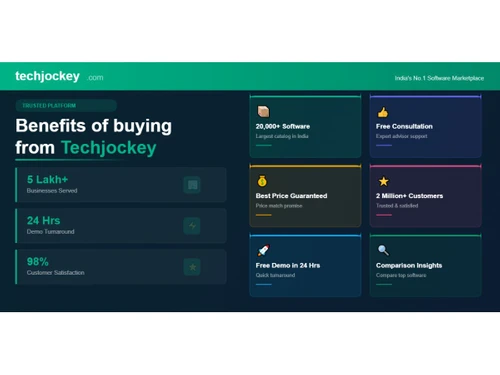
20,000+ Software Listed
Best Price Guranteed
Free Expert Consultation
2M+ Happy Customers
Terms and Condtions

Users with registered businesses can purchase goods from merchants on the platform to satisfy their business needs. Users are not permitted to utilize any products acquired through the platform for resale, advertising, business, or further distribution.
For each purchase made, users will receive a Tax Invoice (or 'GST invoice') that includes specific details such as:
the GSTIN of the user associated with their registered business, and
the specified Entity Name for their business.
It should be noted that not all products are eligible for GST Invoice. Only the products displayed by participating sellers with the 'GST-based Invoice Available' callout on the product description page would qualify.
Certain goods and services are not eligible to get a GST Invoice, including items with VAS, i.e., Value Added Services (e.g., Total Mobile Protection/Assured Buyback) and those involving an exchange offer at the time of purchase.
Users must ensure the accuracy of the GSTIN, and business entity name provided for the GST Invoice. Requests for corrections into GST Invoice would not be accommodated by Techjockey.com or any Seller, and any issues arising from user-provided information are the sole responsibility of users.
Techjockey.com is not liable for the GST Invoice or any associated input tax credit. To efficiently claim an input tax credit, users should select the registered place of business address as per the GST authority's data and follow the provisions of the GST Act and rules.
To claim an input tax credit, the delivery and billing addresses must match. Furthermore, input tax credits will not be granted if the delivery address and GSTIN on the invoice are from different states. In case of incorrect GST details provided during the order placement, the order will be canceled automatically.