linkedin
Gladia logo
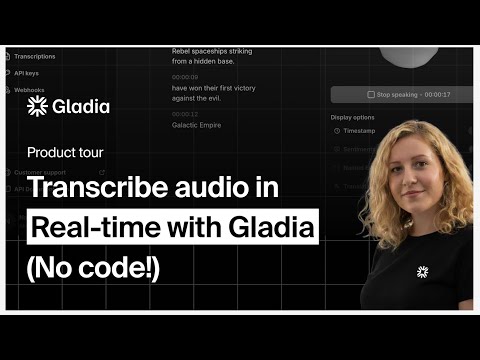
play Transcribe Audio in Real-Time (No Code!) with Gladia | Playground Walkthrough
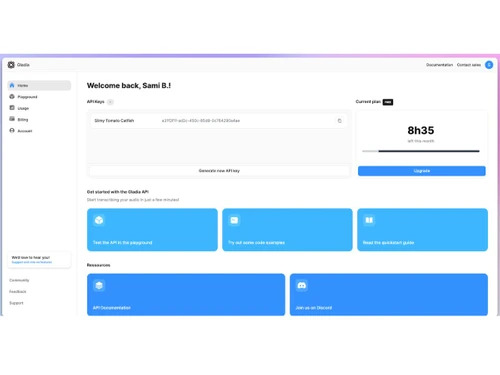
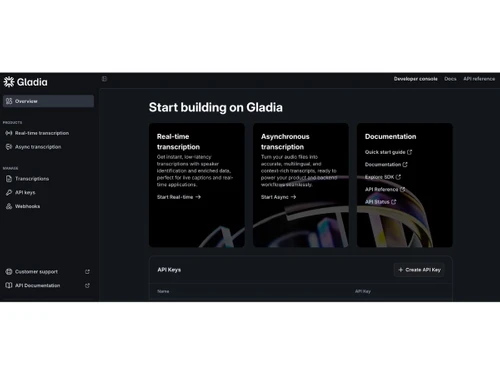
gladia-dashboard
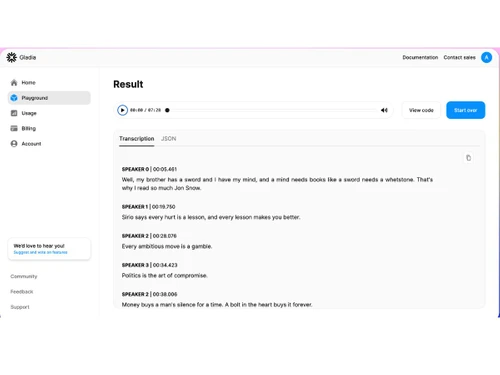
gladia-result

Gladia

Brand: Gladia

  • No Ratings & Reviews

Gladia delivers accurate, multilingual AI audio infrastructure for voice products, ensuring reliable transcription and rich intelligence with enterprise security.

See More

Have you used Gladia before?

Share your insights for better experience

Add a Review

Price Available on Request

Questions about pricing or customization? We’re here to help, just a click away.

100% Genuine
Products
Best Price
Guaranteed
Safe & Secure
Payment
  • Description

  • Pricing

  • Features

  • Specification

  • Review

  • Compare

  • Alternatives

Gladia Software Overview

What is Gladia?

Gladia is a sophisticated, end-to-end audio infrastructure designed to empower developers and enterprises to build advanced voice-enabled products. It operates through a single, unified API that allows users to capture, transcribe, and enrich audio data from any source. Positioned as the foundational layer for any voice-powered technology stack, Gladia ensures that the initial speech-to-text conversion is highly accurate, making all downstream processes, such as AI analysis, CRM updates, and data warehousing, more reliable and effective.

The platform boasts a 99.9% uptime SLA on its Growth and Enterprise plans, and full compliance with enterprise-grade security standards including SOC 2 Type II, GDPR, HIPAA, and ISO 27001. With a focus on developer velocity and robust performance, Gladia provides the essential tools to turn raw audio into a structured, valuable dataset, supporting over 100 languages and ensuring 100% EU data residency for maximum data sovereignty.

Why Choose Gladia?

  • Exceptional Accuracy and Multilingual Support: Real-world conversations are often noisy, accented, and switch between languages. Gladia is engineered to handle this complexity, providing top-tier accuracy on conversational audio. It supports over 100 languages with automatic, accent-sensitive detection, eliminating the need for separate technology stacks for different markets.
  • Integrated Audio Intelligence: Beyond simple transcription, Gladia enriches the data with valuable insights at no extra cost. It natively provides speaker diarization (speaker turns), semantic sentiment analysis, PII redaction, and key entity detection. This built-in intelligence saves developers from having to chain multiple APIs and services together.
  • Enterprise-Grade Infrastructure: The platform is built for reliability and scale. It removes the need for manual capacity planning or failover management, offering a dependable infrastructure that teams can trust. With SOC 2 Type II, GDPR, HIPAA, and ISO 27001 compliance, plus zero data retention available on Enterprise plans, it meets stringent security and data handling requirements.
  • Developer-First Experience: Gladia is designed to accelerate development cycles. With comprehensive SDKs for Python and Node.js, direct API access, and numerous native integrations (including Zapier and webhooks), teams can integrate advanced voice capabilities into their products in hours, not weeks.

Advanced Features of Gladia

  • State-of-the-Art Transcription Engine: Powered by its Solaria-3 model, Gladia achieves an impressive 9.6% Word Error Rate (WER) on real-world English audio, with significant accuracy gains across French, German, Spanish, and Italian.
  • Market-Leading Speaker Diarization: The system accurately identifies and separates different speakers in a single audio stream, a crucial feature for analyzing meetings, interviews, and customer support calls.
  • Real-time and Asynchronous Processing: Gladia supports both live, real-time transcription via WebSocket streaming and batch processing of pre-recorded audio files through a REST API, offering flexibility for any application.
  • Comprehensive Data Enrichment: The API automatically extracts key information from transcripts. This includes PII redaction for sensitive data, entity detection for names and locations, and sentiment analysis to gauge conversational tone.
  • Audio-to-LLM Pipeline: Gladia facilitates a seamless connection between transcribed audio and Large Language Models (LLMs). Users can leverage the native pipeline or bring their own model (BYOM) to power summaries, topic extraction, and other generative AI tasks.

Modules of Gladia

  1. Capture: The first step involves ingesting audio from any source. Gladia provides multiple methods for this, including WebSocket for live streams, REST API for file uploads, and real-time microphone input. It supports all major audio formats (MP3, WAV, FLAC, etc.) and offers native meeting bot integrations for platforms like Zoom and Microsoft Teams on demand.
  2. Transcribe: Once captured, the audio is transformed into a clean, highly accurate, and editable transcript. The transcription engine is optimized for noisy, multilingual, and jargon-heavy audio, ensuring a reliable output. It includes word-level timestamps and market-leading speaker detection.
  3. Enrich: The raw transcript is then enhanced with a layer of audio intelligence. This module automatically applies features such as sentiment analysis, PII redaction, and named entity recognition. This enrichment happens natively within the API, adding deep contextual value without additional processing steps.
  4. Integrate: Finally, the enriched data is ready to be pushed into downstream systems and workflows. Gladia offers robust integration capabilities, including webhooks, Zapier, and over 50 native integrations, allowing you to sync data with your CRM, database, or data warehouse securely and efficiently.

How to Use Gladia?

Integrating Gladia into your application is a straightforward process designed for developer efficiency. The typical workflow involves selecting an input method, sending your audio data, and then utilizing the enriched transcript returned by the API.

First, you choose how to send audio based on your use case. For live audio, you can use the WebSocket streaming API or live mic input. For pre-recorded files, the REST API is ideal. SDKs for popular languages like Python and Node.js are available to simplify this process.

Next, you send the audio data to the Gladia endpoint. The API processes the audio in near real-time, applying its transcription and intelligence models. The system returns a structured JSON object containing the full transcript, speaker labels, word-level timestamps, and all enrichment data, such as detected entities and sentiment scores. This output can then be directly used to power your application's features or integrated into other business systems.

Gladia Pricing

Gladia pricing details are available on request on techjockey.com.

The pricing model is based on different parameters, including extra features, deployment type, and the total number of users. For further queries related to the product, you can contact our product team and learn more about the pricing and offers.

Read more

Gladia Company Details

Founded Year:  2022

Built for developers, Gladia’s speech-to-text APIs deliver ultra-low latency and impeccable transcription accuracy, powering real-time voice agents, meeting assistants, and other voice-driven applications across more than 100 languages and multiple industries.

Director/Founders Jean-Louis Quéguiner, Jonathan Soto
Company Size 1-100 Employees

Gladia Pricing & Plans

Looking for The Right Pricing?

Share your requirements and get a plan built around your business.

  • Define your business needs
  • Get customised pricing
  • Choose features that fit your workflow

Price Available on Request

Get personalised Gladia pricing that fits your needs. Our team will connect with you.

Gladia Features

  • icon_check Real-Time Transcription
    Streams audio input and produces incremental text output with low latency to support live captioning, voice agents, and call
  • icon_check Multilingual Support
    Supports transcription across more than one hundred languages and accents, enabling applications to process global audio content.
  • icon_check Automatic Language Detection
    Identifies the spoken language in an audio stream automatically before transcription to simplify processing of multilingual
  • icon_check Code Switching Detection
    Detects and transcribes speech where multiple languages appear within the same conversation or sentence accurately.
  • icon_check Speaker Diarization
    Separates speakers in multi-participant audio and labels transcript segments to indicate who spoke and when.
  • icon_check Word Level Timestamps
    Attaches precise timing metadata to every recognized word to support caption generation, search, and transcript navigation.
  • icon_check Subtitle Export
    Generates subtitle files in formats such as SRT or VTT directly from transcripts for integration with video publishing workflows.
  • icon_check Custom Vocabulary
    Allows developers to provide domain-specific words or phrases to improve recognition accuracy for brands, products, and
  • icon_check Named Entity Recognition
    Identifies entities such as names, organizations, emails, and phone numbers from transcripts for downstream indexing or analytics.
  • icon_check Sentiment Analysis
    Analyzes emotional tone within speech transcripts to categorize sentiment patterns in conversations or support interactions.
  • icon_check Text Summarization
    Produces condensed summaries of long transcripts by extracting the main ideas from spoken conversations or recordings.
  • icon_check Data Redaction
    Detects and masks sensitive personal information within transcripts to support privacy and compliance requirements.
  • icon_check Partial Transcript Streaming
    Outputs intermediate transcript segments while audio is still being processed to enable responsive real-time applications.
  • icon_check Custom Metadata Attachment
    Allows developers to attach structured metadata to transcription jobs for organization, traceability, and system integration.
Gladia Demo Video play icon

Get Gladia Demo

Watch the demo video to explore key features, real workflows, and how the software fits your business needs.

Understand
Key Features
Personal
Demo Insights
Interactive
Demo Support

Gladia Specifications

Supported Platforms
Ubuntu Ubuntu Windows Windows MacOS MacOS Linux Linux
Devices
Desktop Desktop
Deployment
Cloud-Based Cloud-Based
Suitable For
All Industries
Business Specific
All Businesses
Business Size
Small Business Startups Medium Business Enterprises SMBs SMEs MSMBs MSMEs
Customer Support
Email Communities
Language
English
Integration
API Integration
Training Resources
Videos
AI Features
AI Integrated

Explore the Best Alternative Solutions Similar to Your Business Size and Needs

Gladia Review

Techjockey Trusted Reviews from Verified Users

No reviews are currently available for Gladia. Discover similar Speech Recognition Software reviews

  • TranscribeMe

    4.6

    Whats great - I am sending all of my transcripts to TranscribeMe because they are recommended by the International Coach Federation for the... read more

  • Speechmatics

    4.2

    Whats great - I was impressed with the set of advanced punctuation provided by the software. This is something which is not quite common in... read more

  • CallHippo

    4.4

    Whats great - Callhippo tool offers the ability to connect with the customers in a matter of minutes. The dashboard allows you to monitor t... read more

Compare Gladia With other Speech Recognition Software

Products
Ratings
Pricing
Device Supported
Deployment
Supported Platforms
  • img

    Gladia

  • Price On Request

  • Desktop

    Mobile

  • Web based

    On Premises

  • Windows

    Mac OS

  • img

    Deepgram

  • 4.6

  • Price On Request

  • Desktop

    Mobile

  • Web based

    On Premises

  • Windows

    Mac OS

  • img

    Amazon Lex

  • 5

  • Price On Request

  • Desktop

    Mobile

  • Web based

    On Premises

  • Windows

    Mac OS

  • img

    Lovo AI

  • 4.7

  • Price On Request

  • Desktop

    Mobile

  • Web based

    On Premises

  • Windows

    Mac OS

  • img

    Dragon Home

  • 4.2

  • Price On Request

  • Desktop

    Mobile

  • Web based

    On Premises

  • Windows

    Mac OS

  • img

    TranscribeMe

  • 4.5

  • Price On Request

  • Desktop

    Mobile

  • Web based

    On Premises

  • Windows

    Mac OS

  • img

    Whisper

  • 4.3

  • Price On Request

  • Desktop

    Mobile

  • Web based

    On Premises

  • Windows

    Mac OS

(0) Product(s) selected

Gladia Alternatives

See All Gladia Alternatives

Starting Price:

$4,000 /Year

SAVE UPTO 40%
SAVE UPTO 8%
SAVE UPTO 9%
SAVE UPTO 38%

Available

Price on Request

Available

Price on Request

Starting Price:

$99 /year

Available

Price on Request

Articles for Gladia

See All Related Articles

20,000+ Software Listed

Best Price Guranteed

Free Expert Consultation

2M+ Happy Customers

Terms and Condtions

close

Users with registered businesses can purchase goods from merchants on the platform to satisfy their business needs. Users are not permitted to utilize any products acquired through the platform for resale, advertising, business, or further distribution.

For each purchase made, users will receive a Tax Invoice (or 'GST invoice') that includes specific details such as:

  • the GSTIN of the user associated with their registered business, and

  • the specified Entity Name for their business.

It should be noted that not all products are eligible for GST Invoice. Only the products displayed by participating sellers with the 'GST-based Invoice Available' callout on the product description page would qualify.

Certain goods and services are not eligible to get a GST Invoice, including items with VAS, i.e., Value Added Services (e.g., Total Mobile Protection/Assured Buyback) and those involving an exchange offer at the time of purchase.

Users must ensure the accuracy of the GSTIN, and business entity name provided for the GST Invoice. Requests for corrections into GST Invoice would not be accommodated by Techjockey.com or any Seller, and any issues arising from user-provided information are the sole responsibility of users.

Techjockey.com is not liable for the GST Invoice or any associated input tax credit. To efficiently claim an input tax credit, users should select the registered place of business address as per the GST authority's data and follow the provisions of the GST Act and rules.

To claim an input tax credit, the delivery and billing addresses must match. Furthermore, input tax credits will not be granted if the delivery address and GSTIN on the invoice are from different states. In case of incorrect GST details provided during the order placement, the order will be canceled automatically.