 USA
USA UAE
UAESmall Business
Designed for startups and growing businesses


See More


Brand: Gokarobaar Inc.
Gokarobaar is an easy-to-use, secure, and affordable billing software designed to automate inventory, expense management, stocks, orders, billing, reporting, and more, with just a few clicks. The cloud-based software is accessible from anywhere, and its unique platform automates orders from start to finish. With Gokarobaar in your business arsenal, you can now ensure generating invoices that are ...
See MoreHave you used Gokarobaar before?
Share your insights for better experience
View plans
 Save upto 18%, Get GST Invoice on your business purchase T&C Buy Now & Pay Later, Check offer on payment page.
 Brand: Gokarobaar Inc.
Founded Year: 2022
Advance Billing Application to empower all small & mid-sized businesses.
 Dashboards Billing & Invoicing Order Management Vendor Management Purchase Order Tax Management Reporting Invoice Payments Expense Management Product Management
  Windows
  iOS
iOS  Android
  Desktop
  Mobile
  Cloud-Based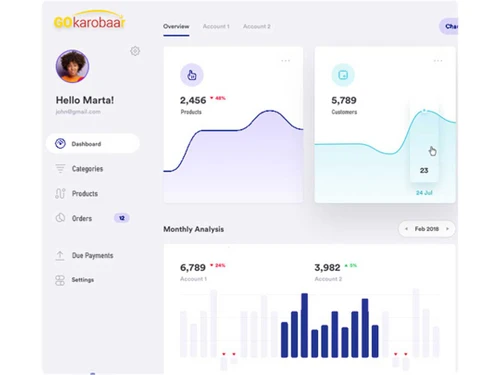
Small Business
Designed for startups and growing businesses
Medium Business
Built for business growth and flexibility
Enterprises
Designed for complex and large-scale business needs
4.4
Out of 5

Overall Rating
Based on
4 Verified Ratings
Rating Breakdown
87% Recommend this Product
Add ReviewTechjockey Trusted Reviews from Verified Users
No reviews are currently available for Gokarobaar. Discover similar GST Software reviews

GoGSTBill
Whats great - Organizes vendor and buyer records, simplifies stock tracking, and reduces paperwork. read more
Spectrum Cloud
Whats great - What I liked most is how smoothly everything runs in one place. I can handle ITR, GST, and TDS without switching software. Th... read more

GSTHero
Whats great - GSTHero does a great job at calculating GST accurately and keeps you updated with the latest GST laws. Plus, it handles your ... read more

Gokarobaar
₹ 3000.00 excl. GST
Desktop
Mobile
Web based
On Premises
Windows
Mac OS

EasyGST
₹ 3900
Desktop
Mobile
Web based
On Premises
Windows
Mac OS
GoGSTBill
₹ 1499
Desktop
Mobile
Web based
On Premises
Windows
Mac OS

Kernel GST Billing Software
₹ 1999
Desktop
Mobile
Web based
On Premises
Windows
Mac OS

invny
Price On Request
Desktop
Mobile
Web based
On Premises
Windows
Mac OS
Spectrum Cloud
₹ 6300
Desktop
Mobile
Web based
On Premises
Windows
Mac OS

ClearTax GST
Price On Request
Desktop
Mobile
Web based
On Premises
Windows
Mac OS

ProfitEazy
₹ 1499
Desktop
Mobile
Web based
On Premises
Windows
Mac OS
floTax
₹ 25000
Desktop
Mobile
Web based
On Premises
Windows
Mac OS

HostBooks GST
Price On Request
Desktop
Mobile
Web based
On Premises
Windows
Mac OS

Atease
₹ 15000
Desktop
Mobile
Web based
On Premises
Windows
Mac OS
(0) Product(s) selected
Available
Price on Request
Available
Price on Request
Starting Price:
₹1,499

Available
Price on Request

Available
Price on Request

Available
Price on Request

Starting Price:
₹149

Available
Price on Request

Starting Price:
₹4,237 /Lifetime
Gokarobaar is compatible with Windows operating systems.
Gokarobaar does not have any apps for mobile devices.
It supports Cloud-based deployment type.
The pricing starts at INR 3,000 for Gokarobaar.
Gokarobaar is used by small-scale business owners.
The Demo is available for free with techjockey.com.
It offers a free trial. However, the premium plan with advanced features starts at INR 3,000.
For Gokarobaar installation, download the installation file on your system and open the Setup Wizard to get started.
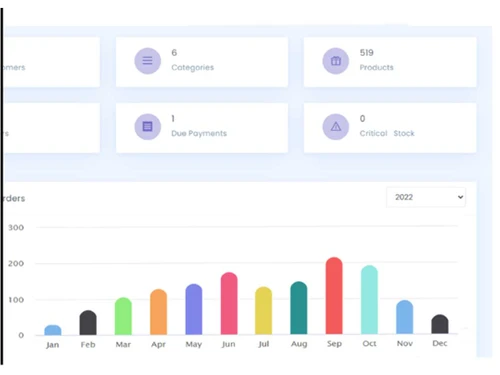
Gokarobaar helps with the easy creation of bills and invoices. It offers a comprehensive dashboard facility to the user, allowing businesses to gain an in-depth overview of their performance. Gokarobaar also helps with the effective management of vendors and orders.
20,000+ Software Listed
Best Price Guranteed
Free Expert Consultation
2M+ Happy Customers
Terms and Condtions

Users with registered businesses can purchase goods from merchants on the platform to satisfy their business needs. Users are not permitted to utilize any products acquired through the platform for resale, advertising, business, or further distribution.
For each purchase made, users will receive a Tax Invoice (or 'GST invoice') that includes specific details such as:
the GSTIN of the user associated with their registered business, and
the specified Entity Name for their business.
It should be noted that not all products are eligible for GST Invoice. Only the products displayed by participating sellers with the 'GST-based Invoice Available' callout on the product description page would qualify.
Certain goods and services are not eligible to get a GST Invoice, including items with VAS, i.e., Value Added Services (e.g., Total Mobile Protection/Assured Buyback) and those involving an exchange offer at the time of purchase.
Users must ensure the accuracy of the GSTIN, and business entity name provided for the GST Invoice. Requests for corrections into GST Invoice would not be accommodated by Techjockey.com or any Seller, and any issues arising from user-provided information are the sole responsibility of users.
Techjockey.com is not liable for the GST Invoice or any associated input tax credit. To efficiently claim an input tax credit, users should select the registered place of business address as per the GST authority's data and follow the provisions of the GST Act and rules.
To claim an input tax credit, the delivery and billing addresses must match. Furthermore, input tax credits will not be granted if the delivery address and GSTIN on the invoice are from different states. In case of incorrect GST details provided during the order placement, the order will be canceled automatically.



