linkedin
iCare Software logo
play Overview for Centers, Preschools, and Montessori
iCare Software-dashboard
iCare Software-engagement

iCare Software

Brand: iCare Software

  • 4.3

  • 3 Ratings

iCare Software streamlines billing, attendance, communication, and child development tracking for daycares and preschools.

See More

Have you used iCare Software before?

Share your insights for better experience

Add a Review

Price Available on Request

Questions about pricing or customization? We’re here to help, just a click away.

100% Genuine
Products
Best Price
Guaranteed
Safe & Secure
Payment
  • Description

  • Pricing

  • Features

  • Specification

  • Review

  • FAQ

iCare Software Overview

What is iCare Software?

iCare Software is a cloud-based child care management software designed for daycares, preschools, and after-school programs.

It helps childcare centers automate administrative tasks such as billing, attendance, and scheduling while tracking children's development through journals, milestones, and progress updates.

The software enables secure parent communication via messaging, notifications, and shared photos or reports. It also offers advanced reporting tools for licensing, subsidies, and staff-child ratios, with role-based access and enterprise-grade security to protect sensitive data.

iCare supports various care programs, including drop-in care, after-school programs, camps, Montessori, and ABA centers. Its scalable design makes it suitable for both single-site and multi-site childcare organizations.

With virtual assistant-like features, iCare automates repetitive tasks and simplifies reporting, helping childcare providers save time, reduce paperwork, improve parent engagement, and manage their centers more efficiently.

Why Choose iCare Child Care Management Software?

  • Integrated Billing & Attendance: Automatically syncs billing with attendance for accurate invoicing.
  • Flexible Rate Management: Supports multiple rate charts, discounts, and subsidy billing.
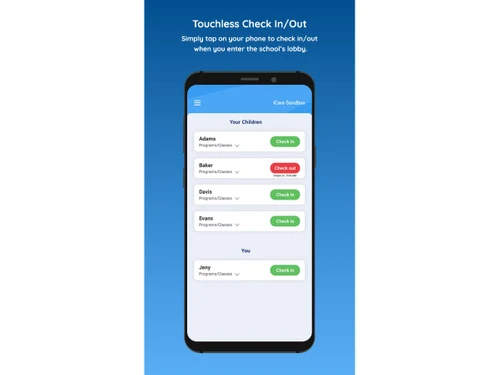
  • Robust Check-In System: Secure child check-in/check-out that meets licensing requirements.
  • Parent Communication Tools: Enables messaging, alerts, photo sharing, and notifications.
  • Enrollment & Waitlist Management: Manage registrations, waitlists, and class capacities easily.
  • Digital Journaling: Teachers can record daily notes, curriculum plans, and milestones.
  • Compliance Document Storage: Securely store health records, immunizations, and licensing documents.
  • Extensive Reporting: Offers 100+ built-in reports plus custom report creation.
  • Multi-Center Management: Manage multiple sites from a single system with site-specific data.
  • Role-Based Access Control: Customize permissions for admins, teachers, parents, and staff.
  • Enterprise-Grade Security: Uses AES-256 encryption, two-factor authentication, and audit logs.
  • Scalable Cloud Infrastructure: Handles growth in children, staff, and locations without lag.

Benefits of iCare Software

  • High Uptime & Reliability: Cloud-based system ensures consistent availability.
  • Staff Scheduling & Time Tracking: This Child Care Management Software can help manage teacher schedules and track hours efficiently.
  • Bus & Transportation Management: Schedule buses, track check-ins, and manage driver routes.
  • Drop-In Care Support: Supports pay-as-you-go childcare with POS, check-in, and billing.
  • Virtual Classroom Capabilities: Run online classes securely via video conferencing.
  • Curriculum Planning: Build lesson plans, align with state standards, and share with parents.
  • State Standards Tracking: Track child development against recommended state standards.
  • Custom Observation Fields: Define fields for observations to tailor tracking.
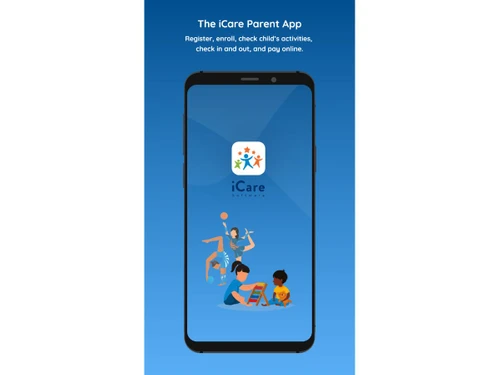
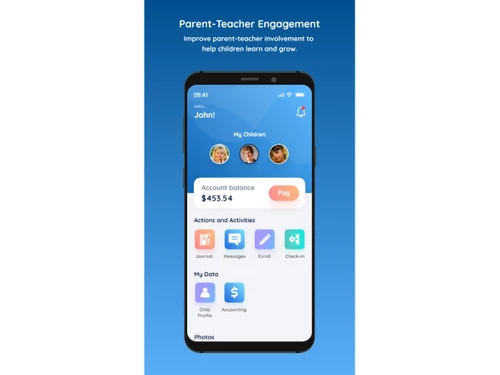
  • Parent Portal & Mobile App: With this Child Care Management Software, parents can manage enrollments, payments, and view daily updates.
  • Automated Payment Processing: Generates invoices and tracks payments automatically.
  • Financial Forecasting Tools: Estimate monthly revenue and expenses for budgeting.
  • Audit-Ready Logs: Maintain full change histories for compliance and transparency.
  • Secure Parent Document Access: Parents can upload and access signed forms safely.
  • Incident Reporting: Record and notify parents about accidents or incidents.
  • HIPAA / FERPA Compliance: Meets data protection laws relevant to childcare.
  • Automated Credential Reminders: Receive notifications for expiring certifications or immunizations.
  • Continuous Software Updates: Regularly releases new features and improvements.
  • Dedicated Onboarding & Support: Personalized training and long-term support for smooth operations.

iCare Software Pricing

iCare Software price details are available on request at techjockey.com.The pricing model is based on different parameters, including extra features, deployment type, and the total number of users. For further queries related to the product, you can contact our product team and learn more about the pricing and offers.

Read more

iCare Software Pricing & Plans

Looking for The Right Pricing?

Share your requirements and get a plan built around your business.

  • Define your business needs
  • Get customised pricing
  • Choose features that fit your workflow

Price Available on Request

Get personalised iCare Software pricing that fits your needs. Our team will connect with you.

iCare Software Features

  • icon_check Attendance Tracking
    Monitor student check-in/out in real time with secure methods, ensuring accurate attendance and compliance records.
  • icon_check Automated Billing
    Generate and process tuition, subsidies, and custom billing rules automatically, reducing manual errors and administrative load.
  • icon_check Parent Communication
    Engage parents via mobile apps, messaging, photos, and daily reports to keep them informed and involved in child activities.
  • icon_check Enrollment Management
    Streamline admissions with online registration, waitlists, digital forms, and automatic placement into programs or classes.
  • icon_check Staff Scheduling
    Create and manage staff schedules, track ratios, handle substitutions, and optimize staffing for compliance and efficiency.
  • icon_check Lesson Planning & Teachers Diary
    Plan, organize, and share curriculum and activities with teachers and parents, supporting structured learning and development.
  • icon_check Child Assessments
    Track developmental milestones, record observations, and generate reports to evaluate individual child growth and progress.
  • icon_check Mobile Access
    Enable staff and parents to access essential features, reports, and updates through secure, user-friendly mobile applications.
  • icon_check Subsidy Management
    Simplify government or third-party subsidy processing with automated calculations, compliance checks, and reporting accuracy.
  • icon_check Role-Based Access Control (RBAC)
    Assign permissions by user roles to ensure secure data access, protecting sensitive information across multiple locations.
  • icon_check Customizable Reporting
    Generate detailed reports on finance, attendance, learning, and compliance with configurable templates and BI dashboards.
  • icon_check Document Management
    Store, organize, and retrieve child, staff, and center documents digitally, ensuring secure and audit-ready record keeping.
  • icon_check Regulatory Compliance
    Maintain adherence to childcare licensing and government regulations with built-in compliance workflows and audit trails.
  • icon_check Payment Processing
    Offer flexible online payment options including auto-pay, cards, and ACH, integrated with billing and accounting modules.
  • icon_check Business Intelligence
    Gain insights with dashboards, KPIs, and predictive analytics powered by AI to improve decision-making and operational growth.
iCare Software Demo Video play icon

Get iCare Software Demo

Watch the demo video to explore key features, real workflows, and how the software fits your business needs.

Understand
Key Features
Personal
Demo Insights
Interactive
Demo Support

iCare Software Specification

Supported Platforms
Windows Windows iOS iOS Android Android MacOS MacOS
Devices
Desktop Desktop Mobile Mobile Tablet Tablet iPad iPad
Deployment
Web-Based Web-Based
Suitable For
Education
Business Specific
Child Care Pre-school
Business Size
Small Business Startups Medium Business Enterprises
Customer Support
Email Communities
Language
English
Training Resources
Videos
Compliance Regulation
HIPAA

iCare Software Review

4.3

Out of 5

img

Overall Rating

Based on
3 Verified Ratings

Rating Breakdown

  • Features 5
  • Value for Money 3.8
  • Ease of Use 4.1
  • Customer Support 4.1

80% Recommend this Product

Add Review

Techjockey Trusted Reviews from Verified Users

No reviews are currently available for iCare Software. Discover similar Child Care Management Software reviews

  • Illumine

    4.8

    Whats great - love all the Features, We are able to save our most valuable information data safe, as well as gather more information in a r... read more
  • Famly

    4.4

    Whats great - Personalized onboarding, ongoing support read more

  • Playground

    4.5

    Whats great - Playground Child Care Software has been an amazing tool for our daycare center. It streamlines everything from daily attendan... read more
How much does iCare Software cost?

iCare Software pricing is available upon request on techjockey.com.

Is there a mobile app available for iCare software.

Yes, iCare Software offers an iOS and Android mobile app.

Which operating systems are compatible with iCare?

iCare Software works on Windows and MacOS.

Does iCare Software offer a free trial?

No, iCare Software does not offer a free trial.

How does iCare Software function?

iCare centralizes childcare operations like billing, attendance, check in, parent communication, and reporting in a cloud-based system.

Who uses iCare Software?

Childcare centers, preschools, after-school programs, Montessori schools, drop-in care providers, and multi-site organizations.

Is a free demo available for iCare Software?

Yes, you can schedule a demo via their website.

Is iCare Software available for free?

No, iCare Software does not offer a free version.

20,000+ Software Listed

Best Price Guranteed

Free Expert Consultation

2M+ Happy Customers

Terms and Condtions

close

Users with registered businesses can purchase goods from merchants on the platform to satisfy their business needs. Users are not permitted to utilize any products acquired through the platform for resale, advertising, business, or further distribution.

For each purchase made, users will receive a Tax Invoice (or 'GST invoice') that includes specific details such as:

  • the GSTIN of the user associated with their registered business, and

  • the specified Entity Name for their business.

It should be noted that not all products are eligible for GST Invoice. Only the products displayed by participating sellers with the 'GST-based Invoice Available' callout on the product description page would qualify.

Certain goods and services are not eligible to get a GST Invoice, including items with VAS, i.e., Value Added Services (e.g., Total Mobile Protection/Assured Buyback) and those involving an exchange offer at the time of purchase.

Users must ensure the accuracy of the GSTIN, and business entity name provided for the GST Invoice. Requests for corrections into GST Invoice would not be accommodated by Techjockey.com or any Seller, and any issues arising from user-provided information are the sole responsibility of users.

Techjockey.com is not liable for the GST Invoice or any associated input tax credit. To efficiently claim an input tax credit, users should select the registered place of business address as per the GST authority's data and follow the provisions of the GST Act and rules.

To claim an input tax credit, the delivery and billing addresses must match. Furthermore, input tax credits will not be granted if the delivery address and GSTIN on the invoice are from different states. In case of incorrect GST details provided during the order placement, the order will be canceled automatically.