linkedin
Inspector Toolbelt logo
play Inspector Toolbelt Home Inspection Software
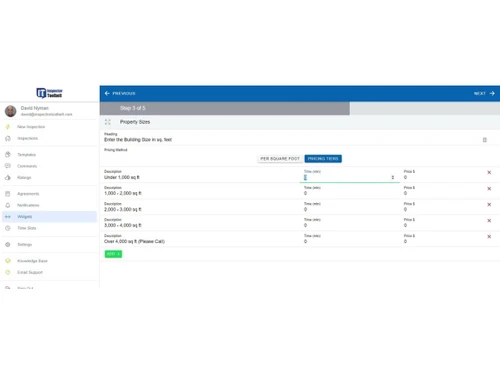
inspector toolbelt-dashboard
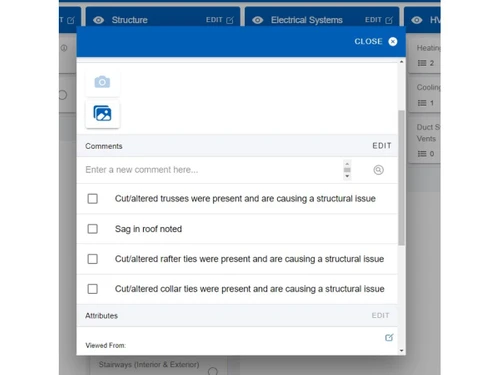
inspector toolbelt-pageview

Inspector Toolbelt

Brand: Full View Marketing

  • 4.5

  • 5 Ratings

An inspection management software that streamlines scheduling, reporting, client management, and billing for inspectors.

See More

Have you used Inspector Toolbelt before?

Share your insights for better experience

Add a Review
Starting Price
$79

View plans

100% Genuine
Products
Best Price
Guaranteed
Safe & Secure
Payment
  • Description

  • Pricing

  • Features

  • Specification

  • Review

  • FAQ

Starting at $79

Inspector Toolbelt Software Overview

What is Inspector Toolbelt?

Inspector Toolbelt is a simple and useful inspection management software made for home inspectors to help them manage inspections and create professional reports easily.

It allows inspectors to record notes, take photos, add videos, and document problems directly on a mobile device or tablet while on site.

The software then turns this information into clear, well-structured inspection reports that can be shared with clients quickly.

It also helps with scheduling appointments, managing clients, handling agreements, and processing payments, so inspectors don't need multiple tools. Even without the internet, inspectors can continue working offline and sync their data later.

Why Choose Inspector Toolbelt Software?

  • Fast & Efficient Interface: The software reduces unnecessary steps, allowing inspectors to complete reports quickly. It streamlines the inspection process for maximum productivity.
  • Works Online & Offline: Conduct inspections anywhere, even without internet access. All data syncs automatically when reconnected.
  • Mobile & Desktop Support: Access your inspections and reports on phones, tablets, or desktops. Flexibility ensures you can work from anywhere.
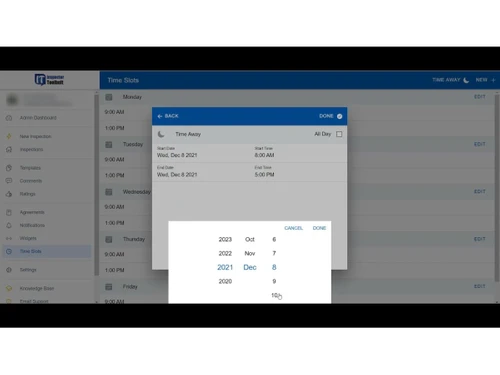
  • Built-in Scheduling Tools: Easily manage appointments, set reminders, and organize your calendar. No need for separate scheduling software.
  • Automated Client Communication: Automatically send agreements, invoices, and completed reports. Keeps clients informed without manual follow-up.
  • Customizable Reports & Templates: Tailor reports to fit your brand or specific inspection needs. Choose from pre-built templates or create your own.
  • Multi-Inspector Team Support: Collaborate efficiently with multiple inspectors on a single project. Each team member can contribute in real-time.
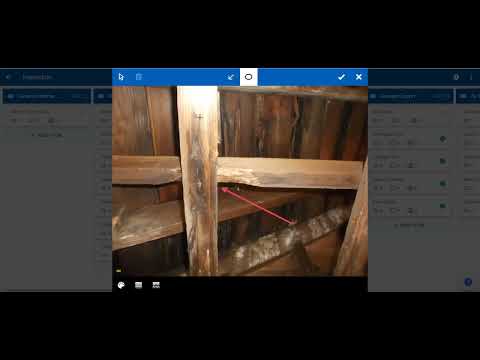
  • Photo & Video Integration: Embed images and videos directly into your reports. Add annotations to provide clear and professional documentation.
  • Quick Ratings & Comment Library: Use pre-saved comments and quick ratings to save time during inspections. Minimize repetitive typing.
  • Back-Office Automation: Store all client information, past reports, and documents securely. Reduces administrative workload and centralizes data.
  • Integrated Payment Options: Collect payments directly through the platform. Makes billing faster and reduces delays in payment processing.
  • Professional Report Layouts: Generate polished PDF and digital reports. Clients and agents get clean, professional, and easy-to-read documentation.

Benefits of Inspector Toolbelt Software

  • Free Scheduling & Sample Reports: Try scheduling features and sample reports without commitment. Great for testing the software before purchasing.
  • Custom Branding: Add your company logo and details to reports. Ensures every document looks professional and represents your brand.
  • Real-Time Collaboration: Team members can work together seamlessly on inspections. Updates appear instantly across devices.
  • Marketing & Follow-Up Tools: Track referrals, follow up with clients, and manage relationships. Helps grow your business over time.
  • Specialized Inspection Templates: Access templates for specialized inspections like 4-point, wind-mitigation, or other state-specific reports.
  • Cloud Sync Across Devices: All data is stored in the cloud and synced across devices. Ensures accuracy and easy access from anywhere.
  • Trusted & Reliable Support: Users praise the software's ease-of-use and responsive customer service. Get help whenever you need it.
  • All-in-One Solution: Combines scheduling, inspection, reporting, billing, and administration in a single platform. No need for multiple tools.

Inspector Toolbelt Pricing

Inspector Toolbelt price starts at USD 79 at Techjockey.com. The pricing model is based on different parameters, including extra features, deployment type, and the total number of users. For further queries related to the product, you can contact our product team and learn more about the pricing and offers.

Read more

Full View Marketing Company Details

Founded Year:  2018

We're a grass-roots company founded by long time friends and veterans in the home inspection and software industries.

Director/Founders Full View Marketing
Company Size 1-100 Employees

Inspector Toolbelt Pricing & Plans

Basic
Key Features
  • Report Generation
  • Real-Time Collaboration
  • Multimedia Integration
  • Multi Format Support
  • Custom Branding
  • Usage Analytics
  • Mobile Access Support
Starting at $79
    • Licenses

      Licenses
      Licenses
    • Monthly

      Monthly
      Monthly

Key Features

  • Report Generation

  • Real-Time Collaboration

  • Multimedia Integration

  • Multi Format Support

  • Custom Branding

  • Usage Analytics

  • Mobile Access Support

Inspector Toolbelt Features

  • icon_check Digital Signature
    Collect electronic signatures from clients directly on inspection agreements.
  • icon_check Client Portal
    Provide clients with secure online access to inspection reports and documents.
  • icon_check Report Generation
    Create professional inspection reports quickly with structured templates and AI-assisted writing tools.
  • icon_check Real-Time Collaboration
    Allow multiple inspectors to work on the same report simultaneously for efficient teamwork.
  • icon_check Multimedia Integration
    Insert images or videos directly into inspection reports for clear documentation of findings.
  • icon_check Multi Format Support
    Provide inspection results in both interactive web view and downloadable PDF formats.
  • icon_check Custom Branding
    Personalize inspection reports with company logos, colors, and branding elements.
  • icon_check Usage Analytics
    Track report activity with insights into view counts, unique users, and IP addresses.
  • icon_check Mobile Access Support
    Ensure inspection reports and tools are fully responsive and easy to use on mobile.
  • icon_check Drag and Drop Functionality
    Easily add photos and files to reports by dragging and dropping them from your device.
  • icon_check User Access Management
    Restrict client access to reports until agreements are signed or payments are completed.
  • icon_check Template Management
    Create, share, import, and export templates to standardize inspections across teams.
  • icon_check Checklist Management
    Build customizable inspection checklists to ensure consistent coverage of property areas.
  • icon_check Agreement Management
    Send, track, and manage inspection agreements digitally before report release.
Inspector Toolbelt Demo Video play icon

Get Inspector Toolbelt Demo

Watch the demo video to explore key features, real workflows, and how the software fits your business needs.

Understand
Key Features
Personal
Demo Insights
Interactive
Demo Support

Inspector Toolbelt Specification

Supported Platforms
Windows Windows iOS iOS Android Android MacOS MacOS Linux Linux
Devices
Desktop Desktop Mobile Mobile Tablet Tablet iPad iPad
Deployment
Web-Based Web-Based
Suitable For
Property
Business Specific
Property
Business Size
Small Business Startups Medium Business Enterprises
Customer Support
Email Communities
Language
English
Training Resources
Videos

Inspector Toolbelt Review

4.5

Out of 5

img

Overall Rating

Based on
5 Verified Ratings

Rating Breakdown

  • Features 4.8
  • Value for Money 4.6
  • Ease of Use 4.5
  • Customer Support 4.4

80% Recommend this Product

Add Review

Be the First to Review

This product has no reviews yet. Be the first to leave your feedback.

Add Review
How much does Inspector Toolbelt cost?

Inspector Toolbelt is available starting at USD 79 on Techjockey.com.

Is there a mobile app available for Inspector Toolbelt Software?

Yes, Inspector Toolbelt has a mobile app for both Android and iOS devices.

Which operating systems are compatible with Inspector Toolbelt Software?

Inspector Toolbelt works on Linux, Windows, macOS, iOS, and Android devices.

Does Inspector Toolbelt Software offer a free trial?

Yes, Inspector Toolbelt free trial is available for new users.

How does Inspector Toolbelt Software function?

Inspector Toolbelt helps inspectors schedule inspections, generate reports, manage clients, and automate billing.

Who uses Inspector Toolbelt Software?

Home inspectors, inspection companies, and multi-inspector teams use Inspector Toolbelt.

Is a free demo available for Inspector Toolbelt Software?

Yes, Inspector Toolbelt free demo can be requested from the official website.

Is Inspector Toolbelt Software available for free?

No, Inspector Toolbelt is a paid software, though free trials and sample reports are available.

20,000+ Software Listed

Best Price Guranteed

Free Expert Consultation

2M+ Happy Customers

Terms and Condtions

close

Users with registered businesses can purchase goods from merchants on the platform to satisfy their business needs. Users are not permitted to utilize any products acquired through the platform for resale, advertising, business, or further distribution.

For each purchase made, users will receive a Tax Invoice (or 'GST invoice') that includes specific details such as:

  • the GSTIN of the user associated with their registered business, and

  • the specified Entity Name for their business.

It should be noted that not all products are eligible for GST Invoice. Only the products displayed by participating sellers with the 'GST-based Invoice Available' callout on the product description page would qualify.

Certain goods and services are not eligible to get a GST Invoice, including items with VAS, i.e., Value Added Services (e.g., Total Mobile Protection/Assured Buyback) and those involving an exchange offer at the time of purchase.

Users must ensure the accuracy of the GSTIN, and business entity name provided for the GST Invoice. Requests for corrections into GST Invoice would not be accommodated by Techjockey.com or any Seller, and any issues arising from user-provided information are the sole responsibility of users.

Techjockey.com is not liable for the GST Invoice or any associated input tax credit. To efficiently claim an input tax credit, users should select the registered place of business address as per the GST authority's data and follow the provisions of the GST Act and rules.

To claim an input tax credit, the delivery and billing addresses must match. Furthermore, input tax credits will not be granted if the delivery address and GSTIN on the invoice are from different states. In case of incorrect GST details provided during the order placement, the order will be canceled automatically.