 USA
USA UAE
UAESmall Business
Designed for startups and growing businesses

See More





Brand: KeenTools
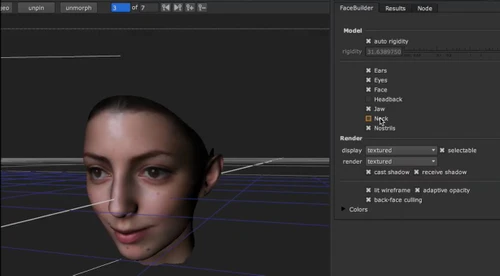
KeenTools FaceBuilder creates photorealistic models of heads and human faces, which are 3D in nature. FaceBuilder has the inbuilt ability to transfer images, videos or footage into the requisite format and the purpose node is used to import documents into KeenTools Nuke format. This is also the reason why FaceBuilder is defined as Nuke node in form and content. The primary requirement for creatin...
See MoreHave you used KeenTools Face Builder before?
Share your insights for better experience
Brand: KeenTools
Founded Year: 2015
KeenTools.
 Single-Photo Support Multi-Photo Input Automatic Face Alignment Facial Expressions Support Global Demographic Diversity Configurable Model Parts Mixed Aspect-Ratio Photo Input Works with Video Source Frames Automatic Camera Setup / Estimation Exportable 3D Geometry MetaHuman-Compatible UV Layout Enhance Models Fast model positioning Camera Focal Length Estimation Create 3D Models

Watch the demo video to explore key features, real workflows, and how the software fits your business needs.
 Ubuntu
  Windows
  MacOS
MacOS  Linux
Linux  Desktop
  Cloud-Based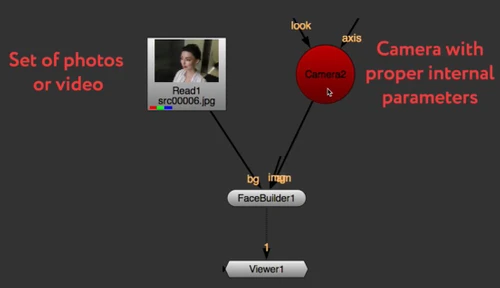

Small Business
Designed for startups and growing businesses
Medium Business
Built for business growth and flexibility
Enterprises
Designed for complex and large-scale business needs
3.4
Out of 5

Overall Rating
Based on
3 Verified Reviews
Rating Breakdown
63% Recommend this Product
Add ReviewUsers express mixed sentiments about KeenTools Face Builder. While some appreciate its advanced features and commend the excellent customer service, others find it overpriced and criticize the usability of the models produced, which often require significant modifications. The positive feedback highlights its effective model positioning and trading options, but the negative reviews emphasize dissatisfaction with the product's value for money, particularly for individual users. Overall, the product has both loyal supporters and frustrated customers.

Jul 6, 2021
Techjockey Verified
“Product is highly overpriced for what it provides”
Pros
i don't think so there is any pros in this and also the price is high.
Cons
The models are not game-ready. The whole reason to buy this is to speed up your workflow but the models that this produces are unusable without heavy modification, and most likely will require you to make another model while using the model it gives you as a reference. Considering that I paid $150 USD this is absolutely ridiculous.
Reason to switch
Null
Nov 7, 2018
Techjockey Verified
“Great module”
Pros
FaceBuilder is based over PinTool and incorporates every one of its qualities, for example, straightforward and incredible model situating instrument, propelled model illustration, a great deal of trading alternatives, central length estimation, and so forth
Cons
NO CONS
Aug 9, 2018
Techjockey Verified
“amazing idea”
Pros
They supplied me with keys for the software literally by return mail. After finding that my system was not compatible with the software after using their excellent communications (reply's to emails within the hour), they offered a full refund. that is what I call customer service and I highly recommend them. I will buy from them again should I need more software.
Cons
N/A

KeenTools Face Builder
Price On Request
Desktop
Mobile
Web based
On Premises
Windows
Mac OS

KeenTools Face Tracker
Price On Request
Desktop
Mobile
Web based
On Premises
Windows
Mac OS

KeenTools Pin Tool
Price On Request
Desktop
Mobile
Web based
On Premises
Windows
Mac OS

KeenTools ReadRigged Geo
Price On Request
Desktop
Mobile
Web based
On Premises
Windows
Mac OS

CLO 3D Fashion
Price On Request
Desktop
Mobile
Web based
On Premises
Windows
Mac OS

Coohom
₹ 750
Desktop
Mobile
Web based
On Premises
Windows
Mac OS

Pacdora
Price On Request
Desktop
Mobile
Web based
On Premises
Windows
Mac OS

Bambu Studio
Price On Request
Desktop
Mobile
Web based
On Premises
Windows
Mac OS

Autodesk 3DS Max
Price On Request
Desktop
Mobile
Web based
On Premises
Windows
Mac OS
Spline
Price On Request
Desktop
Mobile
Web based
On Premises
Windows
Mac OS

SMART PLANT 3D (SP3D)
Price On Request
Desktop
Mobile
Web based
On Premises
Windows
Mac OS
(2) Product(s) selected
Available
Price on Request
Starting Price:
$18 /Month
Available
Price on Request
Starting Price:
$15 /Seat/Month

Available
Price on Request

Starting Price:
$15 /Month

Available
Price on Request

Starting Price:
$2,645 /Quantity

Available
Price on Request

Available
Price on Request
No, the photos are required to be of the same resolution.
Yes, you can build a model using a video instead of a sequence of photos. Basically there is no difference between the two ways.
KeenTools FaceBuilder is not available for mobile phones at this moment.
Yes, the face building software offer allows users to create save file through Nuke’s built-in WriteGeo node
Techjockey offers demo for KeenTools Face Building software. To avail the demo, please request a call.
Yes, you will find KeenTools FaceBuilder tutorial videos online to get started easily with the software.
The pricing for KeenTools FaceBuilder starts at USD 18 per month at techjockey.com
20,000+ Software Listed
Best Price Guranteed
Free Expert Consultation
2M+ Happy Customers
Terms and Condtions

Users with registered businesses can purchase goods from merchants on the platform to satisfy their business needs. Users are not permitted to utilize any products acquired through the platform for resale, advertising, business, or further distribution.
For each purchase made, users will receive a Tax Invoice (or 'GST invoice') that includes specific details such as:
the GSTIN of the user associated with their registered business, and
the specified Entity Name for their business.
It should be noted that not all products are eligible for GST Invoice. Only the products displayed by participating sellers with the 'GST-based Invoice Available' callout on the product description page would qualify.
Certain goods and services are not eligible to get a GST Invoice, including items with VAS, i.e., Value Added Services (e.g., Total Mobile Protection/Assured Buyback) and those involving an exchange offer at the time of purchase.
Users must ensure the accuracy of the GSTIN, and business entity name provided for the GST Invoice. Requests for corrections into GST Invoice would not be accommodated by Techjockey.com or any Seller, and any issues arising from user-provided information are the sole responsibility of users.
Techjockey.com is not liable for the GST Invoice or any associated input tax credit. To efficiently claim an input tax credit, users should select the registered place of business address as per the GST authority's data and follow the provisions of the GST Act and rules.
To claim an input tax credit, the delivery and billing addresses must match. Furthermore, input tax credits will not be granted if the delivery address and GSTIN on the invoice are from different states. In case of incorrect GST details provided during the order placement, the order will be canceled automatically.




