linkedin
Lavu logo
play Lavu Point of Sale for Restaurants
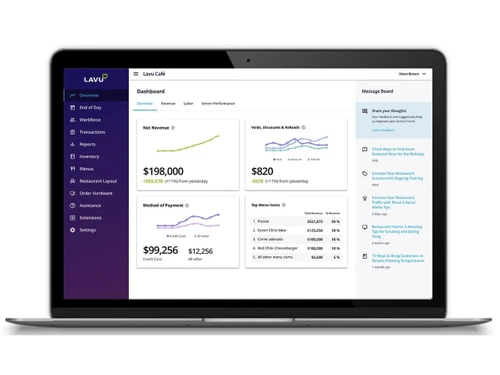
Lavu-dashboard
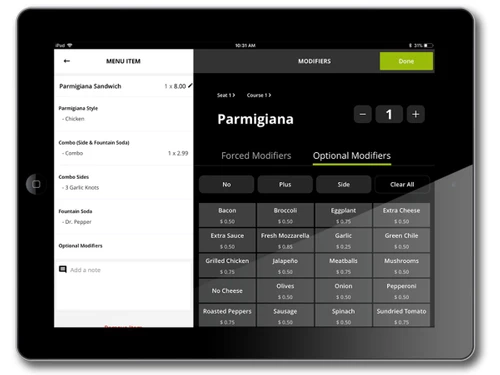
Lavu-menu items

Lavu

Brand: Lavu

  • 4.1

  • 5 Ratings

Lavu turns restaurant management into a smoother and smarter everyday experience! Fast service and organized operations work harmoniously together.

See More

Have you used Lavu before?

Share your insights for better experience

Add a Review

Price Available on Request

Questions about pricing or customization? We’re here to help, just a click away.

100% Genuine
Products
Best Price
Guaranteed
Safe & Secure
Payment
  • Description

  • Pricing

  • Features

  • Specification

  • Review

  • FAQ

Lavu Software Overview

What is Lavu Software?

Lavu is an advanced hospitality management platform developed especially for contemporary restaurant and food industry operations. The system connects restaurant activities through one organized and mobile-friendly digital environment. Restaurants trust Lavu for smoother coordination across service counters, dining spaces, and business management. Traditional restaurant handling often creates unnecessary pressure during busy customer service hours everywhere.

The restaurant POS software supports restaurants ranging from coffee shops to larger full-service dining businesses today. Staff members can handle operations more comfortably via connected and simplified management workflows throughout shifts. Lavu works especially well within fast-moving hospitality environments that require quicker operational coordination consistently. Many restaurant businesses prefer Lavu because operations remain clean and professionally managed throughout.

Why Choose Lavu Software?

  • Busy Hour Balance: Restaurant rush periods appear more manageable during crowded service timings. Staff coordination flows with better rhythm overall.
  • Tableside Order Flow: Direct table ordering supports quicker customer service across dining spaces. Restaurant movement looks smoother during active shifts.
  • Kitchen Screen Support: Digital kitchen coordination reduces confusion during hectic food preparation schedules. Order communication remains well-organized throughout.
  • Cash Pricing Flexibility: Dual pricing options support smoother payment handling during customer transactions. Billing coordination appears practical.
  • Shift Planning Structure: Employee scheduling coordination supports balanced restaurant staffing during busy business hours. Workforce organization stays stable.
  • Multi-Location Rhythm: Connected restaurant branches operate through more unified business coordination systems. Operational consistency stays strong across locations.

Benefits of Lavu Software

  • Quick Billing Process: Payment entries move faster during frantic restaurant timings. Counter handling becomes less stressful during peak hours.
  • Flexible Menu Editing: Food items can be updated quickly during changing restaurant requirements. Seasonal dishes enter menus without extra effort.
  • Ingredient Usage Tracking: Stock records give clearer visibility across kitchen supplies. Waste handling becomes easier during larger orders.
  • Simple Staff Monitoring: Employee records gather inside one connected business platform. Shift attendance tracking works without confusing paperwork.
  • Faster Food Preparation: Kitchen screens display orders without repeated verbal instructions. Cooking teams can handle requests with better timing.
  • Reliable Sales Insights: Revenue summaries provide clearer business performance observations. Restaurant owners can understand stronger selling items faster.
  • Mobile Order Handling: Staff members can take orders while moving across tables. Dining service flows better during crowded evenings.

Lavu Software Pricing

Lavu Software price is available on request at techjockey.com.

The pricing model is based on different parameters, including extra features, deployment type, and the total number of users. For further queries related to the product, you can contact our product team and learn more about the pricing and offers.

Read more

Lavu Company Details

Founded Year:  2010

Lavu is a computer specializes in the fields of the business management system, restaurant software, and point of sale.

Director/Founders Andy Lim / POSLavu, Corey Fiala
Company Size 1-100 Employees

Lavu Pricing & Plans

Looking for The Right Pricing?

Share your requirements and get a plan built around your business.

  • Define your business needs
  • Get customised pricing
  • Choose features that fit your workflow

Price Available on Request

Get personalised Lavu pricing that fits your needs. Our team will connect with you.

Lavu Features

  • icon_check Order Management
    Manage dine-in, takeout, and delivery orders efficiently with customizable menus and quick item modifications.
  • icon_check Inventory Management
    Track ingredients, monitor stock levels, and receive alerts to prevent shortages and overstock issues.
  • icon_check Menu Customization
    Create and modify menu items, add modifiers, pricing options, and categories tailored to your restaurant type.
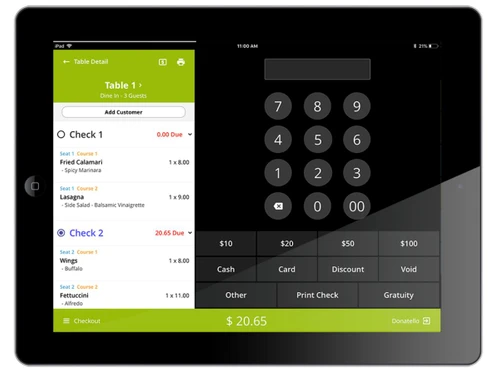
  • icon_check Table Management
    Visualize table layouts, assign servers, and manage seating efficiently for dine-in operations.
  • icon_check Customer Relationship Management (CRM)
    Store customer details, track visits, and enable loyalty programs for personalized experiences.
  • icon_check Employee Management
    Manage staff profiles, schedules, permissions, and time tracking to streamline HR and operations.
  • icon_check Reporting & Analytics
    Access real-time sales, labor, and inventory reports for data-driven decision-making and performance tracking.
  • icon_check Payment Processing
    Accept multiple payment types including cards, cash, and digital wallets with secure, integrated processing.
  • icon_check Kitchen Display System (KDS)
    Send orders directly to kitchen screens to eliminate paper tickets and reduce order preparation errors.
  • icon_check Multi-Location
    Manage multiple restaurant outlets from a single dashboard with consolidated reporting and control.
  • icon_check Loyalty Management
    Set up points-based or tiered loyalty programs to encourage repeat customers and boost retention.
  • icon_check Third Party Integrations
    Connect with accounting tools, delivery apps, and payment gateways for a complete business ecosystem.
  • icon_check Mobile POS
    Use iPads or tablets for order taking, tableside payments, and faster service in any part of the restaurant.
  • icon_check Discounts & Promotions
    Apply custom discounts, happy hour pricing, and promotional codes directly within the POS interface.
Lavu Demo Video play icon

Get Lavu Demo

Watch the demo video to explore key features, real workflows, and how the software fits your business needs.

Understand
Key Features
Personal
Demo Insights
Interactive
Demo Support

Lavu Specifications

Supported Platforms
Windows Windows iOS iOS Android Android
Devices
Desktop Desktop Tablet Tablet iPad iPad
Deployment
Cloud-Based Cloud-Based
Suitable For
Restaurant
Business Specific
Restaurants
Business Size
Small Business Medium Business Enterprises
Customer Support
Email
Language
English

Lavu Review

4.1

Out of 5

img

Overall Rating

Based on
5 Verified Ratings

Rating Breakdown

  • Features 4.3
  • Value for Money 4.1
  • Ease of Use 4.2
  • Customer Support 4.1

80% Recommend this Product

Add Review

Techjockey Trusted Reviews from Verified Users

No reviews are currently available for Lavu. Discover similar Restaurant POS Software reviews

  • Petpooja

    4.1

    Whats great - The software is easy to use and understand. Currently, it has all the features required to run a restaurant efficiently. read more
  • Mink Foodiee Restaurant POS

    4.8

    Whats great - Works with almost all devices, Very easy to setup and use with many services like crm, loyalty programs, inventory managemen... read more

  • TMBill POS

    4.2

    Whats great - No expertise and solution offered, only duping people. read more

How much does Lavu Software cost?

Lavu's pricing is available on request at techjockey.com. Costs may vary based on feature selection, deployment type, and user requirements.

Who uses Lavu Software?

The most frequent users of Lavu include restaurants, cafes, pubs, and food trucks. It also suits growing restaurant chains and hospitality businesses.

Is there a mobile app available for Lavu Software?

Yes, Lavu provides mobile apps for different restaurant tasks. These apps mainly work on iOS and Android devices.

Which operating systems are compatible with Lavu Software?

Lavu supports Windows, iOS, and Android platforms. Restaurants can access features across multiple compatible devices.

Does Lavu Software offer a free trial?

Yes, Lavu does offer a free trial for interested users. Businesses can easily explore features prior to making a purchase decision.

How does Lavu Software function?

Lavu manages restaurant operations through a digital POS system. The widely trusted restaurant management solution handles orders, billing, inventory, staff scheduling, and kitchen communication efficiently.

20,000+ Software Listed

Best Price Guranteed

Free Expert Consultation

2M+ Happy Customers

Terms and Condtions

close

Users with registered businesses can purchase goods from merchants on the platform to satisfy their business needs. Users are not permitted to utilize any products acquired through the platform for resale, advertising, business, or further distribution.

For each purchase made, users will receive a Tax Invoice (or 'GST invoice') that includes specific details such as:

  • the GSTIN of the user associated with their registered business, and

  • the specified Entity Name for their business.

It should be noted that not all products are eligible for GST Invoice. Only the products displayed by participating sellers with the 'GST-based Invoice Available' callout on the product description page would qualify.

Certain goods and services are not eligible to get a GST Invoice, including items with VAS, i.e., Value Added Services (e.g., Total Mobile Protection/Assured Buyback) and those involving an exchange offer at the time of purchase.

Users must ensure the accuracy of the GSTIN, and business entity name provided for the GST Invoice. Requests for corrections into GST Invoice would not be accommodated by Techjockey.com or any Seller, and any issues arising from user-provided information are the sole responsibility of users.

Techjockey.com is not liable for the GST Invoice or any associated input tax credit. To efficiently claim an input tax credit, users should select the registered place of business address as per the GST authority's data and follow the provisions of the GST Act and rules.

To claim an input tax credit, the delivery and billing addresses must match. Furthermore, input tax credits will not be granted if the delivery address and GSTIN on the invoice are from different states. In case of incorrect GST details provided during the order placement, the order will be canceled automatically.