linkedin
Petpooja logo
play Best Restaurant Billing And Management POS Software in India
play Review of the Best Restaurant Billing Software - Petpooja POS
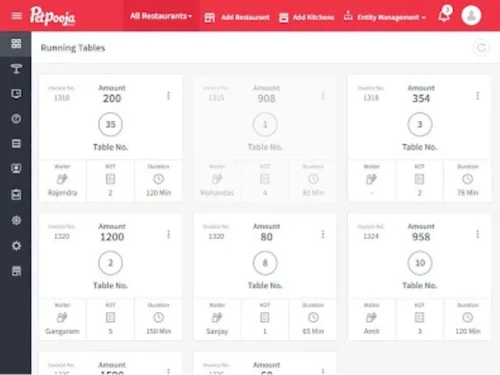
petpooja dashboard

Petpooja

Brand: Petpooja

  • 4.2

  • 53 Ratings & 50 Reviews

Comprehensive restaurant management software that simplifies order management & empowers restaurateurs to focus on delivering exceptional dining experiences.

See More

Have you used Petpooja before?

Share your insights for better experience

Add a Review
Starting Price
₹10,000 excl.GST
₹ 11,800 incl. GST

View plans

offer Save upto 18%, Get GST Invoice on your business purchase T&C
offer Buy Now & Pay Later, Check offer on payment page.
Buy Now
100% Genuine
Products
Best Price
Guaranteed
Safe & Secure
Payment
  • Description

  • Pricing

  • Features

  • Specification

  • Review

  • Compare

  • Alternatives

  • FAQ

Starting at ₹10,000
Buy Now

Petpooja Software Overview

What is Petpooja?

Petpooja is India's premier restaurant management solution, supporting over seventy-five thousand restaurants throughout the country and worldwide including, Canada, UAE, South Africa, and more. The cloud-based restaurant system offers many features, including billing, inventory management, reporting, online order management, menu management, CRM, and more. 

Furthermore, Petpooja serves a wide range of restaurant brands, such as Jumbo King, Yum Yum Cha, Beer Cafe, and more. Whether you operate a cloud kitchen, a large network of restaurants, a café, or a QSR, Petpooja has got you covered. They have a presence in over two hundred cities across India and offer 24/7 customer support. 

It can be easily integrated with various 3rd party applications, such as Tally, Zomato, Paytm, and more, allowing you to manage various tasks through a single dashboard. 

Petpooja is dedicated to creating a strong and dependable chain of restaurants in India, addressing restaurant management challenges for its partners, and supporting their long-term business expansion. 

Petpooja Captain App

With the captain ordering app by Petpooja, your restaurant staff can take food orders and manage table reservations and occupancy through their Android phones. This will increase the speed of order processing and decrease the turnaround time. Further, there are AI-powered food recommendations for a better experience. You, guests, can also request bills on the app, as multiple payment options are integrated on the app.

Who Uses Petpooja Billing Software?

These types of outlets can benefit from exclusive features of Petpooja billing POS software:

  1. Restaurants
  2. Quick Service Restaurants
  3. Food Trucks
  4. Dessert Shop
  5. Coffee Shop
  6. Food Delivery Services
  7. Bakeries
  8. Bars
  9. Cloud Kitchens

What are the Core Features of Petpooja Restaurant Software?

  1. Simple Billing & Kitchen order ticketing (KOT): Petpooja simplifies the billing process needed for the smooth working of a restaurant. You can split, merge, move, and edit anything in the billing table.
  2. Category-wise KOTs and multi-terminal billing options: It is compatible with more than 200 weighing scales, printers, and barcode scanners.
  3. Management of Inventory & Recipes: There are supplier and central kitchen modules to manage raw materials, follow all processes in multi-stage recipes without hassle, and get food-costing reports.
  4. Track food wastage: You can track food wastage in a certain period and find ways to minimize the loss. The stock detail gets automatically synced across aggregator portals.
  5. Menu Management: You can add item categories, variations, add-ons, and combo options. There are separate menus for dine-in and takeaway. Menu timings can be changed at any time and prices can be fixed according to the location.
  6. Online Aggregator and Payments Integrations: You can edit prices, and toggle the items directly from POS. Online integration is available with Zomato, Swiggy, and Dunzo. PayTM and UPI payment options are present to speed up the service. Payment reconciliation ensures that you have accurate details of successful payment.
  7. In-depth Analysis & Reports: Detailed reports help you in making better decisions. There are chain management reports, item-wise and category-wise reports, and more. Features like inventory reporting and GST reporting before filing are also available.
  8. Customer Relationship Management: It has features like customer order history, customer outreach, reporting, and customer reviews, among others. Loyalty programs can be added to provide special benefits to frequent customers.
  9. Petpooja Marketplace: You can choose services and integrations to enhance the platform. On the front end, you can add a website, feedback, kiosk, scan and order, and more. For the backend, you can use token management, KDS, and queue management, among others. You can also buy advanced devices like delivery dispatch devices, food BOTs, and waiter calling smart devices.

Benefits of using Petpooja Restaurant POS Software

Petpooja is advantageous for anyone who is a part of the restaurant ecosystem.

Petpooja for Restaurant Franchise:

If you are a franchisee, the Petpooja restaurant POS system lets you monitor all your outlets in real time and manage outlet inventory. There is an ERP integration with the backend.

You can maintain data consistency via a central kitchen module and menus across all outlets. The software provides the reporting feature for the fee calculation of your franchise.

Petpooja Software for Restaurant Owners:

For the owners, it allows monitoring of daily activities, stock levels, and food expenses via the admin app and dashboard. You get data and analytics like sales information in real-time.

Other benefits include having a website, menu customization, SMS connect, automation of GST, taxes, and discounts, an option to add online ordering and more. The team provides support if the owner gets stuck as well as on-site biller and inventory training.

Petpooja for Restaurant Staff:

The restaurant staff gets training to use the software easily in different languages. Table view provides a better understanding of the occupancy and order status in real-time. Kitchen display systems (KDS) ensure that chefs know what is required and prepare everything quickly.

Petpooja Captain Ordering option ensures a smooth digital process for taking customer orders. Token management further quickens the dispatch process of online orders.

Inventory stock management with smart scale is another option to enable the timely delivery of orders. Kiosks reduce the staff burden as customers can order themselves. For accountants, ERP integration prevents duplication.

Petpooja Software Price

Petpooja Price starts at Rs 10,000/-per year at techjockey.com. For more inquiries regarding the Petbooja billing software, please request a call. Our sales team will connect with you shortly.

Read more

Petpooja Company Details

Founded Year:  2011

Petpooja is India’s leading restaurant management platform. Powering over 75,000+ restaurants across India, the Middle East, Canada, and South Africa.

Director/Founders Apurv Patel, Parthiv Patel
Company Size 1-100 Employees

Petpooja Pricing & Plans

Core

Calculated Price

₹ 10000 Exclusive of all taxes
    • Outlet

      Outlet
      Outlet
    • Yearly

      Yearly
      Yearly

Key Features

  • Cloud billing

  • Inventory module

  • 80+ reports 200+ third-party integrations

  • In-built CRM Menu management

  • Unlimited-user rights/Unlimited cash register

  • Central kitchen module/Multi-terminal billing

Growth

Calculated Price

₹ 20000 Exclusive of all taxes
    • Outlet

      Outlet
      Outlet
    • Yearly

      Yearly
      Yearly

Key Features

  • All Features of Core

  • Scan & order app

  • Feedback management/Kitchen display system

  • Token management app/Captain ordering app

  • Restaurant website /Petpooja loyalty

  • Virtual wallet

Scale

Calculated Price

₹ 30000 Exclusive of all taxes
    • Outlet

      Outlet
      Outlet
    • Yearly

      Yearly
      Yearly

Key Features

  • All Features of Growth

  • Invoice By Petpooja

  • Payroll By Petpooja

  • Tasks By Petpooja

  • Dynamic reports

  • Reservation manager

Petpooja Features

  • icon_check Recipe Management
    Create a thorough recipe module and save the cooking procedure of in-house specials.
  • icon_check Third Party Integration
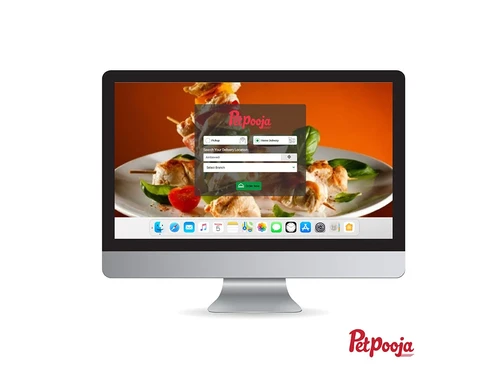
    Petpooja POS software allows restaurants to take their business online. It provides seamless integration with Zomato.
  • icon_check Point of Sale (POS)
    Petpooja offers a high-quality checkout function that creates bills and invoices for all the purchases.
  • icon_check Payment Gateway
    Integrate different payment methods like credit cards, Debit Cards, mobile wallets, UPI, etc. 
  • icon_check Home Delivery Management
    It offers simplified integration with the delivery service provider’s delivery agent with a single click.
  • icon_check SMS and Email
    Restaurateurs can integrate SMS and Email services for better marketing and customer interaction. 
  • icon_check Loyalty Program
    Increase the customer retention rate with user-centered loyalty programs and reward them with discounts and other offers.
  • icon_check Customer Management
    Retain your customers by appreciating their Loyalty by giving customized offers.
  • icon_check Restaurant POS
    Petpooja’s Restaurant POS is a powerful, user-friendly system designed to streamline billing, inventory, and operations.
  • icon_check Table Management
    Software efficiently manages the seating arrangement of the eatery. It also assists in things like pre-bookings.
  • icon_check Schemes & Offers
    Restauranteurs can generate lucrative offers to attract newer customers to their restaurants and increase their customer base.
  • icon_check Analytics & Reporting
    Offers a detailed analysis of the eateries’ operations, and offers innovative solutions to improve the speed, and efficiency.
  • icon_check Billing & Invoicing
    Offers an easy-to-use billing interface. Moreover, 200+ printers are supported. Minimal biller training is required.
  • icon_check Menu Management
    Users can create menus and categorize them, e.g., dine-in, home delivery, parcels, etc.
  • icon_check KOT Management
    KOT services in Petpooja POS are developed to increase the speed and efficiency of the eateries.
  • icon_check Role Management
    Allows restaurant owners to create a thorough hierarchical-oriented workplace with assigned roles for their daily tasks.
Petpooja Demo Video play icon

Get Petpooja Demo

Watch the demo video to explore key features, real workflows, and how the software fits your business needs.

Understand
Key Features
Personal
Demo Insights
Interactive
Demo Support
Product Enrichment Section Image

Petpooja Specifications

Supported Platforms
Windows Windows iOS iOS Android Android MacOS MacOS
Devices
Desktop Desktop Mobile Mobile
Deployment
Cloud-Based Cloud-Based
Suitable For
Retail
Business Specific
All Businesses
Business Size
Small Business Medium Business SMEs
Customer Support
Phone Email Communities
Language
English
Training Resources
Documentation Videos

Explore the Best Alternative Solutions Similar to Your Business Size and Needs

Petpooja Reviews

4.2

Out of 5

img

Overall Rating

Based on
50 Verified Reviews

Rating Breakdown

  • Features 4.1
  • Value for Money 4.1
  • Ease of Use 4.2
  • Customer Support 4.3

80% Recommend this Product

Add Review
AI Generated Summary Based on Real Reviews

Customer sentiment towards Petpooja is largely positive, highlighting its user-friendly interface, comprehensive support, and effective inventory management capabilities. Many users appreciate the seamless integration with online food delivery platforms and the prompt assistance from the support team. However, there are notable complaints regarding inconsistent after-sales support and integration issues, particularly with Swiggy and Zomato, which have resulted in lost business for some users. Overall, while many find it a valuable tool for restaurant management, there are areas for improvement that could enhance the user experience.

Pros

  • "If you have multiple stores, it's great to have everything in one place."

    Amit ChaurasiaSep 7, 2022

  • "Outstanding user experience and seamless integration with platforms for online food delivery"

    Brad MathiasAug 23, 2022

  • "It provides us with a comprehensive set of platforms, including online, dine-in, self-service, inventory, vendors, and many more."

    Subash PadhanAug 17, 2022

Cons

  • "I use this software and my experience is Not Good with the Software."

    JasrajOct 11, 2024

  • "In the present context, there is nothing noteworthy to emphasise."

    The VastraAug 16, 2022

  • "Nothing. Petpooja pos it is easy to use and very flexible for every type of restaurant. No negative points found yet."

    Ravi JainJun 30, 2022

Petpooja Video Reviews

youtubeVideoId

5

“Petpooja review by Madhouse Cafe”

Review by: Varun

youtubeVideoId

5

“Petpooja billing software review by Caffix”

Review by: Umesh Avtani

youtubeVideoId

5

“Petpooja Software Review by IMLY”

Review by: Imly cafe

Praveen Reddy

Owner

Industry: Hospitality User since: 6-12 months

4

Reviewed on: May 19, 2020

Techjockey Verified

“The software works fine. However there is scope still for improvement.”

Pros

The software is easy to use and understand. Currently, it has all the features required to run a restaurant efficiently.

Cons

Integration support is unavailable and so is after sales support. There is no integration for Swiggy and Zomato as a result of which I lost good business deals.

sunny kotecha

Owner

Industry: Hospitality User since: 2+ years

5

Reviewed on: Jul 9, 2020

Techjockey Verified

“Best software with so many features”

Pros

Following is my honest review after using the software for so many years. You can manage your restaurant easily from Mobile anywhere without any load. The most important feature pet pooja providing is a Reconciliation engine for Online partners from where you can check are you receiving the complete amount or not. Petpooja is providing a supplier market from where you can contact wholesalers and easily purchase items at the cheapest rates. Petpooja is providing service 24/7 due to this you can get the support for any issue at any time which is the best part. Also, you will get refer and earn benefits from which you can suggest and get service benefits from Petpooja. They will listen to your suggestion and if possible they will apply it. You will get monthly to monthly something new updated version with some addition.

Cons

It would be great if the mobile application includes various report dashboards for more productivity...

Reason to switch

Petpooja is providing the Market place with 60+ services from where you can boost your business. You can sell or buy equipment from Petpooja Bazaar.

Savio Kenny

Owner

Industry: Hospitality User since: < 6 months

5

Reviewed on: Sep 22, 2020

Techjockey Verified

“The best software in the market with a user friendly interface.”

Pros

This software is so simple and handy that even using it on a mobile is super easy. Managing stocks, changing price of the food products and altering the pricing, all is easy with the software.

Cons

The software has been so good and it's interface is so user friendly that any cons in pet pooja software are difficult to find. My fellow restaurant friends also use the same software.

Reason to switch

Petpooja comes within my budget along with other requirements which are far better than other alternatives as they are expensive too.
See All Petpooja Reviews

Compare Petpooja With other Restaurant POS Software

Products
Ratings
Pricing
Device Supported
Deployment
Supported Platforms
  • img

    Petpooja

  • 4.2

  • ₹ 10000.00 excl. GST

  • Desktop

    Mobile

  • Web based

    On Premises

  • Windows

    Mac OS

  • img

    TMBill POS

  • 4.4

  • ₹ 5999

  • Desktop

    Mobile

  • Web based

    On Premises

  • Windows

    Mac OS

  • img

    Digirestro

  • 4.7

  • ₹ 8000

  • Desktop

    Mobile

  • Web based

    On Premises

  • Windows

    Mac OS

  • img

    Feedo

  • 4.7

  • ₹ 899

  • Desktop

    Mobile

  • Web based

    On Premises

  • Windows

    Mac OS

  • img

    Recaho POS

  • 4.7

  • ₹ 12000

  • Desktop

    Mobile

  • Web based

    On Premises

  • Windows

    Mac OS

  • img

    RoyalPOS

  • 4.8

  • ₹ 5000

  • Desktop

    Mobile

  • Web based

    On Premises

  • Windows

    Mac OS

  • img

    SpotOn

  • 4.3

  • Price On Request

  • Desktop

    Mobile

  • Web based

    On Premises

  • Windows

    Mac OS

  • img

    SpeedLine POS

  • 4.5

  • Price On Request

  • Desktop

    Mobile

  • Web based

    On Premises

  • Windows

    Mac OS

  • img

    Rezku POS

  • 4.4

  • Price On Request

  • Desktop

    Mobile

  • Web based

    On Premises

  • Windows

    Mac OS

  • img

    Track My Table

  • 4.2

  • ₹ 399

  • Desktop

    Mobile

  • Web based

    On Premises

  • Windows

    Mac OS

(0) Product(s) selected

Petpooja Alternatives

See All Petpooja Alternatives

Starting Price:

$55 /Month

Starting Price:

$49 /Month

Available

Price on Request

Lavu

4.1

Available

Price on Request

Starting Price:

$49 /Month

Articles for Petpooja

See All Related Articles

How much does Petpooja pos cost?

Petpooja Price starts at Rs 10,000/-per year at techjockey.com

Does Petpooja work online?

Yes, Petpooja works seamlessly both online and offline for billing and other restaurant management functions.

Is my data safe with Petpooja POS software?

Petpooja POS software is developed with industry-grade security functions. It protects your restaurant’s confidential data from all attempts of hacking and data theft.

Does Petpooja store data on my PC?

Petpooja POS software saves billing data on the PC and then automatically creates a backup of the data and stores it on the cloud.

Will I get the POS hardware setup along with the software?

No, the hardware is a separate package that you will have to purchase. For more information regarding the Petpooja POS hardware + software package, please request a call. Our sales personnel will connect with you shortly

How can I integrate Petpooja with Zomato and Swiggy?

Once your purchase is complete, you can go to the Petpooja marketplace to select online integration with Zomato and Swiggy platforms. The integration will happen within a few hours.

How can I integrate Petpooja with Uber Eats?

You can select the Uber Eats integration module in the Petpooja Marketplace. Petpooja team will connect with you for the successful integration.

Can Petpooja generate paper bills?

Yes, Petpooja POS integrates with printers to print bills from the system

Can I use Petpooja POS offline?

Petpooja POS offers an offline mode for seamless working in the absence of the internet. It automatically updates the data on the cloud when the connection is back.

Can I get Petpooja demo?

Yes. Petpooja online demo is available at Techjockey.

How to download Petpooja billing software?

Open Petpooja's official website and navigate to Petpooja user login. Enter your email ID and password. Click on Sign in. Click on the Settings option on the top right and select ‘Desktop Application’. Download Adobe Air Framework first. Click on the downloaded file to start the installation. Then click on the download option for the Petpooja POS application based on your operating system (Windows, Mac, Linux). After clicking on the download, click continue and agree to install the downloaded file.

What languages are supported in Petpooja

Petpooja software supports Tamil, Bengali, Kannada, Malayalam, Marathi, Oriya Hindi, Punjabi, Urdu, English, and Gujarati.

20,000+ Software Listed

Best Price Guranteed

Free Expert Consultation

2M+ Happy Customers

Terms and Condtions

close

Users with registered businesses can purchase goods from merchants on the platform to satisfy their business needs. Users are not permitted to utilize any products acquired through the platform for resale, advertising, business, or further distribution.

For each purchase made, users will receive a Tax Invoice (or 'GST invoice') that includes specific details such as:

  • the GSTIN of the user associated with their registered business, and

  • the specified Entity Name for their business.

It should be noted that not all products are eligible for GST Invoice. Only the products displayed by participating sellers with the 'GST-based Invoice Available' callout on the product description page would qualify.

Certain goods and services are not eligible to get a GST Invoice, including items with VAS, i.e., Value Added Services (e.g., Total Mobile Protection/Assured Buyback) and those involving an exchange offer at the time of purchase.

Users must ensure the accuracy of the GSTIN, and business entity name provided for the GST Invoice. Requests for corrections into GST Invoice would not be accommodated by Techjockey.com or any Seller, and any issues arising from user-provided information are the sole responsibility of users.

Techjockey.com is not liable for the GST Invoice or any associated input tax credit. To efficiently claim an input tax credit, users should select the registered place of business address as per the GST authority's data and follow the provisions of the GST Act and rules.

To claim an input tax credit, the delivery and billing addresses must match. Furthermore, input tax credits will not be granted if the delivery address and GSTIN on the invoice are from different states. In case of incorrect GST details provided during the order placement, the order will be canceled automatically.