linkedin
Digirestro logo
play Digirestro demo
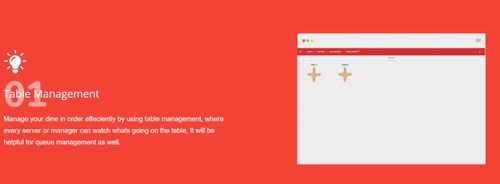
Digiresto Table management Dashboard
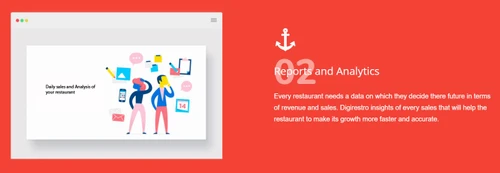
Digiresto Reports and Analytics Dashboard

Digirestro

Brand: Digirestro

  • 4.7

  • 10 Ratings & 10 Reviews

Digirestro is a cloud-based restaurant POS software that provides multiple restaurant management features on a single platform. The software helps with online food ordering, customer management, kitchen display system, recipe, and feedback management. It supports real-time integration with online food aggregators like Zomato, Dunzo, and Swiggy to boost your profitability. Digirestro restaurant ma...

See More

Have you used Digirestro before?

Share your insights for better experience

Add a Review
Starting Price
₹8,000 excl.GST
₹ 9,440 incl. GST

View plans

100% Genuine
Products
Best Price
Guaranteed
Safe & Secure
Payment
  • Description

  • Pricing

  • Features

  • Specification

  • Review

  • Compare

  • Alternatives

  • FAQ

Starting at ₹8,000

Digirestro Software Overview

What is Digirestro?

Digirestro is a cloud-based restaurant POS software that provides multiple restaurant management features on a single platform. The software helps with online food ordering, customer management, kitchen display system, recipe, and feedback management. It supports real-time integration with online food aggregators like Zomato, Dunzo, and Swiggy to boost your profitability.

Digirestro restaurant management software further helps with quality reporting and inventory control. The user-friendly interface of Digirstro ensures faster billing and order management. Restaurants can acquire customer-specific details and run targeted campaigns to generate a loyal customer base.

Why Choose Digirestro Restaurant Management Software?

  • Online Presence: Restaurants and cafes can depend on the wide variety of tools provided by Digirestro, to mark an online presence of their own and stand out from the rest.
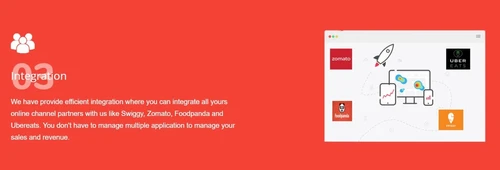
  • Integration: Real-time integration with food aggregators like Swiggy, Zomato, Foodpanda and more.
  • Enhanced Operational Time: As a cafe or restaurant owner you can depend on Digirestro to get real-time help with the technological and strategic changes.
  • Customization: On-demand customization facilitates seamless business growth and enhanced ROI.
  • Dedicated App: The software offers a dedicated mobile app for Android and iOS users, known as Captain App.

Benefits of Using Digirestro Software:

  • A fully automated platform that works on Windows, iOS, and Android
  • Easy to use interface for punching orders
  • Online food ordering widget to receive orders placed on website or app and apply run time offers
  • Inventory control on the go with details of actual recipe costs, profit/ loss, etc.
  • Monitor sales of different dishes and reconcile daily sales reports from anywhere
  • Quality reporting tool for predicting future sales and revenue
  • Easy integration with third-party apps like CRM and ERP
  • 24/7 live support for software-related queries

Key Modules of Digirestro Software

  • Customer Management: You can store customer details from multiple channels. It helps in understanding the preferences of each customer, which is necessary to run relevant campaigns.
  • Kitchen Display System: The software displays orders details directly to the kitchen staff. The staff can quickly take relevant actions and provide personalized service.
  • Loyalty Management: With Digirestro software, users can define criteria for adding loyalty points to customer accounts. It helps in offering benefits to retain customers in the long run.
  • Lending Management: If a restaurant business runs on a subscription-based model, you can use this feature to monitor all lending transactions and send reminders to customers.
  • Recipe Management: It has the option to calculate exact making costs and profit margins for dishes. This helps in setting the price for different recipes.
  • Offer Management: You can set up custom offers for any time duration with the software. This includes happy hours, complimentary gifts, weekend offers, and so on.
  • Integrations with various online food aggregators: Integration with aggregators like Swiggy and Zomato enables businesses to increase their orders and profitability.
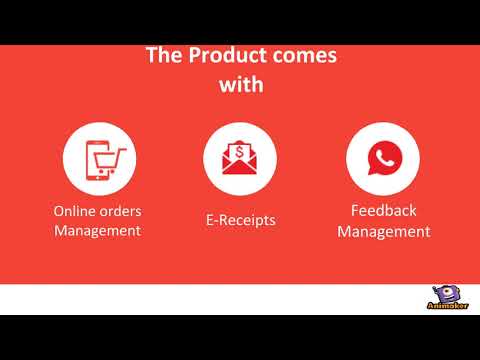
  • Feedback Management: Digirestro helps receive customer feedback about ambiance, food, and more. This helps restaurants understand the improvements they need to make in the future.
  • Captain App: Captain app eliminates the burden of managing KOTs on paper and reduces errors. It enables the captain or waiters present in the restaurant to punch their daily orders automatically.
  • Digi Receipts: You can use e-receipts for orders to save time and share them on email, WhatsApp or SMS with customers. It also helps fetch customer details for running targeted marketing campaigns.
  • Inventory Management: Digirestro enables users to update item quantity and set thresholds. You can punch vendor invoices for daily transactions and get live notifications if the quantity of a product falls below the threshold.
  • Reports Analytics: Restaurant owners and managers can track staff performance, best-performing dishes, and so on.
  • Billing and KOT: The software has a user-friendly interface that enables the creation of KOT and bills for every order in seconds. It facilitates KOT and billing on both desktop and mobile.

How Does Digirestro Work?

The latest version of Digirestro is primarily used for order management, inventory tracking, staff management, and more. This restaurant POS software has an intuitive interface and is simple to use. Digirestro can be easily integrated with your existing systems to ensure a smooth workflow. For more information, you can also refer to user manuals and take an online Digirestro demo at Techjockey.com.

How to Use Digirestro Software?

Get started with Digirestro in 5 simple steps:

Step 1: Buy Digirestro installation key from techjockey.com

Step 2: Directly login through the official website, as it is web based

Step 3: Sign up & create your account

Step 4: Add users & assign permissions

Step 5: Get started with Digirestro

Digirestro Pricing

Digirestro restaurant management software is available for a starting price of INR 8,000/ at techjockey.com. You can generate a callback request with our technical team to gain more information.

Read more

Digirestro Company Details

Founded Year:  2023

We are the people who love to use technology and provide better software solutions to our clients, and Digirestro is one of them, Which consists of the latest cutting-edge technology with an easier user interface.

Director/Founders Deepak singh
Company Size 1-100 Employees

Digirestro Pricing & Plans

Standard

Calculated Price

₹ 8000 Exclusive of all taxes
    • Licenses

      Licenses
      Licenses
    • Yearly

      Yearly
      Yearly

Key Features

  • Table Management

  • Analytics & Reporting

  • Inventory Management

  • Dashboards

  • Real-Time Reports

Advance

Calculated Price

₹ 15000 Exclusive of all taxes
    • Licenses

      Licenses
      Licenses
    • Yearly

      Yearly
      Yearly

Key Features

  • Table Management

  • Analytics & Reporting

  • Inventory Management

  • Dashboards

  • Real-Time Reports

Premium

Calculated Price

₹ 26000 Exclusive of all taxes
    • Licenses

      Licenses
      Licenses
    • Yearly

      Yearly
      Yearly

Key Features

  • Table Management

  • Analytics & Reporting

  • Inventory Management

  • Dashboards

  • Real-Time Reports

Digirestro Features

  • icon_check Table Management
    A dedicated mobile app helps with real-time table management and online bookings.
  • icon_check Analytics & Reporting
    Inbuilt AI helps with real-time reporting and sales analysis.
  • icon_check Integration
    Digirestro facilitates real-time integration with food aggregators (online) like Sqiggy, Zomato, Dunzo and Amazon.
  • icon_check Inventory Management
    Restaurants can set item wise thresholds, update quantity, punch in vendor invoices and receive live notifications on item
  • icon_check Feedback Management
    Restaurants can reach out to their customers about food, staff behaviour and ambience.
  • icon_check Queue Management
    Restaurants can depend on the software to manage the reservation queue.
  • icon_check Receipt Management
    Restaurants calculate the making cost of individual dishes, besides dish wise profit margin.
  • icon_check Menu Management
    Restaurants can decide new menus, make necessary alterations and apply offers.
  • icon_check Recipe Management
    Create a personalized cook book with the help of your chefs and use it for future reference and changes n menu. 
  • icon_check Order Management
    Customers and restaurants can place & receive orders from the website and from the app.
  • icon_check Dashboards
    A dedicated dashboard helps with seamless business process monitoring and reporting.
  • icon_check Loyalty Program
    Customer-specific points table generated by the software enhances customer retention rate.
  • icon_check Real-Time Reports
    Real-time reports provided by the software assures easy business process management and more profit.
  • icon_check Priority Support
    A dedicated customer support team is always at service.
  • icon_check Billing & Invoicing
    An exclusive mobile and desktop-based billing helps with easy payment processing.
Digirestro Demo Video play icon

Get Digirestro Demo

Watch the demo video to explore key features, real workflows, and how the software fits your business needs.

Understand
Key Features
Personal
Demo Insights
Interactive
Demo Support

Digirestro Specifications

Supported Platforms
Windows Windows Android Android
Devices
Desktop Desktop Mobile Mobile Tablet Tablet
Deployment
Cloud-Based Cloud-Based
Suitable For
Cafe & Restaurants
Business Specific
Restaurants
Business Size
Small Business Startups Medium Business SMBs SMEs MSMBs
Customer Support
Phone Email Forums
Language
English
Training Resources
Videos

Explore the Best Alternative Solutions Similar to Your Business Size and Needs

Digirestro Reviews

4.7

Out of 5

img

Overall Rating

Based on
10 Verified Reviews

Rating Breakdown

  • Features 4.7
  • Value for Money 4.8
  • Ease of Use 4.7
  • Customer Support 4.7

93% Recommend this Product

Add Review

Pros

  • "Support is very responsive every time i get response within 5 minutes."

    Khushi Singh Nov 10, 2021

  • "The software allows you to integrate with third party applications and also facilitates personalized delivery operations. We used it and we liked it. So, we will recommend."

    Chetan Kumar V Aug 18, 2021

  • "Digirestro offers order management, customer management, kitchen order ticketing, delivery services and much more! It is truly a great software."

    Swagat AcharyaJun 16, 2020

Cons

  • "We have used Digirestro for last 6 months and we did not find a single that could be a drawback."

    Sachin KumarNov 23, 2021

  • "None as of now. Digirestro is really very good. Its working is great and there isn’t much to question. And it has become a vital part of our operations. "

    Harinder KumarSep 29, 2021

  • "The support team is professional and solves our queries in record time."

    Chetan Kumar V Aug 18, 2021

sachin kumar

Associate

Industry: Hospitality User since: 1-2 years

5

Reviewed on: Nov 23, 2021

Techjockey Verified

“Digirestro is a multipurpose software designed for restaurant!”

Pros

Digirestro features very finely tuned for restaurant business. The software allows you to manage order, kitchen display, loyalty, and orders too. There are no blind spots in its operational capabilities.

Cons

We have used Digirestro for last 6 months and we did not find a single that could be a drawback.

Switched from SlickPOS

Reason to switch

Slick POS was simply not cut for the operations we wanted to include in our restaurant. Digirestro gave us the opportunity to think beyond the box.

Harinder Kumar

Executive

Industry: Travel & Tourism User since: 1-2 years

5

Reviewed on: Sep 29, 2021

Techjockey Verified

“Digirestro boosted our sales and efficiency for all the tasks.”

Pros

Honestly, I am very satisfied with Digirestro the software has done wonders for our restaurant business. We use it for managing multiple outlets and the data accessibility is not a problem.

Cons

None as of now. Digirestro is really very good. Its working is great and there isn’t much to question. And it has become a vital part of our operations.

Switched from Torqus Pos

Reason to switch

It was overall unreliability for us. The software was lacking in features and was riddled with bugs. We sought alternatives because Torqus POS had a poor performance.

Shubhangni Saxena

Associate

Industry: Retail User since: < 6 months

5

Reviewed on: Dec 21, 2020

Techjockey Verified

“It was good for my restaurant business”

Pros

If I have to explain my experience with Digirestro in one word, it would be reliability. It has been an extremely reliable software. My employees didn’t face any issues while learning to operate Digirestro. They can now use the software and effectively handle the restaurant’s billing, inventory, and much more. My business and employees saw a growth and uptick in their skills.

Cons

No objections whatsoever. Digirestro is a breeze to use. No hangs, freezes, mismanagement of orders or anything of that sort. It works effortlessly and lets us operate in the exact same way.

Switched from Poster POS

Reason to switch

Poor performance and overall mismanagement of the orders. The software caused us more problems than ease in operations.

See All Digirestro Reviews

Compare Digirestro With other Restaurant POS Software

Products
Ratings
Pricing
Device Supported
Deployment
Supported Platforms
  • img

    Digirestro

  • 4.7

  • ₹ 8000.00 excl. GST

  • Desktop

    Mobile

  • Web based

    On Premises

  • Windows

    Mac OS

  • img

    Petpooja

  • 4.2

  • ₹ 10000

  • Desktop

    Mobile

  • Web based

    On Premises

  • Windows

    Mac OS

  • img

    Feedo

  • 4.7

  • ₹ 899

  • Desktop

    Mobile

  • Web based

    On Premises

  • Windows

    Mac OS

  • img

    SpotOn

  • 4.3

  • Price On Request

  • Desktop

    Mobile

  • Web based

    On Premises

  • Windows

    Mac OS

  • img

    SpeedLine POS

  • 4.5

  • Price On Request

  • Desktop

    Mobile

  • Web based

    On Premises

  • Windows

    Mac OS

  • img

    Rezku POS

  • 4.4

  • Price On Request

  • Desktop

    Mobile

  • Web based

    On Premises

  • Windows

    Mac OS

  • img

    Track My Table

  • 4.2

  • ₹ 399

  • Desktop

    Mobile

  • Web based

    On Premises

  • Windows

    Mac OS

  • img

    RestoMPOS

  • 4.3

  • Price On Request

  • Desktop

    Mobile

  • Web based

    On Premises

  • Windows

    Mac OS

  • img

    Solo Billing

  • 4.1

  • ₹ 8000

  • Desktop

    Mobile

  • Web based

    On Premises

  • Windows

    Mac OS

  • img

    TMBill POS

  • 4.4

  • ₹ 5999

  • Desktop

    Mobile

  • Web based

    On Premises

  • Windows

    Mac OS

  • img

    FoodyQueen

  • 4.1

  • ₹ 4188

  • Desktop

    Mobile

  • Web based

    On Premises

  • Windows

    Mac OS

(0) Product(s) selected

Digirestro Alternatives

See All Digirestro Alternatives

Starting Price:

$55 /Month

Starting Price:

$49 /Month

Available

Price on Request

Lavu

4.1

Available

Price on Request

Starting Price:

$49 /Month

Available

Price on Request

Articles for Digirestro

See All Related Articles

Which operating system does Digirestro support?

Digirestro restaurant billing software is compatible with Windows, iOSand Android operating systems.

Is there any Digirestro app?

Digirestro restaurant billing software app is available for android and iOS.

What is the deployment type of Digirestro?

Digirestro restaurant billing software supports web-based deployment type.

How much does Digirestro cost?

Digirestro restaurant management software is available for a starting price of INR 8,000/ at techjockey.com.

Who are the potential users of Digirestro?

Digirestro restaurant billing software is typically used in restaurants and other food outlets.

Is there any free trial or demo for Digirestro?

Digirestro restaurant billing software demo is available for free with techjockey.com.

Is Digirestro free?

Digirestro restaurant billing software offers a free trial. However, the premium plan with advanced features starts at ? 10000 at techjockey.com.

How can you download Digirestro?

Digirestro restaurant billing software installation is not required, as it is web-based. Just open the Setup Wizard to get started.

How does Digirestro restaurant billing software work?

Digirestro restaurant management software helps with order, inventory and offer management. It's a complete solution for monitoring sales, integrating with food aggregators and handling customer relations.

20,000+ Software Listed

Best Price Guranteed

Free Expert Consultation

2M+ Happy Customers

Terms and Condtions

close

Users with registered businesses can purchase goods from merchants on the platform to satisfy their business needs. Users are not permitted to utilize any products acquired through the platform for resale, advertising, business, or further distribution.

For each purchase made, users will receive a Tax Invoice (or 'GST invoice') that includes specific details such as:

  • the GSTIN of the user associated with their registered business, and

  • the specified Entity Name for their business.

It should be noted that not all products are eligible for GST Invoice. Only the products displayed by participating sellers with the 'GST-based Invoice Available' callout on the product description page would qualify.

Certain goods and services are not eligible to get a GST Invoice, including items with VAS, i.e., Value Added Services (e.g., Total Mobile Protection/Assured Buyback) and those involving an exchange offer at the time of purchase.

Users must ensure the accuracy of the GSTIN, and business entity name provided for the GST Invoice. Requests for corrections into GST Invoice would not be accommodated by Techjockey.com or any Seller, and any issues arising from user-provided information are the sole responsibility of users.

Techjockey.com is not liable for the GST Invoice or any associated input tax credit. To efficiently claim an input tax credit, users should select the registered place of business address as per the GST authority's data and follow the provisions of the GST Act and rules.

To claim an input tax credit, the delivery and billing addresses must match. Furthermore, input tax credits will not be granted if the delivery address and GSTIN on the invoice are from different states. In case of incorrect GST details provided during the order placement, the order will be canceled automatically.