linkedin
Solo Billing logo
solobilling
solobilling table
solobilling-payments

Solo Billing

Brand: Solo

  • 4.1

  • 3 Ratings

Solo Billing brings speed and order to busy dining floors. One platform easily covers billing, menus, kitchen coordination, and whatnot.

See More

Have you used Solo Billing before?

Share your insights for better experience

Add a Review
Starting Price 20% OFF
₹8,000 excl.GST  ₹10,000
₹ 9,440 incl. GST

View plans

offer Save upto 18%, Get GST Invoice on your business purchase T&C
offer Buy Now & Pay Later, Check offer on payment page.
Buy Now
100% Genuine
Products
Best Price
Guaranteed
Safe & Secure
Payment
  • Description

  • Pricing

  • Features

  • Specification

  • Review

  • Compare

  • Alternatives

  • FAQ

Starting at ₹8,000
Buy Now

Solo Billing Software Overview

What is Solo Billing Software?

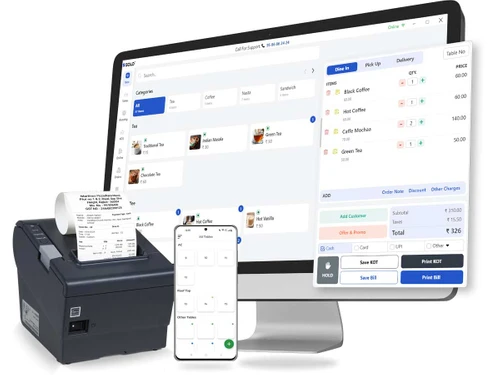
Solo Billing is a restaurant POS software created for restaurants, cafes, bakeries, etc. It allows owners to handle billing, order tracking, and menu management with utter ease. The platform is built with a focus on speed and accuracy. It reduces manual errors, simplifies tasks, and keeps operations well-organized every day.

Its tools include inventory tracking, digital kitchen displays, and clear sales reporting. Staff can manage tables, orders, and payments quickly with minimal training. The system also works with food delivery platforms for smoother service. In short, Solo Billing helps food businesses stay organized while improving overall customer service.

Why Choose Solo Billing Software?

  • Billing Speed: Bills are processed faster than coffee pours, keeping lines short and happy.
  • Ease of Use: A clean design makes training simple and reduces day-one mistakes.
  • Stock Watch: Ingredient levels are tracked constantly, cutting losses from spoilage or shortages.
  • Kitchen Flow: Orders appear instantly on kitchen screens, streamlining communication and saving time.
  • Multiple Payment Choices: Customers enjoy paying their way, from cards to wallets with no fuss.
  • Business Insights: Reports uncover patterns, showing which dishes sell best and when.
  • Menu Control: Updates roll out system-wide instantly, leaving no room for confusion.
  • Delivery Harmony: Third-party orders merge seamlessly, removing the need for separate tracking.

Benefits of Solo Billing Software

  • Customer Insights: Purchase trends are tracked for smarter marketing and repeat business opportunities.
  • Staff Roles: User permissions are defined clearly, improving accountability within the team.
  • Promotion Tools: Seasonal offers are handled efficiently, keeping campaigns organized and error-free.
  • Secure Access: Only authorized users can manage critical data; the aim is to protect against misuse or leaks.
  • Tax Reports: Tax statements are generated quickly, saving stress during filing seasons.
  • No Internet Hassle: Business runs smoothly without being dependent on constant connectivity.
  • Chain Control: Multiple restaurant outlets can be managed from one unified system.
  • Future Ready: The software remains reliable even as customer volume and needs increase over time.

Solo Billing Software Pricing

Solo Billing Software price in India starts at INR 10,000 per year/outlet at techjockey.com.

The pricing model is based on different parameters, including extra features, deployment type, and the total number of users. For further queries related to the product, you can contact our product team and learn more about the pricing and offers.

Read more

Solo Billing Pricing & Plans

Standard
Key Features
  • Accelerate Operations with Cloud-Based
  • Easy-to-Understand Real-time Analytics
  • Fully Integrated Online Ordering
  • Partner Ecosystem Integration
  • Multi-Device App Compatibility
  • Around-the-Clock Support

Calculated Price

₹ 8000 ₹10000
SAVE UPTO 20%
Exclusive of all taxes
    • Outlets

      Outlets
      Outlets
    • Yearly

      Yearly
      Yearly

Key Features

  • Accelerate Operations with Cloud-Based

  • Easy-to-Understand Real-time Analytics

  • Fully Integrated Online Ordering

  • Partner Ecosystem Integration

  • Multi-Device App Compatibility

  • Around-the-Clock Support

Solo Billing Features

  • icon_check Automated Recurring Pay
    Handles complex subscription cycles automatically to ensure consistent revenue collection without any manual intervention now.
  • icon_check Global Payment Gateway
    Connects with top processors like Stripe and PayPal to accept international payments securely in multiple global currencies.
  • icon_check Smart Dunning Management
    Automatically retries failed transactions and sends payment reminders to customers to reduce churn and recover lost revenue.
  • icon_check Customize invoices
    Generates professional, brand-aligned PDF invoices that include your company logo, tax details, and personalized thank notes.
  • icon_check Self-Service Client Hub
    Empowers your customers to manage their own plans, update credit cards, and download past invoices through a secure portal.
  • icon_check Real-Time Revenue Stats
    Provides a visual dashboard tracking Monthly Recurring Revenue (MRR), Churn Rate, and Average Revenue Per User in real-time.
  • icon_check Automatic Tax Calculation
    Integrates regional tax rules to automatically calculate GST, VAT, or Sales Tax based on the customer's specific location.
  • icon_check Table Ordering
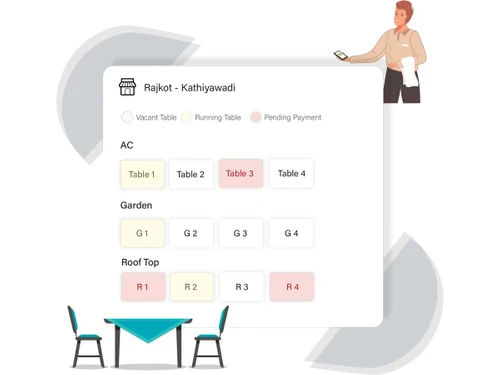
    Multiple tables can share one bill, keeping service organized and efficient.
  • icon_check Multiple Payout Options
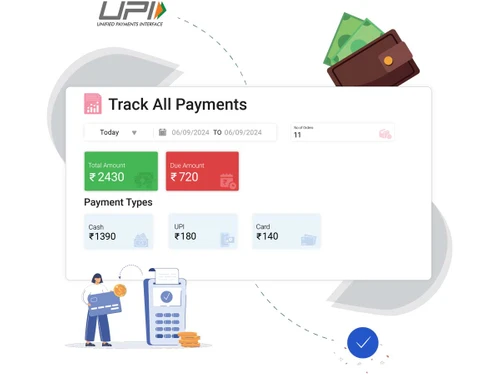
    Payments are flexible, letting diners complete bills their preferred way.
  • icon_check Menu Management
    Menu updates reflect immediately, ensuring staff and customers see accurate options.
  • icon_check Offers & Promotions
    Special deals are handled automatically, preventing errors during busy hours.
  • icon_check QR Code Ordering Platform
    Scannable codes let customers order directly, cutting waiting times significantly.
  • icon_check Third Party Integrations
    Connections to external delivery apps bring all orders into one central system.
  • icon_check Comprehensive Reporting
    Insights on sales and performance help owners make fruitful business choices.
  • icon_check Real Time Orders Tracking
    Instant transmission of orders to the kitchen boosts speed and ensures accuracy.

Solo Billing Specifications

Supported Platforms
Windows Windows iOS iOS Android Android MacOS MacOS
Devices
Desktop Desktop Mobile Mobile Tablet Tablet iPad iPad
Deployment
Cloud-Based Cloud-Based
Suitable For
Food & Beverage Restaurant Cafe Cafe & Restaurants Resort Bakery Ice-Cream Parlour
Business Specific
All Businesses
Business Size
Small Business Startups Medium Business Enterprises SMBs SMEs
Customer Support
Phone Email Communities
Language
English
Integration
API Integration
Training Resources
Live Online Documentation Videos
Technology
Next Generation

Explore the Best Alternative Solutions Similar to Your Business Size and Needs

Solo Billing Review

4.1

Out of 5

img

Overall Rating

Based on
3 Verified Ratings

Rating Breakdown

  • Features 4.1
  • Value for Money 4.1
  • Ease of Use 4.1
  • Customer Support 4.1

80% Recommend this Product

Add Review

Techjockey Trusted Reviews from Verified Users

No reviews are currently available for Solo Billing. Discover similar Restaurant POS Software reviews
  • Petpooja

    4.1

    Whats great - The software is easy to use and understand. Currently, it has all the features required to run a restaurant efficiently. read more

  • Mink Foodiee Restaurant POS

    4.8

    Whats great - Works with almost all devices, Very easy to setup and use with many services like crm, loyalty programs, inventory managemen... read more

  • TMBill POS

    4.2

    Whats great - No expertise and solution offered, only duping people. read more
Compare Solo Billing With other Restaurant POS Software

Products
Ratings
Pricing
Device Supported
Deployment
Supported Platforms
  • img

    Solo Billing

  • 4.1

  • ₹ 8000.00 excl. GST

  • Desktop

    Mobile

  • Web based

    On Premises

  • Windows

    Mac OS

  • img

    Petpooja

  • 4.2

  • ₹ 10000

  • Desktop

    Mobile

  • Web based

    On Premises

  • Windows

    Mac OS

  • img

    Feedo

  • 4.7

  • ₹ 899

  • Desktop

    Mobile

  • Web based

    On Premises

  • Windows

    Mac OS

  • img

    SpotOn

  • 4.3

  • Price On Request

  • Desktop

    Mobile

  • Web based

    On Premises

  • Windows

    Mac OS

  • img

    SpeedLine POS

  • 4.5

  • Price On Request

  • Desktop

    Mobile

  • Web based

    On Premises

  • Windows

    Mac OS

  • img

    Rezku POS

  • 4.4

  • Price On Request

  • Desktop

    Mobile

  • Web based

    On Premises

  • Windows

    Mac OS

  • img

    Track My Table

  • 4.2

  • ₹ 399

  • Desktop

    Mobile

  • Web based

    On Premises

  • Windows

    Mac OS

  • img

    RestoMPOS

  • 4.3

  • Price On Request

  • Desktop

    Mobile

  • Web based

    On Premises

  • Windows

    Mac OS

  • img

    TMBill POS

  • 4.4

  • ₹ 5999

  • Desktop

    Mobile

  • Web based

    On Premises

  • Windows

    Mac OS

  • img

    FoodyQueen

  • 4.1

  • ₹ 4188

  • Desktop

    Mobile

  • Web based

    On Premises

  • Windows

    Mac OS

  • img

    Lavu

  • 4.1

  • Price On Request

  • Desktop

    Mobile

  • Web based

    On Premises

  • Windows

    Mac OS

(0) Product(s) selected

Solo Billing Alternatives

See All Solo Billing Alternatives

Starting Price:

$55 /Month

Starting Price:

$49 /Month

Available

Price on Request

Lavu

4.1

Available

Price on Request

Starting Price:

$49 /Month

Available

Price on Request

How much does Solo Billing Software cost?

Solo Billing Software price in India starts at INR 10,000 per year/outlet at techjockey.com.

Who uses Solo Billing Software?

Solo Billing is mainly used by restaurants, cafes, and small food businesses. It is designed to simplify daily operations and billing processes.

Is there a mobile app available for Solo Billing Software?

Yes, Solo Billing has a mobile app called SOLO Restaurant App. It is available for download on Google Play for staff to manage orders on the go.

Which operating systems are compatible with Solo Billing Software?

Solo Billing is compatible with Windows operating systems. This allows it to run smoothly on most desktop and laptop setups in restaurants or cafes.

Does Solo Billing Software offer a free trial?

Yes, Solo Billing provides a free trial for users to explore its features. This helps businesses evaluate its functionality before committing to a subscription.

How does Solo Billing Software function?

Solo Billing manages orders, billing, inventory, and table tracking in one unified system. The advanced and trusted restaurant POS solution integrates kitchen and front-end operations for faster service and accurate reporting.

20,000+ Software Listed

Best Price Guranteed

Free Expert Consultation

2M+ Happy Customers

Terms and Condtions

close

Users with registered businesses can purchase goods from merchants on the platform to satisfy their business needs. Users are not permitted to utilize any products acquired through the platform for resale, advertising, business, or further distribution.

For each purchase made, users will receive a Tax Invoice (or 'GST invoice') that includes specific details such as:

  • the GSTIN of the user associated with their registered business, and

  • the specified Entity Name for their business.

It should be noted that not all products are eligible for GST Invoice. Only the products displayed by participating sellers with the 'GST-based Invoice Available' callout on the product description page would qualify.

Certain goods and services are not eligible to get a GST Invoice, including items with VAS, i.e., Value Added Services (e.g., Total Mobile Protection/Assured Buyback) and those involving an exchange offer at the time of purchase.

Users must ensure the accuracy of the GSTIN, and business entity name provided for the GST Invoice. Requests for corrections into GST Invoice would not be accommodated by Techjockey.com or any Seller, and any issues arising from user-provided information are the sole responsibility of users.

Techjockey.com is not liable for the GST Invoice or any associated input tax credit. To efficiently claim an input tax credit, users should select the registered place of business address as per the GST authority's data and follow the provisions of the GST Act and rules.

To claim an input tax credit, the delivery and billing addresses must match. Furthermore, input tax credits will not be granted if the delivery address and GSTIN on the invoice are from different states. In case of incorrect GST details provided during the order placement, the order will be canceled automatically.