USA
USA UAE
UAESmall Business
Designed for startups and growing businesses

See More


Brand: Extraaaz
SPOS+ (Super Point of Sale) is a versatile restaurant POS software designed for small to medium businesses, especially restaurants and retail outlets.
See MoreHave you used SPOS+ before?
Share your insights for better experience
View plans
 Save upto 18%, Get GST Invoice on your business purchase T&C Buy Now & Pay Later, Check offer on payment page.
  Order Management Sales Reports Inventory Tracking WhatsApp Billing Menu Management Billing system WhatsApp Billing Inventory Alerts Cloud Analytics Multi-Mode Pay Loyalty Program Expense Tracker
  Windows
  Android
  Desktop
  Mobile
  Tablet
  Cloud-Based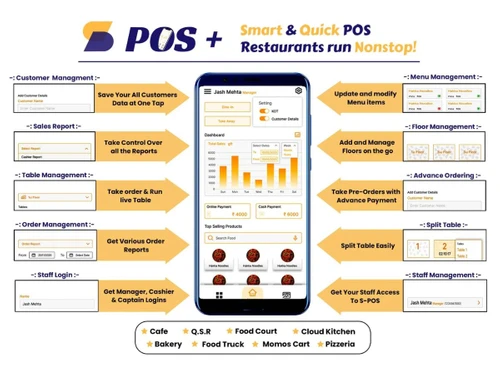
Small Business
Designed for startups and growing businesses
Medium Business
Built for business growth and flexibility
Enterprises
Designed for complex and large-scale business needs
4.2
Out of 5

Overall Rating
Based on
4 Verified Ratings
Rating Breakdown
80% Recommend this Product
Add ReviewTechjockey Trusted Reviews from Verified Users
No reviews are currently available for SPOS+. Discover similar Restaurant POS Software reviews
Petpooja
Whats great - The software is easy to use and understand. Currently, it has all the features required to run a restaurant efficiently. read more

Mink Foodiee Restaurant POS
Whats great - Works with almost all devices, Very easy to setup and use with many services like crm, loyalty programs, inventory managemen... read more

TMBill POS
Whats great - No expertise and solution offered, only duping people. read more

SPOS+
₹ 6999.00 excl. GST
Desktop
Mobile
Web based
On Premises
Windows
Mac OS
Petpooja
₹ 10000
Desktop
Mobile
Web based
On Premises
Windows
Mac OS

Feedo
₹ 899
Desktop
Mobile
Web based
On Premises
Windows
Mac OS

SpotOn
Price On Request
Desktop
Mobile
Web based
On Premises
Windows
Mac OS
SpeedLine POS
Price On Request
Desktop
Mobile
Web based
On Premises
Windows
Mac OS

Rezku POS
Price On Request
Desktop
Mobile
Web based
On Premises
Windows
Mac OS

Track My Table
₹ 399
Desktop
Mobile
Web based
On Premises
Windows
Mac OS

RestoMPOS
Price On Request
Desktop
Mobile
Web based
On Premises
Windows
Mac OS

Solo Billing
₹ 8000
Desktop
Mobile
Web based
On Premises
Windows
Mac OS
TMBill POS
₹ 5999
Desktop
Mobile
Web based
On Premises
Windows
Mac OS

FoodyQueen
₹ 4188
Desktop
Mobile
Web based
On Premises
Windows
Mac OS
(2) Product(s) selected
Starting Price:
$55 /Month
Available
Price on Request
Starting Price:
$49 /Month
Starting Price:
₹399 /Month
Available
Price on Request

Available
Price on Request

Starting Price:
$49 /Month

Starting Price:
₹550 /month

Starting Price:
$10 /Month

Available
Price on Request
SPOS Plus pricing starts at INR 2999 at Techjockey.com. Pricing is customized based on specific business needs.
SPOS Plus supports Windows-based systems and can be accessed via desktop and compatible POS terminals commonly used in retail and restaurants.
SPOS Plus works by integrating order management, billing, inventory tracking, and reporting into a single system, helping businesses run daily operations efficiently.
Yes, it is ideal for small and medium businesses like restaurants, cafs, and retail shops due to its affordable pricing and easy setup.
Yes, SPOS Plus offers a free trial or demo so users can explore its features before purchasing.
It offers order management, billing, inventory tracking, sales reporting, WhatsApp billing, menu management, and GST-compliant invoicing.
While the main software runs on Windows systems, SPOS Plus may offer mobile compatibility or integrations depending on the version and setup.
Restaurant owners, caf managers, retail shopkeepers, and food outlet operators are the primary users of SPOS Plus.
SPOS Plus ensures data security through role-based access, password protection, and regular backups to protect business information.
SPOS Plus is used for managing restaurant and retail operations, including billing, order handling, stock control, and sales tracking.
20,000+ Software Listed
Best Price Guranteed
Free Expert Consultation
2M+ Happy Customers
Terms and Condtions

Users with registered businesses can purchase goods from merchants on the platform to satisfy their business needs. Users are not permitted to utilize any products acquired through the platform for resale, advertising, business, or further distribution.
For each purchase made, users will receive a Tax Invoice (or 'GST invoice') that includes specific details such as:
the GSTIN of the user associated with their registered business, and
the specified Entity Name for their business.
It should be noted that not all products are eligible for GST Invoice. Only the products displayed by participating sellers with the 'GST-based Invoice Available' callout on the product description page would qualify.
Certain goods and services are not eligible to get a GST Invoice, including items with VAS, i.e., Value Added Services (e.g., Total Mobile Protection/Assured Buyback) and those involving an exchange offer at the time of purchase.
Users must ensure the accuracy of the GSTIN, and business entity name provided for the GST Invoice. Requests for corrections into GST Invoice would not be accommodated by Techjockey.com or any Seller, and any issues arising from user-provided information are the sole responsibility of users.
Techjockey.com is not liable for the GST Invoice or any associated input tax credit. To efficiently claim an input tax credit, users should select the registered place of business address as per the GST authority's data and follow the provisions of the GST Act and rules.
To claim an input tax credit, the delivery and billing addresses must match. Furthermore, input tax credits will not be granted if the delivery address and GSTIN on the invoice are from different states. In case of incorrect GST details provided during the order placement, the order will be canceled automatically.