linkedin
TableCore logo
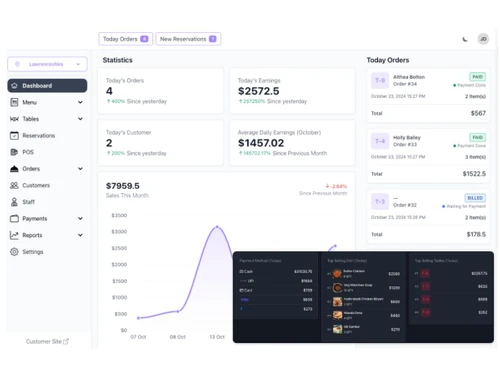
TableCore dashboard
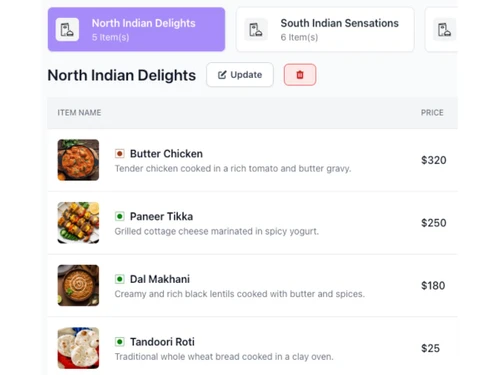
TableCore menu
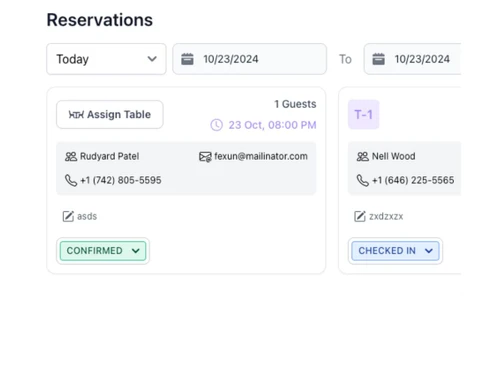
TableCore reservations

TableCore

Brand: CodeLek Technology

  • 4.2

  • 5 Ratings

A smart restaurant management software to manage restaurant tables, orders, billing, and reservations through one easy-to-use system.

See More

Have you used TableCore before?

Share your insights for better experience

Add a Review
Starting Price
$10

View plans

100% Genuine
Products
Best Price
Guaranteed
Safe & Secure
Payment
  • Description

  • Pricing

  • Features

  • Specification

  • Review

  • Compare

  • Alternatives

  • FAQ

Starting at $10

TableCore Software Overview

What is TableCore?

TableCore is a modern restaurant POS software designed to simplify how restaurants handle tables, guests, and orders. From taking orders with a QR code to handling reservations and creating digital menus, this platform helps restaurants give faster and better service to their customers. It also supports billing, invoicing, and full POS system integration for smoother operations.

This business software gives restaurant staff a complete view of ongoing orders, available tables, and customer preferences in real-time. It is also a restaurant POS software that helps reduce errors, speed up service, and track key performance through analytics. Whether you run a cafe, dine-in, or a multi-branch restaurant, TableCore makes management simple and fast.

Why Choose TableCore?

  • Full table control: Manage each table, booking, and current order without confusion.
  • Easy QR code menus: Let customers scan a QR to view the menu and place orders easily.
  • Quick order handling: Process dine-in, take-away, and online orders from a single place.
  • Fast billing system: Generate item-wise bills quickly with taxes and discounts included.
  • POS system ready: Seamlessly connects with your existing POS setup and devices.
  • Improves customer wait time: Helps seat guests faster with real-time table status updates.
  • Multi-device support: Works well on tablets, desktops, and mobile devices.
  • Better team coordination: Staff can track orders, table status, and billing together.

Benefits of TableCore

  • Reduces manual errors: Automated systems prevent wrong orders or billing issues.
  • Makes dining smooth: Guests can reserve, order, and pay without long waits.
  • Boosts restaurant image: Digital menus and fast service enhance customer experience.
  • Cuts down staff workload: Automates routine tasks so the team focuses more on service.
  • Speeds up turnaround time: With fast table rotation, you serve more guests per shift.
  • Gives real-time updates: Know which tables are busy, free, or awaiting payment.
  • Tracks sales and revenue: Daily reports help you see what's working and what's not.
  • Improves stock usage: Order patterns help manage kitchen and ingredient stock smartly.
  • Accessible from anywhere: Cloud support means you can manage branches remotely.
  • Easy setup and usage: No tech skills needed; simple interface for all users.

TableCore Pricing

TableCore price starts at USD 10 per month at Techjockey.com. The pricing model is based on different parameters, including extra features, deployment type, and the total number of users. For further queries related to the product, you can contact our product team and learn more about the pricing and offers.

Read more

TableCore Pricing & Plans

Subscription Package
Starting at $10
    • Licenses

      Licenses
      Licenses
    • Monthly

      Monthly
      Monthly

Key Features

  • Menu Item

  • Item Category

  • Reservation

  • Customer Management

  • Staff management

Life Time
Starting at $199
    • Licenses

      Licenses
      Licenses

Key Features

  • Menu Item

  • Item Category

  • Reservation

  • Customer Management

  • Staff management

TableCore Features

  • icon_check Table Management
    Helps organize dine-in tables, track usage, and reduce customer wait time.
  • icon_check QR Code Ordering Platform
    Guests can scan a QR to view menu, order, and request service from their phones.
  • icon_check Digital Menu by QR Code
    Showcases a digital menu with prices, descriptions, and images via QR access.
  • icon_check Order Management
    Tracks new, ongoing, and completed orders from all dining areas in real time.
  • icon_check POS Integration
    Easily connects with restaurant POS systems to manage billing and receipts.
  • icon_check Reservation Management
    Lets guests book tables in advance and manage upcoming reservations smoothly.
  • icon_check Billing & Invoicing
    Creates accurate bills, applies taxes/discounts, and handles multiple payments.
  • icon_check Multi Device Support
    Runs smoothly on mobiles, tablets, and desktops with responsive design.
  • icon_check Analytics & Reporting
    Gives detailed insights on sales, order trends, and staff performance.
  • icon_check Inventory & Recipe Management
    Tracks raw material levels in real-time and deducts stock automatically based on the dishes sold during each shift today.
  • icon_check Feedback & CRM
    Prompts guests to rate their meal after payment, storing their preferences and contact details to drive future loyalty campaigns
  • icon_check Kitchen Display System
    Replaces paper tickets with a digital screen in the kitchen, allowing chefs to mark orders as "Preparing" or "Ready" for servers

TableCore Specifications

Supported Platforms
Ubuntu Ubuntu Windows Windows MacOS MacOS Linux Linux
Devices
Desktop Desktop
Deployment
Cloud-Based Cloud-Based
Suitable For
Cafe & Restaurants
Business Specific
Restaurants
Business Size
Small Business Startups Medium Business Enterprises
Customer Support
Email Communities
Language
English
Training Resources
Videos

Explore the Best Alternative Solutions Similar to Your Business Size and Needs

TableCore Review

4.2

Out of 5

img

Overall Rating

Based on
5 Verified Ratings

Rating Breakdown

  • Features 4.2
  • Value for Money 4.6
  • Ease of Use 3.9
  • Customer Support 4.2

80% Recommend this Product

Add Review

Techjockey Trusted Reviews from Verified Users

No reviews are currently available for TableCore. Discover similar Restaurant POS Software reviews
  • Petpooja

    4.1

    Whats great - The software is easy to use and understand. Currently, it has all the features required to run a restaurant efficiently. read more

  • Mink Foodiee Restaurant POS

    4.8

    Whats great - Works with almost all devices, Very easy to setup and use with many services like crm, loyalty programs, inventory managemen... read more

  • TMBill POS

    4.2

    Whats great - No expertise and solution offered, only duping people. read more

Compare TableCore With other Restaurant POS Software

Products
Ratings
Pricing
Device Supported
Deployment
Supported Platforms
  • img

    TableCore

  • 4.2

  • Price On Request

  • Desktop

    Mobile

  • Web based

    On Premises

  • Windows

    Mac OS

  • img

    Petpooja

  • 4.2

  • ₹ 10000

  • Desktop

    Mobile

  • Web based

    On Premises

  • Windows

    Mac OS

  • img

    Feedo

  • 4.7

  • ₹ 899

  • Desktop

    Mobile

  • Web based

    On Premises

  • Windows

    Mac OS

  • img

    SpotOn

  • 4.3

  • Price On Request

  • Desktop

    Mobile

  • Web based

    On Premises

  • Windows

    Mac OS

  • img

    SpeedLine POS

  • 4.5

  • Price On Request

  • Desktop

    Mobile

  • Web based

    On Premises

  • Windows

    Mac OS

  • img

    Rezku POS

  • 4.4

  • Price On Request

  • Desktop

    Mobile

  • Web based

    On Premises

  • Windows

    Mac OS

  • img

    Track My Table

  • 4.2

  • ₹ 399

  • Desktop

    Mobile

  • Web based

    On Premises

  • Windows

    Mac OS

  • img

    RestoMPOS

  • 4.3

  • Price On Request

  • Desktop

    Mobile

  • Web based

    On Premises

  • Windows

    Mac OS

  • img

    Solo Billing

  • 4.1

  • ₹ 8000

  • Desktop

    Mobile

  • Web based

    On Premises

  • Windows

    Mac OS

  • img

    TMBill POS

  • 4.4

  • ₹ 5999

  • Desktop

    Mobile

  • Web based

    On Premises

  • Windows

    Mac OS

  • img

    FoodyQueen

  • 4.1

  • ₹ 4188

  • Desktop

    Mobile

  • Web based

    On Premises

  • Windows

    Mac OS

(0) Product(s) selected

TableCore Alternatives

See All TableCore Alternatives

Starting Price:

$55 /Month

Starting Price:

$49 /Month

Available

Price on Request

Lavu

4.1

Available

Price on Request

Starting Price:

$49 /Month

Available

Price on Request

How much does TableCore cost?

TableCore price starts at INR 499 per month at Techjockey.com. It is a powerful restaurant POS software for easy dining and table service.

How does TableCore work?

TableCore handles digital menus, table booking, order processing, billing, and reporting from one easy platform.

Who uses TableCore?

Restaurants, cafs, QSRs, and cloud kitchens use TableCore to automate their dining and POS operations.

Can customers place orders using a QR code?

Yes, customers can scan the QR code to view the digital menu and place orders without waiting for staff.

Does it support reservation management?

Yes, TableCore includes full table reservation management so guests can book in advance.

Is TableCore connected with POS systems?

Yes, it fully supports POS integration for faster order-to-bill processing and data sync.

Can I get reports from TableCore?

Absolutely, it provides detailed sales, performance, and customer analytics for better planning.

Does it help with multi-device access?

Yes, it works across desktops, mobiles, and tablets so you can manage operations easily.

Can staff manage orders easily on TableCore?

Yes, staff can view order history, manage live orders, and update order status from the dashboard.

Is TableCore useful for cloud kitchens too?

Yes, TableCore works well for dine-in restaurants and cloud kitchen models alike.

20,000+ Software Listed

Best Price Guranteed

Free Expert Consultation

2M+ Happy Customers

Terms and Condtions

close

Users with registered businesses can purchase goods from merchants on the platform to satisfy their business needs. Users are not permitted to utilize any products acquired through the platform for resale, advertising, business, or further distribution.

For each purchase made, users will receive a Tax Invoice (or 'GST invoice') that includes specific details such as:

  • the GSTIN of the user associated with their registered business, and

  • the specified Entity Name for their business.

It should be noted that not all products are eligible for GST Invoice. Only the products displayed by participating sellers with the 'GST-based Invoice Available' callout on the product description page would qualify.

Certain goods and services are not eligible to get a GST Invoice, including items with VAS, i.e., Value Added Services (e.g., Total Mobile Protection/Assured Buyback) and those involving an exchange offer at the time of purchase.

Users must ensure the accuracy of the GSTIN, and business entity name provided for the GST Invoice. Requests for corrections into GST Invoice would not be accommodated by Techjockey.com or any Seller, and any issues arising from user-provided information are the sole responsibility of users.

Techjockey.com is not liable for the GST Invoice or any associated input tax credit. To efficiently claim an input tax credit, users should select the registered place of business address as per the GST authority's data and follow the provisions of the GST Act and rules.

To claim an input tax credit, the delivery and billing addresses must match. Furthermore, input tax credits will not be granted if the delivery address and GSTIN on the invoice are from different states. In case of incorrect GST details provided during the order placement, the order will be canceled automatically.