linkedin
Poster POS logo
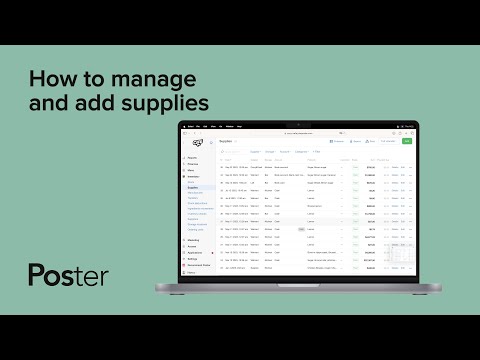
play How to manage and add supplies
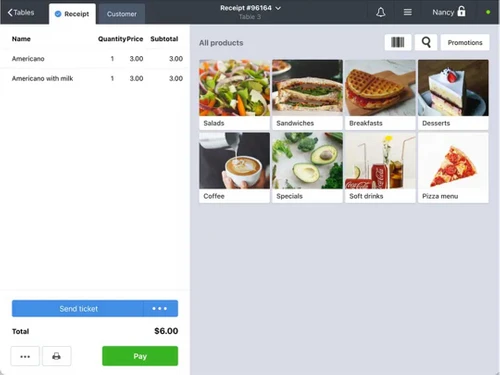
Poster pos receipt
Poster pos menu

Poster POS

Brand: Poster POS Inc

  • 4.3

  • 3 Ratings

Efficiently manage your business with Poster POS software & streamline sales, inventory, & customer interactions easily.

See More

Have you used Poster POS before?

Share your insights for better experience

Add a Review

Price Available on Request

Questions about pricing or customization? We’re here to help, just a click away.

100% Genuine
Products
Best Price
Guaranteed
Safe & Secure
Payment
  • Description

  • Pricing

  • Features

  • Specification

  • Review

  • Compare

  • Alternatives

  • FAQ

Poster POS Software Overview

What is Poster POS Software?

Poster POS is an online cloud-based point-of-sale system. It is compatible with tablets, PCs, laptops, and operating systems like Android and Mac. It can be easily set up within 15 minutes to provide billing, invoicing, sales, inventory management, financial tracking, etc., for food service and retail businesses. It also includes support for real-time reporting, receipt generation, and customer interaction, making it a versatile tool for retail companies. Its easy usability and offline functionality help businesses smoothly manage financial and billing services and increase business efficiency.

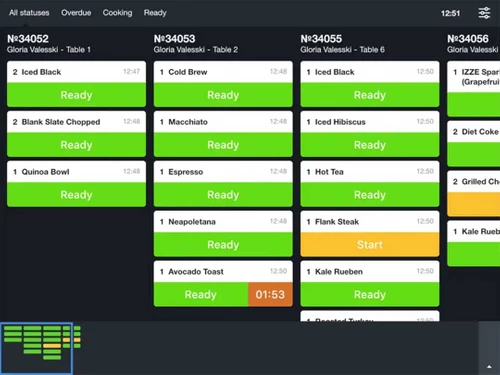
Apart from the basic POS system, Poster POS offers features like order management, receipt management, customer communication like notifications, table reservations support, and online transactions. It enables order-taking, sales monitoring, and restaurant or bar management without requiring extensive training. It comes in two service modes, namely, full, and quick service mode. Users can choose between full-service mode, which provides table services like table reservation management and quick service mode for counter service like billing, order taking, and order management. It uses a kitchen kit to facilitate kitchen ticket printing and order management.

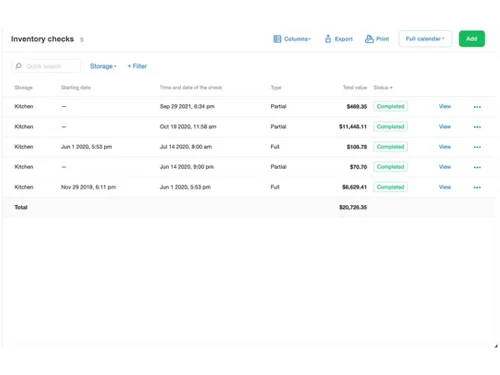
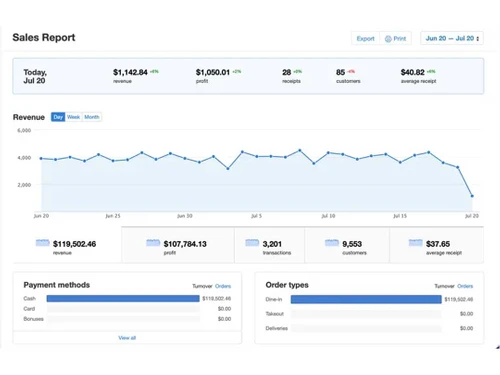
Poster POS management console is an interface for managers to control entire business operations from anywhere through admin tools accessible through a web browser. It also provides a mobile app for quick inventory management and monitoring financial flows. It offers real-time reporting and analytics on inventory, finances, and performance. It can manage operations even if the internet is down by executing data synchronization in offline mode. It supports integrations with third-party services, and Franchise POS for multi-location management.

Why Choose Poster POS System?

This is a point-of-sales system that is cross-platform compatible. It supports operations for Android and iPad devices. This means it gives users the choice of devices that best suit their business needs without worrying about compatibility issues. So, whether it is a small cafe or a busy restaurant and whether you have an Android or iPad device, this application adapts easily to business needs. With a quick setup of 15 minutes, it becomes an ideal choice for businesses of all sizes.

This POS application goes beyond being just a point-of-sale system. It provides numerous features for the staff, making the entire restaurant and food retail store management simple and efficient. Thanks to its intuitive interface, it allows businesses to start selling within minutes. It has features like quick table reservations, bill grouping based on customers, menu management, order management and branded receipts, allowing you to manage your business operations smoothly and enhance customer service and satisfaction.

Benefits of Poster POS Solution

  • Multi-Platform convenience: It is a cross-platform compatible application and thus works on various devices and operating systems, offering flexibility and accessibility.
  • Quick setup: It has an intuitive interface and easy set-up procedures, making staff set up quickly and start selling within minutes, reducing training time.
  • Offline reliability: Despite unstable internet, it allows to continue operations and later synchronizes data with an internet connection.
  • Greater functionality: Beyond the POS system, it provides services of managing orders, table reservations, kitchen counter services, receipts generation, etc., streamlining restaurant operations.
  • Enhanced customer experience: Features like bill grouping, quick and transparent services, branded receipts, and quick reservations improve service quality.

Pricing of Poster POS Platform

Poster POS platform pricing is available on request at techjockey.com.

The pricing model is based on different parameters, including extra features, deployment type, and total users. For further queries related to the product, you can contact our product team and learn more about the pricing and offers.

Read more

Poster POS Inc Company Details

Founded Year:  2013

Cloud-based POS system for cafes and restaurants (point-of-sale)

Director/Founders Rodion Yeroshek, Ryzhkov Oleksandr
Company Size 1-100 Employees

Poster POS Pricing & Plans

Looking for The Right Pricing?

Share your requirements and get a plan built around your business.

  • Define your business needs
  • Get customised pricing
  • Choose features that fit your workflow

Price Available on Request

Get personalised Poster POS pricing that fits your needs. Our team will connect with you.

Poster POS Features

  • icon_check Online Orders
    Expand business reach with online orders to give customers easy payment options.
  • icon_check Sales
    Efficiently track sales and get details on top-selling items and revenue trends.
  • icon_check Payment Options
    Provide multiple payment methods catering to diverse customer preferences.
  • icon_check Payment Receipt
    Provide detailed digital receipts to increase transparency and customer satisfaction.
  • icon_check Kitchen Management
    Manage kitchen operations, ensuring orders are prepared accurately.
  • icon_check Point of Sale (POS)
    Facilitate quick and reliable transactions with a user-friendly POS system.
  • icon_check Menu Management
    Easily update and manage the menu by showcasing items and offerings.
  • icon_check Analytics & Reporting
    Access detailed data insights, helping businesses make informed decisions.
  • icon_check Promotions
    Run targeted promotions to attract and retain customers, increasing loyalty.
Poster POS Demo Video play icon

Get Poster POS Demo

Watch the demo video to explore key features, real workflows, and how the software fits your business needs.

Understand
Key Features
Personal
Demo Insights
Interactive
Demo Support

Poster POS Specifications

Supported Platforms
Windows Windows Android Android
Devices
Desktop Desktop Mobile Mobile
Deployment
Cloud-Based Cloud-Based
Suitable For
Restaurant Cafe & Restaurants
Business Specific
Restaurants Coffee Shops
Business Size
Small Business Startups Medium Business Enterprises SMBs SMEs MSMBs MSMEs
Customer Support
Email Communities
Language
English
Training Resources
Documentation Videos

Explore the Best Alternative Solutions Similar to Your Business Size and Needs

Poster POS Review

4.3

Out of 5

img

Overall Rating

Based on
3 Verified Ratings

Rating Breakdown

  • Features 4.6
  • Value for Money 4
  • Ease of Use 4.3
  • Customer Support 4.3

83% Recommend this Product

Add Review

Techjockey Trusted Reviews from Verified Users

No reviews are currently available for Poster POS. Discover similar POS Software reviews

  • Logic ERP - POS Software

    4.8

    Whats great - Cloud-based SaaS platform with a modern, intuitive UI/UX that is easy to adopt and access from anywhere. read more

  • VPOS

    4.7

    Whats great - I like very most thing in this product are inventory management and stocks management. i loved it because it is very fast in ... read more

  • Peddle Plus One ERP

    4.5

    Whats great - Peddle Plus One ERP is fully loaded with features, has an easy-to-use interface, and is economically priced. The standout is ... read more

Compare Poster POS With other POS Software

Products
Ratings
Pricing
Device Supported
Deployment
Supported Platforms
  • img

    Poster POS

  • 4.3

  • Price On Request

  • Desktop

    Mobile

  • Web based

    On Premises

  • Windows

    Mac OS

  • img

    VPOS

  • 4.7

  • Price On Request

  • Desktop

    Mobile

  • Web based

    On Premises

  • Windows

    Mac OS

  • img

    Invoay SimplePOS

  • 4.5

  • ₹ 8988

  • Desktop

    Mobile

  • Web based

    On Premises

  • Windows

    Mac OS

  • img

    Bharat ZupPOS

  • 5

  • Price On Request

  • Desktop

    Mobile

  • Web based

    On Premises

  • Windows

    Mac OS

  • img

    Raho Free

  • 5

  • ₹ 2999

  • Desktop

    Mobile

  • Web based

    On Premises

  • Windows

    Mac OS

  • img

    Tally Shoper 9

  • 4.1

  • Price On Request

  • Desktop

    Mobile

  • Web based

    On Premises

  • Windows

    Mac OS

  • img

    Zilicius POS

  • 5

  • Price On Request

  • Desktop

    Mobile

  • Web based

    On Premises

  • Windows

    Mac OS

  • img

    Rain POS

  • 4.3

  • Price On Request

  • Desktop

    Mobile

  • Web based

    On Premises

  • Windows

    Mac OS

  • img

    LiquorPOS

  • 4.2

  • Price On Request

  • Desktop

    Mobile

  • Web based

    On Premises

  • Windows

    Mac OS

  • img

    Bravo POS

  • 4.2

  • Price On Request

  • Desktop

    Mobile

  • Web based

    On Premises

  • Windows

    Mac OS

(0) Product(s) selected

Poster POS Alternatives

See All Poster POS Alternatives

Available

Price on Request

Available

Price on Request

Available

Price on Request

Available

Price on Request

Available

Price on Request
Available

Price on Request

Available

Price on Request
Articles for Poster POS

See All Related Articles

Which operating system does the Poster POS Support?

Poster POS is compatible with Windows and macOS device systems.

Is there any Poster POS App?

Poster POS app is not available on Android and iOS devices.

What is the deployment type of the Poster POS?

Poster POS system supports web-based deployment.

How much does the Poster POS Software Cost?

Poster POS software pricing is available on request at techjockey.com.

Who are the potential users of the Poster POS System?

Poster POS suits many businesses, including restaurants, cafes, retail stores, and small to medium-sized enterprises looking for an efficient point-of-sale solution to manage inventory, finances, and analytics.

Is there any free trial or demo for the Poster Point-of-Sales Solution?

Poster POS software demo is available for free with techjockey.com.

Is the Poster POS Software Free?

Poster POS system does not offer a free trial.

How can you download the Poster POS Software?

Poster POS Software installation is not required, as it is web-based. Just open the Setup Wizard to get started.

How does Poster POS Software work?

Poster POS is a point-of-sale (POS) software that provides real-time reporting and management capabilities. It allows businesses to effortlessly monitor their inventory, financial data, and analytics remotely, enabling them to make informed decisions anywhere in the world.

20,000+ Software Listed

Best Price Guranteed

Free Expert Consultation

2M+ Happy Customers

Terms and Condtions

close

Users with registered businesses can purchase goods from merchants on the platform to satisfy their business needs. Users are not permitted to utilize any products acquired through the platform for resale, advertising, business, or further distribution.

For each purchase made, users will receive a Tax Invoice (or 'GST invoice') that includes specific details such as:

  • the GSTIN of the user associated with their registered business, and

  • the specified Entity Name for their business.

It should be noted that not all products are eligible for GST Invoice. Only the products displayed by participating sellers with the 'GST-based Invoice Available' callout on the product description page would qualify.

Certain goods and services are not eligible to get a GST Invoice, including items with VAS, i.e., Value Added Services (e.g., Total Mobile Protection/Assured Buyback) and those involving an exchange offer at the time of purchase.

Users must ensure the accuracy of the GSTIN, and business entity name provided for the GST Invoice. Requests for corrections into GST Invoice would not be accommodated by Techjockey.com or any Seller, and any issues arising from user-provided information are the sole responsibility of users.

Techjockey.com is not liable for the GST Invoice or any associated input tax credit. To efficiently claim an input tax credit, users should select the registered place of business address as per the GST authority's data and follow the provisions of the GST Act and rules.

To claim an input tax credit, the delivery and billing addresses must match. Furthermore, input tax credits will not be granted if the delivery address and GSTIN on the invoice are from different states. In case of incorrect GST details provided during the order placement, the order will be canceled automatically.