USA
USA UAE
UAESmall Business
Designed for startups and growing businesses

See More




Brand: Tally Solutions
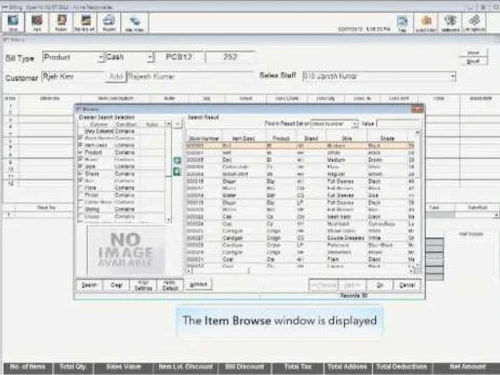
TallyShoper9 is a retailPOS software that provides innovative solutions to all the challenges retailers face in their operations.It supervises all aspects of the POS operation and automatestasks like till management, catalogue management, inventory management and tracking the flow of goods.Shoper9 from Tally also helps with setting multiple prices for any items and providing predictive bill val...
See MoreHave you used Tally Shoper 9 before?
Share your insights for better experience
Brand: Tally Solutions
Founded Year: 1986
Tally Solutions Pvt. Ltd., is an Indian multinational company that provides enterprise resource planning software. It is headquartered in Bengaluru, Karnataka India.
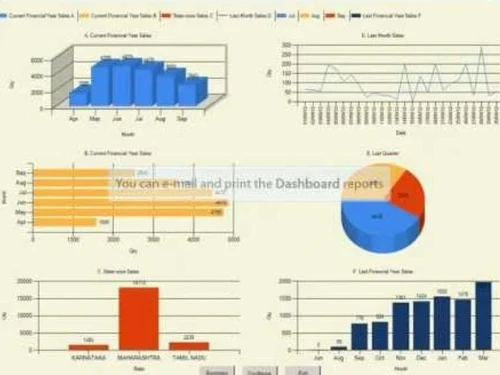
 Alerts Stock Management Catalogue Management Print Management Offers & Schemes Predictive Analytics Tally Import System Security & Software Management Analytics & Reporting Workflow Management Multi User Live Update Flow of Goods and Information, Point of Sale (POS) Accounting & Taxation Audit Mangement

Watch the demo video to explore key features, real workflows, and how the software fits your business needs.
 Ubuntu
  Windows
  MacOS
MacOS  Linux
Linux  Desktop
  Cloud-Based
  Perpetual
Small Business
Designed for startups and growing businesses
Medium Business
Built for business growth and flexibility
Enterprises
Designed for complex and large-scale business needs
4.1
Out of 5

Overall Rating
Based on
7 Verified Reviews
Rating Breakdown
82% Recommend this Product
Add ReviewUsers generally appreciate Tally Shoper 9 for its user-friendly interface and efficient customer support, highlighting its effectiveness in managing retail operations. Many find it a comprehensive solution for point-of-sale needs, contributing to improved customer satisfaction and reduced errors. However, some users have noted that the application can experience slow performance and that the user experience could be enhanced. Overall, the sentiment is positive, with users recommending the software for its simplicity and support.
Pros
"Simple to use! The software is quite simple to use, and both during and after deployment, assistance is excellent. It's made life so simple"
"This program has a number of features that assist any firm in handling everyday tasks for both employers and employees."
"This POS system is incredibly efficient and easy to use. The program's user interface is nice. The best feature is the knowledgeable and easily accessible customer care."
Cons
"The business needs to improve the user experience. There have been many times when the app and data retrieval have been slow."

Sep 1, 2022
Techjockey Verified
“Great product and easy to use”
Pros
Simple to use! The software is quite simple to use, and both during and after deployment, assistance is excellent. It's made life so simple
Cons
no cons found till now
Jul 14, 2022
Techjockey Verified
“Great solution for your retail shop”
Pros
This POS system is incredibly efficient and easy to use. The program's user interface is nice. The best feature is the knowledgeable and easily accessible customer care.
Cons
no cons found till now
Jun 23, 2022
Techjockey Verified
“Amazing product and easy to use”
Pros
It serves as a one-stop shop for all of your point of sale needs thanks to its user interface and connectivity with e-commerce and payments.
Cons
no cons found till now from my side

Tally Shoper 9
Price On Request
Desktop
Mobile
Web based
On Premises
Windows
Mac OS

Invoay SimplePOS
₹ 8988
Desktop
Mobile
Web based
On Premises
Windows
Mac OS

VPOS
Price On Request
Desktop
Mobile
Web based
On Premises
Windows
Mac OS

Bharat ZupPOS
Price On Request
Desktop
Mobile
Web based
On Premises
Windows
Mac OS

Peddle Plus One ERP
₹ 8474
Desktop
Mobile
Web based
On Premises
Windows
Mac OS

HDPOS
Price On Request
Desktop
Mobile
Web based
On Premises
Windows
Mac OS

Raho Free
₹ 2999
Desktop
Mobile
Web based
On Premises
Windows
Mac OS

Quickbill
₹ 15300
Desktop
Mobile
Web based
On Premises
Windows
Mac OS

Zilicius POS
Price On Request
Desktop
Mobile
Web based
On Premises
Windows
Mac OS

Rain POS
Price On Request
Desktop
Mobile
Web based
On Premises
Windows
Mac OS

SwilERP
₹ 9000
Desktop
Mobile
Web based
On Premises
Windows
Mac OS
(0) Product(s) selected
Available
Price on Request
Available
Price on Request
Available
Price on Request

Available
Price on Request

Starting Price:
₹239

Starting Price:
₹12,000

Available
Price on Request

Available
Price on Request

Available
Price on Request

Starting Price:
$89 /Month





After Shoper 9 installation, click on manage license after starting it. In the new screen, choose the option First time activation for your organization. Enter the serial number and activation key provided in the CD in their respective fields. In the e-mail ID of Administrator field, enter a valid e-mail id and enter it again for confirmation in the repeated field. Click Submit. You will receive an e-mail with the unlock Key. Select the option Unlock License and enter the unlock key that you received. Click Submit and Shoper 9 License will be activated.
Open Shoper 9 Tally after installation and click on Manage License. In the new screen, select the option Activation of an additional site for your organization. Enter the serial number and activation key provided with the Shoper 9 CD in the given fields. Enter the Account ID provided by your HO. Type a unique Site ID of your choice. Enter a valid e-mail id and confirm it in the E-Mail ID of Administrator field. Click Submit. You will receive an e-mail with the unlock Key. Select the option Unlock License and enter the unlock key that you received by e-mail. Click Submit and the activation the Shoper 9 License will be complete.
The license configuration happens during the installation process by default. In case it does not happen, open Shoper 9 and click on Manage License. In the new screen, select Configure License. Enter the IP Address/Host Name and Port number of the license server. Click Submit.
No. The terminals can be configured to the License server to avoid activating licenses at individual terminals.
You can get a free Tally Shoper 9 demo at techjockey.com. For more details, please visit techjockey.com.
Go to the official website https://tallysolutions.com. Go to Download section. Click on Shoper 9 download option. A zip file will get downloaded. Extract it and follow the installation steps. You can also click on the link to download previous versions or support files.
The pricing of Tally Shoper 9 starts at INR 18,000. For more details, please visit techjockey.com.
Operating system must be Microsoft Windows 7 or above (64-bit edition). A minimum of 512 MB RAM and available storage space of 512 MB (on your hard disk, cloud location, and so on) is necessary.
20,000+ Software Listed
Best Price Guranteed
Free Expert Consultation
2M+ Happy Customers
Terms and Condtions

Users with registered businesses can purchase goods from merchants on the platform to satisfy their business needs. Users are not permitted to utilize any products acquired through the platform for resale, advertising, business, or further distribution.
For each purchase made, users will receive a Tax Invoice (or 'GST invoice') that includes specific details such as:
the GSTIN of the user associated with their registered business, and
the specified Entity Name for their business.
It should be noted that not all products are eligible for GST Invoice. Only the products displayed by participating sellers with the 'GST-based Invoice Available' callout on the product description page would qualify.
Certain goods and services are not eligible to get a GST Invoice, including items with VAS, i.e., Value Added Services (e.g., Total Mobile Protection/Assured Buyback) and those involving an exchange offer at the time of purchase.
Users must ensure the accuracy of the GSTIN, and business entity name provided for the GST Invoice. Requests for corrections into GST Invoice would not be accommodated by Techjockey.com or any Seller, and any issues arising from user-provided information are the sole responsibility of users.
Techjockey.com is not liable for the GST Invoice or any associated input tax credit. To efficiently claim an input tax credit, users should select the registered place of business address as per the GST authority's data and follow the provisions of the GST Act and rules.
To claim an input tax credit, the delivery and billing addresses must match. Furthermore, input tax credits will not be granted if the delivery address and GSTIN on the invoice are from different states. In case of incorrect GST details provided during the order placement, the order will be canceled automatically.