USA
USA UAE
UAESmall Business
Designed for startups and growing businesses

See More




Brand: Lavu
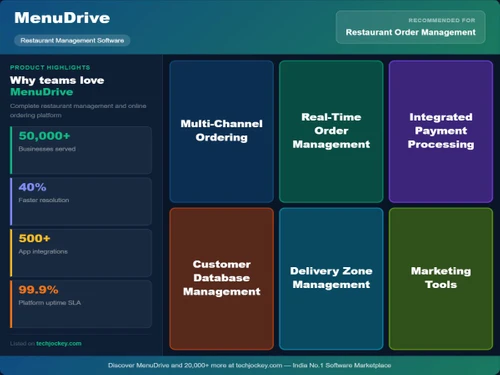
MenuDrive is an online ordering platform that helps restaurants accept direct orders, manage deliveries, process payments, and grow sales through built-in marketing tools.
See MoreHave you used MenuDrive before?
Share your insights for better experience
Brand: Lavu
Founded Year: 2010
Lavu is a computer specializes in the fields of the business management system, restaurant software, and point of sale.
 Online Ordering System Menu Management Delivery Management Pickup and Takeout Support Alerts & Notifications Payment Processing POS Integration Customer Data Management Promotions Management Reporting & Analytics Multi-Location Support Third Party Integration Status Tracking Service Area Configuration

Watch the demo video to explore key features, real workflows, and how the software fits your business needs.
 Ubuntu
  Windows
  MacOS
MacOS  Linux
Linux  Desktop
  Cloud-Based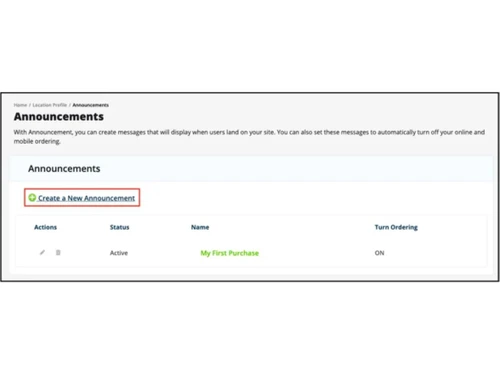
Small Business
Designed for startups and growing businesses
Medium Business
Built for business growth and flexibility
Enterprises
Designed for complex and large-scale business needs
Techjockey Trusted Reviews from Verified Users
No reviews are currently available for MenuDrive. Discover similar Restaurant Management Software reviews

Microtech POS
Whats great - Access to real-time data allows for better decision-making. Many billing software solutions offer mobile apps for on-the-go ... read more

Limetray
Whats great - Limetray has proved to be very profitable for us. It offers multiple user login facilities, which saves huge operational cost... read more

POSist
Whats great - It was one of the best investments we made. POSist helped us analyse all the loopholes and barriers in our operations and cut... read more
MenuDrive
Price On Request
Desktop
Mobile
Web based
On Premises
Windows
Mac OS
POSist
₹ 36800
Desktop
Mobile
Web based
On Premises
Windows
Mac OS
Limetray
Price On Request
Desktop
Mobile
Web based
On Premises
Windows
Mac OS
Etable Restro Manager
₹ 5988
Desktop
Mobile
Web based
On Premises
Windows
Mac OS

eRe4u
₹ 4000
Desktop
Mobile
Web based
On Premises
Windows
Mac OS

Eatlot
Price On Request
Desktop
Mobile
Web based
On Premises
Windows
Mac OS
OrderSeva
₹ 2000
Desktop
Mobile
Web based
On Premises
Windows
Mac OS

HDRestaurant
Price On Request
Desktop
Mobile
Web based
On Premises
Windows
Mac OS
ALLPOS Restaurant HUB
₹ 10000
Desktop
Mobile
Web based
On Premises
Windows
Mac OS

FoodBox
₹ 61654
Desktop
Mobile
Web based
On Premises
Windows
Mac OS

Sudish POS
₹ 12500
Desktop
Mobile
Web based
On Premises
Windows
Mac OS
(0) Product(s) selected
Available
Price on Request
Available
Price on Request
Starting Price:
₹10,000 /Outlet/Year
Starting Price:
₹12,500

Starting Price:
₹2,990 /Month
Starting Price:
$349 /Month

Starting Price:
₹5,500 /Yearly

Starting Price:
₹10,000 /yearly

Available
Price on Request

Starting Price:
$330 /Month/Location
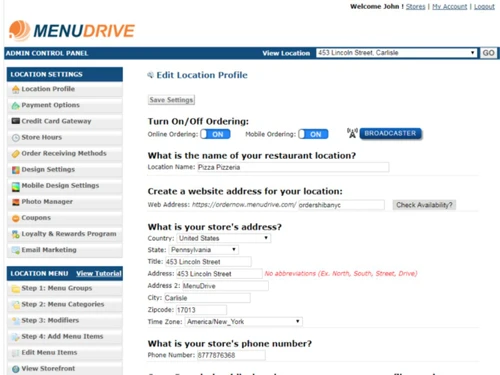
MenuDrive is a comprehensive online ordering and marketing platform designed specifically for restaurants. It provides an industry-leading suite of tools to help increase new traffic to your site, convert visitors into customers, and drive repeat business.
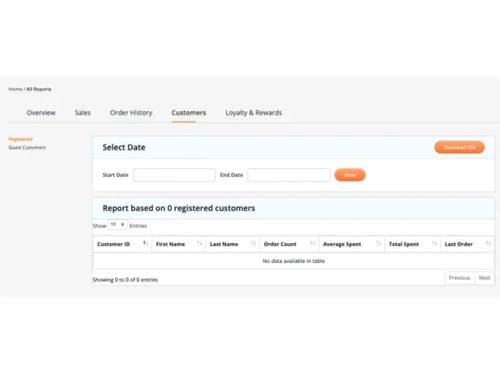
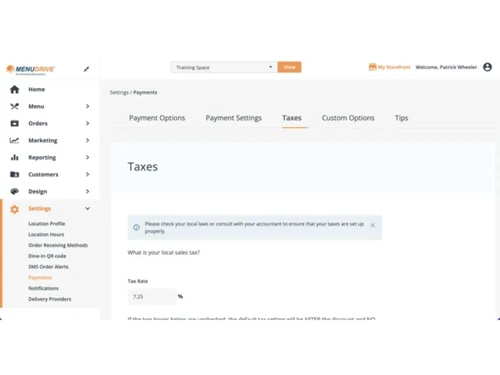
MenuDrive offers a robust set of features including a full online ordering system for web and mobile, comprehensive menu management, delivery and pickup/takeout support, instant order alerts, secure payment processing, and POS integration. It also provides customer data management, promotions management, and customizable website templates.
MenuDrive helps restaurants boost sales and loyalty through its extensive marketing tools. This includes print marketing, QR codes, SEO with Google My Business, analytics for promotions, an easy email builder, and retention features like coupons and loyalty programs. It also supports social media sharing, birthday texts/emails, and marketing automation to drive repeat business.
Yes, MenuDrive is a commission-free online ordering platform. This allows restaurants to launch their own online ordering site and keep all their profits from online sales and food delivery.
Yes, MenuDrive offers POS integration. It integrates with supported POS systems, including Lavu POS, to automatically sync orders, which helps reduce manual entry and improve order accuracy for all-in-one management.
MenuDrive price starts at USD 149 at techjockey.com. Additionally, MenuDrive offers a generous 90-day free trial, allowing restaurants to experience the platform before committing.
MenuDrive supports a wide range of order types to adapt to customer preferences, including curbside pickup, contactless ordering, takeout, delivery, and dine-in. Customers can place orders via website and mobile, with options for customer accounts, group orders, and further customization.
MenuDrive is ideal for independent restaurants, restaurant chains, pizzerias, cafes, ghost kitchens, and food service businesses that want to manage online ordering, deliveries, and customer engagement while reducing reliance on third-party delivery platforms.
20,000+ Software Listed
Best Price Guranteed
Free Expert Consultation
2M+ Happy Customers
Terms and Condtions

Users with registered businesses can purchase goods from merchants on the platform to satisfy their business needs. Users are not permitted to utilize any products acquired through the platform for resale, advertising, business, or further distribution.
For each purchase made, users will receive a Tax Invoice (or 'GST invoice') that includes specific details such as:
the GSTIN of the user associated with their registered business, and
the specified Entity Name for their business.
It should be noted that not all products are eligible for GST Invoice. Only the products displayed by participating sellers with the 'GST-based Invoice Available' callout on the product description page would qualify.
Certain goods and services are not eligible to get a GST Invoice, including items with VAS, i.e., Value Added Services (e.g., Total Mobile Protection/Assured Buyback) and those involving an exchange offer at the time of purchase.
Users must ensure the accuracy of the GSTIN, and business entity name provided for the GST Invoice. Requests for corrections into GST Invoice would not be accommodated by Techjockey.com or any Seller, and any issues arising from user-provided information are the sole responsibility of users.
Techjockey.com is not liable for the GST Invoice or any associated input tax credit. To efficiently claim an input tax credit, users should select the registered place of business address as per the GST authority's data and follow the provisions of the GST Act and rules.
To claim an input tax credit, the delivery and billing addresses must match. Furthermore, input tax credits will not be granted if the delivery address and GSTIN on the invoice are from different states. In case of incorrect GST details provided during the order placement, the order will be canceled automatically.