USA
USA UAE
UAESmall Business
Designed for startups and growing businesses


See More



Brand: Microtech Solution
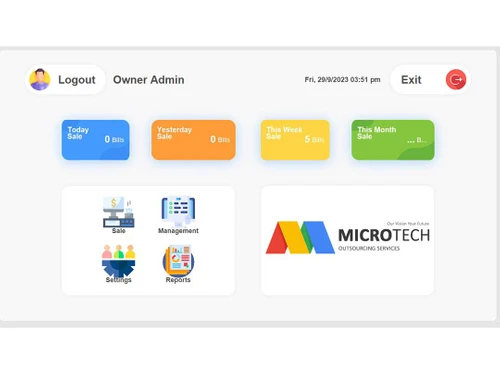
Microtech POS is a restaurant management software that allows restaurant owners to manage orders, billing, inventory, and customer relationships efficiently.
See MoreHave you used Microtech POS before?
Share your insights for better experience
Brand: Microtech Solution
Founded Year: 2018
Microtech POS solutions is providing finest restaurant management software
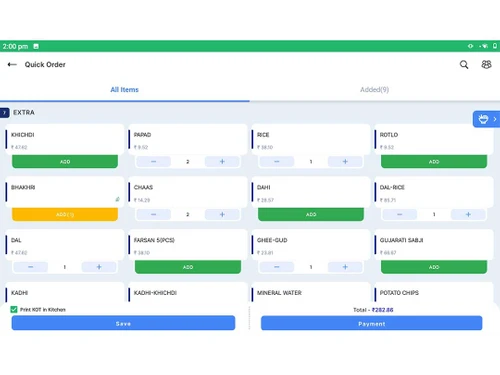
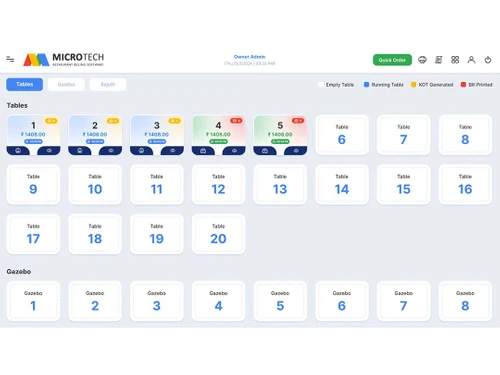
 Billing & Invoicing Menu Management Department Management Table Management Integrations Order Management Reporting Captain Android Kitchen Display Smart KOT Handling Quick Service Billing Multi-Menu Specialist Offline Mode Support Real-Time Stock Logs Recipe Management Digital Receipt Share Manage Employee Access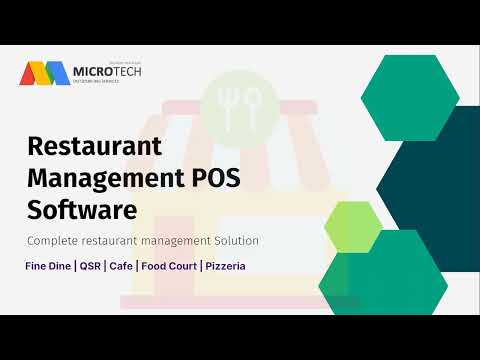

Watch the demo video to explore key features, real workflows, and how the software fits your business needs.
 Ubuntu
  Windows
  Android
  MacOS
MacOS  Desktop
  Mobile
  Cloud-Based
  Perpetual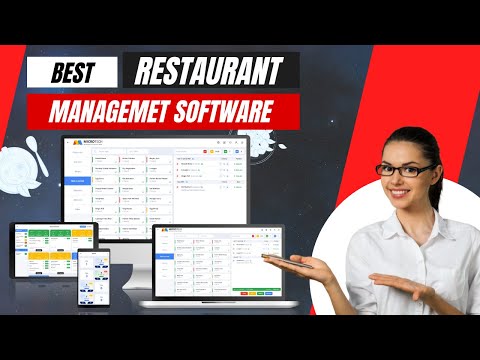
Small Business
Designed for startups and growing businesses
Medium Business
Built for business growth and flexibility
Enterprises
Designed for complex and large-scale business needs
4.4
Out of 5

Overall Rating
Based on
27 Verified Reviews
Rating Breakdown
91% Recommend this Product
Add ReviewOverall, users express high satisfaction with Microtech POS, particularly appreciating its efficiency in managing various order types and real-time data access, which enhances decision-making and operational transparency. The captain ordering app and KDS integration are frequently highlighted for improving service speed and kitchen communication. However, some users note challenges with initial setup, a learning curve for new staff, and occasional technical support costs. While the software is praised for its comprehensive features, some feel that customization options and interface design could be improved.
Pros
"I can maintain the Inventory and Stock very easily and I am using currently this billing solution."
"Access to real-time data allows for better decision-making. Many billing software solutions offer mobile apps for on-the-go access"
"Website orders integrated directly with the POS. Recipe management ensures consistent food quality. KOT printing minimizes kitchen confusion. Offline orders sync automatically."
Cons
"The colour is not good for the Table as I aspect but you have to visit one time on product"
"Takes time to configure for optimal use. Limited customization options for receipts."
"Slightly expensive for smaller establishments. The app interface could be more intuitive for beginners. "

Sep 13, 2024
Techjockey Verified
“Good Software”
Pros
Access to real-time data allows for better decision-making. Many billing software solutions offer mobile apps for on-the-go access
Cons
Technical support costs: May require additional costs for technical support. Data migration challenges: Moving data from existing systems can be complex. Vendor reliability: Relying on a software vendor for critical business functions can pose risks.
Jun 14, 2024
Techjockey Verified
“All in one platform”
Pros
Automation, efficiency, accuracy, organization, integration, scalability, customization, reporting.
Cons
Cost, learning curve, dependency, security, customization limitations, vendor lock-in.
Jun 12, 2024
Techjockey Verified
“Fantastic POS for Handling Dine-In and Delivery Orders Simultaneously”
FoodPOS has made it easy to handle multiple order types efficiently. Whether it's dine-in, delivery, or takeaway, every order is managed seamlessly in one system.
Pros
Smoothly manages all order types. Inventory updates automatically after sales. KOT printing reduces kitchen errors. Admin app offers real-time insights.
Cons
Setup can be time-consuming. Some features require advanced configuration.

Microtech POS
₹ 5000.00 excl. GST
Desktop
Mobile
Web based
On Premises
Windows
Mac OS

POSist
₹ 36800
Desktop
Mobile
Web based
On Premises
Windows
Mac OS

Limetray
Price On Request
Desktop
Mobile
Web based
On Premises
Windows
Mac OS
Etable Restro Manager
₹ 5988
Desktop
Mobile
Web based
On Premises
Windows
Mac OS

eRe4u
₹ 4000
Desktop
Mobile
Web based
On Premises
Windows
Mac OS

Eatlot
Price On Request
Desktop
Mobile
Web based
On Premises
Windows
Mac OS
OrderSeva
₹ 2000
Desktop
Mobile
Web based
On Premises
Windows
Mac OS

HDRestaurant
Price On Request
Desktop
Mobile
Web based
On Premises
Windows
Mac OS
ALLPOS Restaurant HUB
₹ 10000
Desktop
Mobile
Web based
On Premises
Windows
Mac OS

FoodBox
₹ 61654
Desktop
Mobile
Web based
On Premises
Windows
Mac OS

Sudish POS
₹ 12500
Desktop
Mobile
Web based
On Premises
Windows
Mac OS
(0) Product(s) selected
Available
Price on Request
Available
Price on Request
Starting Price:
₹10,000 /Outlet/Year
Starting Price:
₹12,500

Starting Price:
₹2,990 /Month
Starting Price:
$349 /Month

Starting Price:
₹5,500 /Yearly

Starting Price:
₹10,000 /yearly
Available
Price on Request

Starting Price:
$330 /Month/Location
Microtech POS is compatible with Ubuntu, Windows, Linux, and macOS operating systems.
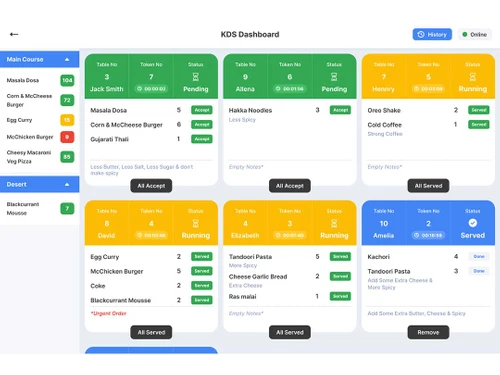
Microtech POS platform is available for Android users. In addition to the desktop software, users can access Captain and KDS Android apps. a) KDS App or Kitchen Display System: It will help you centrally manage all the orders through a robust kitchen display app. In addition, with the KDS app, restaurant owners can seamlessly manage KOTs (Kitchen Order Tickets) that will appear with all the essential details like order type, table number, captain name, and more. The kitchen operator or the concerned chef can easily change the KOT status, including accepting the order, preparing, and preparing to serve. b) Captain App: Another notable feature of the Microtech Restaurant Billing software is the Captain App. You can empower the chefs with departmental access, enabling them to effectively manage tables, look after order placement and billing, and smooth synchronization among the captain app, KDS app, and desktop.
Microtech POS supports web-based deployment.
Microtech POS price in India starts from INR 10,000 on techjockey.com.
Microtech POS can help restaurant owners, managers, and food service businesses manage orders, generate customer bills, and track sales and inventory.
Yes, a free demo of Microtech POS is available at techjockey.com.
Yes, Microtech POS is available for free.
Since Microtech POS supports web-based deployment, there is no need for software installation. Just open the setup wizard and get started.
Microtech POS is a restaurant management software that allows restaurant owners to manage orders, departments, bills, and menus efficiently.
20,000+ Software Listed
Best Price Guranteed
Free Expert Consultation
2M+ Happy Customers
Terms and Condtions

Users with registered businesses can purchase goods from merchants on the platform to satisfy their business needs. Users are not permitted to utilize any products acquired through the platform for resale, advertising, business, or further distribution.
For each purchase made, users will receive a Tax Invoice (or 'GST invoice') that includes specific details such as:
the GSTIN of the user associated with their registered business, and
the specified Entity Name for their business.
It should be noted that not all products are eligible for GST Invoice. Only the products displayed by participating sellers with the 'GST-based Invoice Available' callout on the product description page would qualify.
Certain goods and services are not eligible to get a GST Invoice, including items with VAS, i.e., Value Added Services (e.g., Total Mobile Protection/Assured Buyback) and those involving an exchange offer at the time of purchase.
Users must ensure the accuracy of the GSTIN, and business entity name provided for the GST Invoice. Requests for corrections into GST Invoice would not be accommodated by Techjockey.com or any Seller, and any issues arising from user-provided information are the sole responsibility of users.
Techjockey.com is not liable for the GST Invoice or any associated input tax credit. To efficiently claim an input tax credit, users should select the registered place of business address as per the GST authority's data and follow the provisions of the GST Act and rules.
To claim an input tax credit, the delivery and billing addresses must match. Furthermore, input tax credits will not be granted if the delivery address and GSTIN on the invoice are from different states. In case of incorrect GST details provided during the order placement, the order will be canceled automatically.