linkedin
Lumos logo
Lumos-dashboard
Lumos-spend
Lumos-assigned

Lumos

Brand: Lumos

  • 4.2

  • 4 Ratings

Lumos is a SaaS management platform that helps businesses track, manage, and optimize all their software applications, user access, and spending from one dashboard.

See More

Have you used Lumos before?

Share your insights for better experience

Add a Review

Price Available on Request

Questions about pricing or customization? We’re here to help, just a click away.

100% Genuine
Products
Best Price
Guaranteed
Safe & Secure
Payment
  • Description

  • Pricing

  • Features

  • Specification

  • Review

  • FAQ

Lumos Software Overview

What is Lumos?

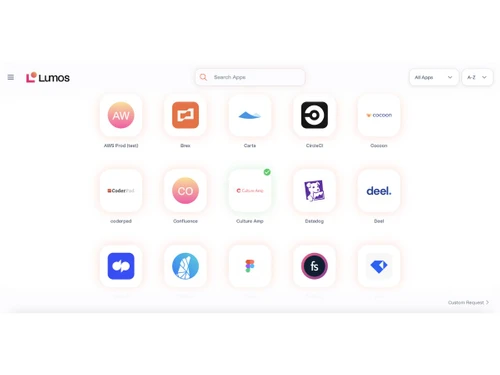
Lumos is a SaaS management platform that helps companies manage all their cloud-based software in one place. It automatically finds every app a company uses including ones IT didn't know about and shows them in a central dashboard.

Lumos tracks software usage, spending, and risks so businesses can control costs and improve security. The platform also automates user access when employees join, change roles, or leave, reducing IT workload.

It helps remove unused licenses and duplicate apps to save money. Lumos gives IT teams clear visibility and insights about software across the organization.

It integrates with many tools and systems to simplify workflows. Ultimately, Lumos helps companies optimize SaaS spending, improve governance, and reduce IT manual tasks.

Why Choose Lumos SaaS Management Software?

  • Complete SaaS Visibility: Provides a clear view of all software used across the organization.
  • Shadow App Detection: Identifies unauthorized or hidden applications in use.
  • AI-Based Insights: Uses artificial intelligence to analyze usage, spend, and risk.
  • Centralized Dashboard: Displays all SaaS data in one unified interface.
  • License Reclamation: Lumos SaaS Management Software detects and removes unused or idle licenses.
  • Renewal Management: Prevents unexpected renewals with automated tracking.
  • User Access Automation: Automates access during onboarding and role changes.
  • Reduced IT Workload: Minimizes manual IT tasks through automation.
  • Tool Integrations: Connects smoothly with HR, finance, and IT systems.
  • Vendor Control: Centralizes SaaS vendor and contract management.
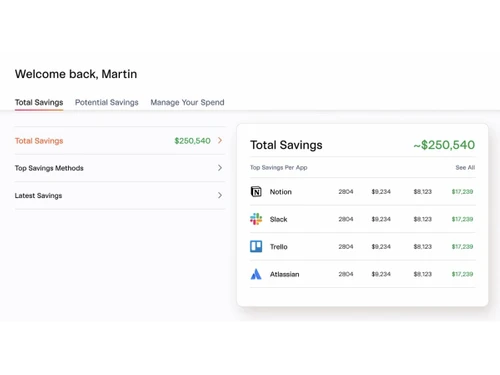
  • Spend Analytics: Lumos offers detailed insights into software spending.
  • Budget Optimization: Improves financial planning and cost control.
  • Self-Service Access: Enables employees to request app access easily.

Benefits of Lumos Software

  • Security Risk Monitoring: Identifies and manages SaaS security risks.
  • Compliance Assistance: Lumos SaaS Management Software helps meet regulatory and audit requirements.
  • Least-Privilege Access: Ensures users receive only necessary permissions.
  • Fast Employee Onboarding: Quick provisions required software access.
  • Secure Offboarding: Instantly removes access when employees leave.
  • Lower Support Tickets: Reduces IT support requests significantly.
  • Smart Recommendations: Suggests actions to improve access and spending.
  • Real-Time Usage Tracking: Provides live data on SaaS usage.
  • Custom Workflow Setup: Allows workflows to match business needs.
  • Access Orchestration: Coordinates app access across teams automatically.
  • Approved App Catalog: This SaaS Management platform offers a list of company-approved applications.
  • Policy-Based Controls: Applies detailed access and security policies.
  • Single Data Source: Acts as one trusted source for SaaS information.

Lumos Pricing

Lumos price details are available on request at techjockey.com.

The pricing model is based on different parameters, including extra features, deployment type, and the total number of users. For further queries related to the product, you can contact our product team and learn more about the pricing and offers.

Read more

Lumos Company Details

Founded Year:  2020

Lumos is a tech company that develops unified access platforms for IT and security teams to manage app and data access.

Director/Founders Alan Lopez, Andrej Safundzic, Leo Mehr
Company Size 1-100 Employees

Lumos Pricing & Plans

Looking for The Right Pricing?

Share your requirements and get a plan built around your business.

  • Define your business needs
  • Get customised pricing
  • Choose features that fit your workflow

Price Available on Request

Get personalised Lumos pricing that fits your needs. Our team will connect with you.

Lumos Features

  • icon_check Application Discovery
    Identify all SaaS apps in use, including shadow IT, with detailed usage, spend, and license visibility.
  • icon_check License Management
    Optimize licenses by reclaiming unused seats, eliminating duplicates, and tracking renewals to reduce costs.
  • icon_check Access Requests
    Enable self-service app access requests through Slack, Teams, CLI, or ITSM, reducing IT workload and delays.
  • icon_check User Provisioning
    Automate onboarding workflows to grant required app access instantly, ensuring quick and secure user setup.
  • icon_check Audit & Compliance Reporting
    Generate detailed reports for SOX, SOC 2, and ISO27001 audits to simplify regulatory compliance efforts.
  • icon_check Spend Analysis
    Track app spend, usage patterns, and trends with analytics to drive smarter procurement and consolidation.
  • icon_check Workflow Automation
    Automate approvals, provisioning, and policy enforcement with AI-powered workflows to save time and effort.
  • icon_check Access Reviews
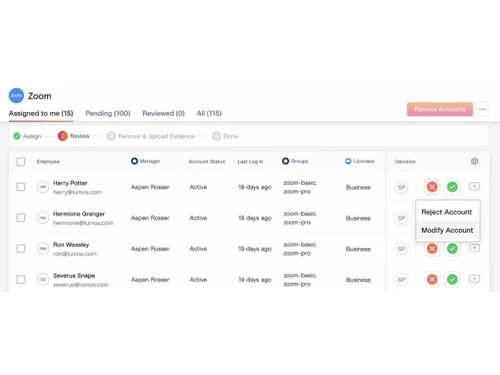
    Streamline compliance audits with automated, periodic access reviews and evidence collection for regulations.
  • icon_check User Deprovisioning
    Automatically remove user access during offboarding to maintain security and prevent unauthorized access.

Lumos Specifications

Supported Platforms
Ubuntu Ubuntu Windows Windows MacOS MacOS Linux Linux
Devices
Desktop Desktop
Deployment
Cloud-Based Cloud-Based
Suitable For
All Industries
Business Specific
All Businesses
Business Size
Small Business Startups Medium Business Enterprises
Customer Support
Email Communities
Language
English
Training Resources
Videos

Lumos Review

4.2

Out of 5

img

Overall Rating

Based on
4 Verified Ratings

Rating Breakdown

  • Features 4.6
  • Value for Money 4.1
  • Ease of Use 4.2
  • Customer Support 4

80% Recommend this Product

Add Review

Be the First to Review

This product has no reviews yet. Be the first to leave your feedback.

Add Review

Articles for Lumos

See All Related Articles

How much does Lumos Software cost?

Lumos pricing information is available upon request at techjockey.com.

Is there a mobile app available for Lumos SaaS Management Software?

No, Lumos does not offer a mobile app for managing access on the go.

Which operating systems are compatible with Lumos Software?

Lumos SaaS Management Software is compatible with major operating systems including Ubuntu, Windows, MacOS, and Linux.

Does Lumos Software offer a free trial?

No, Lumos SaaS Management Software does not provide a free trial.

How does Lumos SaaS Management Software Work?

Lumos automatically discovers all SaaS apps, centralizes usage and spend data, and automates access and lifecycle workflows in one dashboard.

Who uses Lumos Software?

Lumos SaaS Management Software is used by IT teams, security teams, and organizations managing SaaS applications and software costs.

Is a free demo available for Lumos SaaS Management Software?

Yes, Lumos offers a free demo that you can book to see the platform in action.

Is Lumos Software available for free?

No, Lumos SaaS Management Software does not offer a free version.

20,000+ Software Listed

Best Price Guranteed

Free Expert Consultation

2M+ Happy Customers

Terms and Condtions

close

Users with registered businesses can purchase goods from merchants on the platform to satisfy their business needs. Users are not permitted to utilize any products acquired through the platform for resale, advertising, business, or further distribution.

For each purchase made, users will receive a Tax Invoice (or 'GST invoice') that includes specific details such as:

  • the GSTIN of the user associated with their registered business, and

  • the specified Entity Name for their business.

It should be noted that not all products are eligible for GST Invoice. Only the products displayed by participating sellers with the 'GST-based Invoice Available' callout on the product description page would qualify.

Certain goods and services are not eligible to get a GST Invoice, including items with VAS, i.e., Value Added Services (e.g., Total Mobile Protection/Assured Buyback) and those involving an exchange offer at the time of purchase.

Users must ensure the accuracy of the GSTIN, and business entity name provided for the GST Invoice. Requests for corrections into GST Invoice would not be accommodated by Techjockey.com or any Seller, and any issues arising from user-provided information are the sole responsibility of users.

Techjockey.com is not liable for the GST Invoice or any associated input tax credit. To efficiently claim an input tax credit, users should select the registered place of business address as per the GST authority's data and follow the provisions of the GST Act and rules.

To claim an input tax credit, the delivery and billing addresses must match. Furthermore, input tax credits will not be granted if the delivery address and GSTIN on the invoice are from different states. In case of incorrect GST details provided during the order placement, the order will be canceled automatically.