linkedin
MaxelTracker logo
MaxelTracker productive
MaxelTracker dashboard
MaxelTracker geolocation

MaxelTracker

Brand: MaxelTracker

  • 4.3

  • 5 Ratings

  • MaxelTracker is an AI-powered employee monitoring and productivity tool.
  • It helps businesses track work hours, app usage, and team performance.
  • The software provides automated insights and real-time productivity analytics.
  • It supports remote, hybrid, and in-office workforce monitoring.
See More

Have you used MaxelTracker before?

Share your insights for better experience

Add a Review
Starting Price
₹1,730 excl.GST
₹ 2,042 incl. GST

View plans

offer Save upto 18%, Get GST Invoice on your business purchase T&C
offer Buy Now & Pay Later, Check offer on payment page.
Buy Now
100% Genuine
Products
Best Price
Guaranteed
Safe & Secure
Payment
  • Description

  • Pricing

  • Features

  • Specification

  • Review

  • Compare

  • Alternatives

  • FAQ

Starting at ₹1,730
Buy Now

MaxelTracker Software Overview

What is MaxelTracker?

MaxelTracker is an AI-based employee monitoring software that helps businesses enhance their teams' productivity, transparency, and performance. It offers automated insights, real-time analytics, and tracking of activities to support organizations managing in-office, remote, or hybrid teams.

The software is geared towards productivity enhancement based on data other than simple surveillance. MaxelTracker can also assist managers in learning how teams operate and where to optimize their work, with various features. It includes automated time tracking, application and site monitoring, smart screenshots, and performance analytics.

Key Features of MaxelTracker

  • AI-Powered Productivity Analytics: With the help of AI-powered insights, MaxelTracker can be used to examine work patterns to allow businesses to know which hours are productive and unproductive among teams.
  • Automated Time Tracking: The system will automatically track the hours worked by employees, which will remove the use of manual timesheets and will save time spent on administration.
  • Application and Website Usage Monitoring: Managers can monitor the apps and sites that employees access at work so that they can determine distractions and streamline the working processes.
  • Smart Screenshots: MaxelTracker takes scheduled or random screenshots to give visual evidence of work without violating the privacy of the data by offering data-blurring options.
  • Role-Based Access Control: Organizations have an opportunity to give access permissions to managers, the HR team, and employees. It allows them to have access to productivity data in a secure and structured manner.
  • Performance Analytics and Reports: The software produces detailed productivity reports, which help HR and managers to determine the areas of improvement and the top performers.
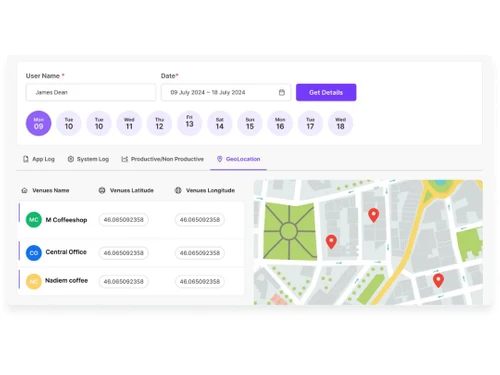
  • Location Tracking for Remote Teams: GPS tracking is useful in keeping track of attendance and work patterns of teams that are distributed. So that they are accountable and transparent.

Pricing of MaxelTracker

MaxelTracker offers pricing starting from INR 1,730 at Techjockey. You can get in touch with them for more information.

Read more

MaxelTracker Pricing & Plans

Pro
Key Features
  • App Logs
  • System Logs
  • GEO-Location Tracking
  • Productivity Tracking
  • Role Based Access
  • Apps and Website Tracking

Calculated Price

1730 Exclusive of all taxes
    • Licenses

      Licenses
      Licenses
    • Yearly

      Yearly
      Yearly

Key Features

  • App Logs

  • System Logs

  • GEO-Location Tracking

  • Productivity Tracking

  • Role Based Access

  • Apps and Website Tracking

MaxelTracker Features

  • icon_check AI-Powered Reports
    Leverage AI to generate insights and performance analytics from tracked activity patterns for smarter decision-making.
  • icon_check Productivity Analytics
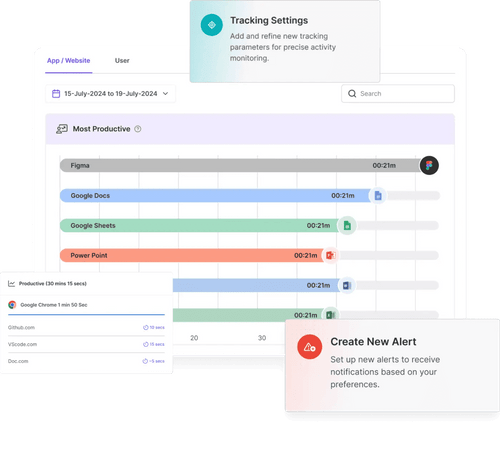
    Analyze productive vs unproductive hours by reviewing apps, websites, and tracked work timelines.
  • icon_check Overtime Detection
    Identify overtime hours automatically to help balance workloads and manage payroll accurately.
  • icon_check Time Tracking
    Automatically track employee clock-ins, clock-outs, work hours, idle time, and attendance for complete productivity visibility.
  • icon_check Categorization
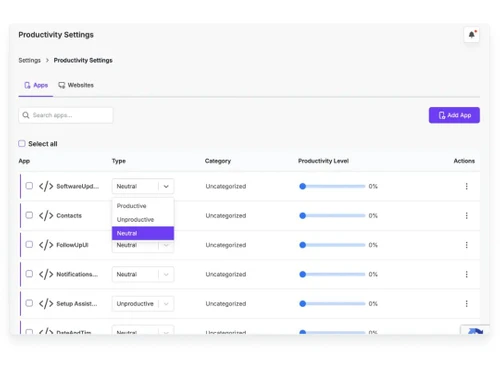
    Automatically sort app and website usage into productive and non-productive categories to reveal focus patterns.
  • icon_check Role based access
    Assign role-specific permissions so managers and HR view only the data relevant to their responsibilities.
  • icon_check Screenshots
    Capture scheduled screenshots during work hours with optional blur to balance oversight and privacy.
  • icon_check Alerts & Notifications
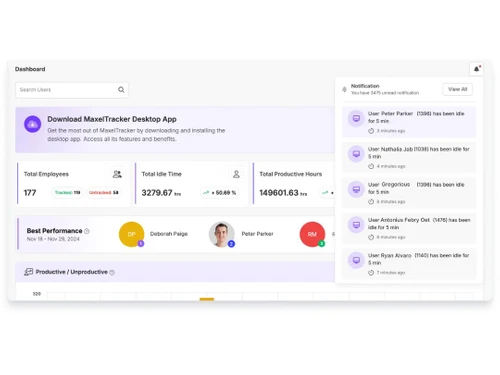
    Send automatic alerts for productivity drops, idle time thresholds, non-work app access, or policy deviations.
  • icon_check Location Tracking
    Use GPS to verify where employees work, aiding remote team management and attendance verification.
  • icon_check GPS Location Verification
    Tracks real-time geographic coordinates of mobile or remote staff to verify attendance and ensure operational site security.
  • icon_check Monitoring Dashboard
    View live activity streams, attendance data, and productivity trends from a centralized dashboard.

MaxelTracker Specifications

Supported Platforms
Ubuntu Ubuntu Windows Windows MacOS MacOS Linux Linux
Devices
Desktop Desktop
Deployment
Cloud-Based Cloud-Based
Suitable For
All Industries
Business Specific
All Businesses
Business Size
Small Business Startups Medium Business Enterprises SMBs SMEs MSMBs MSMEs
Customer Support
Phone Email Forums
Language
English
Training Resources
In Person

Explore the Best Alternative Solutions Similar to Your Business Size and Needs

MaxelTracker Review

4.3

Out of 5

img

Overall Rating

Based on
5 Verified Ratings

Rating Breakdown

  • Features 4.2
  • Value for Money 4.5
  • Ease of Use 4.4
  • Customer Support 4.3

90% Recommend this Product

Add Review

Techjockey Trusted Reviews from Verified Users

No reviews are currently available for MaxelTracker. Discover similar Employee Monitoring Software reviews
  • WorkTime

    4.7

    Whats great - Great piece of kit with support team that’s a lifesaver and their response time is super fast. Major plus for me. read more
  • Mera Work

    5.0

    Whats great - User-friendly interface read more

  • DeskTrack

    5.0

    Whats great - Best DeskTrack Employee Monitoring Software, I am using nearly 1 year. support is good, our employees' activities are tracked... read more

Compare MaxelTracker With other Employee Monitoring Software

Products
Ratings
Pricing
Device Supported
Deployment
Supported Platforms
  • img

    MaxelTracker

  • 4.3

  • ₹ 1730.40 excl. GST

  • Desktop

    Mobile

  • Web based

    On Premises

  • Windows

    Mac OS

  • img

    DeskTrack

  • 4.9

  • Price On Request

  • Desktop

    Mobile

  • Web based

    On Premises

  • Windows

    Mac OS

  • img

    WorkWitness

  • 4.8

  • Price On Request

  • Desktop

    Mobile

  • Web based

    On Premises

  • Windows

    Mac OS

  • img

    We360 ai

  • 5

  • ₹ 399

  • Desktop

    Mobile

  • Web based

    On Premises

  • Windows

    Mac OS

  • img

    Mera Work

  • 4.9

  • ₹ 325

  • Desktop

    Mobile

  • Web based

    On Premises

  • Windows

    Mac OS

  • img

    Time Champ

  • 4.7

  • ₹ 200

  • Desktop

    Mobile

  • Web based

    On Premises

  • Windows

    Mac OS

  • img

    Hoverwatch

  • 4.4

  • Price On Request

  • Desktop

    Mobile

  • Web based

    On Premises

  • Windows

    Mac OS

  • img

    Twib

  • 4.7

  • ₹ 199

  • Desktop

    Mobile

  • Web based

    On Premises

  • Windows

    Mac OS

  • img

    TheOneSpy

  • 4.2

  • Price On Request

  • Desktop

    Mobile

  • Web based

    On Premises

  • Windows

    Mac OS

  • img

    WorkTrack

  • 4.1

  • ₹ 299

  • Desktop

    Mobile

  • Web based

    On Premises

  • Windows

    Mac OS

  • img

    TeamTrace

  • 4.9

  • Price On Request

  • Desktop

    Mobile

  • Web based

    On Premises

  • Windows

    Mac OS

(0) Product(s) selected

MaxelTracker Alternatives

See All MaxelTracker Alternatives

Starting Price:

$30 /Month

Starting Price:

$29 /Month

Starting Price:

₹299 /Month

Starting Price:

$4 User/Month

Starting Price:

$8 /User/Month

Starting Price:

₹13,625 /Quantity

Articles for MaxelTracker

See All Related Articles

What is MaxelTracker used for?

MaxelTracker is used to monitor employee activity, track work hours, and analyze productivity using AI-driven insights and performance reports.

Is MaxelTracker suitable for remote teams?

Yes, it is designed for remote, hybrid, and in-office teams, offering location tracking, time monitoring, and activity reports.

Does MaxelTracker record employee screens?

Yes, it can capture automated screenshots during work hours, with options to blur sensitive information for privacy.

Is there a free trial available?

Yes, MaxelTracker provides a 14-day free trial without requiring a credit card.

What platforms does MaxelTracker support?

It is compatible with Windows, macOS, and Linux systems.

How much does MaxelTracker cost?

The pricing of MaxelTracker starts from INR 1,730 at Techjockey.

How does MaxelTracker work?

MaxelTracker runs in the background on employee devices, automatically tracking work hours, app and website usage, idle time, and optional screenshots. It converts this data into real-time dashboards and reports to help managers analyze and improve team productivity.

20,000+ Software Listed

Best Price Guranteed

Free Expert Consultation

2M+ Happy Customers

Terms and Condtions

close

Users with registered businesses can purchase goods from merchants on the platform to satisfy their business needs. Users are not permitted to utilize any products acquired through the platform for resale, advertising, business, or further distribution.

For each purchase made, users will receive a Tax Invoice (or 'GST invoice') that includes specific details such as:

  • the GSTIN of the user associated with their registered business, and

  • the specified Entity Name for their business.

It should be noted that not all products are eligible for GST Invoice. Only the products displayed by participating sellers with the 'GST-based Invoice Available' callout on the product description page would qualify.

Certain goods and services are not eligible to get a GST Invoice, including items with VAS, i.e., Value Added Services (e.g., Total Mobile Protection/Assured Buyback) and those involving an exchange offer at the time of purchase.

Users must ensure the accuracy of the GSTIN, and business entity name provided for the GST Invoice. Requests for corrections into GST Invoice would not be accommodated by Techjockey.com or any Seller, and any issues arising from user-provided information are the sole responsibility of users.

Techjockey.com is not liable for the GST Invoice or any associated input tax credit. To efficiently claim an input tax credit, users should select the registered place of business address as per the GST authority's data and follow the provisions of the GST Act and rules.

To claim an input tax credit, the delivery and billing addresses must match. Furthermore, input tax credits will not be granted if the delivery address and GSTIN on the invoice are from different states. In case of incorrect GST details provided during the order placement, the order will be canceled automatically.