linkedin
MicroMain logo
play MicroMain CMMS Quick Look - 14 Day Free Trial
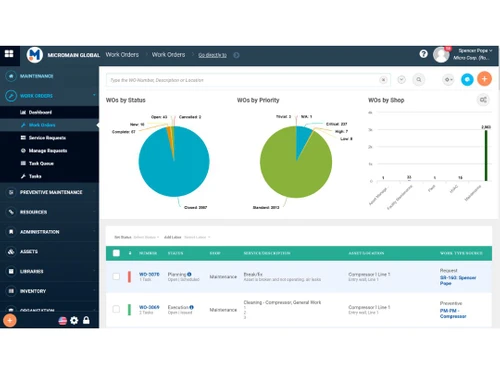
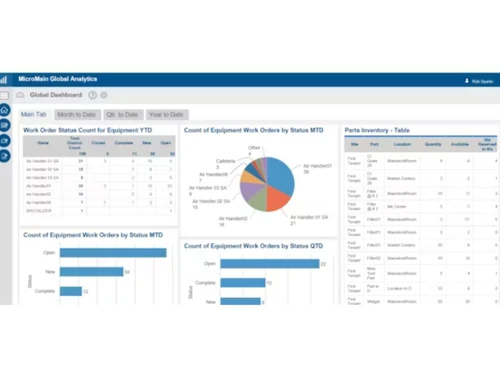
MicroMain Dashboard
MicroMain Maintenance

MicroMain

Brand: MicroMain

  • 4.3

  • 5 Ratings

MicroMain is a software designed to streamline maintenance operations and optimize asset performance for organizations of all sizes.

See More

Have you used MicroMain before?

Share your insights for better experience

Add a Review

Price Available on Request

Questions about pricing or customization? We’re here to help, just a click away.

100% Genuine
Products
Best Price
Guaranteed
Safe & Secure
Payment
  • Description

  • Pricing

  • Features

  • Specification

  • Review

  • Compare

  • Alternatives

  • FAQ

MicroMain Software Overview

What is MicroMain?

MicroMain is a company that offers CMMS software solutions to help businesses manage maintenance and assets efficiently. Their software features preventive maintenance scheduling, asset tracking, inventory management, and workforce tracking.

With MicroMain, businesses can streamline maintenance operations, reduce downtime, and improve productivity. The user-friendly software provides comprehensive reporting and analytics capabilities for informed decision-making. It's designed to optimize maintenance workflows and enhance operational efficiency.

Why Choose MicroMain Software?

  • Comprehensive Features: The software offers various features, including preventive maintenance scheduling, asset tracking, inventory management, and workforce tracking, catering to diverse maintenance needs.
  • User-Friendly Interface: The software is designed with an intuitive and easy-to-use interface, making it accessible for all users without extensive training.
  • Enhanced Efficiency: By centralizing maintenance data and processes, MicroMain helps businesses optimize workflows, reduce downtime, and boost operational efficiency.
  • Customization Options: The software allows customization to adapt to specific business requirements, ensuring flexibility and scalability as operations evolve.
  • Reporting and Analytics: With robust reporting and analytics capabilities, MicroMain enables data-driven decision-making, providing insights to improve maintenance strategies and resource allocation.
  • Proven Track Record: It has a track record of success, serving numerous businesses across industries with reliable and effective CMMS/EAM solutions.
  • Customer Support: It offers excellent customer support, providing assistance and guidance to ensure smooth implementation and ongoing use of the software.

Benefits of MicroMain Platform

  • Increased Equipment Reliability: MicroMain software helps implement preventive maintenance strategies, resulting in fewer equipment breakdowns and increased reliability, thereby minimizing unplanned downtime.
  • Extended Asset Lifespan: With effective maintenance scheduling and asset tracking, MicroMain software helps organizations prolong the lifespan of their assets by ensuring timely maintenance and proper care.
  • Cost Savings: By reducing downtime, optimizing maintenance schedules, and improving inventory management, MicroMain software helps businesses save on maintenance costs and operational expenses.
  • Regulatory Compliance: MicroMain software assists businesses in meeting compliance standards by providing tools for tracking maintenance activities, managing safety inspections, and generating compliance reports.
  • Improved Work Order Management: With streamlined work order management capabilities, MicroMain software enables businesses to efficiently schedule, assign, and track maintenance tasks, ensuring timely completion and accountability.
  • Enhanced Inventory Management: MicroMain software automates inventory tracking and management, reducing the risk of stockouts or overstocking and ensuring optimal inventory levels for maintenance operations.
  • Better Decision-Making: Through comprehensive reporting and analytics features, MicroMain software provides actionable insights into maintenance performance, asset health, and resource utilization, empowering informed decision-making at all levels of the organization.

Pricing of MicroMain CMMS Software

MicroMain price details are available on request at techjockey.com.

The pricing model is based on different parameters, including extra features, deployment type, and the total number of users. For further queries related to the product, you can contact our product team and learn more about the pricing and offers.

Read more

MicroMain Company Details

Founded Year:  1991

MicroMain Corporation, a provider of Computerized Maintenance Management Software (CMMS).

Director/Founders N/A
Company Size 1-100 Employees

MicroMain Pricing & Plans

Looking for The Right Pricing?

Share your requirements and get a plan built around your business.

  • Define your business needs
  • Get customised pricing
  • Choose features that fit your workflow

Price Available on Request

Get personalised MicroMain pricing that fits your needs. Our team will connect with you.

MicroMain Features

  • icon_check Inventory Management
    Manage spare parts inventory with stock tracking, automatic reordering, and usage history to avoid shortages.
  • icon_check Purchase Order Management
    Generate and manage purchase orders for parts and services while tracking vendor details and procurement costs.
  • icon_check Vendor Management
    Maintain vendor records, contracts, and performance history to streamline procurement and supplier coordination.
  • icon_check Barcode Scanning
    Use barcode and QR code scanning to quickly identify assets, update records, and streamline maintenance tasks.
  • icon_check Maintenance Scheduling
    Plan and schedule maintenance activities with calendar views, task prioritization, and automated notifications.
  • icon_check Reporting & Analytics
    Generate detailed reports and dashboards to track KPIs, maintenance costs, and asset performance trends.
  • icon_check Asset Tracking
    Tracks and manages assets throughout their lifecycle, facilitating maintenance and inventory management.
  • icon_check Calibration Management
    Manages calibration schedules and records to ensure equipment accuracy and compliance with standards.
  • icon_check Inventory Control
    Manages inventory levels, locations, and replenishment processes for efficient operations.
  • icon_check Mobile Access
    Allows users to access and manage CMMS data and functionalities from mobile devices, enhancing flexibility and productivity.
  • icon_check Preventive Maintenance
    Schedules and automates routine maintenance tasks to prevent equipment failures and prolong asset lifespan.
  • icon_check Service History Tracking
    Records and tracks maintenance activities and service history for assets, aiding in maintenance planning and analysis.
  • icon_check Technicians Management
    Assigns tasks, tracks technician availability, and monitors performance to optimize workforce management.
  • icon_check Work Order Management
    Creates, assigns, tracks, and manages work orders efficiently to ensure timely completion of maintenance tasks.
MicroMain Demo Video play icon

Get MicroMain Demo

Watch the demo video to explore key features, real workflows, and how the software fits your business needs.

Understand
Key Features
Personal
Demo Insights
Interactive
Demo Support

MicroMain Specifications

Supported Platforms
Windows Windows iOS iOS Android Android MacOS MacOS Linux Linux
Devices
Desktop Desktop Mobile Mobile
Deployment
Cloud-Based Cloud-Based Perpetual Perpetual
Suitable For
All Industries
Business Specific
All Businesses
Business Size
Small Business Medium Business Enterprises SMBs SMEs MSMEs
Customer Support
Phone Email Live Chat
Language
English
Integration
API Integration
Training Resources
Webinars Documentation Videos

Explore the Best Alternative Solutions Similar to Your Business Size and Needs

MicroMain Review

4.3

Out of 5

img

Overall Rating

Based on
5 Verified Ratings

Rating Breakdown

  • Features 4.8
  • Value for Money 4.1
  • Ease of Use 4.3
  • Customer Support 4

86% Recommend this Product

Add Review

Be the First to Review

This product has no reviews yet. Be the first to leave your feedback.

Add Review

Compare MicroMain With other CMMS Software

Products
Ratings
Pricing
Device Supported
Deployment
Supported Platforms
  • img

    MicroMain

  • 4.3

  • Price On Request

  • Desktop

    Mobile

  • Web based

    On Premises

  • Windows

    Mac OS

  • img

    ATL-CMMS

  • 4.1

  • ₹ 7500

  • Desktop

    Mobile

  • Web based

    On Premises

  • Windows

    Mac OS

  • img

    Limble CMMS

  • 4.8

  • Price On Request

  • Desktop

    Mobile

  • Web based

    On Premises

  • Windows

    Mac OS

  • img

    Click Maint CMMS

  • 4.1

  • Price On Request

  • Desktop

    Mobile

  • Web based

    On Premises

  • Windows

    Mac OS

  • img

    MaintainX

  • 4.3

  • Price On Request

  • Desktop

    Mobile

  • Web based

    On Premises

  • Windows

    Mac OS

  • img

    Fiix

  • 4.3

  • Price On Request

  • Desktop

    Mobile

  • Web based

    On Premises

  • Windows

    Mac OS

  • img

    Cryotos CMMS

  • 4.4

  • Price On Request

  • Desktop

    Mobile

  • Web based

    On Premises

  • Windows

    Mac OS

  • img

    Upkeep

  • 4.5

  • Price On Request

  • Desktop

    Mobile

  • Web based

    On Premises

  • Windows

    Mac OS

  • img

    Abexa Worldwide

  • 5

  • Price On Request

  • Desktop

    Mobile

  • Web based

    On Premises

  • Windows

    Mac OS

  • img

    Gruntify

  • 4.3

  • Price On Request

  • Desktop

    Mobile

  • Web based

    On Premises

  • Windows

    Mac OS

  • img

    Zoidii

  • 4.5

  • Price On Request

  • Desktop

    Mobile

  • Web based

    On Premises

  • Windows

    Mac OS

(2) Product(s) selected

MicroMain Alternatives

See All MicroMain Alternatives

Starting Price:

$25 /User/Month

Fiix

4.3

Starting Price:

$45 /Month

Starting Price:

$20 /User/Month

Starting Price:

$19 /Month

Starting Price:

$39 /Month

Available

Price on Request

Starting Price:

$33 /user/month

Articles for MicroMain

See All Related Articles

Which operating system does MicroMain Software Support?

MicroMain Software is compatible with Ubuntu, Windows, Linux and MacOS.

Is there any MicroMain Software App?

MicroMain Software app is unavailable for Android and iOS users.

What is the deployment type of MicroMain Software?

It supports cloud-based deployment.

How much does MicroMain Software Cost?

MicroMain price details are available on request at techjockey.com.

Who are the potential users of MicroMain Software?

MicroMain Software is typically used by all industries to streamline maintenance operations and asset management.

Is there any free demo for MicroMain Software?

Yes, a demo of MicroMain is available at techjockey.com.

Is MicroMain Software Free?

MicroMain Software is not available for free. You can contact our product experts to learn more about the pricing plans.

Does MicroMain offer a free trial?

Yes, MicroMain Software offers a free trial.

How can you download MicroMain Software?

MicroMain Software installation is not required, as it is cloud-based. Just open the Setup Wizard to get started.

How does MicroMain Software Work?

MicroMain software streamlines maintenance operations by automating work order management and preventive maintenance scheduling, ensuring optimal asset performance and reliability. It centralizes asset data and processes, facilitating efficient maintenance workflows and informed decision-making.

20,000+ Software Listed

Best Price Guranteed

Free Expert Consultation

2M+ Happy Customers

Terms and Condtions

close

Users with registered businesses can purchase goods from merchants on the platform to satisfy their business needs. Users are not permitted to utilize any products acquired through the platform for resale, advertising, business, or further distribution.

For each purchase made, users will receive a Tax Invoice (or 'GST invoice') that includes specific details such as:

  • the GSTIN of the user associated with their registered business, and

  • the specified Entity Name for their business.

It should be noted that not all products are eligible for GST Invoice. Only the products displayed by participating sellers with the 'GST-based Invoice Available' callout on the product description page would qualify.

Certain goods and services are not eligible to get a GST Invoice, including items with VAS, i.e., Value Added Services (e.g., Total Mobile Protection/Assured Buyback) and those involving an exchange offer at the time of purchase.

Users must ensure the accuracy of the GSTIN, and business entity name provided for the GST Invoice. Requests for corrections into GST Invoice would not be accommodated by Techjockey.com or any Seller, and any issues arising from user-provided information are the sole responsibility of users.

Techjockey.com is not liable for the GST Invoice or any associated input tax credit. To efficiently claim an input tax credit, users should select the registered place of business address as per the GST authority's data and follow the provisions of the GST Act and rules.

To claim an input tax credit, the delivery and billing addresses must match. Furthermore, input tax credits will not be granted if the delivery address and GSTIN on the invoice are from different states. In case of incorrect GST details provided during the order placement, the order will be canceled automatically.