 USA
USA UAE
UAESmall Business
Designed for startups and growing businesses

See More


Brand: Manupatra Information Solutions
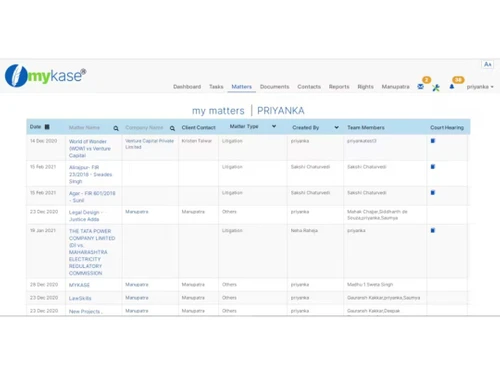
myKase is designed to help legal professionals manage cases, documents, tasks, and client communications efficiently from a single platform.
See MoreHave you used MyKase before?
Share your insights for better experience
Looking for The Right Pricing?
Share your requirements and get a plan built around your business.
Price Available on Request
Get personalised MyKase pricing that fits your needs. Our team will connect with you.
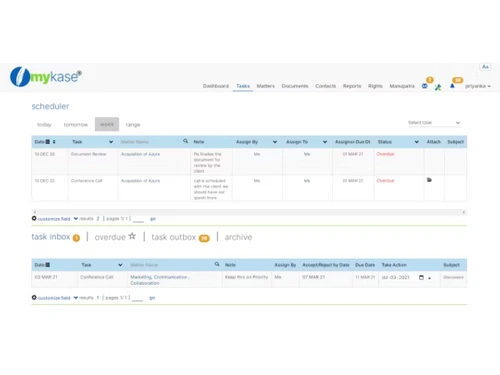
 Seamless Collaboration Task and Workflow Automation Client Portal Communication Document Management Integrations Conflict Search & Matter Management Mobile App Security Task Management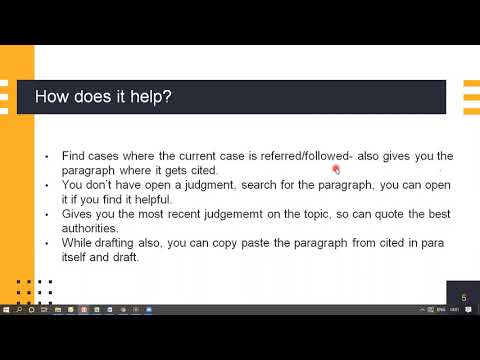

Watch the demo video to explore key features, real workflows, and how the software fits your business needs.
 Ubuntu
  Windows
  iOS
iOS  Android MacOS
  Linux
Linux  Desktop
  Mobile
  Tablet
  Cloud-Based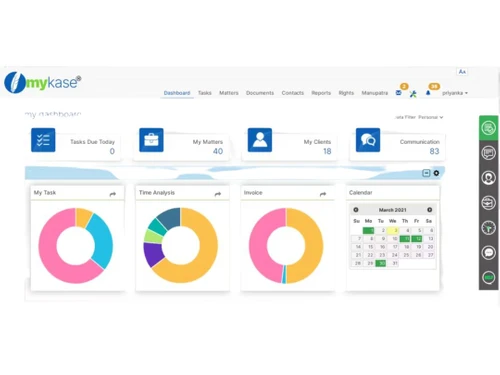
Small Business
Designed for startups and growing businesses
Medium Business
Built for business growth and flexibility
Enterprises
Designed for complex and large-scale business needs
4.3
Out of 5

Overall Rating
Based on
20 Verified Reviews
Rating Breakdown
89% Recommend this Product
Add ReviewUsers generally appreciate MyKase for its affordability and comprehensive features, particularly for case tracking, invoicing, and document management. Many find it user-friendly and effective for managing multiple cases, with automation features that save time. However, common complaints include a learning curve, a need for more integrations and customization options, and occasional slow customer support. Some users also noted minor bugs and an outdated interface, indicating areas for improvement. Overall, the sentiment is positive, especially for small firms.

Mar 19, 2025
Techjockey Verified
“Great Value for the Price”
For the price, MyKase is a fantastic deal. It has all the important features I need as a lawyer, from case tracking to invoicing. I just wish it integrated with more third-party tools.
Pros
Affordable, feature-packed, and user-friendly.
Cons
Needs more integrations with other tools.
Reason to switch
Needed a more cost-effective solution.
Mar 7, 2025
Techjockey Verified
“Best Case Management Tool I’ve Used”
I’ve used a few case management tools, and MyKase is my favorite so far. It helps me keep track of multiple cases without missing deadlines. It took a few days to learn everything, but now it’s smooth sailing.
Pros
Great for managing multiple cases at once.
Cons
The learning curve at first.
Reason to switch
Clio was too complicated for my needs.
Mar 1, 2025
Techjockey Verified
“Saves Me Time with Automation”
MyKase has saved me a lot of time by automating things like case tracking and invoicing. The dashboard took some time to get used to, but now it’s much easier to navigate.
Pros
Automates tasks like case tracking and billing.
Cons
The dashboard could be more intuitive.
Reason to switch
Needed better automation features.

MyKase
Price On Request
Desktop
Mobile
Web based
On Premises
Windows
Mac OS

THEO For Legal Profession
Price On Request
Desktop
Mobile
Web based
On Premises
Windows
Mac OS

Advocate Diary Law Firm Management Software
Price On Request
Desktop
Mobile
Web based
On Premises
Windows
Mac OS

Manage My Lawsuits
₹ 9125
Desktop
Mobile
Web based
On Premises
Windows
Mac OS

DoNotPay
Price On Request
Desktop
Mobile
Web based
On Premises
Windows
Mac OS

NAMISITE Lawyer Online
₹ 3699
Desktop
Mobile
Web based
On Premises
Windows
Mac OS

Lexzur (App4Legal)
Price On Request
Desktop
Mobile
Web based
On Premises
Windows
Mac OS

CASEpeer
Price On Request
Desktop
Mobile
Web based
On Premises
Windows
Mac OS

AI Lawyer
Price On Request
Desktop
Mobile
Web based
On Premises
Windows
Mac OS

Legal XGen
₹ 2000
Desktop
Mobile
Web based
On Premises
Windows
Mac OS

Legal Robot
Price On Request
Desktop
Mobile
Web based
On Premises
Windows
Mac OS
(0) Product(s) selected
Available
Price on Request
Starting Price:
₹3,699
Starting Price:
$8
Starting Price:
$69 /month
Starting Price:
$10 /month
Available
Price on Request

Available
Price on Request

Available
Price on Request

Available
Price on Request

Available
Price on Request

Available
Price on Request
MyKase pricing information can be obtained upon request at techjockey.com.
Yes, MyKase offers an Android and iOS mobile app.
MyKase supports ubuntu, linux, windows and macos operating systems.
No, MyKase does not offer a free trial.
MyKase is a cloud-based platform that centralizes case management, document storage, task automation, and team collaboration.
Legal professionals, law firms, corporate legal departments, and professionals handling various legal matters use MyKase.
Yes, you can request a MyKase demo through their official website.
No, MyKase does not offer a free version; it requires a subscription.
20,000+ Software Listed
Best Price Guranteed
Free Expert Consultation
2M+ Happy Customers
Terms and Condtions

Users with registered businesses can purchase goods from merchants on the platform to satisfy their business needs. Users are not permitted to utilize any products acquired through the platform for resale, advertising, business, or further distribution.
For each purchase made, users will receive a Tax Invoice (or 'GST invoice') that includes specific details such as:
the GSTIN of the user associated with their registered business, and
the specified Entity Name for their business.
It should be noted that not all products are eligible for GST Invoice. Only the products displayed by participating sellers with the 'GST-based Invoice Available' callout on the product description page would qualify.
Certain goods and services are not eligible to get a GST Invoice, including items with VAS, i.e., Value Added Services (e.g., Total Mobile Protection/Assured Buyback) and those involving an exchange offer at the time of purchase.
Users must ensure the accuracy of the GSTIN, and business entity name provided for the GST Invoice. Requests for corrections into GST Invoice would not be accommodated by Techjockey.com or any Seller, and any issues arising from user-provided information are the sole responsibility of users.
Techjockey.com is not liable for the GST Invoice or any associated input tax credit. To efficiently claim an input tax credit, users should select the registered place of business address as per the GST authority's data and follow the provisions of the GST Act and rules.
To claim an input tax credit, the delivery and billing addresses must match. Furthermore, input tax credits will not be granted if the delivery address and GSTIN on the invoice are from different states. In case of incorrect GST details provided during the order placement, the order will be canceled automatically.



