 USA
USA UAE
UAESmall Business
Designed for startups and growing businesses


See More


Brand: Netlux Systems Pvt Ltd.
An antivirus software protects devices from viruses, malware, and online threats, ensuring safe browsing, secure data, and smooth system performance.
See MoreHave you used Netlux Antivirus before?
Share your insights for better experience
View plans
 Save upto 18%, Get GST Invoice on your business purchase T&C Buy Now & Pay Later, Check offer on payment page.
 Core Protection
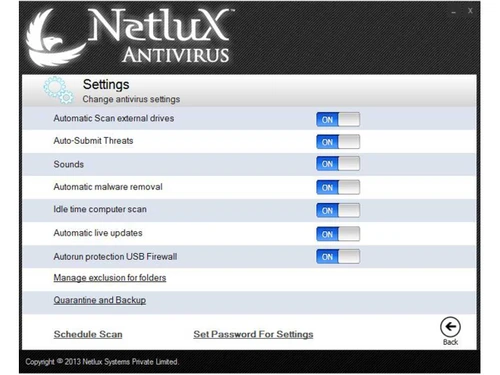
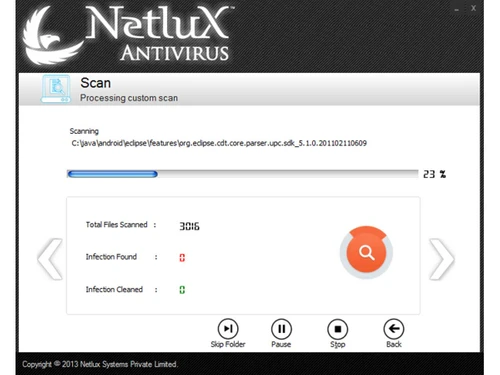
 Real-Time Threat Detection Multi-Layered Malware Detection Threat Removal and Quarantine Rootkit Detection & Removal Behavioral Analysis Exploit Prevention Heuristic Analysis Anti-Spyware USB Protection On-Demand & Scheduled Scanning
 Internet & Network Security
Web Protection & URL Filtering Firewall Protection IDS / IPS Protection Wi-Fi Security Email Protection Anti-Spam Filters Ad Blocker Advanced Threat Protection
File Rollback Ransomware Protection Application Whitelisting Behavioral Ransomware Protection Data Protection and Privacy
Webcam Protection Anti-Phishing & Identity Protection Data Encryption VPN (Virtual Private Network) Privacy Control Browser Privacy Tools Data Shredder Dark Web Monitoring Data Leak Prevention Device Performance and Optimization
System Optimization Tools Battery Saver Disk Cleanup and Junk File Removal Startup Manager Game Mode Network Performance Monitor Family and Parental Controls
Parental Control Activity Reports App Monitoring Geo-Fencing and Location Tracking Content Filtering Backup and Data Recovery
Automatic Backup Cloud Backup System Restore Options Administrative Features
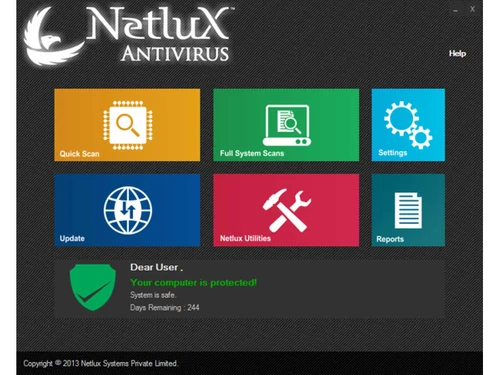
Compliance & Reporting User-Friendly Dashboard Remote Management Console Alerts & Notifications
Real-Time Threat Alerts Real-Time Updates Suspicious Activity Alerts Scan Results Notifications Ransomware Detection Alerts Phishing and Malicious Website Warnings Webcam and Microphone Access Warnings Network Security Alerts Location and Geo-Fencing Alerts Customizable Notifications  Windows
  Desktop
  Cloud-Based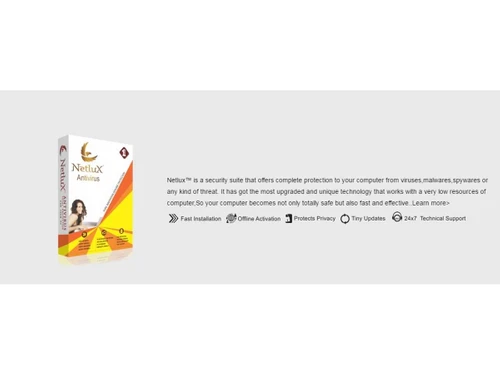
Small Business
Designed for startups and growing businesses
Medium Business
Built for business growth and flexibility
Enterprises
Designed for complex and large-scale business needs
4.1
Out of 5

Overall Rating
Based on
5 Verified Ratings
Rating Breakdown
80% Recommend this Product
Add ReviewTechjockey Trusted Reviews from Verified Users
No reviews are currently available for Netlux Antivirus. Discover similar Antivirus Software reviews

SiyanoAV Total Security
Whats great - Simple and easy to use, with fast real-time scanning, a clean dashboard, quiet background operation, and minimal impact on ev... read more

Bitdefender Antivirus Plus
Whats great - The purchase and activation process was quick and hassle-free, with fast license delivery, responsive support, competitive pr... read more

TotalAV Antivirus
Whats great - TotalAV and their regular updates have really made me feel confident that my protection is up to date. I do not think any fut... read more

Netlux Antivirus
₹ 253.39 excl. GST
Desktop
Mobile
Web based
On Premises
Windows
Mac OS

Quick Heal AntiVirus Pro
Price On Request
Desktop
Mobile
Web based
On Premises
Windows
Mac OS

Quick Heal Total Security
Price On Request
Desktop
Mobile
Web based
On Premises
Windows
Mac OS

Mcafee Antivirus
₹ 271
Desktop
Mobile
Web based
On Premises
Windows
Mac OS

Quick Heal Total Security for Android
₹ 127
Desktop
Mobile
Web based
On Premises
Windows
Mac OS

Kaspersky Plus
₹ 259
Desktop
Mobile
Web based
On Premises
Windows
Mac OS

SystMade Total Security
₹ 549
Desktop
Mobile
Web based
On Premises
Windows
Mac OS

Bitdefender Premium Security
Price On Request
Desktop
Mobile
Web based
On Premises
Windows
Mac OS

Net Protector Total Security for Linux
₹ 850
Desktop
Mobile
Web based
On Premises
Windows
Mac OS

AVG Ultimate
₹ 302
Desktop
Mobile
Web based
On Premises
Windows
Mac OS

Avast Antivirus
₹ 1199
Desktop
Mobile
Web based
On Premises
Windows
Mac OS
(0) Product(s) selected
Starting Price:
₹709 /Year ₹1,909
Starting Price:
₹549 ₹1,849
Starting Price:
₹2,999
Starting Price:
₹850 /User
Starting Price:
₹302 /Month
Starting Price:
₹1,515 /Month

Starting Price:
₹800 /Year

Starting Price:
₹799 /Year

Starting Price:
₹279 /Year ₹1,299

Starting Price:
₹2,570 /PC/Year

Starting Price:
€70 /Year




Netlux Antivirus pricing is available at INR 253 per year at Techjockey.com.
It detects, scans and prevents threats in real-time making your devices virus, malware and online-attack free.
Yes, Netlux Antivirus will help you spend some time using it without paying before making a decision to buy a plan.
Home users, small enterprisers and large world companies trust it to ensure good and successful protection against cyber-attacks.
Yes, it stops the ransomware attack and helps you not to lose your valuable data to hackers and lockdown.
Yes, depending on your plan, you can safeguard multiple devices including laptops, desktops, as well as servers.
No, Netlux Antivirus will work quietly in the background and not slow down your computer.
It checks on its own with up-to-date security definitions and safeguards you against emerging and changing online threats each day.
20,000+ Software Listed
Best Price Guranteed
Free Expert Consultation
2M+ Happy Customers
Terms and Condtions

Users with registered businesses can purchase goods from merchants on the platform to satisfy their business needs. Users are not permitted to utilize any products acquired through the platform for resale, advertising, business, or further distribution.
For each purchase made, users will receive a Tax Invoice (or 'GST invoice') that includes specific details such as:
the GSTIN of the user associated with their registered business, and
the specified Entity Name for their business.
It should be noted that not all products are eligible for GST Invoice. Only the products displayed by participating sellers with the 'GST-based Invoice Available' callout on the product description page would qualify.
Certain goods and services are not eligible to get a GST Invoice, including items with VAS, i.e., Value Added Services (e.g., Total Mobile Protection/Assured Buyback) and those involving an exchange offer at the time of purchase.
Users must ensure the accuracy of the GSTIN, and business entity name provided for the GST Invoice. Requests for corrections into GST Invoice would not be accommodated by Techjockey.com or any Seller, and any issues arising from user-provided information are the sole responsibility of users.
Techjockey.com is not liable for the GST Invoice or any associated input tax credit. To efficiently claim an input tax credit, users should select the registered place of business address as per the GST authority's data and follow the provisions of the GST Act and rules.
To claim an input tax credit, the delivery and billing addresses must match. Furthermore, input tax credits will not be granted if the delivery address and GSTIN on the invoice are from different states. In case of incorrect GST details provided during the order placement, the order will be canceled automatically.



