USA
USA UAE
UAESmall Business
Designed for startups and growing businesses


See More


Brand: Nmap
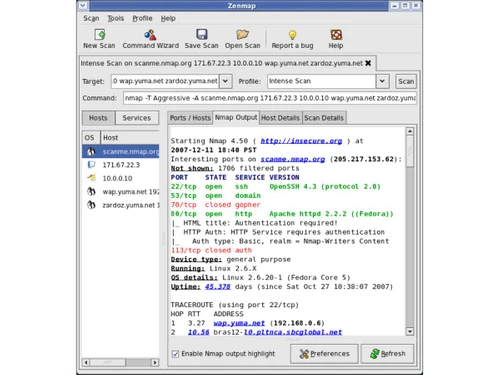
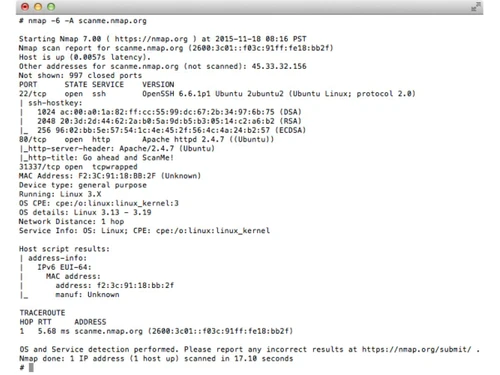
Nmap is a free network scanning tool used to discover devices, open ports, and security issues on a computer network.
See MoreHave you used Nmap before?
Share your insights for better experience
This Product is Available Free Forever.
Start instantly with no fees, no subscriptions, and no commitments.
Free Forever Plan
Get started immediately at no cost. Upgrade anytime if your business demand more.
Free Forever Port Scanning Service Version Detection OS Fingerprinting Host Discovery Nmap Scripting Engine (NSE) Network Mapping Tool Firewall and Filter Detection Stealth Scanning (SYN Scan) IPv6 Support Timing and Performance Controls Scriptable Output Formats Zenmap GUI Integration Ndiff Result Comparison Ncat Secure Networking Tool Nping Packet Generator
  Windows
  MacOS
MacOS  Linux
Linux  Desktop
  Perpetual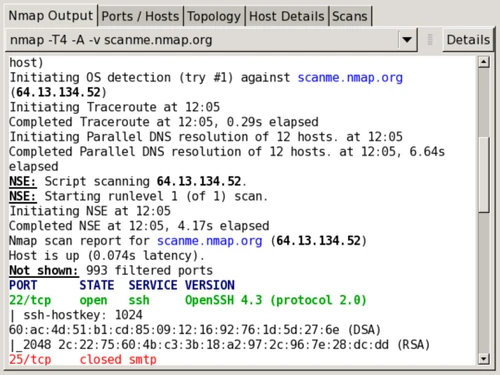
Small Business
Designed for startups and growing businesses
Medium Business
Built for business growth and flexibility
Enterprises
Designed for complex and large-scale business needs
4.2
Out of 5

Overall Rating
Based on
4 Verified Ratings
Rating Breakdown
80% Recommend this Product
Add ReviewTechjockey Trusted Reviews from Verified Users
No reviews are currently available for Nmap. Discover similar Network Security Solutions reviews

Nebtree
Whats great - I am thankful to Techjockey for suggesting this software. Not only does Nebtree provide insightful analytics of internet usag... read more

Net Protector Corporate Web Control
Whats great - It is useful in blocking entertainment websites, it works appropriately there is no issue in working. It is minimal complex, ... read more

TrackOFF
Whats great - Foils sites that track your online action utilizing fingerprinting. Effectively identifies following endeavors. Can clear tre... read more
Nmap
FREE
Desktop
Mobile
Web based
On Premises
Windows
Mac OS

Accops HySecure
Price On Request
Desktop
Mobile
Web based
On Premises
Windows
Mac OS

Aryaka
Price On Request
Desktop
Mobile
Web based
On Premises
Windows
Mac OS

Aircrack-ng
Price On Request
Desktop
Mobile
Web based
On Premises
Windows
Mac OS

Twingate
Price On Request
Desktop
Mobile
Web based
On Premises
Windows
Mac OS

Nexthink
Price On Request
Desktop
Mobile
Web based
On Premises
Windows
Mac OS

Smartguard
Price On Request
Desktop
Mobile
Web based
On Premises
Windows
Mac OS

CDN Pro
Price On Request
Desktop
Mobile
Web based
On Premises
Windows
Mac OS
Fortinet Secure SD-WAN
Price On Request
Desktop
Mobile
Web based
On Premises
Windows
Mac OS
Cisco Catalyst SD-WAN
Price On Request
Desktop
Mobile
Web based
On Premises
Windows
Mac OS

Juniper Security Director
Price On Request
Desktop
Mobile
Web based
On Premises
Windows
Mac OS
(0) Product(s) selected
Available
Price on Request
Starting Price:
$6 /Month
Available
Price on Request
Available
Price on Request
Available
Price on Request
Available
Price on Request
Available
Price on Request
Available
Price on Request

Available
Price on Request
Available
Price on Request

Available
Price on Request
Nmap price is available for FREE, as listed on techjockey.com.
No, Nmap does not offer a mobile app for iOS and Android.
Nmap works on Windows, Linux and MacOS.
Yes, Nmap is fully free to use, so no trial is required.
Nmap scans networks to detect connected devices, open ports, services, and security risks.
Network administrators, cybersecurity professionals, ethical hackers, and IT students.
Yes, the full version itself acts as a free demo.
Yes, Nmap is completely free and open-source software.
20,000+ Software Listed
Best Price Guranteed
Free Expert Consultation
2M+ Happy Customers
Terms and Condtions

Users with registered businesses can purchase goods from merchants on the platform to satisfy their business needs. Users are not permitted to utilize any products acquired through the platform for resale, advertising, business, or further distribution.
For each purchase made, users will receive a Tax Invoice (or 'GST invoice') that includes specific details such as:
the GSTIN of the user associated with their registered business, and
the specified Entity Name for their business.
It should be noted that not all products are eligible for GST Invoice. Only the products displayed by participating sellers with the 'GST-based Invoice Available' callout on the product description page would qualify.
Certain goods and services are not eligible to get a GST Invoice, including items with VAS, i.e., Value Added Services (e.g., Total Mobile Protection/Assured Buyback) and those involving an exchange offer at the time of purchase.
Users must ensure the accuracy of the GSTIN, and business entity name provided for the GST Invoice. Requests for corrections into GST Invoice would not be accommodated by Techjockey.com or any Seller, and any issues arising from user-provided information are the sole responsibility of users.
Techjockey.com is not liable for the GST Invoice or any associated input tax credit. To efficiently claim an input tax credit, users should select the registered place of business address as per the GST authority's data and follow the provisions of the GST Act and rules.
To claim an input tax credit, the delivery and billing addresses must match. Furthermore, input tax credits will not be granted if the delivery address and GSTIN on the invoice are from different states. In case of incorrect GST details provided during the order placement, the order will be canceled automatically.