linkedin
OneUp logo
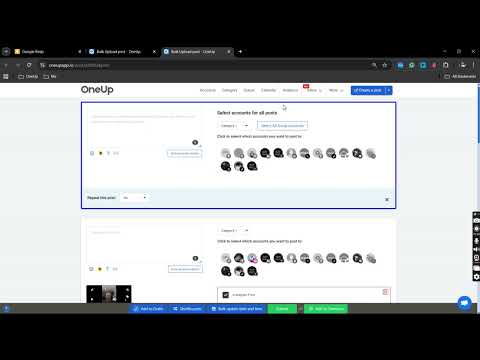
play How to Bulk Schedule Instagram Reels
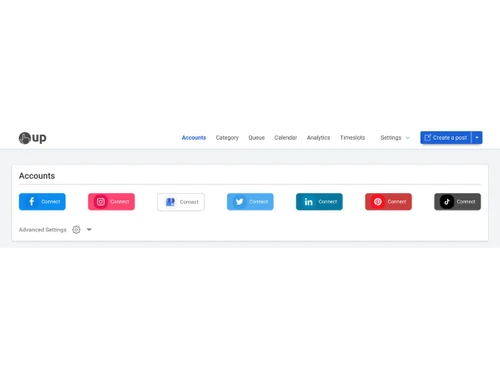
OneUp-connect account
OneUp-create post

OneUp

Brand: OneUp

  • No Ratings & Reviews

OneUp is a social media management tool that helps users schedule, publish, and manage posts across multiple social media platforms from one dashboard.

See More

Have you used OneUp before?

Share your insights for better experience

Add a Review
Starting Price
$18

View plans

100% Genuine
Products
Best Price
Guaranteed
Safe & Secure
Payment
  • Description

  • Pricing

  • Features

  • Specification

  • Review

  • Compare

  • Alternatives

  • FAQ

Starting at $18

OneUp Software Overview

What is OneUp?

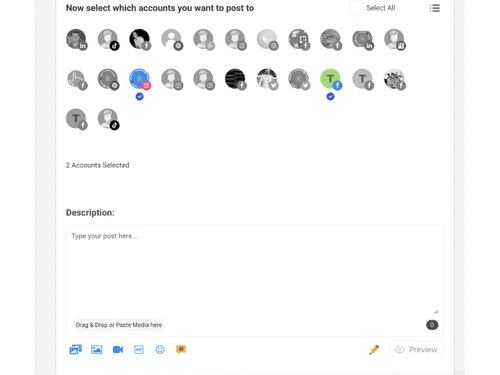
OneUp is a social media management tool that helps people manage many social media accounts from one place. It allows users to create, schedule, and automatically publish posts on platforms like Facebook, Instagram, LinkedIn, X, TikTok, Pinterest, YouTube, and Google Business Profile.

The software is designed for businesses, agencies, creators, and marketers who want to save time and stay active online. OneUp offers features like post scheduling, repeating posts, analytics, social inbox, team collaboration, approval workflows, and content calendar view.

Users can also upload posts in bulk, create captions with AI, and design graphics through Canva integration. It supports Instagram Reels, Stories, TikTok videos, and X threads. The platform helps users organize content, track engagement, and manage multiple clients easily. OneUp is known for its simple interface, automation tools, and affordable pricing plans for social media management.

Why Choose OneUp Software?

  • Multi-Platform Scheduling: Manage and schedule posts for multiple social media platforms from one dashboard.
  • Easy-to-Use Interface: Offers a clean and user-friendly interface suitable for beginners and professionals.
  • Automated Posting: Automatically publishes content at scheduled times without manual effort.
  • AI Caption Generator: Helps create engaging captions and post ideas using AI-powered tools.
  • Social Media Analytics: Provides insights and performance reports to track engagement and growth.
  • Supports Major Platforms: Works with Instagram, Facebook, LinkedIn, TikTok, Pinterest, YouTube, and X.
  • Bulk Scheduling Feature: Upload and schedule multiple posts at once to save time.
  • Team Collaboration Tools: Allows teams to collaborate, review, and manage social content together.
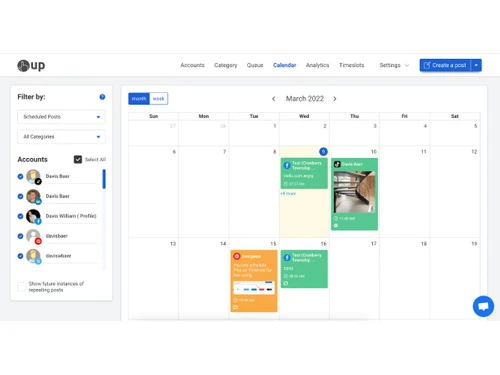
  • Calendar View: Visual content calendar helps organize and plan marketing campaigns easily.
  • Post Recycling: Automatically repost evergreen content to keep profiles active.

Benefits of OneUp Software

  • Media Management: Store and organize images, videos, and other content in one place.
  • Custom Scheduling Options: Choose the best posting times for better audience engagement.
  • Hashtag Management: Save and reuse hashtag groups for faster content creation.
  • Affordable Pricing Plans: Provides budget-friendly plans suitable for startups and small businesses.
  • Mobile Accessibility: Manage social media accounts from mobile devices anytime, anywhere.
  • Engagement Management: Reply to comments and messages directly from the platform.
  • Time-Saving Automation: Reduces repetitive social media tasks through smart automation.
  • Supports Agencies: Ideal for marketing agencies handling multiple client accounts.
  • Reliable Cloud-Based Platform: Access the software securely from any device with internet connectivity.

OneUp Pricing

OneUp price starts at USD 18 at techjockey.com.

The pricing model is based on different parameters, including extra features, deployment type, and the total number of users. For further queries related to the product, you can contact our product team and learn more about the pricing and offers.

Read more

OneUp Company Details

Founded Year:  2017

Schedule and recycle your content on Facebook, Twitter, Pinterest, LinkedIn, and Google+. Save yourself hours every week.

Director/Founders Davis Baer, Vishal Kumar
Company Size 1-100 Employees

OneUp Pricing & Plans

Starter
Starting at $18
    • Licenses

      Licenses
      Licenses
    • Monthly

      Monthly
      Monthly

Key Features

  • 10 Social Accounts

  • 150 Scheduled Posts

  • No add'l Team Members

  • Facebook (Posts, Reels, Stories)

  • Multi-image posts

Intermediate
Starting at $60
    • Licenses

      Licenses
      Licenses
    • Monthly

      Monthly
      Monthly

Key Features

  • 15 Social Accounts

  • Unlimited Scheduled Posts

  • 2 add'l Team Members

  • Facebook (Posts, Reels, Stories)

  • Multi-image posts

Growth
Starting at $120
    • Licenses

      Licenses
      Licenses
    • Monthly

      Monthly
      Monthly

Key Features

  • 30 Social Accounts

  • Unlimited Scheduled Posts

  • 8 add'l Team Members

  • Facebook (Posts, Reels, Stories)

  • Multi-image posts

Business
Starting at $300
    • Licenses

      Licenses
      Licenses
    • Monthly

      Monthly
      Monthly

Key Features

  • Unlimited Social Accounts

  • Unlimited Scheduled Posts

  • Unlimited Team Members

  • Facebook (Posts, Reels, Stories)

  • Multi-image posts

OneUp Features

  • icon_check Scheduling
    Schedule posts across multiple social networks in advance using a unified calendar and time-based automation.
  • icon_check Multi-Platform Support
    Publish content simultaneously to Facebook, Instagram, X, LinkedIn, TikTok, and more from one dashboard.
  • icon_check Content Recycling
    Automatically reshare evergreen posts at predefined intervals to maximize reach and engagement.
  • icon_check Bulk Uploading
    Upload and schedule hundreds of posts at once using CSV files or spreadsheets to save time.
  • icon_check Media Library
    Store, organize, and reuse images and videos in a centralized library for faster content creation.
  • icon_check Team Collaboration
    Collaborate with team members using shared access, role permissions, and approval workflows.
  • icon_check Approval Workflow
    Enable content approval processes to ensure posts meet brand and compliance standards before publishing.
  • icon_check Social Inbox
    Manage comments, messages, and reviews from multiple social platforms in a single inbox view.
  • icon_check Analytics & Reporting
    Track post performance, engagement metrics, and growth trends with built-in analytics dashboards.
  • icon_check URL Shortener
    Shorten links and track clicks to measure campaign effectiveness across social channels.
  • icon_check Canva Integration
    Design social media graphics directly within the platform using integrated Canva tools.
  • icon_check Calendar View
    Visualize all scheduled posts in a calendar layout for better planning and content consistency.
  • icon_check API Access
    Integrate OneUp with third-party apps and workflows using secure and flexible API endpoints.
  • icon_check Account Management
    Manage multiple brands or clients from one account with separate workspaces and permissions.
OneUp Demo Video play icon

Get OneUp Demo

Watch the demo video to explore key features, real workflows, and how the software fits your business needs.

Understand
Key Features
Personal
Demo Insights
Interactive
Demo Support

OneUp Specifications

Supported Platforms
Windows Windows iOS iOS Android Android MacOS MacOS
Devices
Desktop Desktop
Deployment
Cloud-Based Cloud-Based
Suitable For
All Industries
Business Specific
All Businesses
Business Size
Small Business Startups Medium Business Enterprises
Customer Support
Email Communities
Language
English
Training Resources
Videos

Explore the Best Alternative Solutions Similar to Your Business Size and Needs

OneUp Review

Techjockey Trusted Reviews from Verified Users

No reviews are currently available for OneUp. Discover similar Social Media Management Tools reviews

  • Antler

    4.5

    Whats great - Ideal for first-time or idea-stage founders read more

  • Publer

    4.4

    Whats great - Supports various content types, integrates with multiple platforms, reliable performance read more

  • Hootsuite

    3.9

    Whats great - Hootsuite is incredibly easy to user, allows quick scheduling, posting, and monitoring. This software also provides detailed ... read more
Compare OneUp With other Social Media Management Tools

Products
Ratings
Pricing
Device Supported
Deployment
Supported Platforms
  • img

    OneUp

  • Price On Request

  • Desktop

    Mobile

  • Web based

    On Premises

  • Windows

    Mac OS

  • img

    Hootsuite

  • 4.1

  • ₹ 2600

  • Desktop

    Mobile

  • Web based

    On Premises

  • Windows

    Mac OS

  • img

    MySampark

  • 5

  • Price On Request

  • Desktop

    Mobile

  • Web based

    On Premises

  • Windows

    Mac OS

  • img

    Loomly

  • 4.0

  • Price On Request

  • Desktop

    Mobile

  • Web based

    On Premises

  • Windows

    Mac OS

  • img

    Inflact

  • 4.4

  • Price On Request

  • Desktop

    Mobile

  • Web based

    On Premises

  • Windows

    Mac OS

  • img

    TubeBuddy

  • 4.5

  • Price On Request

  • Desktop

    Mobile

  • Web based

    On Premises

  • Windows

    Mac OS

  • img

    Predis AI

  • 4.5

  • Price On Request

  • Desktop

    Mobile

  • Web based

    On Premises

  • Windows

    Mac OS

  • img

    Zoho Social

  • 4.6

  • ₹ 900

  • Desktop

    Mobile

  • Web based

    On Premises

  • Windows

    Mac OS

  • img

    Postly

  • 4.3

  • Price On Request

  • Desktop

    Mobile

  • Web based

    On Premises

  • Windows

    Mac OS

  • img

    Buffer

  • 4.7

  • Price On Request

  • Desktop

    Mobile

  • Web based

    On Premises

  • Windows

    Mac OS

  • img

    Postiz

  • 4.5

  • Price On Request

  • Desktop

    Mobile

  • Web based

    On Premises

  • Windows

    Mac OS

(0) Product(s) selected

OneUp Alternatives

See All OneUp Alternatives

Starting Price:

$65 /Month

Starting Price:

$4 /Month

Starting Price:

$29 /Month

Starting Price:

$29 /Month

Starting Price:

$1,249
Starting Price:

$30 /Month
Orlo

4.1

Available

Price on Request

Starting Price:

$37 /Month

Starting Price:

$49 /Month
Articles for OneUp

See All Related Articles

How much does OneUp Software cost?

OneUp pricing starts at USD 18 on techjockey.

Is there a mobile app available for OneUp Software?

Yes, OneUp Software offers mobile apps on iOS and Android.

Which operating systems are compatible with OneUp Software?

OneUp Software is web-based and works on Windows, macOS, Android, and iOS devices.

Does OneUp Software offer a free trial?

Yes, OneUp Software provides a free trial for new users.

How does OneUp Software function?

OneUp Software helps users schedule, automate, publish, and manage social media content from one platform.

Who uses OneUp Software?

Businesses, marketers, content creators, agencies, and social media managers use OneUp Software.

Is a free demo available for OneUp Software?

Yes, users can explore OneUp Software through a demo or trial version.

Is OneUp Software available for free?

OneUp Software offers limited free access and paid subscription plans with advanced features.

20,000+ Software Listed

Best Price Guranteed

Free Expert Consultation

2M+ Happy Customers

Terms and Condtions

close

Users with registered businesses can purchase goods from merchants on the platform to satisfy their business needs. Users are not permitted to utilize any products acquired through the platform for resale, advertising, business, or further distribution.

For each purchase made, users will receive a Tax Invoice (or 'GST invoice') that includes specific details such as:

  • the GSTIN of the user associated with their registered business, and

  • the specified Entity Name for their business.

It should be noted that not all products are eligible for GST Invoice. Only the products displayed by participating sellers with the 'GST-based Invoice Available' callout on the product description page would qualify.

Certain goods and services are not eligible to get a GST Invoice, including items with VAS, i.e., Value Added Services (e.g., Total Mobile Protection/Assured Buyback) and those involving an exchange offer at the time of purchase.

Users must ensure the accuracy of the GSTIN, and business entity name provided for the GST Invoice. Requests for corrections into GST Invoice would not be accommodated by Techjockey.com or any Seller, and any issues arising from user-provided information are the sole responsibility of users.

Techjockey.com is not liable for the GST Invoice or any associated input tax credit. To efficiently claim an input tax credit, users should select the registered place of business address as per the GST authority's data and follow the provisions of the GST Act and rules.

To claim an input tax credit, the delivery and billing addresses must match. Furthermore, input tax credits will not be granted if the delivery address and GSTIN on the invoice are from different states. In case of incorrect GST details provided during the order placement, the order will be canceled automatically.