linkedin
Onshape logo
play What is Onshape?
onshape-design
onshape-image

Onshape

Brand: ONSHAPE

  • 4.5

  • 3 Ratings

OnShape CAD Software offers powerful 3D modelling and collaborative design tools for seamless product development and efficient teamwork.

See More

Have you used Onshape before?

Share your insights for better experience

Add a Review
Starting Price
$1500

View plans

100% Genuine
Products
Best Price
Guaranteed
Safe & Secure
Payment
  • Description

  • Pricing

  • Features

  • Specification

  • Review

  • Compare

  • Alternatives

  • FAQ

Starting at $1,500

Onshape Software Overview

What is OnShape Software?

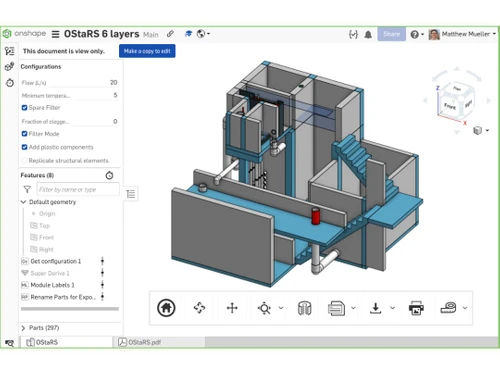
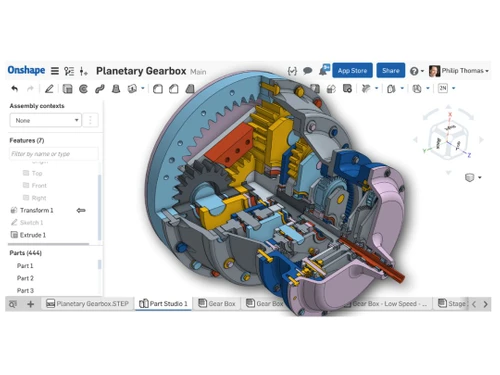
Onshape, a 3D CAD software, empowers agile design and engineering teams with comprehensive capabilities for modelling parts and assemblies and creating production drawings. It facilitates efficient collaboration and version control to ensure teams can work on the same data simultaneously without risking data loss or duplication, thereby compressing design cycles.

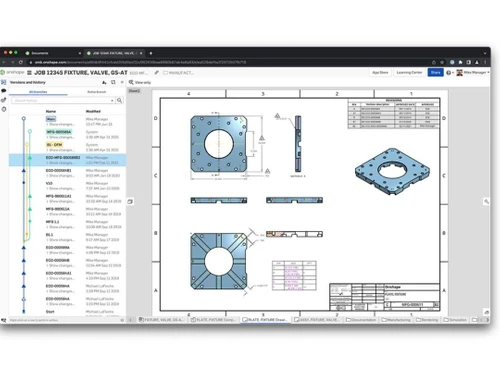
The software allows automatic recording of all design steps, creating a meticulous audit trail of changes, including specifics of alterations and their respective authors. This enables users to restore previous design versions, compare variations, and rectify errors. Access permissions are flexible, offering the ability to edit or revoke permissions at any time, with automatic notifications for shared documents, versions, and comments.

It offers FeatureScript, an open-source programming language to craft custom features to tailor their CAD experience. The software ensures seamless integration by reading native CAD data from applications like SOLIDWORKS®, Rhinoceros®, CATIA®, Creo®, Autodesk Inventor®, and Autodesk AutoCAD®. Additionally, it can write native SOLIDWORKS®, Rhinoceros®, and AutoCAD® data, ensuring compatibility across various CAD ecosystems.

Why Choose OnShape Software?

OnShape provides validation tools to check designs for errors to ensure they meet design specifications and standards. Users can quickly modify imported geometry with direct editing tools to simplify design changes. The CAD software includes a part library with standard components and fasteners to save time in design and ensure accuracy. It allows users to easily reuse and repurpose existing design elements to enhance efficiency in creating new assemblies.

The CAD platform offers advanced revision management tools to track and manage design changes. Users can compare different design versions, enabling thorough analysis of changes and improvements. The software allows users to perform structural and thermal analyses directly within the platform. Users can translate and work with CAD files from various software applications to ensure seamless collaboration with external partners. The software enables the creation and management of complex assemblies with multiple components.

Benefits of OnShape CAD Software

  • The CAD software allows users to create and customize their design features and functionalities using FeatureScript, enhancing design flexibility.
  • It supports parametric modelling, allowing users to create designs with defined parameters that can be easily adjusted.
  • The platform includes specialized tools for sheet metal design to streamline the creation of sheet metal components.
  • Users can work simultaneously on solid and sheet metal parts within the same design.
  • It provides tools for creating detailed 2D drawings and adding annotations to communicate design intent.

OnShape Pricing

OnShape pricing starts from $1500 at techjockey.com.

The pricing model is based on different parameters, including extra features, deployment type, and total users. For further queries related to the product, you can contact our product team and learn more about the pricing and offers.

Read more

ONSHAPE Company Details

Founded Year:  2012

Onshape is a next-generation SaaS design platform that speeds up product development. It’s an all-in-one system that combines CAD, release management, workflow, collaboration, analytics, admin tools, and an API with more than 50 engineering applications.

Director/Founders David Corcoran, John McEleney, Jon Hirschtick, Scott Harris, Tommy Li
Company Size 101-500 Employees

Onshape Pricing & Plans

Standard
Starting at $1500
    • Users

      Users
      Users
    • Yearly

      Yearly
      Yearly

Key Features

  • Commercial Use

  • Private Documents

  • Part & Assembly Modeling

  • Surfacing

  • Mixed Modeling

  • Sheet Metal

  • Frames

  • Drawings

  • In-Context Editing

  • Assembly Mates

Professional
Starting at $2500
    • Users

      Users
      Users
    • Yearly

      Yearly
      Yearly

Key Features

  • Commercial Use

  • Private Documents

  • Part & Assembly Modeling

  • Surfacing

  • Mixed Modeling

  • Sheet Metal

  • Frames

  • Drawings

  • Managed In-Context Editing

  • Access Anywhere

Onshape Features

  • icon_check Data Management
    Allows you to efficiently organize and control design data throughout product development.
  • icon_check Collaboration
    Enables real-time collaboration among team members to enhance communication.
  • icon_check Workflow
    Allows teams to work concurrently, make changes seamlessly, and maintain a clear revision history.
  • icon_check Assemblies
    Offers powerful assembly modelling tools to easily create and manage complex product assemblies.
  • icon_check Bill of Material
    Users can generate and manage detailed bills of materials to streamline the documentation.
  • icon_check Configuration
    Allows the creation and management of design configurations to facilitate the exploration of design alternatives.
  • icon_check Analytics
    Offers features that provide insights into design performance and collaboration metrics.
  • icon_check Integrations
    Seamlessly integrates with other design and engineering tools to enhance its versatility and compatibility.
  • icon_check Support
    Provides customer support and resources to assist users in maximizing the software's capabilities.
  • icon_check Security
    Employs robust measures to protect sensitive design data and intellectual property.
Onshape Demo Video play icon

Get Onshape Demo

Watch the demo video to explore key features, real workflows, and how the software fits your business needs.

Understand
Key Features
Personal
Demo Insights
Interactive
Demo Support

Onshape Specifications

Supported Platforms
Ubuntu Ubuntu Windows Windows iOS iOS Android Android MacOS MacOS Linux Linux
Devices
Desktop Desktop Mobile Mobile Tablet Tablet iPad iPad
Deployment
Cloud-Based Cloud-Based
Suitable For
All Industries
Business Specific
All Businesses
Business Size
Small Business Startups Medium Business Enterprises SMBs SMEs MSMBs MSMEs
Customer Support
Email Live Chat Communities Forums
Language
Nederlands English français Italiano 日本人
Integration
API Integration
Training Resources
Documentation Videos

Explore the Best Alternative Solutions Similar to Your Business Size and Needs

Onshape Review

4.5

Out of 5

img

Overall Rating

Based on
3 Verified Ratings

Rating Breakdown

  • Features 4.3
  • Value for Money 5
  • Ease of Use 4.5
  • Customer Support 4.3

86% Recommend this Product

Add Review

Techjockey Trusted Reviews from Verified Users

No reviews are currently available for Onshape. Discover similar CAD Software reviews

  • Tinkercad

    4.9

    Whats great - One of the best experiences I had with Tinkercad is its ability to provide primitive shapes that I could easily drag out, man... read more

  • Autocad Mechanical

    4.6

    Whats great - As same as customary autocad I like all the visual enhancements in most recent form, for the most part I like the best approa... read more
  • Autodesk Autocad Mobile App

    4.6

    Whats great - AutoCAD portable (once in the past AutoCAD 360) is a simple to utilize drawing and drafting application from Autodesk. It tha... read more

Compare Onshape With other CAD Software

Products
Ratings
Pricing
Device Supported
Deployment
Supported Platforms
  • img

    Onshape

  • 4.5

  • Price On Request

  • Desktop

    Mobile

  • Web based

    On Premises

  • Windows

    Mac OS

  • img

    Solid Edge

  • 4.6

  • Price On Request

  • Desktop

    Mobile

  • Web based

    On Premises

  • Windows

    Mac OS

  • img

    Autodesk AutoCAD

  • 4.7

  • ₹ 16520

  • Desktop

    Mobile

  • Web based

    On Premises

  • Windows

    Mac OS

  • img

    Siemens NX

  • 4.7

  • ₹ 623869

  • Desktop

    Mobile

  • Web based

    On Premises

  • Windows

    Mac OS

  • img

    AutoCAD LT

  • 4.4

  • ₹ 4720

  • Desktop

    Mobile

  • Web based

    On Premises

  • Windows

    Mac OS

  • img

    CADMATE

  • 4.3

  • ₹ 25000

  • Desktop

    Mobile

  • Web based

    On Premises

  • Windows

    Mac OS

  • img

    progeCAD

  • 4.3

  • Price On Request

  • Desktop

    Mobile

  • Web based

    On Premises

  • Windows

    Mac OS

  • img

    MicroStation

  • 4.1

  • ₹ 121046

  • Desktop

    Mobile

  • Web based

    On Premises

  • Windows

    Mac OS

  • img

    Visao

  • 4.1

  • Price On Request

  • Desktop

    Mobile

  • Web based

    On Premises

  • Windows

    Mac OS

  • img

    Shapr3D

  • 4.6

  • Price On Request

  • Desktop

    Mobile

  • Web based

    On Premises

  • Windows

    Mac OS

  • img

    KOMPAS-3D

  • 4.4

  • Price On Request

  • Desktop

    Mobile

  • Web based

    On Premises

  • Windows

    Mac OS

(0) Product(s) selected

Onshape Alternatives

See All Onshape Alternatives

Available

Price on Request

Starting Price:

$38 /Seat/Month

Starting Price:

$15 /Month

Starting Price:

$70 /License

QCAD

4.5

Starting Price:

€41 /Quantity

Starting Price:

$70 /License

Starting Price:

$100 /Quantity

Starting Price:

$25 /Quantity

Which operating system does OnShape CAD Software support?

OnShape CAD Software is compatible with Windows and macOS operating systems.

Is there any OnShape CAD App?

The OnShape CAD app is unavailable on Android and iOS devices.

What is the deployment type of OnShape CAD Software?

OnShape CAD Software supports web-based deployment.

How much does OnShape CAD Software cost?

OnShape CAD Software pricing starts from $1500 at techjockey.com

Who are the potential users of OnShape CAD Platform?

Onshape CAD platform is accessible to students, educators, and professionals alike, making it suitable for anyone needing a user-friendly, browser-based CAD platform for 3D design and collaboration.

Is there any free trial or demo for OnShape CAD Software?

OnShape CAD Software demo is available for free with techjockey.com.

Is OnShape CAD Software free?

OnShape CAD Software doesn't offer a free trial.

How can you download OnShape CAD Software?

OnShape CAD Software’s installation is not required, as it is web-based. Just open the Setup Wizard to get started.

How does OnShape CAD Software work?

Onshape is a user-friendly, open-source CAD platform accessible on any web-connected device. It provides a collaborative environment for students and educators, allowing them to easily design and model 3D objects. Its versatility and accessibility make it a valuable tool for machine designers and engineers to create and collaborate on projects.

20,000+ Software Listed

Best Price Guranteed

Free Expert Consultation

2M+ Happy Customers

Terms and Condtions

close

Users with registered businesses can purchase goods from merchants on the platform to satisfy their business needs. Users are not permitted to utilize any products acquired through the platform for resale, advertising, business, or further distribution.

For each purchase made, users will receive a Tax Invoice (or 'GST invoice') that includes specific details such as:

  • the GSTIN of the user associated with their registered business, and

  • the specified Entity Name for their business.

It should be noted that not all products are eligible for GST Invoice. Only the products displayed by participating sellers with the 'GST-based Invoice Available' callout on the product description page would qualify.

Certain goods and services are not eligible to get a GST Invoice, including items with VAS, i.e., Value Added Services (e.g., Total Mobile Protection/Assured Buyback) and those involving an exchange offer at the time of purchase.

Users must ensure the accuracy of the GSTIN, and business entity name provided for the GST Invoice. Requests for corrections into GST Invoice would not be accommodated by Techjockey.com or any Seller, and any issues arising from user-provided information are the sole responsibility of users.

Techjockey.com is not liable for the GST Invoice or any associated input tax credit. To efficiently claim an input tax credit, users should select the registered place of business address as per the GST authority's data and follow the provisions of the GST Act and rules.

To claim an input tax credit, the delivery and billing addresses must match. Furthermore, input tax credits will not be granted if the delivery address and GSTIN on the invoice are from different states. In case of incorrect GST details provided during the order placement, the order will be canceled automatically.