linkedin
Panatracker logo
play Panatracker Intro Video
Panatracker item
Panatracker unit

Panatracker

Brand: Panatracker

  • 4.4

  • 4 Ratings

Track your cows effortlessly with Panatracker cloud-based software, providing real-time insights into your cattle operations for improved management and profitability.

See More

Have you used Panatracker before?

Share your insights for better experience

Add a Review

Price Available on Request

Questions about pricing or customization? We’re here to help, just a click away.

100% Genuine
Products
Best Price
Guaranteed
Safe & Secure
Payment
  • Description

  • Pricing

  • Features

  • Specification

  • Review

  • Compare

  • Alternatives

  • FAQ

Panatracker Software Overview

What is Panatracker?

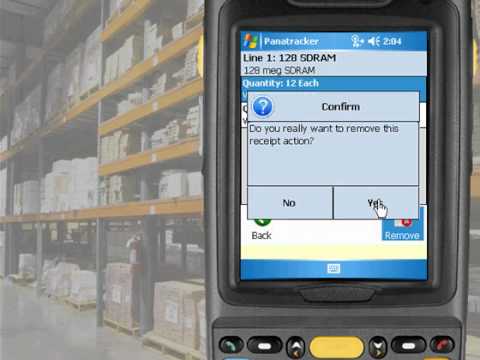
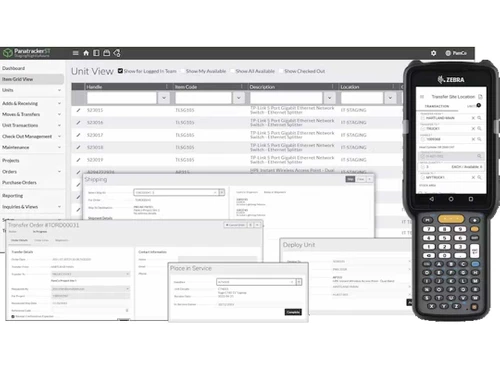
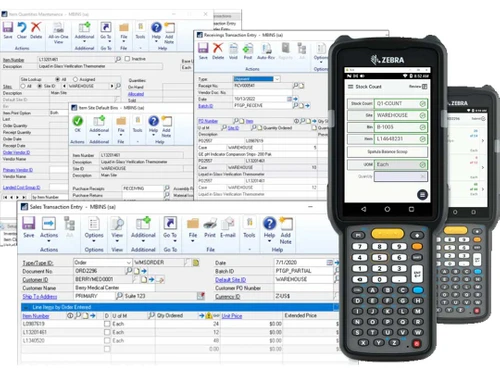
Panatracker is a comprehensive software solution that helps businesses manage their retail operations, from inventory tracking to barcode printing. It simplifies retail processes, improves efficiency, and enhances customer satisfaction. Panatracker streamlines retail tasks, making them easier and faster to complete. This frees up time for retailers to focus on other important aspects of their business, such as customer service and marketing.

Panatracker also helps retailers provide better customer service by giving them real-time access to inventory information. This means that retailers can quickly and accurately answer customer questions about product availability and pricing.

Why Choose Panatracker Barcode Printing Software?

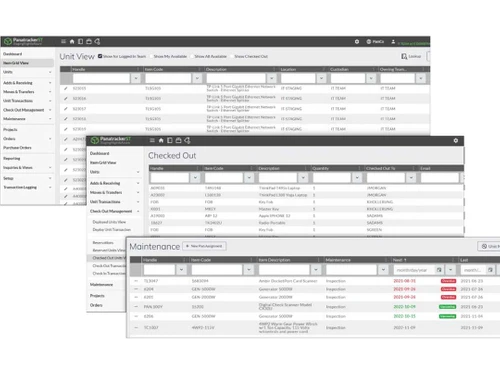
  • Advanced Inventory Management: Seamlessly integrate barcoding and RFID technology for precise inventory tracking. Establish item templates to simplify product setup and guarantee data consistency. Maintain a comprehensive audit trail to trace data changes for accountability.
  • Seamless Data Exchange: Import and export data effortlessly to connect with external systems and facilitate information sharing.
  • Barcoding & RFID Integration: Seamlessly integrate barcoding and RFID technology for accurate and efficient inventory management.
  • Item Templates: Create and manage item templates to streamline product setup and ensure consistent data entry.
  • Audit History: Track all changes made to data, providing a complete audit trail for enhanced accountability.
  • Data Import/Export: Easily import and export data to integrate with other systems and share information seamlessly.
  • Automated Email Notifications: Set up automated email notifications to stay informed about inventory levels, orders, and other important events.
  • Transaction Hooks: Utilise transaction hooks to trigger specific actions based on transactions, such as sending notifications or updating inventory records.
  • Comprehensive Barcode Tracking: Accurately monitor barcoded items throughout the retail workflow, from receiving to sales transactions.

Benefits of Panatracker Software

  • Improved Inventory Management: Gain real-time visibility into inventory levels to prevent stockouts and overstocking. Reduce manual errors and improve data accuracy through automated processes, such as barcode scanning and inventory tracking software.
  • Enhanced Efficiency: Streamline workflows and automate repetitive tasks, such as order processing and invoice generation. Save time and reduce the risk of errors by automating data entry and validation processes. Improve communication and collaboration between team members by providing real-time access to inventory and customer information.
  • Track and receive alerts: Track inventory levels across multiple locations and warehouses to optimise stock allocation and minimise waste.Receive alerts when inventory levels fall below predefined thresholds to ensure timely replenishment.
  • Increased Accuracy: Ensure accurate data entry and tracking throughout the retail process, from receiving to sales. Eliminate discrepancies and improve data integrity by using barcode scanners and inventory management software. Improve decision-making by relying on reliable and up-to-date inventory information.
  • Improved Customer Service: Respond quickly and accurately to customer inquiries about product availability and pricing. Fulfil orders efficiently by providing accurate and up-to-date inventory information to warehouse staff.
  • Customer experience analysis: Track customer purchase history and preferences to offer personalised recommendations and promotions.
  • Compliance and Security: Meet industry regulations and protect sensitive data by implementing robust security measures.
  • Data protection: Comply with data protection laws and regulations, such as GDPR and HIPAA. Implement access controls and encryption to protect customer and business data from unauthorised access.

Pricing Of Panatracker

Panatracker pricing is available on request at techjockey.com.

The pricing model is based on different parameters, including extra features, deployment type, and the total number of users. For further queries related to the product, you can contact our product team to learn more about the pricing and offers.

Read more

Panatracker Company Details

Founded Year:  2004

Panatrack creates innovative software for tracking inventory and assets. Focusing on the efficiency and accuracy achieved by barcode and mobile technology, we create solutions to track items and capture the transactions that are critical to efficient business operations.

Director/Founders Panatrack
Company Size 1-100 Employees

Panatracker Pricing & Plans

Looking for The Right Pricing?

Share your requirements and get a plan built around your business.

  • Define your business needs
  • Get customised pricing
  • Choose features that fit your workflow

Price Available on Request

Get personalised Panatracker pricing that fits your needs. Our team will connect with you.

Panatracker Features

  • icon_check Barcoding/RFID
    Integrate barcoding and RFID technology for efficient inventory management.
  • icon_check Item Templates
    Create and manage item templates for consistent product setup.
  • icon_check Audit History
    Track data changes for enhanced accountability.
  • icon_check Data Import/Export
    Seamlessly import and export data for integration and data sharing.
  • icon_check Label Printing
    Generate custom barcode labels for accurate product identification.
  • icon_check Automated Email Notifications
    Stay informed about inventory and other events with automated email notifications.
  • icon_check Transaction Hooks
    Customise the software to trigger specific actions based on transactions.
  • icon_check Barcode Tracking
    Accurately track barcoded items throughout the retail process.
Panatracker Demo Video play icon

Get Panatracker Demo

Watch the demo video to explore key features, real workflows, and how the software fits your business needs.

Understand
Key Features
Personal
Demo Insights
Interactive
Demo Support

Panatracker Specifications

Supported Platforms
Windows Windows iOS iOS Android Android
Devices
Desktop Desktop Mobile Mobile iPad iPad
Deployment
Cloud-Based Cloud-Based
Suitable For
All Industries
Business Specific
All Businesses
Business Size
Small Business Medium Business SMBs SMEs
Customer Support
Phone Email Live Chat Forums
Language
English
Training Resources
In Person Live Online Webinars Documentation

Panatracker Review

4.4

Out of 5

img

Overall Rating

Based on
4 Verified Ratings

Rating Breakdown

  • Features 4.6
  • Value for Money 4.5
  • Ease of Use 4.5
  • Customer Support 4

90% Recommend this Product

Add Review

Techjockey Trusted Reviews from Verified Users

No reviews are currently available for Panatracker. Discover similar Barcode Printing Software reviews

  • NiceLabel Designer

    4.5

    Whats great - NiceLabel Designer makes automated digit calculation checks to make sure that the most accurate barcode has been generated. A... read more

  • Seagull BarTender

    5.0

    Whats great - What a fantastic service 10/10 I've since signed up with them. read more

  • Zoho Inventory

    4.4

    Whats great - Zoho Inventory is an incredible asset that permits us a sufficient and institutionalized order of our substance tests, changi... read more

Compare Panatracker With other Barcode Printing Software

Products
Ratings
Pricing
Device Supported
Deployment
Supported Platforms
  • img

    Panatracker

  • 4.4

  • Price On Request

  • Desktop

    Mobile

  • Web based

    On Premises

  • Windows

    Mac OS

  • img

    NiceLabel Designer

  • 4.4

  • Price On Request

  • Desktop

    Mobile

  • Web based

    On Premises

  • Windows

    Mac OS

  • img

    Codesoft

  • 4.7

  • Price On Request

  • Desktop

    Mobile

  • Web based

    On Premises

  • Windows

    Mac OS

  • img

    EasyLabel

  • 4.0

  • Price On Request

  • Desktop

    Mobile

  • Web based

    On Premises

  • Windows

    Mac OS

  • img

    iBarcoder

  • 4.2

  • Price On Request

  • Desktop

    Mobile

  • Web based

    On Premises

  • Windows

    Mac OS

  • img

    Barcode Producer

  • 4.4

  • Price On Request

  • Desktop

    Mobile

  • Web based

    On Premises

  • Windows

    Mac OS

  • img

    Label Flow

  • 4.0

  • Price On Request

  • Desktop

    Mobile

  • Web based

    On Premises

  • Windows

    Mac OS

  • img

    BarCloud

  • 4.2

  • Price On Request

  • Desktop

    Mobile

  • Web based

    On Premises

  • Windows

    Mac OS

  • img

    TFORMer Designer

  • 3.9

  • Price On Request

  • Desktop

    Mobile

  • Web based

    On Premises

  • Windows

    Mac OS

  • img

    Labelterm

  • 4.2

  • Price On Request

  • Desktop

    Mobile

  • Web based

    On Premises

  • Windows

    Mac OS

(0) Product(s) selected

Panatracker Alternatives

See All Panatracker Alternatives

Available

Price on Request

Starting Price:

$245 /License

Starting Price:

$50 /Quantity

Available

Price on Request

Available

Price on Request

Available

Price on Request

Starting Price:

$299 /License

Articles for Panatracker

See All Related Articles

Which operating system does Panatracker Barcode Printing Software Support?

Panatracker Software supports Windows, iOS, and Android operating systems.

Is there any Panatracker Barcode Printing Software App?

Panatracker Software does not offer any app for Android and iOS devices.

What is the deployment type of Panatracker Barcode Printing Software?

Panatracker Software supports web-based deployment.

How much does Panatracker Software Cost?

Panatracker Software pricing is available on request at techjockey.com.

Who are the potential users of Panatracker Barcode Printing Software?

Panatracker Software is designed for businesses like Stores, Multi Brand outlets, particularly those looking to streamline their retail operations, improve inventory management, and enhance customer satisfaction.

Is there any free demo for Panatracker Software?

Yes, a demo of Panatracker Software is available at techjockey.com.

Is Panatracker Free?

Panatracker Software is not available for free. You can contact our product experts to know more about the pricing plans.

Does Panatracker offer a free trial?

Panatracker Barcode Printing Software does not offer a free trial.

How can you download Panatracker Software?

Since Panatracker Software supports web-based deployment, there is no need for software download. Just open the setup wizard and get started.

How does Panatracker software Work?

Panatracker Software provides a comprehensive suite of tools to manage inventory, track items, generate barcodes, and automate tasks. It helps businesses streamline their retail operations, reduce errors, and make data-driven decisions to improve efficiency and profitability.

20,000+ Software Listed

Best Price Guranteed

Free Expert Consultation

2M+ Happy Customers

Terms and Condtions

close

Users with registered businesses can purchase goods from merchants on the platform to satisfy their business needs. Users are not permitted to utilize any products acquired through the platform for resale, advertising, business, or further distribution.

For each purchase made, users will receive a Tax Invoice (or 'GST invoice') that includes specific details such as:

  • the GSTIN of the user associated with their registered business, and

  • the specified Entity Name for their business.

It should be noted that not all products are eligible for GST Invoice. Only the products displayed by participating sellers with the 'GST-based Invoice Available' callout on the product description page would qualify.

Certain goods and services are not eligible to get a GST Invoice, including items with VAS, i.e., Value Added Services (e.g., Total Mobile Protection/Assured Buyback) and those involving an exchange offer at the time of purchase.

Users must ensure the accuracy of the GSTIN, and business entity name provided for the GST Invoice. Requests for corrections into GST Invoice would not be accommodated by Techjockey.com or any Seller, and any issues arising from user-provided information are the sole responsibility of users.

Techjockey.com is not liable for the GST Invoice or any associated input tax credit. To efficiently claim an input tax credit, users should select the registered place of business address as per the GST authority's data and follow the provisions of the GST Act and rules.

To claim an input tax credit, the delivery and billing addresses must match. Furthermore, input tax credits will not be granted if the delivery address and GSTIN on the invoice are from different states. In case of incorrect GST details provided during the order placement, the order will be canceled automatically.