linkedin
Paperspace logo
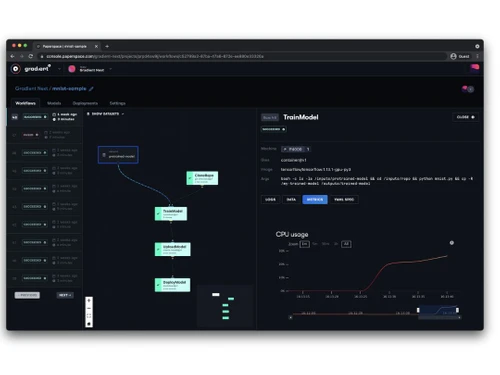
play Paperspace Gradient Product Walkthrough
paperspace dashboard
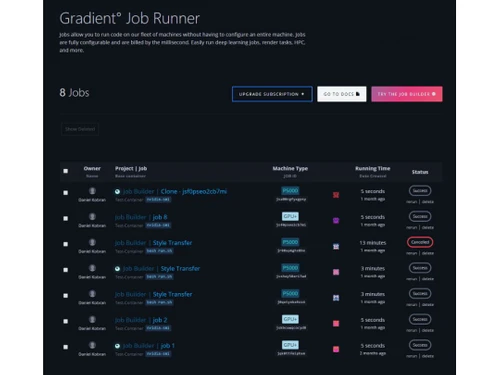
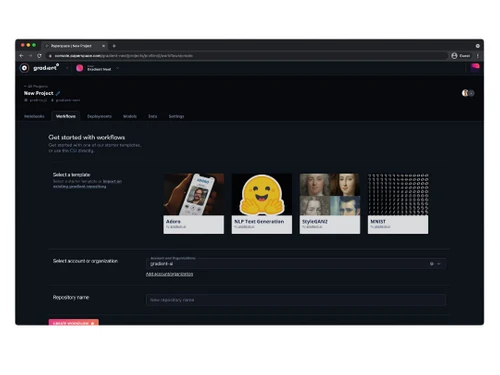
paperspace gradient

Paperspace

Brand: DIGITALOCEAN

  • 4.6

  • 4 Ratings

Paperspace is a cloud platform that provides immediate, high-end virtual machines (VMs) with potent GPUs or CPUs for heavy tasks such as AI model training, 3D visualization, and data science.

See More

Have you used Paperspace before?

Share your insights for better experience

Add a Review
Starting Price
$8

View plans

100% Genuine
Products
Best Price
Guaranteed
Safe & Secure
Payment
  • Description

  • Pricing

  • Features

  • Specification

  • Review

  • Compare

  • Alternatives

  • FAQ

Starting at $8

Paperspace Software Overview

What is Paperspace?

Paperspace is a Virtualization Management Software and cloud platform for AI, machine learning, and high-performance computing workloads. It provides GPU-powered virtual machines, cloud desktops, and an ML development environment with tools like Jupyter Notebooks and automated training pipelines.

The service is designed for researchers, developers, and companies that require scalable computer resources without dealing with physical infrastructure. It supports flexible pricing options such as pay-as-you-go and subscription-based services, thus saving on cost for model training, simulations, and other intensive activities. Paperspace stands out in ease of use, speedy GPU instances, and direct compatibility with major ML frameworks.

High-Performance Cloud GPUs

Paperspace has powerful GPU instances from NVIDIA, such as the A100 and RTX 5000, and these are optimized for high-performance workloads like deep learning, scientific computing, and even 3D rendering. These GPUs can be utilized with negligible setup time, which helps in efficiently scaling resources.

Gradient Platform for AI Development

The Gradient platform is designed specifically for AI and machine learning workflows, and it consists of several pre-built Jupyter Notebooks, model training options that are one-click, and easy deployment features. Without needing extensive knowledge of DevOps, users can train and deploy models, and this eases access for data scientists and researchers.

Fast SSD Storage and Optimized Networking

With SSDs using NVMe, rapid data access and processing ensure high performance, and Paperspace does provide this. The platform also has low-latency networking, and this is important for tasks of distributed computing and real-time applications.

API and Command-Line Interface

With detailed documentation on their website, Paperspace provides a comprehensive API and CLI, allowing the automation of virtual machines, workflows, or even programmatically setting jobs for deployment. This is beneficial for teams that want to script and work with customized pipelines.

Benefits of Using Paperspace

  • Cost Efficiency: Due to discounted spot instances and pay-as-you-go pricing, Paperspace serves as a cost-efficient substitute to purchasing and maintaining physical servers for scalable or infrequent workloads.
  • High-Speed Performance: Optimized Networking and NVMe SSD storage guarantees low-latency operations and rapid data processing, both crucial for large-scale data analysis as well as real-time applications.
  • Hybrid Cloud Flexibility: The Bring Your Cloud feature, when used in conjunction with AWS, GCP, or other private infrastructure cloud solutions, allows businesses to readily control their resources while leveraging the power of Paperspace’s GPUs, providing seamless integration.
  • Automation and Scalability: Robust API and CLI support facilitate automated resource management, increasing efficiency by eliminating the need for manual intervention, making it simple to scale workloads up or down depending on demand.
  • Enterprise-Grade Security: Paperspace’s secure networking, encryption, and SOC 2 compliance guarantee data protection for sensitive industries operating under strict compliance requirements.
  • No Vendor Lock-In: Ideal for long-term project portability, users not being bound to proprietary ecosystems means having full control over their models and data.

Paperspace Pricing

The pricing of Paperspace starts from $8 per month plus utilization costs on paid instances. You can get in touch with Techjockey.com for more information.

Pricing Plans:

  • Free: $0
  • Pro: $8 per month
  • Growth: $39 users per month
  • Enterprise: Custom Pricing
Read more

DIGITALOCEAN Company Details

Founded Year:  2012

DigitalOcean provides a cloud platform to deploy, manage, and scale applications of any size.

Director/Founders Alec Hartman, Ben Uretsky, Mitch Wainer, Moisey Uretsky
Company Size 501-1000 Employees

Paperspace Pricing & Plans

Individual-Pro
Key Features
  • Mid-range instances
  • Private projects
  • 15GB storage
  • Faster free GPUs
Starting at $8
    • Licenses

      Licenses
      Licenses
    • Monthly

      Monthly
      Monthly

Key Features

  • Mid-range instances

  • Private projects

  • 15GB storage

  • Faster free GPUs

Paperspace Features

  • icon_check Real Time Analytics
    Assists in immediate decisions and modifications by providing actionable insights from live data feeds.
  • icon_check Machine Learning
    Without explicit programming, AI models self-optimize, analyze historical and real-time data patterns, and predict outcomes.
  • icon_check Scalable Application
    Performs effortlessly even during peak demand periods by sustaining performance.
  • icon_check Desktop Virtualization
    Provides users with comprehensive remote-access desktop experiences while hosting databases on protected remote servers.
  • icon_check Collaboration
    With real-time editing, video calls, and shared docs, teamwork across disciplines and even different time zones becomes easy.
  • icon_check Multi User Support
    Permits multiple users to access the same computer system while maintaining individual user custom configurations.
  • icon_check Virtual Desktops
    Access to cloud-managed and secured PCs gives users an independent workspace devoid of device interference at any time.
  • icon_check Automated Workflow
    This renders operations effortless by reducing manual effort to perform scripted repetitive tasks and more.
Paperspace Demo Video play icon

Get Paperspace Demo

Watch the demo video to explore key features, real workflows, and how the software fits your business needs.

Understand
Key Features
Personal
Demo Insights
Interactive
Demo Support

Paperspace Specifications

Supported Platforms
Ubuntu Ubuntu Windows Windows Linux Linux
Devices
Desktop Desktop
Deployment
Cloud-Based Cloud-Based
Suitable For
All Industries
Business Specific
All Businesses
Business Size
Small Business Medium Business Enterprises SMEs MSMBs
Customer Support
Phone Email Forums
Language
English
Integration
API Integration

Paperspace Review

4.6

Out of 5

img

Overall Rating

Based on
4 Verified Ratings

Rating Breakdown

  • Features 4.5
  • Value for Money 4.7
  • Ease of Use 4.3
  • Customer Support 5

85% Recommend this Product

Add Review

Techjockey Trusted Reviews from Verified Users

No reviews are currently available for Paperspace. Discover similar Virtualization Management Software reviews

  • Citrix Apps & Desktops Virtualization

    4.8

    Whats great - During outages, Citrix's components step up with crucial features, ensuring a reliable performance. Accessing a centralized C... read more

  • Flaneer

    4.6

    Whats great - A trustworthy and user-friendly program, ensuring a secure pathway for managing remote access. Flaneer goes the extra mile b... read more

  • IconEdutech

    4.8

    Whats great - With IconEdutech, you can create a hybrid learning environment and keep teachers and parents updated on the academic progress... read more

Compare Paperspace With other Virtualization Management Software

Products
Ratings
Pricing
Device Supported
Deployment
Supported Platforms
  • img

    Paperspace

  • 4.6

  • Price On Request

  • Desktop

    Mobile

  • Web based

    On Premises

  • Windows

    Mac OS

  • img

    NetApp VDI

  • 4.3

  • Price On Request

  • Desktop

    Mobile

  • Web based

    On Premises

  • Windows

    Mac OS

  • img

    Flaneer

  • 4.6

  • Price On Request

  • Desktop

    Mobile

  • Web based

    On Premises

  • Windows

    Mac OS

  • img

    VirtualBox

  • Price On Request

  • Desktop

    Mobile

  • Web based

    On Premises

  • Windows

    Mac OS

  • img

    QEMU

  • Price On Request

  • Desktop

    Mobile

  • Web based

    On Premises

  • Windows

    Mac OS

  • img

    VMware Horizon 7

  • 4.2

  • Price On Request

  • Desktop

    Mobile

  • Web based

    On Premises

  • Windows

    Mac OS

(0) Product(s) selected

Paperspace Alternatives

See All Paperspace Alternatives

Available

Price on Request

Starting Price:

€95

Available

Price on Request

Articles for Paperspace

See All Related Articles

How much does Paperspace cost?

The Paperspace’s pricing starts from $8 per month with utilization costs on paid instances.

Is Paperspace free?

Yes, Paperspace is available for free with limited functionalities.

Is there a mobile app for Paperspace?

There is no dedicated mobile app available for users, however, it is available for Mac, PC, and Linux users.

Is a free demo available in Paperspace?

No, there is no free demo available in Paperspace.

Who can use Paperspac?

The key users of Paperspace are Schools, Offices, Linux Users, Writers, Teachers, and more.

Is Paperspace GPU free?

Yes, Paperspace GPU is available for free.

How does Paperspace work?

Paperspace offers on-demand cloud GPU/CPU machines you can access remotely through RDP/SSH, charged by the second for AI, rendering, or development. Simply sign up, spin up a VM, use it, and then suspend/delete it to avoid charges.

20,000+ Software Listed

Best Price Guranteed

Free Expert Consultation

2M+ Happy Customers

Terms and Condtions

close

Users with registered businesses can purchase goods from merchants on the platform to satisfy their business needs. Users are not permitted to utilize any products acquired through the platform for resale, advertising, business, or further distribution.

For each purchase made, users will receive a Tax Invoice (or 'GST invoice') that includes specific details such as:

  • the GSTIN of the user associated with their registered business, and

  • the specified Entity Name for their business.

It should be noted that not all products are eligible for GST Invoice. Only the products displayed by participating sellers with the 'GST-based Invoice Available' callout on the product description page would qualify.

Certain goods and services are not eligible to get a GST Invoice, including items with VAS, i.e., Value Added Services (e.g., Total Mobile Protection/Assured Buyback) and those involving an exchange offer at the time of purchase.

Users must ensure the accuracy of the GSTIN, and business entity name provided for the GST Invoice. Requests for corrections into GST Invoice would not be accommodated by Techjockey.com or any Seller, and any issues arising from user-provided information are the sole responsibility of users.

Techjockey.com is not liable for the GST Invoice or any associated input tax credit. To efficiently claim an input tax credit, users should select the registered place of business address as per the GST authority's data and follow the provisions of the GST Act and rules.

To claim an input tax credit, the delivery and billing addresses must match. Furthermore, input tax credits will not be granted if the delivery address and GSTIN on the invoice are from different states. In case of incorrect GST details provided during the order placement, the order will be canceled automatically.