USA
USA UAE
UAESmall Business
Designed for startups and growing businesses

See More





Brand: Hecto Networks
PetroMeter is a cutting-edge software solution designed to provide petrol pump dealers with a simple and efficient way to manage their accounting and reporting needs. This cloud-based petrol pump management software offers a comprehensive suite of features that streamline the entire process, from invoicing and inventory management to reporting and financial analysis. It is incredibly user-friendl...
See MoreHave you used PetroMeter before?
Share your insights for better experience
Brand: Hecto Networks
Founded Year: 2020
Petrometer is a cloud-based, petrol bunk management software designed for fuel station owners and dealers to streamline daily operations and enhance business efficiency. Accessible from mobile, tablet, and desktop.
Looking for The Right Pricing?
Share your requirements and get a plan built around your business.
Price Available on Request
Get personalised PetroMeter pricing that fits your needs. Our team will connect with you.
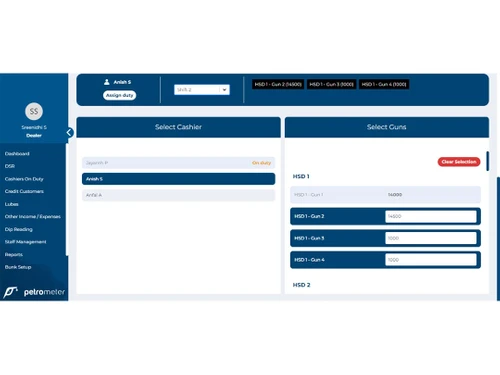
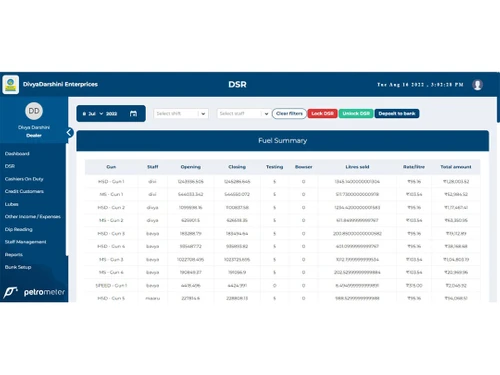
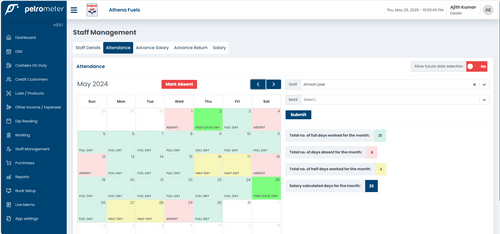
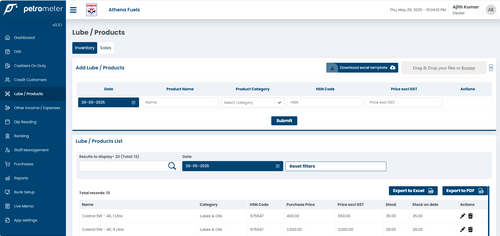
 Android Application Dashboards Sales Management Billing & Invoicing Purchasing Analytics & Reporting Automatic SMS Lubes Inventory Stock Management Staff Access Permission DSR Lock Tally Export General Ledger Credit Management

Watch the demo video to explore key features, real workflows, and how the software fits your business needs.
 Ubuntu
  Windows
  Android Windows(Phone)
  Desktop
  Mobile
  Cloud-Based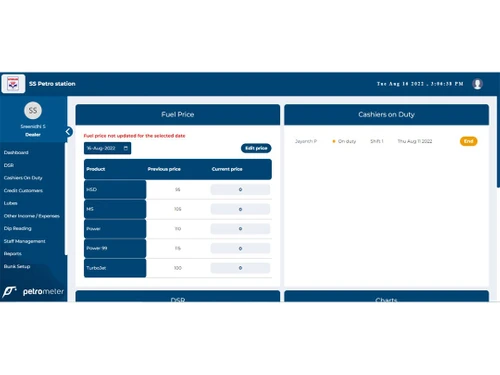
Small Business
Designed for startups and growing businesses
Medium Business
Built for business growth and flexibility
Enterprises
Designed for complex and large-scale business needs
4.6
Out of 5

Overall Rating
Based on
4 Verified Reviews
Rating Breakdown
93% Recommend this Product
Add ReviewUsers consistently praise PetroMeter for its user-friendly interface and responsive customer support, highlighting its ease of operation and feature-rich design. Many co-founders and accountants from small to medium-sized companies report high satisfaction levels, noting the software's ability to streamline tasks effectively. There are no significant complaints or limitations mentioned, indicating a strong overall positive sentiment among users who recommend it highly for petrol pump accounting needs.

May 20, 2026
Techjockey Verified
“Very user friendly software”
Cashier on duty is very simple. Dip calculation Staff salary management and we can see everything in single click
Pros
We Can operate the software easily. Good customer support team
Cons
Na
Oct 31, 2022
Techjockey Verified
“Excellent software .”
Pros
I have used another software for a while, but it had hell lot of problems, This software is easy to use, more features and best part is we can ask for a new feature and it is been served , i am totally satisfied.
Cons
NO CONS
Reason to switch
Lot of issues, wrong calculations, their support team 2-3 months before they were giving good support especially Mr. Anandhu now it is hard.
Oct 7, 2022
Techjockey Verified
“Best petrol pump accounting software in the market”
Pros
It's a highly user-friendly and feature-loaded tool, built on advanced technology and supported by good customer service.
Cons
No Cons as of now
Reason to switch
Dip reading Lubes and inventory management Cashier duty management Credit customer management

PetroMeter
Price On Request
Desktop
Mobile
Web based
On Premises
Windows
Mac OS

PetroPulse360
₹ 999
Desktop
Mobile
Web based
On Premises
Windows
Mac OS

My Lucky Meter
₹ 10000
Desktop
Mobile
Web based
On Premises
Windows
Mac OS

Petro Genius
₹ 13500
Desktop
Mobile
Web based
On Premises
Windows
Mac OS

MuePetro
₹ 16000
Desktop
Mobile
Web based
On Premises
Windows
Mac OS

Accord Fuel Management System
₹ 500000
Desktop
Mobile
Web based
On Premises
Windows
Mac OS

PumpCount
₹ 15000
Desktop
Mobile
Web based
On Premises
Windows
Mac OS

SOFTGUN Petrol Pump Software
Price On Request
Desktop
Mobile
Web based
On Premises
Windows
Mac OS

PetroTally
Price On Request
Desktop
Mobile
Web based
On Premises
Windows
Mac OS

PetroSoft India
₹ 8000
Desktop
Mobile
Web based
On Premises
Windows
Mac OS

araPATROL
₹ 300
Desktop
Mobile
Web based
On Premises
Windows
Mac OS
(2) Product(s) selected
Starting Price:
₹999 /Month
Starting Price:
₹10,000
Available
Price on Request
Starting Price:
₹8,000

Available
Price on Request

Available
Price on Request

Available
Price on Request

Available
Price on Request

Available
Price on Request

Available
Price on Request

Starting Price:
₹18,000 /Quantity
PetroMeter Petrol Pump Management Software available for Android and iOS mobile devices.
PetroMeter Petrol Pump Management Software is compatible with windows and macOS operating systems.
PetroMeter Petrol Pump Management Software web-based deployment.
PetroMeter Petrol Pump Management Software pricing is available on request at techjockey.com.
PetroMeter Petrol Pump Management Software is typically used in industries that deal in fuel, oil, or other types of liquids.
PetroMeter Petrol Pump Management Software demo is available for free with techjockey.com.
PetroMeter Petrol Pump Management Software offers a free trial. However, the premium plan with advanced features is available at techjockey.com with exciting deals.
PetroMeter Petrol Pump Management Software installation is not required, as it is web-based. Just open the Setup Wizard to get started.
PetroMeter Petrol Pump Management Software helps with sales management, stock management, staff access permission, analytics & reporting.
20,000+ Software Listed
Best Price Guranteed
Free Expert Consultation
2M+ Happy Customers
Terms and Condtions

Users with registered businesses can purchase goods from merchants on the platform to satisfy their business needs. Users are not permitted to utilize any products acquired through the platform for resale, advertising, business, or further distribution.
For each purchase made, users will receive a Tax Invoice (or 'GST invoice') that includes specific details such as:
the GSTIN of the user associated with their registered business, and
the specified Entity Name for their business.
It should be noted that not all products are eligible for GST Invoice. Only the products displayed by participating sellers with the 'GST-based Invoice Available' callout on the product description page would qualify.
Certain goods and services are not eligible to get a GST Invoice, including items with VAS, i.e., Value Added Services (e.g., Total Mobile Protection/Assured Buyback) and those involving an exchange offer at the time of purchase.
Users must ensure the accuracy of the GSTIN, and business entity name provided for the GST Invoice. Requests for corrections into GST Invoice would not be accommodated by Techjockey.com or any Seller, and any issues arising from user-provided information are the sole responsibility of users.
Techjockey.com is not liable for the GST Invoice or any associated input tax credit. To efficiently claim an input tax credit, users should select the registered place of business address as per the GST authority's data and follow the provisions of the GST Act and rules.
To claim an input tax credit, the delivery and billing addresses must match. Furthermore, input tax credits will not be granted if the delivery address and GSTIN on the invoice are from different states. In case of incorrect GST details provided during the order placement, the order will be canceled automatically.