USA
USA UAE
UAESmall Business
Designed for startups and growing businesses

See More


Brand: PetroSoft India
PetroSoft India is our country's leading petrol pump management software, offering a tailored solution for petrol pump businesses.
See MoreHave you used PetroSoft India before?
Share your insights for better experience
Brand: PetroSoft India
Founded Year: 2005
PetroSoft India – a Petrol Pump Management Software designed by the experts at Vritti.
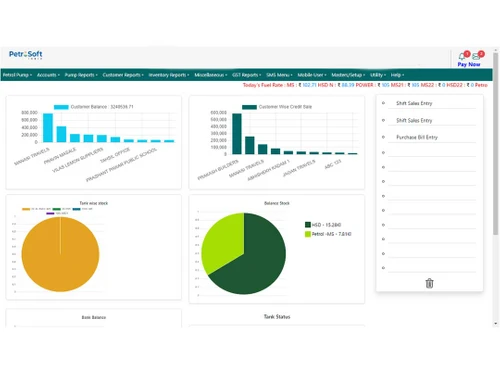
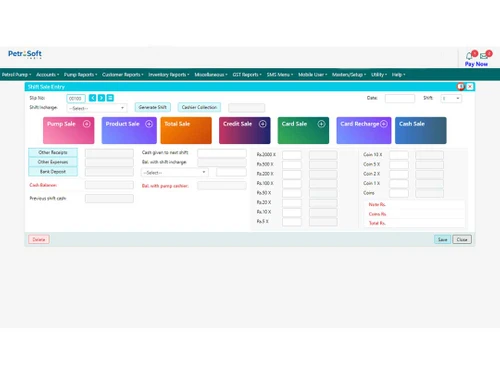
 Dip Calculation Facility Balance Sheet Profit & Loss Statement Data Export Integrations Stock Reports Density Management Inventory Management Expense Management DSR Management
  Windows
  Android
  Desktop
  Mobile
  Tablet
  Cloud-Based
  Perpetual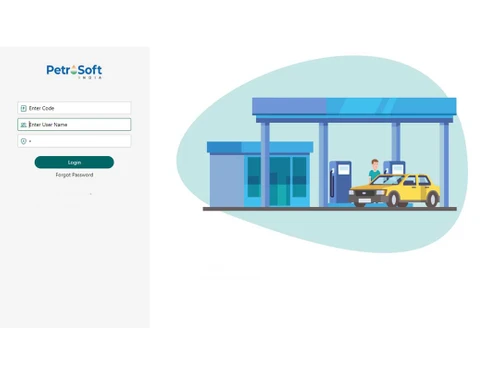

Small Business
Designed for startups and growing businesses
Medium Business
Built for business growth and flexibility
Enterprises
Designed for complex and large-scale business needs
4.4
Out of 5

Overall Rating
Based on
11 Verified Reviews
Rating Breakdown
87% Recommend this Product
Add ReviewCustomers generally appreciate PetroSoft India for its comprehensive coverage of petrol pump operations, including billing, reconciliation, and inventory management. Users highlight the software's tailored design for the petroleum industry and its excellent customer support. However, some common concerns include a steep learning curve initially, an outdated user interface, and the need for more training resources. While the software is deemed effective for larger operations, smaller businesses may find it somewhat pricey. Overall, it is well-recommended for its efficiency and reporting capabilities.
Pros
"Specifically tailored for Indian petrol pumps, efficient operations management, excellent inventory control and reporting, user-friendly interface."
"The software is great for fuel station billing and managing inventory in real-time."
Cons
"Might require a stable internet connection to fully utilize all online monitoring features."
"Took me a while to get used to the interface, especially for detailed reports."

Mar 5, 2025
Techjockey Verified
“One-Stop Software for Pumps”
From purchases, dip readings, to customer billing, PetroSoft has everything covered. I don’t need to use multiple systems anymore. Took me a few days to get familiar, but now I can’t imagine going back.
Pros
Covers everything from purchase to sales.
Cons
Slight learning curve in initial days.
Reason to switch
Manual records were error-prone and tedious. PetroSoft brought everything under one roof.
Mar 19, 2025
Techjockey Verified
“Made Daily Reconciliation Super Easy”
My favorite thing about PetroSoft is how it handles reconciliation—it literally saves me an hour a day. The density adjustment feature is super useful, especially during temperature changes.
Pros
Reconciliation and density calculations are automatic.
Cons
The UI feels outdated.
Reason to switch
Simifox couldn’t handle density or tank dips automatically.
Feb 18, 2025
Techjockey Verified
“Customer Friendly and Affordable”
The pricing plan is fair, especially for the features we get. The after-sales support is something I’ve personally found very helpful—they solve most issues in a single call. I do wish there were more training videos available though.
Pros
Fair pricing and excellent support.
Cons
Needs more training resources online.
Reason to switch
PumpCount had great general features, but PetroSoft was better suited for our fuel station.

PetroSoft India
₹ 8000.00 excl. GST
Desktop
Mobile
Web based
On Premises
Windows
Mac OS
PetroPulse360
₹ 999
Desktop
Mobile
Web based
On Premises
Windows
Mac OS

My Lucky Meter
₹ 10000
Desktop
Mobile
Web based
On Premises
Windows
Mac OS

Petro Genius
₹ 13500
Desktop
Mobile
Web based
On Premises
Windows
Mac OS

MuePetro
₹ 16000
Desktop
Mobile
Web based
On Premises
Windows
Mac OS

PetroMeter
Price On Request
Desktop
Mobile
Web based
On Premises
Windows
Mac OS

Accord Fuel Management System
₹ 500000
Desktop
Mobile
Web based
On Premises
Windows
Mac OS

PumpCount
₹ 15000
Desktop
Mobile
Web based
On Premises
Windows
Mac OS

SOFTGUN Petrol Pump Software
Price On Request
Desktop
Mobile
Web based
On Premises
Windows
Mac OS

PetroTally
Price On Request
Desktop
Mobile
Web based
On Premises
Windows
Mac OS

araPATROL
₹ 300
Desktop
Mobile
Web based
On Premises
Windows
Mac OS
(0) Product(s) selected
Starting Price:
₹999 /Month
Starting Price:
₹10,000
Available
Price on Request

Starting Price:
₹25,000 /Quantity

Available
Price on Request

Available
Price on Request

Available
Price on Request

Available
Price on Request

Available
Price on Request

Available
Price on Request

Starting Price:
₹18,000 /Quantity
PetroSoft India is compatible with Windows and macOS devices.
PetroSoft India is available for Android and iOS users.
PetroSoft India supports cloud-based deployment.
The pricing of PetroSoft India starts at ? 15,000 (plus taxes) on techjockey.com.
Potential users of PetroSoft India include petroleum retailers, distributors, and operators looking to enhance operational efficiency, streamline inventory management, and make data-driven decisions to optimize their businesses within the petroleum industry.
The PetroSoft India platform demo is available for free with techjockey.com.
No, PetroSoft India is not a free software. Its pricing starts from INR 15,000 at techjockey.com.
No, PetroSoft India does not offer a free trial to the users.
There is no need software installation since PetroSoft India supports cloud-based deployment. Just open the setup wizard and get started.
PetroSoft India operates by leveraging innovative technologies to streamline and optimize operations in the petroleum industry, offering solutions such as fuel retail automation, inventory management, and analytics to enhance efficiency and decision-making processes for businesses.
20,000+ Software Listed
Best Price Guranteed
Free Expert Consultation
2M+ Happy Customers
Terms and Condtions

Users with registered businesses can purchase goods from merchants on the platform to satisfy their business needs. Users are not permitted to utilize any products acquired through the platform for resale, advertising, business, or further distribution.
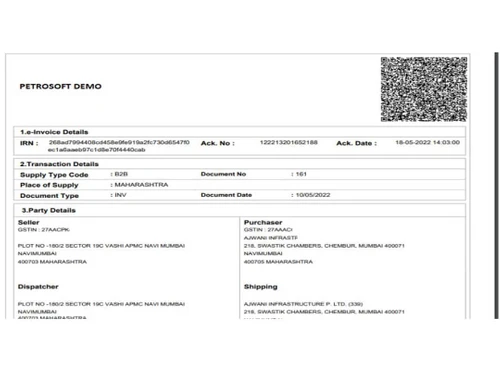
For each purchase made, users will receive a Tax Invoice (or 'GST invoice') that includes specific details such as:
the GSTIN of the user associated with their registered business, and
the specified Entity Name for their business.
It should be noted that not all products are eligible for GST Invoice. Only the products displayed by participating sellers with the 'GST-based Invoice Available' callout on the product description page would qualify.
Certain goods and services are not eligible to get a GST Invoice, including items with VAS, i.e., Value Added Services (e.g., Total Mobile Protection/Assured Buyback) and those involving an exchange offer at the time of purchase.
Users must ensure the accuracy of the GSTIN, and business entity name provided for the GST Invoice. Requests for corrections into GST Invoice would not be accommodated by Techjockey.com or any Seller, and any issues arising from user-provided information are the sole responsibility of users.
Techjockey.com is not liable for the GST Invoice or any associated input tax credit. To efficiently claim an input tax credit, users should select the registered place of business address as per the GST authority's data and follow the provisions of the GST Act and rules.
To claim an input tax credit, the delivery and billing addresses must match. Furthermore, input tax credits will not be granted if the delivery address and GSTIN on the invoice are from different states. In case of incorrect GST details provided during the order placement, the order will be canceled automatically.