linkedin
PicoScope logo
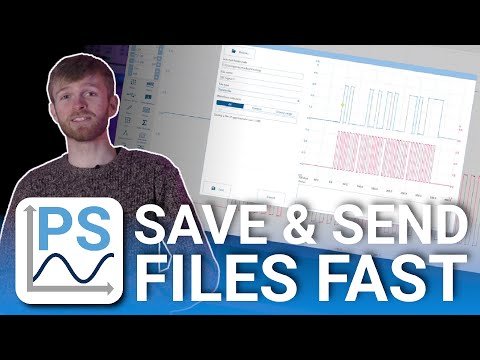
play Using PSDATA Files | PicoScope 7
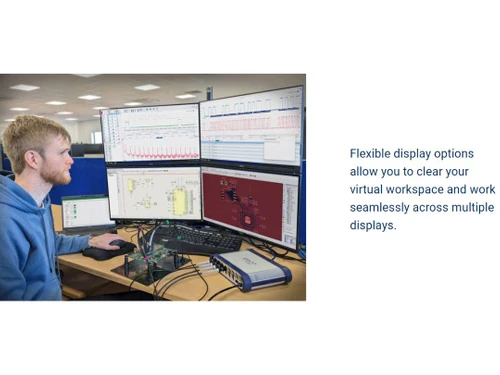
PicoScope Display
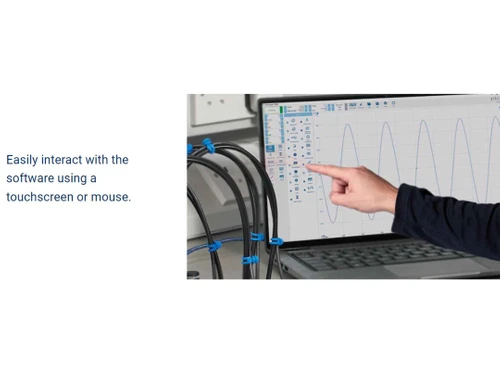
PicoScope Interact

PicoScope

Brand: Pico Technology

  • 4.2

  • 4 Ratings

PicoScope is a versatile signal acquisition software for enhanced visibility and cross-platform compatibility.

See More

Have you used PicoScope before?

Share your insights for better experience

Add a Review

Price Available on Request

Questions about pricing or customization? We’re here to help, just a click away.

100% Genuine
Products
Best Price
Guaranteed
Safe & Secure
Payment
  • Description

  • Pricing

  • Features

  • Specification

  • Review

  • Compare

  • Alternatives

  • FAQ

PicoScope Software Overview

What is PicoScope?

PicoScope is an advanced computer software designed for real-time signal acquisition, specifically tailored for Pico Technology oscilloscopes and data loggers. Compatible with Microsoft Windows, Mac OS X, Debian, and Ubuntu platforms, PicoScope provides a versatile solution for engineers and enthusiasts alike.

This software serves as a comprehensive tool for viewing and analyzing real-time signals, offering features such as FFT analysis, a spectrum analyzer, voltage-based triggers, and the ability to effortlessly save/load waveforms to disk.

PicoScope is not limited to USB oscilloscopes but is also compatible with parallel port oscilloscopes, showcasing its adaptability to varying hardware configurations.

The software's reputation is particularly strong, delivering exceptional performance on both desktop and laptop PCs. Notably, the Linux version has been acclaimed for surpassing alternative Linux scope software, making it a potential replacement for professional benchtop scopes. PicoScope's versatility extends to ARM-based platforms like BeagleBone Black and Raspberry Pi development hardware, emphasizing its broad compatibility.

PicoScope software necessitates a PicoScope oscilloscope from the Pico Technology range, which offers diverse specifications, including bandwidths up to 1 GHz, up to four input channels, and impressive sampling rates up to 5 GS/s. The software's compatibility with a range of oscilloscope models denotes its flexibility in catering to various user requirements.

Why Choose PicoScope Software?

  • Intuitive Interface: PicoScope provides a user-friendly interface for scope, XY, spectrum, and persistence views, ensuring ease of use for various applications.
  • Precise Digital Triggers: Advanced digital triggers enhance accuracy, allowing users to capture specific events with precision.
  • Efficient Automated Measurements: Save time with automated measurements, streamlining the analysis process for increased efficiency.
  • Flexible Signal Generation: Utilize the built-in signal generator with an AWG editor for versatile signal generation tailored to specific testing requirements.
  • Buffering for Smooth Display: On-device buffering ensures a smooth and frequently updated display, even on extended timebases.

Benefits of PicoScope Platform

  • Enhanced Visibility: Gain real-time insights into signals with advanced features like FFT, spectrum analysis, and configurable triggers.
  • Cross-Platform Compatibility: Enjoy seamless functionality on Microsoft Windows, Mac OS X, Debian, and Ubuntu platforms.
  • Versatile Hardware Support: This software is compatible with a range of Pico Technology oscilloscopes, accommodating varying specifications and user needs.
  • Innovative Linux Capabilities: Experience superior performance on Linux, recognized for converting a Linux PC into a powerful oscilloscope and spectrum analyzer.
  • Broad Integration Options: Developers benefit from a free software development kit (SDK), enabling programming in C#, VB.NET, C++, Microsoft Excel, LabVIEW, or MATLAB.
  • Diverse Signal Decoding: Decode and analyze over 70 serial standards, including I2C, SPI, UART, CAN, LIN, FlexRay, RapidIO, PCI Express, and Serial ATA.

Pricing of PicoScope Oscilloscope Software

PicoScope is available for free on techjockey.com.

Read more

Pico Technology Company Details

Founded Year:  1991

Pico Technology is a leading global provider of high-performance oscilloscopes, diagnostic equipment, data loggers, and signal generators.

Director/Founders Alan Tong, Mike Green
Company Size 101-500 Employees

PicoScope Pricing & Plans

Looking for The Right Pricing?

Share your requirements and get a plan built around your business.

  • Define your business needs
  • Get customised pricing
  • Choose features that fit your workflow

Price Available on Request

Get personalised PicoScope pricing that fits your needs. Our team will connect with you.

PicoScope Features

  • icon_check Math Channel Functions
    Unleash the power of advanced mathematical operations on your signals for deeper analysis and insights.
  • icon_check Measurements
    Gain precise and comprehensive measurement data to assess signal characteristics with accuracy.
  • icon_check Measure First Cycle from Trigger
    Evaluate the initial cycle from the trigger point, providing specific insights into signal behaviour.
  • icon_check Extended UART
    Expand your capabilities with extended UART support, ensuring compatibility with a broader range of devices.
  • icon_check NMEA-183
    Seamlessly decode NMEA-183 data for efficient navigation and communication signal analysis.
  • icon_check SENT SPC
    Harness the potential of SENT SPC decoding, enhancing your ability to interpret and understand SENT signals.
  • icon_check Either Polarity Triggering
    Enjoy flexibility by capturing signals regardless of their polarity, providing adaptable triggering options.
  • icon_check Dropout Direction / Location
    Identify and analyze signal dropouts with precision, determining their direction and location.
  • icon_check Start Edge Control
    Get control over the start edge of signals, allowing for fine-tuned adjustments to capture specific signal characteristics.
  • icon_check Quick Access Shortcut
    Streamline your workflow with quick access shortcuts, enhancing efficiency.
PicoScope Demo Video play icon

Get PicoScope Demo

Watch the demo video to explore key features, real workflows, and how the software fits your business needs.

Understand
Key Features
Personal
Demo Insights
Interactive
Demo Support

PicoScope Specifications

Supported Platforms
Windows Windows
Devices
Desktop Desktop
Deployment
Perpetual Perpetual
Suitable For
Healthcare
Business Specific
Hospitals
Business Size
Small Business Startups Medium Business Enterprises
Customer Support
Phone Email Live Chat Communities Forums
Language
čeština Nederlands English Deutsche Ελληνικά
Training Resources
Documentation Videos

Explore the Best Alternative Solutions Similar to Your Business Size and Needs

PicoScope Review

4.2

Out of 5

img

Overall Rating

Based on
4 Verified Ratings

Rating Breakdown

  • Features 4.2
  • Value for Money 4.1
  • Ease of Use 4
  • Customer Support 4.5

85% Recommend this Product

Add Review

Be the First to Review

This product has no reviews yet. Be the first to leave your feedback.

Add Review

Compare PicoScope With other Oscilloscope Software

Products
Ratings
Pricing
Device Supported
Deployment
Supported Platforms
  • img

    PicoScope

  • 4.2

  • Price On Request

  • Desktop

    Mobile

  • Web based

    On Premises

  • Windows

    Mac OS

  • img

    Zelscope

  • 4.5

  • Price On Request

  • Desktop

    Mobile

  • Web based

    On Premises

  • Windows

    Mac OS

  • img

    Visual Analyser

  • 4.2

  • Price On Request

  • Desktop

    Mobile

  • Web based

    On Premises

  • Windows

    Mac OS

  • img

    Digilent WaveForms

  • 4.2

  • Price On Request

  • Desktop

    Mobile

  • Web based

    On Premises

  • Windows

    Mac OS

  • img

    BitScope DSO

  • 4

  • Price On Request

  • Desktop

    Mobile

  • Web based

    On Premises

  • Windows

    Mac OS

  • img

    RTSPECT

  • 4.3

  • Price On Request

  • Desktop

    Mobile

  • Web based

    On Premises

  • Windows

    Mac OS

  • img

    PPMScope

  • 4.0

  • Price On Request

  • Desktop

    Mobile

  • Web based

    On Premises

  • Windows

    Mac OS

(0) Product(s) selected

PicoScope Alternatives

See All PicoScope Alternatives

Available

Price on Request

Available

Price on Request

Starting Price:

$228 /Year

Which operating system does PicoScope support?

PicoScope is compatible with Windows, MacOS, and Linux device systems.

Is there any PicoScope App?

The PicoScope app is not available for Android and iOS devices.

What is the deployment type of PicoScope?

PicoScope supports on-premises deployment.

How much does PicoScope cost?

PicoScope is available for free on techjockey.com.

Who are the potential users of PicoScope?

Potential users of PicoScope include engineers, enthusiasts, and developers seeking a comprehensive and versatile signal analysis tool compatible with Pico Technology oscilloscopes, offering advanced features and broad cross-platform compatibility.

Is there any free trial or demo for PicoScope?

PicoScope platform demo is available for free with techjockey.com.

Is PicoScope Free?

PicoScope is available for free.

How can you download PicoScope?

For PicoScope software installation, you can go directly to Techjockey's official website and buy this solution. Once purchased, you will receive a key to download the same via email.

How Does PicoScope Work?

PicoScope works as advanced computer software designed for real-time signal acquisition, tailored for Pico Technology oscilloscopes and data loggers, to provide engineers and enthusiasts with a versatile tool for viewing and analyzing signals.

20,000+ Software Listed

Best Price Guranteed

Free Expert Consultation

2M+ Happy Customers

Terms and Condtions

close

Users with registered businesses can purchase goods from merchants on the platform to satisfy their business needs. Users are not permitted to utilize any products acquired through the platform for resale, advertising, business, or further distribution.

For each purchase made, users will receive a Tax Invoice (or 'GST invoice') that includes specific details such as:

  • the GSTIN of the user associated with their registered business, and

  • the specified Entity Name for their business.

It should be noted that not all products are eligible for GST Invoice. Only the products displayed by participating sellers with the 'GST-based Invoice Available' callout on the product description page would qualify.

Certain goods and services are not eligible to get a GST Invoice, including items with VAS, i.e., Value Added Services (e.g., Total Mobile Protection/Assured Buyback) and those involving an exchange offer at the time of purchase.

Users must ensure the accuracy of the GSTIN, and business entity name provided for the GST Invoice. Requests for corrections into GST Invoice would not be accommodated by Techjockey.com or any Seller, and any issues arising from user-provided information are the sole responsibility of users.

Techjockey.com is not liable for the GST Invoice or any associated input tax credit. To efficiently claim an input tax credit, users should select the registered place of business address as per the GST authority's data and follow the provisions of the GST Act and rules.

To claim an input tax credit, the delivery and billing addresses must match. Furthermore, input tax credits will not be granted if the delivery address and GSTIN on the invoice are from different states. In case of incorrect GST details provided during the order placement, the order will be canceled automatically.