linkedin
Pro Tools logo
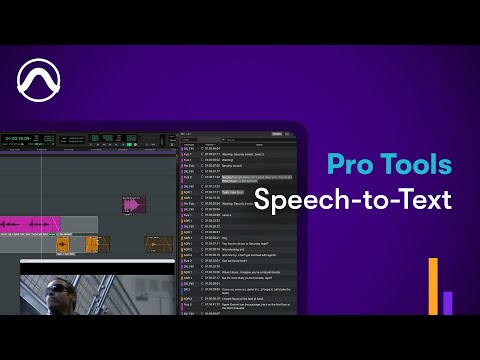
play How to Use Pro Tools Speech-to-Text
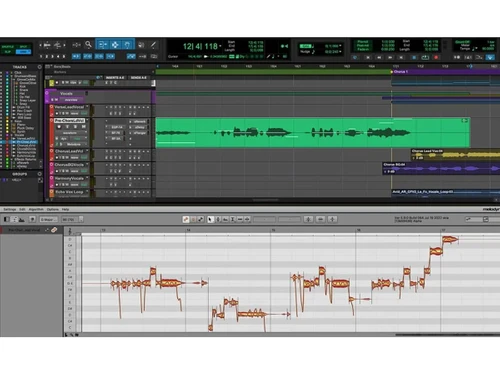
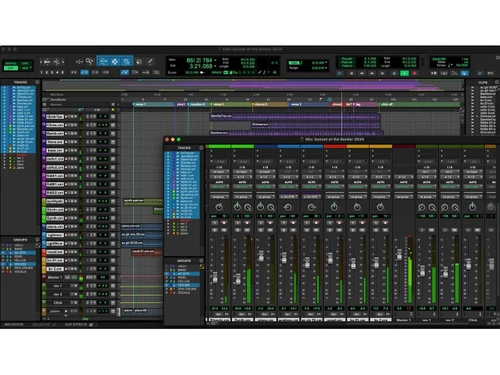
avid pro tools-interface
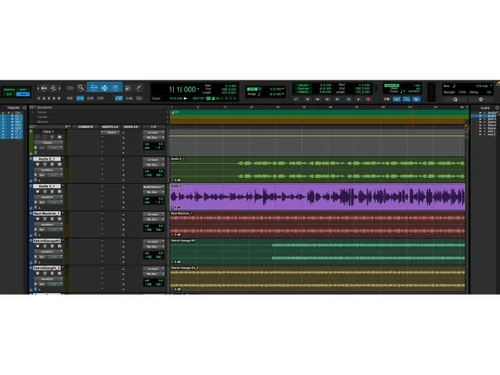
avid pro tools-music

Pro Tools

Brand: Avid Technology

  • 4.5

  • 16 Ratings & 11 Reviews

Pro Tools by Avid is a popular audio editing software used for professional music creation, recording, and post-production. With advanced tools for editing, MIDI, immersive mixing, and plugin integration, it's ideal for beginners to industry experts. Free and paid tiers available.

See More

Have you used Pro Tools before?

Share your insights for better experience

Add a Review
Starting Price
$10

View plans

100% Genuine
Products
Best Price
Guaranteed
Safe & Secure
Payment
  • Description

  • Pricing

  • Features

  • Specification

  • Review

  • Compare

  • Alternatives

  • FAQ

  • Questions

Starting at $10

Pro Tools Software Overview

What is Pro Tools?

Pro Tools by Avid is a professional-grade audio editing and production software trusted by top artists, producers, and engineers across the globe. It offers a comprehensive, end-to-end solution for music creation, recording, editing, mixing, and even audio post-production. 

Whether you are a seasoned professional or an aspiring artist, Pro Tools provides the tools and features to bring your creative vision to life. It’s widely regarded as the industry standard for audio production in music, movies, TV shows, and video games.

Why Choose Pro Tools Audio Editing Software?

Pro Tools is more than just an audio editor—it’s an entire music production environment that empowers you to create at the highest level. Here’s why Pro Tools is the top choice for professionals and beginners alike:

  • Industry Standard: Used in nearly every major music release, film, and TV production, Pro Tools' universal session format makes it easy to collaborate with studios and professionals worldwide.
  • Complete Music Production: From sketching ideas to the final mix, Pro Tools provides everything you need in one software, including virtual instruments, effects, loops, and MIDI tools to shape your sound.
  • Massive Library of Plugins and Sounds: Access 120+ instruments and effects with immersive mixing support, allowing you to create rich, layered tracks with ease.
  • Seamless Workflow: Pro Tools simplifies complex production workflows, offering tools for recording, editing, and mixing without interrupting your creative process.
  • Regular Content Updates: Stay inspired with frequent updates, including new plugins, features, and exclusive content from Sonic Drop and Inner Circle rewards.

Additional Features of Pro Tools

Pro Tools comes packed with features designed to elevate your audio production:

  • Pro Tools Sketch: Capture your ideas on the go with Pro Tools Sketch. Easily work with loops, MIDI, and audio on an intuitive timeline to refine your arrangements.
  • Immersive Mixing Support: Whether working on stereo or Dolby Atmos projects, Pro Tools supports immersive mixing, offering precise control over every audio element in your project.
  • Advanced MIDI Tools: Build realistic-sounding tracks with Pro Tools' easy-to-use MIDI tools, and experiment freely with new MIDI effects that sync seamlessly with your session.
  • ARA 2 Plugin Integration: Pro Tools supports ARA 2, enabling faster plugin workflows by avoiding unnecessary audio roundtrips.
  • Dropbox Replay Integration: Easily collaborate and gather feedback with Dropbox Replay, streamlining the review and approval process for your audio projects.
  • Hardware Integration: Pro Tools pairs with Avid’s premium hardware for pristine audio conversion, near-zero latency, and unmatched hands-on control.

Pricing of Pro Tools

Pro Tools offers different subscription tiers tailored to your needs, whether you're a beginner, a serious artist, or an audio engineer:

  • Pro Tools Artist: Starts at $9.99/month which offers 32 audio and 64 MIDI tracks, 110+ instruments and effects, plus exclusive content through Inner Circle and Sonic Drop.
  • Pro Tools Studio: Starts at $34.99/month which is Ideal for serious artists and producers, this plan includes 512 audio tracks, 1 video track, 130+ instruments and effects, and immersive mixing support.
  • Pro Tools Ultimate ($99/month): Starts at $99/month for advanced music and post-production workflows. It includes 2,048 audio tracks, 64 video tracks, full audio post-production capabilities, and immersive mixing features.
Read more

Avid Technology Company Details

Founded Year:  1987

Avid Technology is a media platform specializes in digital media creation tools for film, video, audio, and broadcast professionals.

Director/Founders Bill Warner
Company Size 1000+ Employees

Pro Tools Pricing & Plans

Artist
Starting at $10
    • Licenses

      Licenses
      Licenses
    • Monthly

      Monthly
      Monthly

Key Features

  • 32 audio tracks

  • Simultaneous recording inputs - 16

  • 64 MIDI tracks

  • 110+ instruments and effects

Studio
Starting at $35
    • Licenses

      Licenses
      Licenses
    • Monthly

      Monthly
      Monthly

Key Features

  • 512 audio tracks

  • 1,024 MIDI tracks

  • 130+ instruments and effects

  • Immersive mixing

  • 1 video track

Ultimate
Starting at $99
    • Licenses

      Licenses
      Licenses
    • Monthly

      Monthly
      Monthly

Key Features

  • 2,048 audio tracks

  • 1,024 MIDI tracks

  • 130+ instruments and effects

  • Immersive mixing

  • 64 video tracks and editing

  • Full audio post workflows

Pro Tools Features

  • icon_check Multitrack Recording
    Capture multiple audio sources simultaneously with precise control, allowing detailed studio-grade recordings across track layers.
  • icon_check Multitrack Playback
    Play back numerous audio and MIDI tracks together in one session, ensuring reliable synchronization for complex production
  • icon_check MIDI Sequencing
    Build musical arrangements by sequencing MIDI notes and events, enabling detailed control of virtual instruments and hardware
  • icon_check MIDI Editing
    Modify MIDI notes, timing, velocity, and controller data using dedicated tools that support accurate musical adjustments and
  • icon_check Surround and Atmos Mixing
    Mix audio in surround and immersive formats, allowing placement and movement of sounds within multichannel or Atmos-based
  • icon_check Virtual Instruments
    Access built-in virtual instruments that deliver playable sounds for composing, arranging, and layering elements within
  • icon_check Plug-Ins Support
    Use a wide range of audio plug-ins for processing, synthesis, and effects, enabling flexible sound shaping directly within
  • icon_check Digital Mixing Console
    Control faders, pans, sends, inserts, and routing within a full digital mixer designed for detailed audio balancing across large
  • icon_check Non Destructive Editing
    Edit clips without altering original recordings by using an internal system that preserves source audio and stores all edit
  • icon_check Elastic Audio Processing
    Apply real-time timing and pitch adjustments to audio clips, enabling flexible correction or creative manipulation without
  • icon_check Clip Level Gain Control
    Adjust gain at the clip level to balance audio segments, create smooth level transitions, or correct inconsistencies before
  • icon_check Clip Effects Processing
    Apply processing to individual clips independently from the track chain, enabling detailed sound adjustments at precise timeline
  • icon_check Offline Audio Rendering
    Render effects or processing offline to reduce system load, enabling smoother playback and freeing CPU resources during active
  • icon_check Video Track Integration
    Import and work with video tracks directly on the timeline, enabling precise audio alignment for scoring, sound design, and post
  • icon_check Track Automation
    Automate volume, pan, and effect parameters over time, ensuring dynamic control of mix elements throughout playback and
Pro Tools Demo Video play icon

Get Pro Tools Demo

Watch the demo video to explore key features, real workflows, and how the software fits your business needs.

Understand
Key Features
Personal
Demo Insights
Interactive
Demo Support

Pro Tools Specifications

Supported Platforms
Windows Windows MacOS MacOS
Devices
Desktop Desktop
Deployment
Perpetual Perpetual
Suitable For
Media House
Business Specific
Media
Customer Support
Email Communities
Language
English
Integration
API Integration
Training Resources
Videos
AI Features
AI Integrated

Explore the Best Alternative Solutions Similar to Your Business Size and Needs

Pro Tools Reviews

4.5

Out of 5

img

Overall Rating

Based on
11 Verified Reviews

Rating Breakdown

  • Features 4.4
  • Value for Money 4.5
  • Ease of Use 4.4
  • Customer Support 4.6

91% Recommend this Product

Add Review

Pros

  • "Trusted by audio engineers, has a professional-grade output with highly detailed control."

    Ajay Singh Nov 19, 2024

  • "Editing is easy to use, with extensive plugins, and edits up to 32-bit, 192hz audio."

    ARVIND KUMARNov 18, 2024

  • "Dependable, trusted by professionals, and had high-quality recording and mixing."

    Nov 17, 2024

Cons

  • "Challenging for beginners, not very adaptable and plugins are costly."

    Nov 17, 2024

  • "The interface is outdated, expensive, and not the most user-friendly."

    Momin ChoudharyNov 17, 2024

  • "MIDI integration in Pro Tools is not as optimized and I have experienced a lot of lags."

    Srinivas RathodNov 12, 2024

Pro Tools Video Reviews

youtubeVideoId

4.6

“Pro Tools First Review 2020 | Does it Still Suck 10 Yrs Later? Part 1”

Review by: Home Recording Made Easy

youtubeVideoId

4.4

“Pro Tools 2020 Review”

Review by: Matty Harris | Mix and Master My Song

ARVIND KUMAR

SEO Manager

Industry: Writing and Editing User since: < 6 months

4.5

Reviewed on: Nov 18, 2024

Techjockey Verified

“High Standards but Too Costly”

I love Pro Tools for the fact that they offer excellent output quality and all the features a sound engineer would love to have. But it’s difficult to learn if you’re new to audio production, and the subscription model and extra plugin costs are excessive.

Pros

Editing is easy to use, with extensive plugins, and edits up to 32-bit, 192hz audio.

Cons

Too expensive, pricey plugins and it takes time to master.

Switched from ReMasterMedia

Reason to switch

I was using ReMasterMedia before this and I did not like it at all, the distortion and poor quality was an instant regret.

Ajay Singh

Content Creator

Industry: Publishing User since: < 6 months

4.3

Reviewed on: Nov 19, 2024

Techjockey Verified

“Top Pick for Veterans of Audio Mixing”

Professionals and veterans of the DAW community loved the Pro Tools since they had always been accustomed to the interface. However, I found out that it has compatibility issues with my M1 laptop and had to run it through Rosetta.

Pros

Trusted by audio engineers, has a professional-grade output with highly detailed control.

Cons

Compatibility issues and the pricing subscription model.

Switched from Adobe Audition

Reason to switch

I was searching for a DAW with a better usability and editing approach. Pro Tools seemed like a viable option regardless of the price.

Srinivas Rathod

IT Manager

Industry: Telecommunication User since: < 6 months

4.1

Reviewed on: Nov 12, 2024

Techjockey Verified

“Superb for Audio Use”

In a studio setting where you need to carefully work is required, Pro Tools excels, and its editing capabilities are unmatched. However, I had come across MIDI integration in Pro Tools is poor and experience time lagging.

Pros

Ideal for studio-quality recording, equipped with accurate editing capabilities, and scalable for large projects.

Cons

MIDI integration in Pro Tools is not as optimized and I have experienced a lot of lags.

Switched from Studio One

Reason to switch

My previous DAW’s interface was cluttered and did not have as many instruments as Pro Tools.
See All Pro Tools Reviews

Compare Pro Tools With other DAW Software

Products
Ratings
Pricing
Device Supported
Deployment
Supported Platforms
  • img

    Pro Tools

  • 4.5

  • Price On Request

  • Desktop

    Mobile

  • Web based

    On Premises

  • Windows

    Mac OS

  • img

    FL Studio

  • 4.5

  • ₹ 2599

  • Desktop

    Mobile

  • Web based

    On Premises

  • Windows

    Mac OS

  • img

    SynthMaster

  • 4.6

  • Price On Request

  • Desktop

    Mobile

  • Web based

    On Premises

  • Windows

    Mac OS

  • img

    Nuendo

  • 4.4

  • ₹ 64477

  • Desktop

    Mobile

  • Web based

    On Premises

  • Windows

    Mac OS

  • img

    Resolume

  • 4.3

  • Price On Request

  • Desktop

    Mobile

  • Web based

    On Premises

  • Windows

    Mac OS

  • img

    Mixcraft 10.6

  • 4.5

  • Price On Request

  • Desktop

    Mobile

  • Web based

    On Premises

  • Windows

    Mac OS

  • img

    n-Track Studio

  • 4.2

  • Price On Request

  • Desktop

    Mobile

  • Web based

    On Premises

  • Windows

    Mac OS

  • img

    Addictive Drums 2

  • 4.1

  • Price On Request

  • Desktop

    Mobile

  • Web based

    On Premises

  • Windows

    Mac OS

  • img

    Groove Agent

  • 4.2

  • ₹ 19109

  • Desktop

    Mobile

  • Web based

    On Premises

  • Windows

    Mac OS

  • img

    RipX DAW

  • 4.3

  • ₹ 9400

  • Desktop

    Mobile

  • Web based

    On Premises

  • Windows

    Mac OS

  • img

    Maschine

  • 4.0

  • Price On Request

  • Desktop

    Mobile

  • Web based

    On Premises

  • Windows

    Mac OS

(0) Product(s) selected

Pro Tools Alternatives

See All Pro Tools Alternatives
SAVE UPTO 30%

Starting Price:

€299 /Quantity

Starting Price:

$49 /Quantity
LMMS

4.2

Available

Price on Request

Available

Price on Request

Available

Price on Request

Articles for Pro Tools

See All Related Articles

Can you get Avid Pro Tools for free?

Yes, Pro Tools offers a free version called Pro Tools Intro. It includes 8 audio and 8 MIDI tracks, 39 instruments and effects, and 2GB of loops and samples, making it accessible for beginners.

What is Avid Pro Tools used for?

Avid Pro Tools is used for audio production, including music creation, recording, editing, and mixing. It's widely used by professionals in the music, film, TV, and gaming industries for top-level audio post-production.

Is Pro Tools good for beginners?

Yes, Pro Tools is beginner-friendly, especially with the Pro Tools Intro version, offering essential tools for music production. The software scales up with advanced features, making it suitable for both beginners and professionals.

Is Avid only for Mac?

No, Avid Pro Tools is available for both Mac and Windows operating systems, making it versatile and accessible to a wide range of users regardless of their platform preference.

How many GB is Avid Pro Tools?

The installation size of Avid Pro Tools is around 15-20 GB, but it can increase based on the additional plugins, samples, and effects you choose to install or download from their library.

Pro Tools Questions

Q:

How to troubleshoot lag in Pro Tools?

Vijay • Sep 11, 2025
A:

If you're experiencing lag in Pro Tools 2025, here are some effective troubleshooting steps:

  • Adjust Buffer Size
  • Optimize Sample Rate
  • Enable Low Latency Monitoring
  • Free Up System Resources
  • Update Drivers & Plugins
  • Use ASIO4ALL (Windows)
manish shrivastava • Sep 16, 2025
Q:

How do I make beats in Pro Tools?

umesh gaga • Nov 18, 2024
A:

To make beats in Pro Tools, follow the steps given below:

  • Open Pro Tools
  • Open a new session
  • Create a new MIDI or Instrument track
  • Add a virtual instrument
  • To design your beat, use MIDI notes, making adjustments for layering and rhythm.
aggrinder • Nov 18, 2024
Q:

How do I use Pro Tools without iLok?

Baldev Singh • Nov 18, 2024
A:

You can use Pro Tools without an iLok key by activating your license in the iLok cloud.

Hareesh • Nov 18, 2024
Q:

How do I use VST in Pro Tools?

NITESH CHHHABHAIYA • Nov 18, 2024
A:

Pro Tools does not natively support VSTs but uses AAX plugins. However, you can use a third-party VST-to-AAX wrapper like Blue Cat Audio's 'PatchWork' or 'VST2RTAS Adapter.'

MOHAMMED Madari • Nov 18, 2024
A:

To record vocals on separate tracks in Pro Tools, follow the steps given below:

  • Open Pro Tools
  • Create a new track for each vocal
  • Prepare each track for recording individually
  • One by one, record the vocals on the appropriate tracks.
Gurmeet singh • Nov 18, 2024
See All Pro Tools Questions

20,000+ Software Listed

Best Price Guranteed

Free Expert Consultation

2M+ Happy Customers

Terms and Condtions

close

Users with registered businesses can purchase goods from merchants on the platform to satisfy their business needs. Users are not permitted to utilize any products acquired through the platform for resale, advertising, business, or further distribution.

For each purchase made, users will receive a Tax Invoice (or 'GST invoice') that includes specific details such as:

  • the GSTIN of the user associated with their registered business, and

  • the specified Entity Name for their business.

It should be noted that not all products are eligible for GST Invoice. Only the products displayed by participating sellers with the 'GST-based Invoice Available' callout on the product description page would qualify.

Certain goods and services are not eligible to get a GST Invoice, including items with VAS, i.e., Value Added Services (e.g., Total Mobile Protection/Assured Buyback) and those involving an exchange offer at the time of purchase.

Users must ensure the accuracy of the GSTIN, and business entity name provided for the GST Invoice. Requests for corrections into GST Invoice would not be accommodated by Techjockey.com or any Seller, and any issues arising from user-provided information are the sole responsibility of users.

Techjockey.com is not liable for the GST Invoice or any associated input tax credit. To efficiently claim an input tax credit, users should select the registered place of business address as per the GST authority's data and follow the provisions of the GST Act and rules.

To claim an input tax credit, the delivery and billing addresses must match. Furthermore, input tax credits will not be granted if the delivery address and GSTIN on the invoice are from different states. In case of incorrect GST details provided during the order placement, the order will be canceled automatically.