linkedin
Tracktion Waveform logo
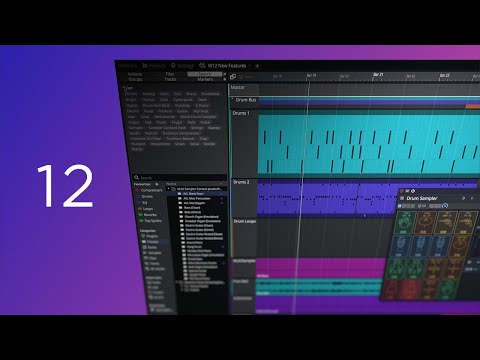
play Waveform 12 Quick Look
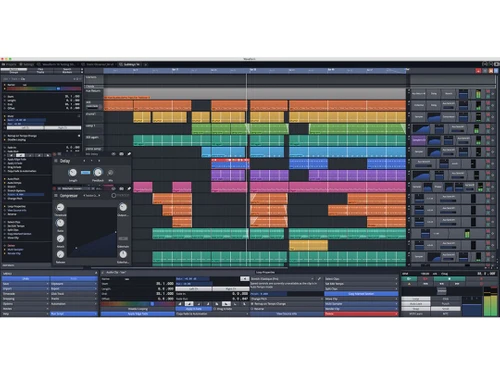
tracktion waveform dashboard
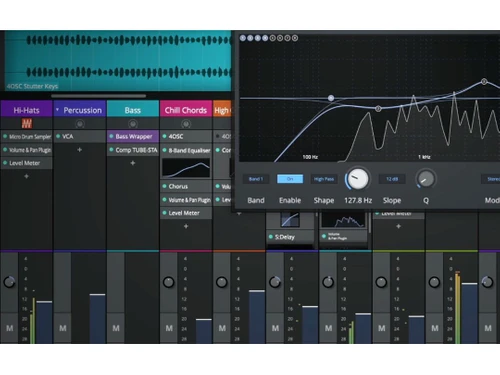
tracktion waveform graphs

Tracktion Waveform

Brand: Tracktion

  • 4.2

  • 4 Ratings

Tracktion Waveform is a digital audio workstation (DAW) for music creators with plugins, interactive UI, and a powerful audio engine.

See More

Have you used Tracktion Waveform before?

Share your insights for better experience

Add a Review
Starting Price
$199

View plans

100% Genuine
Products
Best Price
Guaranteed
Safe & Secure
Payment
  • Description

  • Pricing

  • Features

  • Specification

  • Review

  • Compare

  • Alternatives

  • FAQ

Starting at $199

Tracktion Waveform Software Overview

What is Tracktion Waveform?

Waveform is a digital audio workstation (DAW) developed by Tracktion. It provides a music creator set of tools for recording, editing, mixing, editing audio, MIDI, and making creative audio tracks. Audio files can be imported into it. It supports live recording and manipulation of sounds by adding various effects, 15 new audio FX and VST, VST3, and AU plugins.

Its interface provides a customizable workspace with intuitive controls and visual feedback. It has a flexible layout adaptable to different needs and supports over 20 presets. It allows better categorization, making better searching of things. It has a powerful audio engine that produces high-quality playback and sound. It also supports expandable capabilities using additional packs for different musical needs.

Why Choose Tracktion Waveform Software?

  • Recording studio: Allows to capture live performances, layer tracks, edit, and produce full songs with professional-grade tools and effects.
  • Mixing and mastering: Helps to balance track levels, apply EQ, and fine-tune dynamics for polished, professional-sounding music ready for release.
  • Sound design: Design custom sounds, effects, and atmospheres for films, games, and multimedia projects using synthesis and audio manipulation tools.
  • Music production: Create beats, melodies, and arrangements using virtual instruments, MIDI sequencing, and audio editing features.
  • Podcasting: Produce podcasts with voiceovers, interviews, and sound effects, utilizing audio editing, mixing, and publishing capabilities.

Benefits of Tracktion Waveform Platform

  • Professional quality: It helps to produce high-quality audio, effects, and professional-grade music production and sound design.
  • Better navigation for search: Better organized browsing, tagging, and smart lists improve efficiency in finding and organizing plugins, presets, and content.
  • Powerful audio engine: Its high-performance processing audio engine has reduced CPU load and ensures top-quality audio production and playback.
  • Intuitive interface: Customizable colour schemes, visual feedback, and user-friendly controls enhance the creative workflow and user experience.
  • Action panels: Unified properties and actions panels simplify navigation and speed up editing and project management.

Pricing of Tracktion Waveform DAW Software

Tracktion Waveform price in India starts at $ 149. Tracktion Waveform has multiple pricing plans and caters to a diverse customer base.

For subscription-related details and offers on premium packages, please request a call back from our product experts.

Read more

Tracktion Company Details

Founded Year:  2012

Tracktion designs, manufactures and distributes music production tools.

Director/Founders Julian Storer
Company Size 1-100 Employees

Tracktion Waveform Pricing & Plans

WAVEFORM PRO
Key Features
  • Waveform Pro 13
  • DAW Essentials Collection
  • Collective
  • Sanfilippo Imagina drum loop library
  • Autotune
  • Melodyne Essential
Starting at $199
    • Licenses

      Licenses
      Licenses

Key Features

  • Waveform Pro 13

  • DAW Essentials Collection

  • Collective

  • Sanfilippo Imagina drum loop library

  • Autotune

  • Melodyne Essential

Tracktion Waveform Features

  • icon_check Audio Effects
    For professional sound manipulation, access a range of audio effects, including compressors, reverbs, and EQs.
  • icon_check Drum Grid Mode
    Use the drum grid mode for precise drum programming and rhythmic control in music production.
  • icon_check Dual Guitar IR
    Use impulse responses for realistic guitar tones and quality audio experiences.
  • icon_check MIDI Randomization
    Make creative music with MIDI randomization features for generating unique musical patterns and variations.
  • icon_check Utility Plugins
    Use utility plugins like AB switches, mono converters, and spectrum analyzers for audio processing tasks.
  • icon_check MIDI Strum
    Simulate realistic guitar strumming patterns and techniques using MIDI strumming capabilities.
  • icon_check Controller Integration
    Integrate MIDI controllers for tactile control over virtual instruments, effects, and recording parameters.
  • icon_check Quick Action Bar
    Use a customizable quick action bar to access frequently used functions and tools.
  • icon_check Custom Layouts
    Create personalized layouts and workspaces for specific projects, preferences, and workflows.
  • icon_check Edit Overview
    With tools and visual feedback, get an overview of the editing process for precise audio editing.
Tracktion Waveform Demo Video play icon

Get Tracktion Waveform Demo

Watch the demo video to explore key features, real workflows, and how the software fits your business needs.

Understand
Key Features
Personal
Demo Insights
Interactive
Demo Support

Tracktion Waveform Specifications

Supported Platforms
Windows Windows MacOS MacOS Linux Linux
Devices
Desktop Desktop
Deployment
Perpetual Perpetual
Suitable For
All Industries
Business Specific
All Businesses
Business Size
Small Business Startups Medium Business Enterprises
Customer Support
Email Communities Forums
Language
English
Training Resources
Documentation Videos

Explore the Best Alternative Solutions Similar to Your Business Size and Needs

Tracktion Waveform Review

4.2

Out of 5

img

Overall Rating

Based on
4 Verified Ratings

Rating Breakdown

  • Features 4.2
  • Value for Money 4.5
  • Ease of Use 4.3
  • Customer Support 4

87% Recommend this Product

Add Review

Techjockey Trusted Reviews from Verified Users

No reviews are currently available for Tracktion Waveform. Discover similar DAW Software reviews

  • Reaper

    4.4

    Whats great - REAPER offers a comprehensive set of professional features. read more
  • Pro Tools

    4.4

    Whats great - Editing is easy to use, with extensive plugins, and edits up to 32-bit, 192hz audio. read more
  • Mixcraft 10.6

    4.5

    Whats great - Mixcraft 9 offers both audio and video editing feature. That's changed my decision to choose it as my DAW. The software is ma... read more

Compare Tracktion Waveform With other DAW Software

Products
Ratings
Pricing
Device Supported
Deployment
Supported Platforms
  • img

    Tracktion Waveform

  • 4.2

  • Price On Request

  • Desktop

    Mobile

  • Web based

    On Premises

  • Windows

    Mac OS

  • img

    FL Studio

  • 4.5

  • ₹ 2599

  • Desktop

    Mobile

  • Web based

    On Premises

  • Windows

    Mac OS

  • img

    SynthMaster

  • 4.6

  • Price On Request

  • Desktop

    Mobile

  • Web based

    On Premises

  • Windows

    Mac OS

  • img

    Nuendo

  • 4.4

  • ₹ 64477

  • Desktop

    Mobile

  • Web based

    On Premises

  • Windows

    Mac OS

  • img

    Resolume

  • 4.3

  • Price On Request

  • Desktop

    Mobile

  • Web based

    On Premises

  • Windows

    Mac OS

  • img

    Mixcraft 10.6

  • 4.5

  • Price On Request

  • Desktop

    Mobile

  • Web based

    On Premises

  • Windows

    Mac OS

  • img

    n-Track Studio

  • 4.2

  • Price On Request

  • Desktop

    Mobile

  • Web based

    On Premises

  • Windows

    Mac OS

  • img

    Addictive Drums 2

  • 4.1

  • Price On Request

  • Desktop

    Mobile

  • Web based

    On Premises

  • Windows

    Mac OS

  • img

    Groove Agent

  • 4.2

  • ₹ 19109

  • Desktop

    Mobile

  • Web based

    On Premises

  • Windows

    Mac OS

  • img

    RipX DAW

  • 4.3

  • ₹ 9400

  • Desktop

    Mobile

  • Web based

    On Premises

  • Windows

    Mac OS

  • img

    Pro Tools

  • 4.5

  • Price On Request

  • Desktop

    Mobile

  • Web based

    On Premises

  • Windows

    Mac OS

(0) Product(s) selected

Tracktion Waveform Alternatives

See All Tracktion Waveform Alternatives
SAVE UPTO 30%

Starting Price:

€299 /Quantity

Starting Price:

$10 /Month

Starting Price:

$49 /Quantity
LMMS

4.2

Available

Price on Request

Available

Price on Request

Articles for Tracktion Waveform

See All Related Articles

Which operating system does Tracktion Waveform support?

Tracktion Waveform is compatible with Windows, Linux, Ubuntu, and MacOS operating systems.

Is there any Tracktion Waveform app?

Tracktion Waveform app is available for mobile devices.

What is the deployment type of Tracktion Waveform?

Tracktion Waveform supports web-based deployment.

How much does Tracktion Waveform cost?

Tracktion Waveform pricing starts at $ 149 for the Waveform pro plan at techjockey.com.

Who are the potential users of Tracktion Waveform?

Tracktion Waveform is typically used in music production, podcasting, and sound design by musicians, podcasters, and audio engineers for creating, editing, and mastering audio content.

Is there any free demo for Tracktion Waveform?

Tracktion Waveform demo is available with techjockey.com.

Is Tracktion Waveform free?

Yes, Tracktion Waveform software is available for free.

Does Tracktion Waveform offer a free trial?

No, Tracktion Waveform software does not offer a free trial to users.

How can you download Tracktion Waveform?

Since the product Tracktion Waveform supports web-based deployment, there is no need for software installation. Just open the setup wizard and get started.

How does Tracktion Waveform work?

Tracktion Waveform helps with main functionalities like multitrack recording, audio editing, mixing, and mastering, using a new browser-based layout, plugins, powerful audio engine, and intuitive interface.

20,000+ Software Listed

Best Price Guranteed

Free Expert Consultation

2M+ Happy Customers

Terms and Condtions

close

Users with registered businesses can purchase goods from merchants on the platform to satisfy their business needs. Users are not permitted to utilize any products acquired through the platform for resale, advertising, business, or further distribution.

For each purchase made, users will receive a Tax Invoice (or 'GST invoice') that includes specific details such as:

  • the GSTIN of the user associated with their registered business, and

  • the specified Entity Name for their business.

It should be noted that not all products are eligible for GST Invoice. Only the products displayed by participating sellers with the 'GST-based Invoice Available' callout on the product description page would qualify.

Certain goods and services are not eligible to get a GST Invoice, including items with VAS, i.e., Value Added Services (e.g., Total Mobile Protection/Assured Buyback) and those involving an exchange offer at the time of purchase.

Users must ensure the accuracy of the GSTIN, and business entity name provided for the GST Invoice. Requests for corrections into GST Invoice would not be accommodated by Techjockey.com or any Seller, and any issues arising from user-provided information are the sole responsibility of users.

Techjockey.com is not liable for the GST Invoice or any associated input tax credit. To efficiently claim an input tax credit, users should select the registered place of business address as per the GST authority's data and follow the provisions of the GST Act and rules.

To claim an input tax credit, the delivery and billing addresses must match. Furthermore, input tax credits will not be granted if the delivery address and GSTIN on the invoice are from different states. In case of incorrect GST details provided during the order placement, the order will be canceled automatically.