linkedin
Anvil Studio logo
play Anvil Studio Tutorial 1 - how to make a simple rhythm track
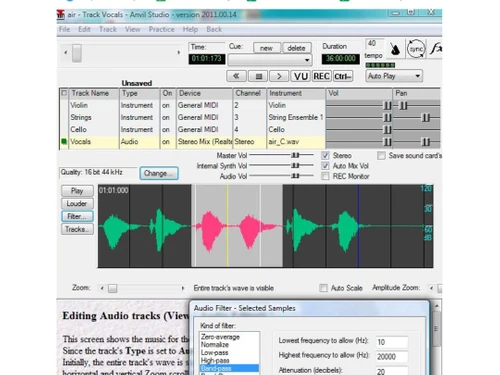
anvil studio audio
anvil studio pattern

Anvil Studio

Brand: Willow Software

  • 4.1

  • 3 Ratings

Anvil Studio is a digital audio workstation featuring multi-track editing, MIDI sequencing, and audio accessories.

See More

Have you used Anvil Studio before?

Share your insights for better experience

Add a Review
Starting Price
$29

View plans

100% Genuine
Products
Best Price
Guaranteed
Safe & Secure
Payment
  • Description

  • Pricing

  • Features

  • Specification

  • Review

  • Compare

  • Alternatives

  • FAQ

Starting at $29

Anvil Studio Software Overview

What is Anvil Studio?

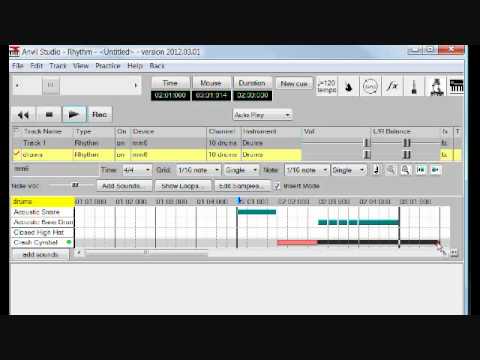
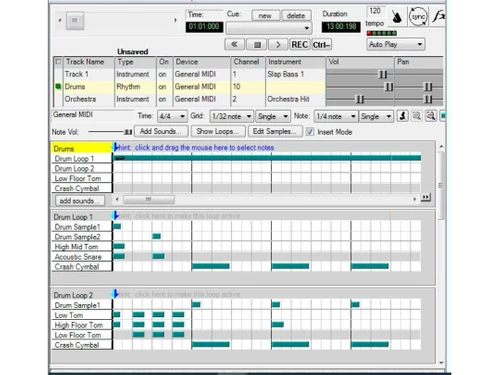
Anvil Studio is a Windows digital audio workstation music software that combines MIDI and audio features for creating and editing music. Its interface provides features for editors like rhythm editing, piano roll, and dynamic editing, thus helping them make audio with different rhythms. It allows users to import, record, and edit audio samples, add effects, and create multiple-level loops and drum beats for creative music. The files can be either in. MID or. WAV formats.

It provides multiple language support for lyrics and real-time MIDI recording from external devices. It can display twenty-five track information at the same time. It provides audio functionalities, including recording and editing stereo or mono tracks, adding audio effects and filters, Multi-audio 1/8 and 8/16 capabilities, ASIO, and automation. It also provides Pro-Mix support and tools for live performances.

Why Choose Anvil Studio Software?

  • Music making: It helps create great music compositions using MIDI tracks and features like dynamic rhythm editing, piano roll editing, drum beats, filters, etc.
  • Audio recording: Users can easily record, edit, and manipulate audio tracks for quality audio production.
  • Multimedia Projects: Helps create different multimedia projects comprising audio and MIDI elements for interactive presentations.
  • Educational tool: Its easy-to-use features allow users to learn music fundamentals, audio editing, piano, and details.
  • Live performance: This allows for smooth musical, audio, and interactive live performances by wirelessly using MIDI instruments, effects, and virtual instruments.

Benefits of Anvil Studio Platform

  • Interface: A simple interface helps users to use musical instruments, effects, and features easily.
  • Creativity: Multi-level loops, dynamic rhythm editing, and MIDI manipulation provide numerous creative possibilities for audio editing.
  • Integration: It supports smooth integration with external MIDI devices, VST effects, and ASIO drivers, adding more effects to the composition.
  • Multi-track recording: Allows the creation of unlimited MIDI tracks and up to 16 audio tracks with accessories.
  • VST Effects: Increase the effects of the music with virtual instruments and effects and use it in live performances.
  • Sheet music printing: It can easily print sheet music from standard MIDI files.

Pricing of Anvil Studio DAW Platform

Anvil Studio is available for free.

The price of Anvil Studio in India may vary based on factors like customization, additional features required, the number of users, and the deployment type. Please request a callback for subscription-related details and to avail of offers on premium packages.

Read more

Anvil Studio Pricing & Plans

Pro-Mix
Starting at $29
    • Licenses

      Licenses
      Licenses

Anvil Studio Features

  • icon_check Multi-level loops
    Layered loops allow for better musical arrangements for textures and complex rhythmic patterns.
  • icon_check Percussion editor
    Customize percussion notation with standard symbols and notation to make rhythmic elements.
  • icon_check Stretch / compress notes
    Adjust note durations dynamically to better control timing and expression in musical phrases.
  • icon_check File/Truncate menu
    Easily shorten the duration of MIDI files, optimizing file size and performance efficiency.
  • icon_check User-defined keyboard shortcuts
    Personalize workflow with custom key combinations for easy music composition and editing.
  • icon_check Import/export WMA
    Integrate audio files in WMA format, expanding compatibility in audio production.
  • icon_check VST effects
    Enhance audio tracks with virtual studio technology (VST) effects, & improve sound quality, & offer different possibilities.
  • icon_check MIDI Editor
    Edit MIDI data by including note properties, pitch, duration, and dynamics to improve musicality.
  • icon_check Automatic layout
    Arrange musical bars and staves automatically, optimizing visual clarity in complex compositions.
  • icon_check Slave Synchronization mode
    Synchronize MIDI playback with external devices as a slave for timing and alignment in music setups.
Anvil Studio Demo Video play icon

Get Anvil Studio Demo

Watch the demo video to explore key features, real workflows, and how the software fits your business needs.

Understand
Key Features
Personal
Demo Insights
Interactive
Demo Support

Anvil Studio Specifications

Supported Platforms
Windows Windows
Devices
Desktop Desktop
Deployment
Perpetual Perpetual
Suitable For
All Industries
Business Specific
All Businesses
Business Size
Small Business Startups Medium Business Enterprises
Customer Support
Email
Language
English
Training Resources
Videos

Explore the Best Alternative Solutions Similar to Your Business Size and Needs

Anvil Studio Review

4.1

Out of 5

img

Overall Rating

Based on
3 Verified Ratings

Rating Breakdown

  • Features 4.5
  • Value for Money 4
  • Ease of Use 4
  • Customer Support 4

86% Recommend this Product

Add Review

Techjockey Trusted Reviews from Verified Users

No reviews are currently available for Anvil Studio. Discover similar DAW Software reviews

  • Reaper

    4.4

    Whats great - REAPER offers a comprehensive set of professional features. read more
  • Pro Tools

    4.4

    Whats great - Editing is easy to use, with extensive plugins, and edits up to 32-bit, 192hz audio. read more
  • Mixcraft 10.6

    4.5

    Whats great - Mixcraft 9 offers both audio and video editing feature. That's changed my decision to choose it as my DAW. The software is ma... read more

Compare Anvil Studio With other DAW Software

Products
Ratings
Pricing
Device Supported
Deployment
Supported Platforms
  • img

    Anvil Studio

  • 4.1

  • Price On Request

  • Desktop

    Mobile

  • Web based

    On Premises

  • Windows

    Mac OS

  • img

    FL Studio

  • 4.5

  • ₹ 2599

  • Desktop

    Mobile

  • Web based

    On Premises

  • Windows

    Mac OS

  • img

    SynthMaster

  • 4.6

  • Price On Request

  • Desktop

    Mobile

  • Web based

    On Premises

  • Windows

    Mac OS

  • img

    Nuendo

  • 4.4

  • ₹ 64477

  • Desktop

    Mobile

  • Web based

    On Premises

  • Windows

    Mac OS

  • img

    Resolume

  • 4.3

  • Price On Request

  • Desktop

    Mobile

  • Web based

    On Premises

  • Windows

    Mac OS

  • img

    Mixcraft 10.6

  • 4.5

  • Price On Request

  • Desktop

    Mobile

  • Web based

    On Premises

  • Windows

    Mac OS

  • img

    n-Track Studio

  • 4.2

  • Price On Request

  • Desktop

    Mobile

  • Web based

    On Premises

  • Windows

    Mac OS

  • img

    Addictive Drums 2

  • 4.1

  • Price On Request

  • Desktop

    Mobile

  • Web based

    On Premises

  • Windows

    Mac OS

  • img

    Groove Agent

  • 4.2

  • ₹ 19109

  • Desktop

    Mobile

  • Web based

    On Premises

  • Windows

    Mac OS

  • img

    RipX DAW

  • 4.3

  • ₹ 9400

  • Desktop

    Mobile

  • Web based

    On Premises

  • Windows

    Mac OS

  • img

    Pro Tools

  • 4.5

  • Price On Request

  • Desktop

    Mobile

  • Web based

    On Premises

  • Windows

    Mac OS

(0) Product(s) selected

Anvil Studio Alternatives

See All Anvil Studio Alternatives
SAVE UPTO 30%

Starting Price:

€299 /Quantity

Starting Price:

$10 /Month

Starting Price:

$49 /Quantity

LMMS

4.2

Available

Price on Request

Available

Price on Request

Articles for Anvil Studio

See All Related Articles

Can a beginner in music production use Anvil Studio?

Yes, Anvil Studi is user-friendly and offers features that help beginners make music creatively.

Can external MIDI keyboards and audio interfaces be integrated with Anvil Studio?

Yes, Anvil Studio supports third-party integration to increase the capabilities for making creative music.

Does Anvil Studio provide troubleshooting of issues?

Yes, Anvil Studio provides support forums, resources, and online documentation for troubleshooting.

Can I use Anvil Studio for live performances?

You can use Anvil Studio for live performance with wireless support for MIDI controllers and external devices.

Who are the ideal users for Anvil Studio?

Anvil Studio can be used by musicians, composers, educators, live performers, and audio enthusiasts.

What is the use of Anvil Studio software?

Anvil Studio is a digital audio workstation that helps users create, edit, and mix audio files for music, learn music, and produce multimedia projects.

What is the cost structure of Anvil Studio?

Anvil Studio is a free version. However, users can pay to access optional accessories like Multi-Audio capabilities and Pro-Mix.

Does Anvil Studio allow project sharing?

Anvil Studio allows community-based sharing of projects to the web or sharing the source code.

20,000+ Software Listed

Best Price Guranteed

Free Expert Consultation

2M+ Happy Customers

Terms and Condtions

close

Users with registered businesses can purchase goods from merchants on the platform to satisfy their business needs. Users are not permitted to utilize any products acquired through the platform for resale, advertising, business, or further distribution.

For each purchase made, users will receive a Tax Invoice (or 'GST invoice') that includes specific details such as:

  • the GSTIN of the user associated with their registered business, and

  • the specified Entity Name for their business.

It should be noted that not all products are eligible for GST Invoice. Only the products displayed by participating sellers with the 'GST-based Invoice Available' callout on the product description page would qualify.

Certain goods and services are not eligible to get a GST Invoice, including items with VAS, i.e., Value Added Services (e.g., Total Mobile Protection/Assured Buyback) and those involving an exchange offer at the time of purchase.

Users must ensure the accuracy of the GSTIN, and business entity name provided for the GST Invoice. Requests for corrections into GST Invoice would not be accommodated by Techjockey.com or any Seller, and any issues arising from user-provided information are the sole responsibility of users.

Techjockey.com is not liable for the GST Invoice or any associated input tax credit. To efficiently claim an input tax credit, users should select the registered place of business address as per the GST authority's data and follow the provisions of the GST Act and rules.

To claim an input tax credit, the delivery and billing addresses must match. Furthermore, input tax credits will not be granted if the delivery address and GSTIN on the invoice are from different states. In case of incorrect GST details provided during the order placement, the order will be canceled automatically.