linkedin
Procare logo
play Manage Every Aspect of Your Center with Procare
procare program
procare child care management

Procare

Brand: Procare Software

  • 4.0

  • 5 Ratings

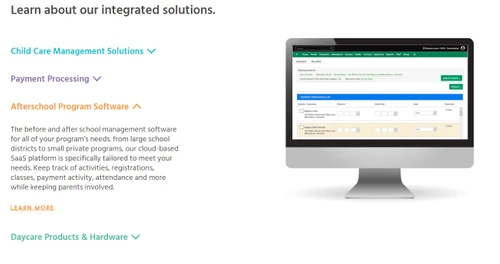
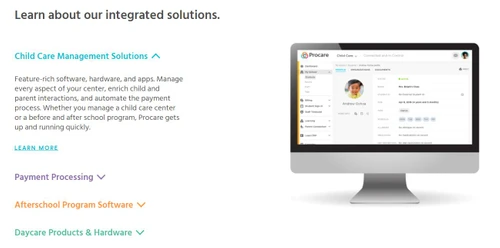
Procare is a childcare management application encompassing daycares, preschools, and early learning centers. It aids in attendance tracking, automated billing, parental communication, staff management, and reporting of compliance for maximized efficiency.

See More

Have you used Procare before?

Share your insights for better experience

Add a Review

Price Available on Request

Questions about pricing or customization? We’re here to help, just a click away.

100% Genuine
Products
Best Price
Guaranteed
Safe & Secure
Payment
  • Description

  • Pricing

  • Features

  • Specification

  • Review

  • Compare

  • Alternatives

  • FAQ

Procare Software Overview

What is Procare?

Procare is comprehensive childcare management software designed to help childcare centers, preschools, and after-school programs manage their daily operations. It provides tools for parent communication, attendance tracking, billing, scheduling, staff management, and more, making it easier to run childcare businesses efficiently while maintaining compliance and improving communication with parents.

Procare offers data security, customizable reports, and mobile apps for easier management and communication. The software integrates with various accounting, payroll, and point-of-sale systems, streamlining business operations.

Top Features of Procare

  • Parent Communication: Maintains punctual messaging, alerts, and updates with parents from different child care centers, ensuring effective communication and engagement. It further enables interaction through sharing of photos and videos with parents.
  • Attendance Tracking: Attendance can be checked automatically using the customizable check-in/check-out systems, which makes it easier to track attendance and minimize mistakes. Attendance reports are also available in real-time, which helps to systematically construct and monitor the reports.
  • Scheduling: Centers can be given the abilities to create and manage their staff as well as child schedules, ensuring that daily activities can run smoothly without scheduling bottlenecks and conflicts arising. Automatic schedule changes help to update newly added staff members and children.
  • Staff Management: Staff schedules, certifications, payroll, and more can be all managed for easier staff coordination as well as compliance with labor rules. Such tools allow better policy compliance and tracking of staff performance and attendance.
  • Customizable Reports: Attendance, billing, payments, and other operations are generated with reports by the system, providing managers with useful outputs to improve the services being offered. Detailed analysis by using the reports through other formats is also made possible as they can easily be exported.
  • Mobile App Access: Staff and parents are given mobile access for real-time schedules, communications and updates for better access. All users are kept informed by allowing instant updates and notifications by the app.
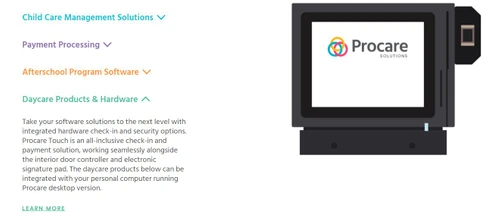
  • Point-of-Sale (POS) Integration: Integrates with POS systems to help with payment processing, tracking, and managing financial transactions in real-time, reducing manual effort. It also syncs financial data with other systems to ensure seamless financial operations.

Benefits of Procare

  • Improved Efficiency: Automates important processes, such as billing, attendance tracking, and scheduling, that take time to do manually, making it easier and more efficient. Staff can prioritize spending time with children and center activities.
  • Better Parent Engagement: Enables enhanced communication through real-time updates, share messaging, photos, while video sharing, which increases parent satisfaction and engagement. Parents can have more visibility and trust towards their child, increasing retention.
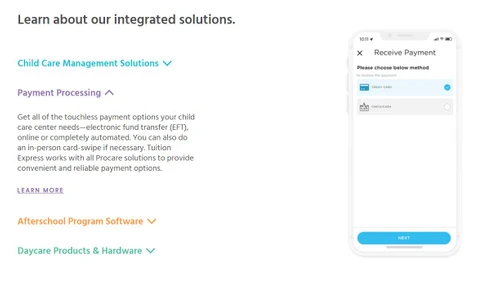
  • Streamlined Billing & Payments: Eases the process of payment, invoicing, and payment tracking, assuring timely and accurate financial transactions for the childcare centers. It also accommodates different flexible payment methods preferred by parents.
  • Enhanced Security & Compliance: Guarantees secure data storage while helping childcare centers remain compliant with other governing regulations and state licensing requirements. The system also comes with audit-ready documentation capabilities, which simplifies and reduces the stress of inspections.
  • Staff & Resource Management: Aids in supervising staff schedules, certifications, and payroll to comply with labor laws and staff efficiency, while productivity. It helps eliminate the chances of staffing conflicts, hence ensuring a fair distribution of the work done throughout the team.
  • Customizable Reports & Analytics: Gives the ability to create customized reports that provide crucial information on attendance, finances, and operations, forms enabling systems to respond accurately to them. These reports can also serve as a tool to analyze trends and fine-tune business strategies over time.

Procare Pricing

The Procare pricing is available on a call request to Techjockey.com. You can also call them for any other information.

Read more

Procare Software Company Details

Founded Year:  1992

For more than 30 years, Procare Solutions has been helping early childhood educators simplify operations and create meaningful connections with families, so they can focus on what matters most – the children in their care.

Director/Founders Jeffrey Blum
Company Size 101-500 Employees

Procare Pricing & Plans

Looking for The Right Pricing?

Share your requirements and get a plan built around your business.

  • Define your business needs
  • Get customised pricing
  • Choose features that fit your workflow

Price Available on Request

Get personalised Procare pricing that fits your needs. Our team will connect with you.

Procare Features

  • icon_check Classroom Management
    Keeps tabs on student activities, attendance, and achievements through lesson planning.
  • icon_check Mobile App
    Offers mobile communication and alerts for parents and staff in the case of emergencies.
  • icon_check Financial Management
    Makes budgeting, expense, and financial report automation easier by using simplification tools.
  • icon_check Payment Processing
    Enable security and flexibility to make payments, set automated reminders, & recurring billing through secure online payments.
  • icon_check Staff Management
    Oversees the efficient management of schedules, payroll, certifications, and performance tracking.
  • icon_check Parent Engagement
    Let parents become more involved with their children for real-time updates, event notification, and achievement tracking.
  • icon_check Parent Communication
    Sends messages, alerts, and reports out to parents to keep them engaged and informed.
  • icon_check Registrations
    Simplifies the admission process through online enrollment, waiting list, and form submission management.
  • icon_check Lead Management
    Monitors inquiries, follow-ups, and other important aspects through automated tools and reminders.
  • icon_check Support
    Provides customer support via live chat, phone calls, and training resources for individual customers.
Procare Demo Video play icon

Get Procare Demo

Watch the demo video to explore key features, real workflows, and how the software fits your business needs.

Understand
Key Features
Personal
Demo Insights
Interactive
Demo Support

Procare Specifications

Supported Platforms
Windows Windows iOS iOS Android Android MacOS MacOS
Devices
Desktop Desktop Mobile Mobile Tablet Tablet iPad iPad
Deployment
Cloud-Based Cloud-Based
Suitable For
Education
Business Specific
Child Care Pre-school
Business Size
Small Business Startups Medium Business Enterprises
Customer Support
Email Live Chat Communities
Language
English
Training Resources
Webinars Documentation Videos

Explore the Best Alternative Solutions Similar to Your Business Size and Needs

Enterprises

Designed for complex and large-scale business needs

Famly

4.3

Lillio

3.9

Tadpoles

4.1

See More

Procare Review

4.0

Out of 5

img

Overall Rating

Based on
5 Verified Ratings

Rating Breakdown

  • Features 4.2
  • Value for Money 4.2
  • Ease of Use 4
  • Customer Support 3.9

94% Recommend this Product

Add Review

Techjockey Trusted Reviews from Verified Users

No reviews are currently available for Procare. Discover similar Child Care Management Software reviews

  • Illumine

    4.8

    Whats great - love all the Features, We are able to save our most valuable information data safe, as well as gather more information in a r... read more
  • Famly

    4.4

    Whats great - Personalized onboarding, ongoing support read more

  • Playground

    4.5

    Whats great - Playground Child Care Software has been an amazing tool for our daycare center. It streamlines everything from daily attendan... read more

Compare Procare With other Child Care Management Software

Products
Ratings
Pricing
Device Supported
Deployment
Supported Platforms
  • img

    Procare

  • 4.0

  • Price On Request

  • Desktop

    Mobile

  • Web based

    On Premises

  • Windows

    Mac OS

  • img

    Kriyo

  • 4.1

  • ₹ 400

  • Desktop

    Mobile

  • Web based

    On Premises

  • Windows

    Mac OS

  • img

    Brightwheel

  • 4.1

  • Price On Request

  • Desktop

    Mobile

  • Web based

    On Premises

  • Windows

    Mac OS

  • img

    iCare Software

  • 4.3

  • Price On Request

  • Desktop

    Mobile

  • Web based

    On Premises

  • Windows

    Mac OS

  • img

    Illumine

  • 4.8

  • ₹ 800

  • Desktop

    Mobile

  • Web based

    On Premises

  • Windows

    Mac OS

  • img

    Parent ApS

  • 4.1

  • Price On Request

  • Desktop

    Mobile

  • Web based

    On Premises

  • Windows

    Mac OS

  • img

    Kinderpass

  • 4.3

  • Price On Request

  • Desktop

    Mobile

  • Web based

    On Premises

  • Windows

    Mac OS

  • img

    Kidsoft

  • 4.4

  • Price On Request

  • Desktop

    Mobile

  • Web based

    On Premises

  • Windows

    Mac OS

  • img

    NestliCare

  • Price On Request

  • Desktop

    Mobile

  • Web based

    On Premises

  • Windows

    Mac OS

  • img

    Playground

  • 4.4

  • Price On Request

  • Desktop

    Mobile

  • Web based

    On Premises

  • Windows

    Mac OS

  • img

    LineLeader

  • 4.1

  • Price On Request

  • Desktop

    Mobile

  • Web based

    On Premises

  • Windows

    Mac OS

(0) Product(s) selected

Procare Alternatives

See All Procare Alternatives

Available

Price on Request

Starting Price:

₹75 /Month

Available

Price on Request

Available

Price on Request

Available

Price on Request

Available

Price on Request

Starting Price:

$50 /Month

How much does Procare cost?

You need to call Techjockey.com for pricing information.

How does Procare work?

Procare automates childcare management, including monitoring attendance, billing, scheduling workers, and contact with parents. It includes a mobile app, secure payments, and custom reporting to help achieve smooth running and compliance.

Is Procare available for free?

No, Procare is not available for free. However, you can try it after taking a demo.

Is a free demo available in Procare?

Yes, there is a demo available in Procare.

Who can use Procare?

The major users of Procare are childcare centers, preschools, daycare providers, after-school programs, and early education institutions.

Is there any mobile app for Procare?

Yes, Procare app is available for users.

20,000+ Software Listed

Best Price Guranteed

Free Expert Consultation

2M+ Happy Customers

Terms and Condtions

close

Users with registered businesses can purchase goods from merchants on the platform to satisfy their business needs. Users are not permitted to utilize any products acquired through the platform for resale, advertising, business, or further distribution.

For each purchase made, users will receive a Tax Invoice (or 'GST invoice') that includes specific details such as:

  • the GSTIN of the user associated with their registered business, and

  • the specified Entity Name for their business.

It should be noted that not all products are eligible for GST Invoice. Only the products displayed by participating sellers with the 'GST-based Invoice Available' callout on the product description page would qualify.

Certain goods and services are not eligible to get a GST Invoice, including items with VAS, i.e., Value Added Services (e.g., Total Mobile Protection/Assured Buyback) and those involving an exchange offer at the time of purchase.

Users must ensure the accuracy of the GSTIN, and business entity name provided for the GST Invoice. Requests for corrections into GST Invoice would not be accommodated by Techjockey.com or any Seller, and any issues arising from user-provided information are the sole responsibility of users.

Techjockey.com is not liable for the GST Invoice or any associated input tax credit. To efficiently claim an input tax credit, users should select the registered place of business address as per the GST authority's data and follow the provisions of the GST Act and rules.

To claim an input tax credit, the delivery and billing addresses must match. Furthermore, input tax credits will not be granted if the delivery address and GSTIN on the invoice are from different states. In case of incorrect GST details provided during the order placement, the order will be canceled automatically.