linkedin
Tadpoles logo
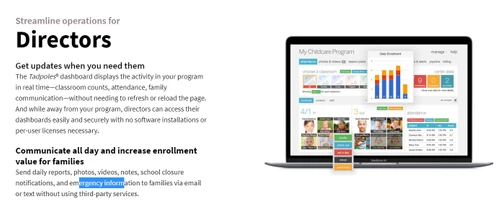
tadpoles dashboard director
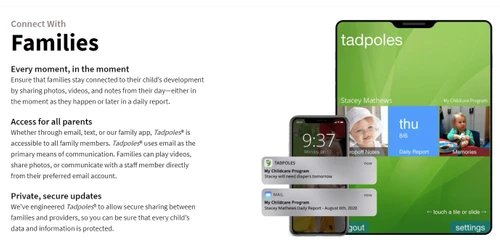
tadpoles family app
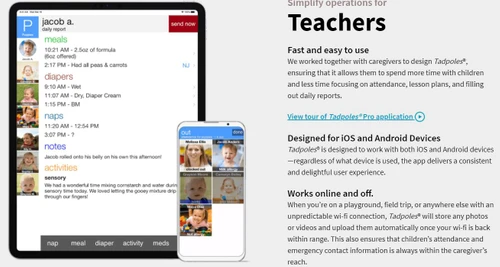
tadpoles teacher app

Tadpoles

Brand: Tadpoles

  • 4.1

  • 5 Ratings

Tadpoles is a childcare management software that helps preschools and daycare centers manage attendance, daily reports, lesson plans, and parent communication.

See More

Have you used Tadpoles before?

Share your insights for better experience

Add a Review

Price Available on Request

Questions about pricing or customization? We’re here to help, just a click away.

100% Genuine
Products
Best Price
Guaranteed
Safe & Secure
Payment
  • Description

  • Pricing

  • Features

  • Specification

  • Review

  • Compare

  • Alternatives

  • FAQ

TadpolesSoftware Overview

What is Tadpoles?

Tadpoles is a comprehensive, all-in-one Child Care Management Software designed to streamline the daily operations of early childhood education centers. As a web-based platform, it provides an intuitive and simple interface for educators, administrators, and parents. The software serves as an end-to-end solution, centralizing key tasks such as attendance tracking, lesson planning, and parent communication into a single, cohesive system. By digitizing and automating routine administrative duties, Tadpoles empowers childcare providers to dedicate more time and focus to the children in their care, enhancing both educational quality and operational efficiency.

Why Choose Tadpoles?

  • Enhanced Parent Engagement: Through a dedicated parent app, families receive daily reports, photos, videos, and direct messages, keeping them connected and involved.
  • Increased Staff Efficiency: The teacher-focused app simplifies administrative tasks like attendance, daily reporting, and curriculum planning, freeing up valuable time for educators to focus on teaching and interaction.
  • Centralized Operations: Tadpoles consolidates multiple functions into one platform, eliminating the need for disparate systems for communication, reporting, and planning.
  • User-Friendly Design: With its simple and easy-to-use interface, staff can quickly adopt the software with minimal training, ensuring a smooth transition for your entire center.

Advanced Features of Tadpoles

  • Teacher App: A dedicated mobile application that allows teachers to easily record attendance, log daily activities (meals, naps, lessons), share photos and videos, and communicate with parents directly from their classroom device.
  • Parent App: Provides parents with a secure, private portal to view their child's daily reports, receive milestone updates, view photo and video galleries, and communicate with teachers and staff.
  • Attendance Tracking: Streamlines the check-in and check-out process, providing accurate, real-time attendance records for safety, billing, and compliance purposes.
  • Daily Reports: Educators can quickly generate and share digital daily sheets that detail a child's meals, naps, diaper changes, learning activities, and mood, which are sent directly to parents.
  • Lesson Plans: A tool for creating, managing, and sharing curriculum and lesson plans with staff and parents, ensuring educational goals are transparent and consistently applied.
  • Communication Hub: Facilitates seamless two-way communication between parents and staff through in-app messaging, announcements, and alerts.

Key Capabilities of Tadpoles

  • Classroom & Curriculum Management: This capability focuses on the educational core of your center. It includes tools for creating detailed lesson plans, tracking developmental milestones, and generating rich daily reports that document learning activities and routines.
  • Parent & Family Engagement: At its heart, Tadpoles is a communication platform. It provides a direct and engaging channel to share moments from a child's day through photos, videos, and real-time updates, fostering a strong school-to-home connection.
  • Administrative & Operational Automation: Tadpoles simplifies the administrative burden on directors and staff. Key functions like attendance logging, staff communication, and event coordination are automated, ensuring accuracy and saving significant time.
  • Mobile Accessibility: With dedicated apps for both teachers and parents, Tadpoles ensures that all stakeholders can access critical information and communication tools anytime, anywhere, from their preferred mobile device.

How to Use Tadpoles?

  1. Initial Setup: An administrator configures the system by creating classrooms, adding staff profiles, and enrolling children with their parent contact information.
  2. Daily Classroom Use: Teachers use the Teacher App on a tablet or mobile device to check children in, record meals, naps, and activities throughout the day, and capture photos or videos of key moments.
  3. Engaging with Parents: As teachers log information, parents receive instant notifications and a comprehensive daily report through the Parent App, allowing them to feel connected to their child's experience.
  4. Administrative Oversight: Directors and administrators can access a centralized dashboard to monitor attendance across the center, review communication logs, and ensure operational consistency.

Tadpoles Pricing

Tadpoles pricing details are available on request on techjockey.com.

The pricing model is based on different parameters, including extra features, deployment type, and the total number of users. For further queries related to the product, you can contact our product team and learn more about the pricing and offers.

Read more

Tadpoles Company Details

Founded Year:  2011

Tadpoles provides a free application for daycare and childcare providers to capture information about their children and share that information securely and privately with parents.

Director/Founders Andy Monroe, Bill McHugh
Company Size 1-100 Employees

Tadpoles Pricing & Plans

Looking for The Right Pricing?

Share your requirements and get a plan built around your business.

  • Define your business needs
  • Get customised pricing
  • Choose features that fit your workflow

Price Available on Request

Get personalised Tadpoles pricing that fits your needs. Our team will connect with you.

Tadpoles Features

  • icon_check Teacher App
    Enables teachers to capture activities, photos, and notes throughout the day using a simple, mobile-friendly interface.
  • icon_check Easy to Use
    Designed with intuitive navigation, ensuring staff and parents can quickly learn and efficiently use the platform daily.
  • icon_check Parent App
    Gives families real-time updates, photos, and messages from the classroom, keeping them connected to their child’s day.
  • icon_check Attendance
    Tracks student check-in/check-out times digitally, providing secure, timestamped records accessible by staff and families.
  • icon_check Communication
    Allows teachers and parents to exchange messages, announcements, and reminders within a secure, unified app interface.
  • icon_check Lesson Plans
    Lets teachers create, organize, and share curriculum plans directly with families while aligning with early learning goals.
  • icon_check Daily Reports
    Automatically compiles daily activities, naps, meals, and photos into easy-to-read summaries sent to each child’s parent.
  • icon_check Field Trip
    Manages permission slips, trip details, and attendance digitally to simplify planning and ensure parent visibility and safety.
  • icon_check Dashboards
    Provides administrators and staff with real-time overviews of attendance, teacher activity, and parent engagement metrics.
  • icon_check Classroom Management
    Helps teachers monitor group sizes, ratios, transitions, and child needs in real time to maintain licensing and quality care.
  • icon_check Enrollment
    Simplifies admissions with digital forms, waitlist tracking, and status updates to streamline onboarding for new families.

Tadpoles Specification

Supported Platforms
Windows Windows iOS iOS Android Android MacOS MacOS
Devices
Desktop Desktop Mobile Mobile
Deployment
Web-Based Web-Based
Suitable For
Education
Business Specific
Child Care Pre-school
Business Size
Small Business Startups Medium Business Enterprises SMBs SMEs MSMBs MSMEs
Customer Support
Forums
Language
English
Training Resources
Videos

Explore the Best Alternative Solutions Similar to Your Business Size and Needs

Enterprises

Designed for complex and large-scale business needs

Famly

4.3

Procare

4.0

Lillio

3.9

See More

Tadpoles Review

4.1

Out of 5

img

Overall Rating

Based on
5 Verified Ratings

Rating Breakdown

  • Features 3.9
  • Value for Money 3.9
  • Ease of Use 4.3
  • Customer Support 4.3

92% Recommend this Product

Add Review

Techjockey Trusted Reviews from Verified Users

No reviews are currently available for Tadpoles. Discover similar Child Care Management Software reviews

  • Illumine

    4.8

    Whats great - love all the Features, We are able to save our most valuable information data safe, as well as gather more information in a r... read more
  • Famly

    4.4

    Whats great - Personalized onboarding, ongoing support read more

  • Playground

    4.5

    Whats great - Playground Child Care Software has been an amazing tool for our daycare center. It streamlines everything from daily attendan... read more

Compare Tadpoles With other Child Care Management Software

Products
Ratings
Pricing
Device Supported
Deployment
Supported Platforms
  • img

    Tadpoles

  • 4.1

  • Price On Request

  • Desktop

    Mobile

  • Web based

    On Premises

  • Windows

    Mac OS

  • img

    Illumine

  • 4.8

  • ₹ 800

  • Desktop

    Mobile

  • Web based

    On Premises

  • Windows

    Mac OS

  • img

    Kriyo

  • 4.1

  • ₹ 400

  • Desktop

    Mobile

  • Web based

    On Premises

  • Windows

    Mac OS

  • img

    iCare Software

  • 4.3

  • Price On Request

  • Desktop

    Mobile

  • Web based

    On Premises

  • Windows

    Mac OS

  • img

    Kinderpass

  • 4.3

  • Price On Request

  • Desktop

    Mobile

  • Web based

    On Premises

  • Windows

    Mac OS

  • img

    Parent ApS

  • 4.1

  • Price On Request

  • Desktop

    Mobile

  • Web based

    On Premises

  • Windows

    Mac OS

  • img

    Brightwheel

  • 4.1

  • Price On Request

  • Desktop

    Mobile

  • Web based

    On Premises

  • Windows

    Mac OS

  • img

    Kidsoft

  • 4.4

  • Price On Request

  • Desktop

    Mobile

  • Web based

    On Premises

  • Windows

    Mac OS

  • img

    Playground

  • 4.4

  • Price On Request

  • Desktop

    Mobile

  • Web based

    On Premises

  • Windows

    Mac OS

  • img

    Famly

  • 4.3

  • Price On Request

  • Desktop

    Mobile

  • Web based

    On Premises

  • Windows

    Mac OS

  • img

    LineLeader

  • 4.1

  • Price On Request

  • Desktop

    Mobile

  • Web based

    On Premises

  • Windows

    Mac OS

(0) Product(s) selected

Tadpoles Alternatives

See All Tadpoles Alternatives

Starting Price:

₹75 /Month

Available

Price on Request

Available

Price on Request

Available

Price on Request
Available

Price on Request

Available

Price on Request

Starting Price:

$13 /Month

Starting Price:

$50 /Month

Which operating system does Tadpoles support?

Tadpoles is compatible with Windows, IOS, Android and MacOS operating systems.

Is there any Tadpoles app?

Tadpoles app is available for and Mobile.

What is deployment type of Tadpoles?

Tadpoles supports Web-Based.

Who are the potential users of Tadpoles?

Tadpoles is typically used in Education.

Is there any Tadpoles demo or free trial?

Tadpoles demo is available for free at Techjockey.com.

Is Tadpoles free?

Tadpoles offers a free trial. However, the premium plan with advanced features available at Techjockey.com

How can you download Tadpoles?

For Tadpoles installation, insert the given CD/USB flash storage in your system and open the Setup Wizard to get started. The web-based version can be accessed directly through Tadpoles portal.

How does Tadpoles work?

Tadpoles helps with Teacher App,Easy to Use,Parent App and Attendance. It's a complete solution for Communication,Lesson Plans,Daily Reports and Field Trip.

Are there any hidden charges for Tadpoles updates?

Tadpoles regular updates are available free of cost. There are no hidden software update charges.

What is Tadpoles used for?

Tadpoles Child Care Management Software used for Teacher App,Easy to Use,Parent App and Attendance.

How do I contact Tadpoles support?

You can directly visit Tadpoles portal and get in touch with Tadpoles customer support for any software-related query.

How to get Tadpoles lifetime deal?

Please contact our product experts to get Tadpoles lifetime deal with exclusive offers.

What is the Tadpoles app?

Tadpoles is an all-in-one child care management software that helps providers and parents with communication, daily reports, attendance tracking, and lesson planning through dedicated teacher and parent apps.

How do I log into my Tadpoles account?

You can log into your Tadpoles account by visiting the official Tadpoles website or opening the mobile app and entering the email address and password associated with your account.

How do I get pictures from Tadpoles?

Parents can view and receive pictures sent by their child care provider through the Tadpoles parent app as part of daily reports and communications.

What key features does Tadpoles offer for child care centers?

Tadpoles provides key features for child care centers including a teacher app, a parent app, attendance tracking, communication tools, lesson planning, and daily reports.

How much does Tadpoles software cost?

Tadpoles pricing details are available on request on techjockey.com.

What type of businesses is Tadpoles designed for?

Tadpoles is designed to serve a wide range of child care businesses, including startups, small to medium-sized businesses (SMBs), SMEs, and agencies.

Is Tadpoles a mobile app or a web-based software?

Tadpoles is a web-based child care management software that also provides dedicated mobile apps for both teachers and parents for easy access.

20,000+ Software Listed

Best Price Guranteed

Free Expert Consultation

2M+ Happy Customers

Terms and Condtions

close

Users with registered businesses can purchase goods from merchants on the platform to satisfy their business needs. Users are not permitted to utilize any products acquired through the platform for resale, advertising, business, or further distribution.

For each purchase made, users will receive a Tax Invoice (or 'GST invoice') that includes specific details such as:

  • the GSTIN of the user associated with their registered business, and

  • the specified Entity Name for their business.

It should be noted that not all products are eligible for GST Invoice. Only the products displayed by participating sellers with the 'GST-based Invoice Available' callout on the product description page would qualify.

Certain goods and services are not eligible to get a GST Invoice, including items with VAS, i.e., Value Added Services (e.g., Total Mobile Protection/Assured Buyback) and those involving an exchange offer at the time of purchase.

Users must ensure the accuracy of the GSTIN, and business entity name provided for the GST Invoice. Requests for corrections into GST Invoice would not be accommodated by Techjockey.com or any Seller, and any issues arising from user-provided information are the sole responsibility of users.

Techjockey.com is not liable for the GST Invoice or any associated input tax credit. To efficiently claim an input tax credit, users should select the registered place of business address as per the GST authority's data and follow the provisions of the GST Act and rules.

To claim an input tax credit, the delivery and billing addresses must match. Furthermore, input tax credits will not be granted if the delivery address and GSTIN on the invoice are from different states. In case of incorrect GST details provided during the order placement, the order will be canceled automatically.