USA
USA UAE
UAESmall Business
Designed for startups and growing businesses

See More



Brand: Pulse Grid
Have you used Pulse Grid before?
Share your insights for better experience
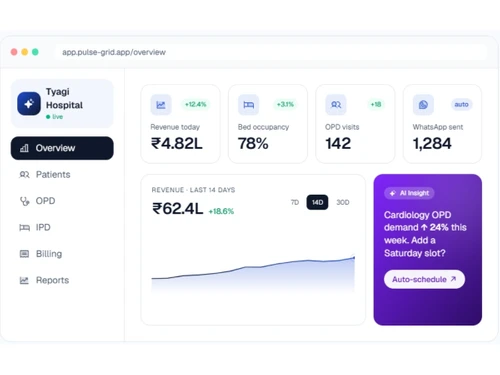
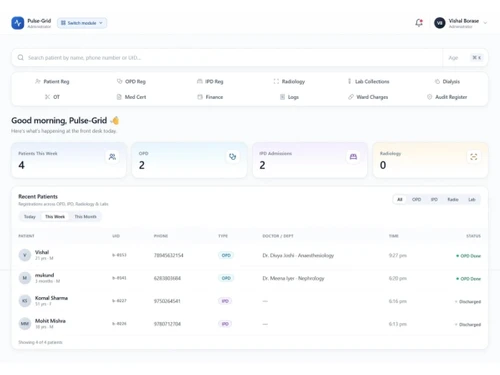
 Patient Management Appointment Management OPD Management IPD Management Electronic Medical Record (EMR) Pharmacy Management Laboratory Management Inventory Management Discharge Management Medical Records Management Reporting & Analytics Whatsapp Integration AI Assistant Billing & Invoicing User Access Management
  Windows
  iOS
iOS  Android MacOS
  Desktop
  Mobile
  Tablet
  iPad
iPad  Cloud-Based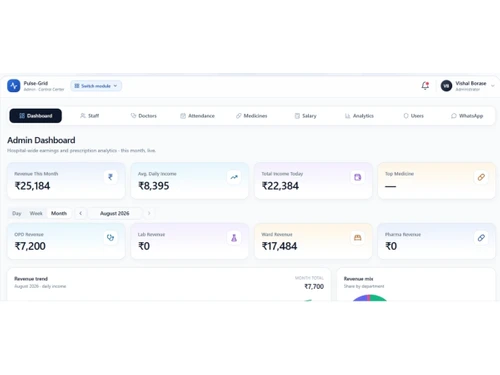
Small Business
Designed for startups and growing businesses
Medium Business
Built for business growth and flexibility
Enterprises
Designed for complex and large-scale business needs
Techjockey Trusted Reviews from Verified Users
No reviews are currently available for Pulse Grid. Discover similar Hospital Management Software reviews

MocDoc HMS
Whats great - We can take reports easily in the Mocdoc through this software, it is very handy. read more

Ezovion HMS
Whats great - Easy to use and a much productive functioning makes it one of the best software I’ve ever used! The features make this softwa... read more

Healthray HMIS
Whats great - The software covers patient registration, diagnostics, pharmacy, billing, and inventory management. Its intuitive interface a... read more

Pulse Grid
Price On Request
Desktop
Mobile
Web based
On Premises
Windows
Mac OS

Acssel HMS
₹ 1500
Desktop
Mobile
Web based
On Premises
Windows
Mac OS

Practo Insta
Price On Request
Desktop
Mobile
Web based
On Premises
Windows
Mac OS

Ether HMS
₹ 2000
Desktop
Mobile
Web based
On Premises
Windows
Mac OS

ZenoHosp
₹ 9000
Desktop
Mobile
Web based
On Premises
Windows
Mac OS
Hosman
Price On Request
Desktop
Mobile
Web based
On Premises
Windows
Mac OS

Lifemaan
Price On Request
Desktop
Mobile
Web based
On Premises
Windows
Mac OS

E_kshitiz
₹ 100000
Desktop
Mobile
Web based
On Premises
Windows
Mac OS

MediVaulta
Price On Request
Desktop
Mobile
Web based
On Premises
Windows
Mac OS

Meshink Hospital Management
₹ 10000
Desktop
Mobile
Web based
On Premises
Windows
Mac OS

OmniWorks HMS
₹ 15000
Desktop
Mobile
Web based
On Premises
Windows
Mac OS
(0) Product(s) selected
Starting Price:
₹9,000 /Month
Available
Price on Request
Available
Price on Request
Available
Price on Request
Starting Price:
₹15,000 /Year ₹30,000

Available
Price on Request

Starting Price:
₹100,000 /License
Starting Price:
₹99,999 /User/Year

Starting Price:
₹80,000 /Year

Starting Price:
₹2,000

Starting Price:
₹1,500,000
20,000+ Software Listed
Best Price Guranteed
Free Expert Consultation
2M+ Happy Customers
Terms and Condtions

Users with registered businesses can purchase goods from merchants on the platform to satisfy their business needs. Users are not permitted to utilize any products acquired through the platform for resale, advertising, business, or further distribution.
For each purchase made, users will receive a Tax Invoice (or 'GST invoice') that includes specific details such as:
the GSTIN of the user associated with their registered business, and
the specified Entity Name for their business.
It should be noted that not all products are eligible for GST Invoice. Only the products displayed by participating sellers with the 'GST-based Invoice Available' callout on the product description page would qualify.
Certain goods and services are not eligible to get a GST Invoice, including items with VAS, i.e., Value Added Services (e.g., Total Mobile Protection/Assured Buyback) and those involving an exchange offer at the time of purchase.
Users must ensure the accuracy of the GSTIN, and business entity name provided for the GST Invoice. Requests for corrections into GST Invoice would not be accommodated by Techjockey.com or any Seller, and any issues arising from user-provided information are the sole responsibility of users.
Techjockey.com is not liable for the GST Invoice or any associated input tax credit. To efficiently claim an input tax credit, users should select the registered place of business address as per the GST authority's data and follow the provisions of the GST Act and rules.
To claim an input tax credit, the delivery and billing addresses must match. Furthermore, input tax credits will not be granted if the delivery address and GSTIN on the invoice are from different states. In case of incorrect GST details provided during the order placement, the order will be canceled automatically.



![[Infographic] How HMS can help you boost revenue and enhance patient care](https://cdn.techjockey.com/blog/wp-content/uploads/2019/08/05185944/how-hms-can-help-boost-hospital-revenue-and-patient-care.jpg?d=265x163 "Blog - [Infographic] How HMS can help you boost revenue and enhance patient care")