 USA
USA UAE
UAESmall Business
Designed for startups and growing businesses

See More




Brand: QmarkSoft
Have you used Qmarksoft Pathology Lab Software before?
Share your insights for better experience
View plans
 Save upto 18%, Get GST Invoice on your business purchase T&C Buy Now & Pay Later, Check offer on payment page.
 Brand: QmarkSoft
Founded Year: 2010
QmarkSoft
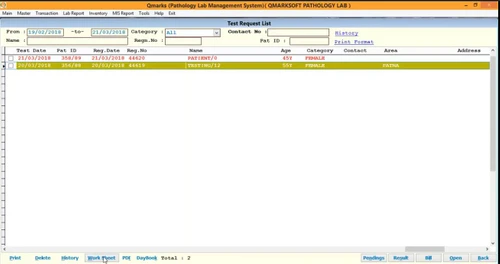
 Cloud-Based Operations Automated Machine Interfacing Smart Patient Registration Barcode Generation Customizable Report Formats Integrated Billing System Historical Trend Analysis Comprehensive Test Library Online Patient Portal Patient Management Stock Management SMS and Email Accounting & Taxation Radiology Management Pathology Management Rate Variation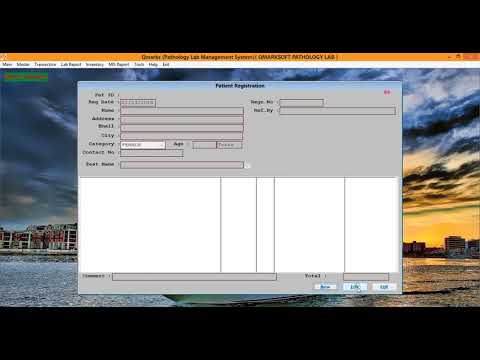

Watch the demo video to explore key features, real workflows, and how the software fits your business needs.
 Windows
  iOS
iOS  Android MacOS
  Desktop
  Mobile
  Tablet
  iPad
iPad  Cloud-Based
  Perpetual
Small Business
Designed for startups and growing businesses
Medium Business
Built for business growth and flexibility
Enterprises
Designed for complex and large-scale business needs
4.0
Out of 5

Overall Rating
Based on
3 Verified Reviews
Rating Breakdown
83% Recommend this Product
Add ReviewUsers generally appreciate Qmarksoft Pathology Lab Software for its ability to simplify lab work and expedite report generation, citing a user-friendly interface as a significant advantage. Many find the software essential for managing workloads effectively. However, some users report confusion due to the variety of test formats, which can complicate report accuracy. Additionally, adjusting reference values can be challenging, particularly as they differ between labs. Overall, the sentiment is positive, with users expressing a willingness to recommend the software.

Apr 13, 2020
Techjockey Verified
“The software has made lab pathology work simpler.”
Pros
A pathology software was a much-needed product as it helps to ease out the workload. It helps generate reports quickly, something that was otherwise very time-consuming. The interface is user friendly and provides for low and high values, features that are built in the software.
Cons
The software seems confusing sometimes owing to so many test formats and the user who is typing the report has to cross-check whether or not individual tests have been covered. Initially had a tough time changing some of these reference values for they vary from lab to lab.
Nov 25, 2019
Techjockey Verified
“The software has made pathology laboratory work simple”
Pros
The product which I have purchased is for easing our work load. A pathology software was a much-needed product. It helps us give reports at a faster rate, which took quite time consuming earlier. The interface is user-friendly and provides us with low and high values which is inbuilt in the software.
Cons
The software seems confusing sometimes owing to so many test formats. And, the person who is typing the report has to see whether individual tests have been covered or not. Initially, we had a tough time to change some of the reference values as they vary from lab to lab.
Aug 24, 2016
Techjockey Verified
“ give great information on companies”
Pros
I have already purchased a software from them and it worked like a charm. I'm considering now to update it, so will take a look with them
Cons
N/A

Qmarksoft Pathology Lab Software
₹ 1500.00 excl. GST
Desktop
Mobile
Web based
On Premises
Windows
Mac OS

Cloud Pathology
₹ 500
Desktop
Mobile
Web based
On Premises
Windows
Mac OS
LabLytic
₹ 499
Desktop
Mobile
Web based
On Premises
Windows
Mac OS
.png)
Flabs Lab Management Software
Price On Request
Desktop
Mobile
Web based
On Premises
Windows
Mac OS

eLabAssist
₹ 1305
Desktop
Mobile
Web based
On Premises
Windows
Mac OS

LabSmart
₹ 2999
Desktop
Mobile
Web based
On Premises
Windows
Mac OS

SoftEazy PathoPro
₹ 1999
Desktop
Mobile
Web based
On Premises
Windows
Mac OS

Birlamedisoft PathoGold
₹ 5900
Desktop
Mobile
Web based
On Premises
Windows
Mac OS

MocDoc Lab Management System
Price On Request
Desktop
Mobile
Web based
On Premises
Windows
Mac OS

Fabric LIMS
₹ 7500
Desktop
Mobile
Web based
On Premises
Windows
Mac OS

eZeeLab Software
₹ 500
Desktop
Mobile
Web based
On Premises
Windows
Mac OS
(0) Product(s) selected
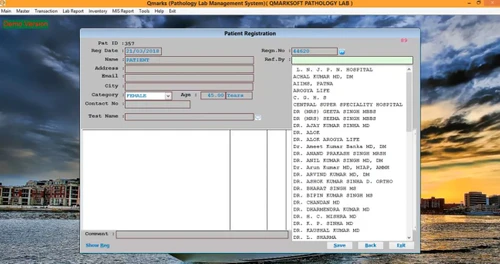
Qmarksoft Pathology Lab Software captures patient information, processes test records, issues bills, and generates reports based on one system. It automates tracking and reporting of samples to ensure the operations of the lab are quicker and more precise.
The cost of Qmarksoft Pathology Lab Software starts from INR 1,500 at Techjckey.
Pathology labs, diagnostic centers, and medical testing facilities can benefit from this solution.
Yes, it allows quick and accurate generation of lab test reports.
Yes, the software provides billing and invoicing features for lab services.
Yes, it has a simple interface designed for lab staff with minimal technical knowledge.
Yes, it supports a wide range of pathology tests and profiles.
Yes, it maintains patient details and test history for easy access.
You can contact the official provider or reseller for the latest pricing and licensing details.
20,000+ Software Listed
Best Price Guranteed
Free Expert Consultation
2M+ Happy Customers
Terms and Condtions

Users with registered businesses can purchase goods from merchants on the platform to satisfy their business needs. Users are not permitted to utilize any products acquired through the platform for resale, advertising, business, or further distribution.
For each purchase made, users will receive a Tax Invoice (or 'GST invoice') that includes specific details such as:
the GSTIN of the user associated with their registered business, and
the specified Entity Name for their business.
It should be noted that not all products are eligible for GST Invoice. Only the products displayed by participating sellers with the 'GST-based Invoice Available' callout on the product description page would qualify.
Certain goods and services are not eligible to get a GST Invoice, including items with VAS, i.e., Value Added Services (e.g., Total Mobile Protection/Assured Buyback) and those involving an exchange offer at the time of purchase.
Users must ensure the accuracy of the GSTIN, and business entity name provided for the GST Invoice. Requests for corrections into GST Invoice would not be accommodated by Techjockey.com or any Seller, and any issues arising from user-provided information are the sole responsibility of users.
Techjockey.com is not liable for the GST Invoice or any associated input tax credit. To efficiently claim an input tax credit, users should select the registered place of business address as per the GST authority's data and follow the provisions of the GST Act and rules.
To claim an input tax credit, the delivery and billing addresses must match. Furthermore, input tax credits will not be granted if the delivery address and GSTIN on the invoice are from different states. In case of incorrect GST details provided during the order placement, the order will be canceled automatically.






![[Infographic] List of Best Laboratory Management Software](https://cdn.techjockey.com/blog/wp-content/uploads/2018/01/26140008/infographic-laboratory-management-software-list_feature.jpg?d=265x163 "Blog - [Infographic] List of Best Laboratory Management Software")