linkedin
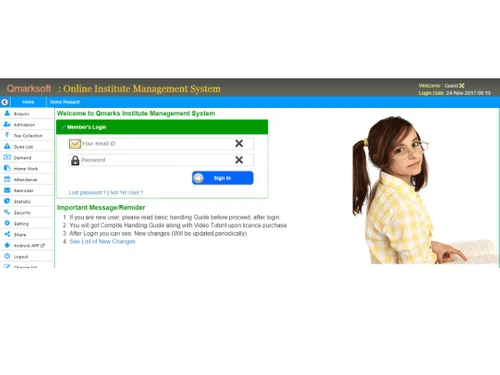
Qmarksoft Online School Software logo
play All In one School Software Online and Offline Version with Branded Mobile APP
qmarksoft-online-school-software-image1

Qmarksoft Online School Software

Brand: QmarkSoft

  • 4.6

  • 24 Ratings & 24 Reviews

Qmarksoft is a school management software that helps in automating various school related tasks. With Qmarksoft, schools find it easy to manage their daily task whether the classroom is operating on premise or remotely. Qmarksoft online school management software is suitable for schools and other educational institutes of different sizes. Qmarksoft school software has so many useful features tha...

See More

Have you used Qmarksoft Online School Software before?

Share your insights for better experience

Add a Review
Starting Price
₹600 excl.GST
₹ 708 incl. GST

View plans

offer Save upto 18%, Get GST Invoice on your business purchase T&C
offer Buy Now & Pay Later, Check offer on payment page.
Buy Now
100% Genuine
Products
Best Price
Guaranteed
Safe & Secure
Payment
  • Description

  • Pricing

  • Features

  • Specification

  • Review

  • Compare

  • Alternatives

  • FAQ

Starting at ₹600
Buy Now

Qmarksoft Online School Software Overview

What is Qmarksoft?

Qmarksoft is a school management software that helps in automating various school related tasks. With Qmarksoft, schools find it easy to manage their daily task whether the classroom is operating on premise or remotely. Qmarksoft online school management software is suitable for schools and other educational institutes of different sizes. 

Qmarksoft school software has so many useful features that allows you to easily maintain the examination, transportation, fees, student information, hostel, faculty management, etc. From purchasing to implementation, Qmarksoft school management system has simple features that is suitable for schools looking for managing both academic and administrative tasks. There is a separate login portal for teachers, students, parents and the admin staff to check assignments, progress report, fee submission status, etc. 

How does Qmarksoft Help Schools Manage Various Processes?

  1. It helps in managing student enquiries, registration & admission processes. 
  2. Helps manage the schedule of your teaching & non-teaching staff. 
  3. Registration and admission of students is transparent and quick with Qmarksoft.
  4. The school software also provides transport and hostel fee management features. 
  5. It automates the calculation of any pending fee. There is a class-wise fee structure to simplify the process.
  6. The school management software supports live video classes and provides multi-level security to users.
  7. Qmarksoft supports financial accounting through the balance sheet, voucher, etc.
  8. A simple administration dashboard to manage different school activities.
  9. Timetable management feature to generate timetables quickly.

Benefits of Qmarksoft School Management Software

Qmarksoft online software promises big benefits for schools and management that have been using it overtime. 

  1. Customizable: The schools can customize the features to suit their admin and academic needs. 
  2. Easy reporting: With Qmarksoft school management software, you can audit and manage several reports on the go. 
  3. Easy administration: The fully functional dashboard of Qmarksoft allows the schools to manage admin-related tasks efficiently. 
  4. Exam management: The school management software helps in creating exams and setting grading levels according to batches that ensure transparency in student assessment. 
  5. Modern design: Qmarksoft school software comes with a modern design suitable for quick access.
  6. User friendly: Qmarksoft school management system is user-friendly and does not require much effort to operate. 
  7. Fully responsive software: You can use Qmarksoft on any device at anytime from anywhere. All you need is an internet connection, a valid USERID, and a password. 
  8. Scheduling: Using Qmarksoft’s timetable feature, the school management can generate, maintain and monitor the timetables quickly. 
  9. Supports more than one platform: Qmarksoft school software can be used on Ubuntu as well as Windows. 
  10. Automatic alerts: With Qmarksoft you can create alerts for birthdays, important days like an annual day or sports day, and meetings. 

Pricing of Qmarksoft Online School Software

Qmarksoft price is available in three plans that are Standard, Advanced and Premium:

  1. Qmarksoft’s standard plan is available at Rs. 600/- per month for 100 students.
  2. Qmarksoft’s advance plan is available at Rs. 800/- per month for 100 students.
  3. Qmarksoft’s premium version is available at Rs. 999/- per month for 100 students. 

To buy Qmarksoft school management software or to book free online demo, you can request a call back from our product expert. 

Read more

QmarkSoft Company Details

Founded Year:  2010

QmarkSoft

Director/Founders Shruti Shankar
Company Size 1-100 Employees

Qmarksoft Online School Software Pricing & Plans

Standard

Calculated Price

600 Exclusive of all taxes
    • Student

      Student
      Student
    • Monthly

      Monthly
      Monthly

Key Features

  • Dedicated Support

  • Unlimited Data

  • Signature and logo integration

  • Enquiry, Registration, Admission

  • Online and Offline fee Collection

  • Hostel Management

Advance

Calculated Price

800 Exclusive of all taxes
    • Student

      Student
      Student
    • Monthly

      Monthly
      Monthly

Key Features

  • Dedicated Support

  • All of Standard Version

  • + Custom Domain Support

  • + HR and Payroll

  • + Exam Management System

  • + API Support

Premium

Calculated Price

999 Exclusive of all taxes
    • Licenses

      Licenses
      Licenses
    • Monthly

      Monthly
      Monthly

Key Features

  • Dedicated Support

  • All of Advance Version

  • + While Label Parent Portal

  • + Library Management

  • + Stock and Inventory

  • + Online Exam

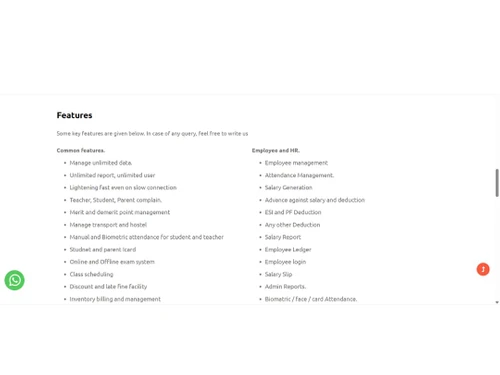
Qmarksoft Online School Software Features

  • icon_check Enquiry Management
    It allows parents to enquire about their child’s day-to-day activities in school.
  • icon_check Student Management
    With this feature, the school management can easily chart their future plans, and can track daily activities.  
  • icon_check Store Management
    With Qmarksoft school management software, it is easy to manage in-house stationery store.
  • icon_check Library Management
    Using the software, the school can keep track of each book issued to students by the library.
  • icon_check Payroll Management
    Qmarksoft school ERP software auto generates payroll of teachers and the school staff.
  • icon_check Administration
    The school ERP software helps the school administration managing administrative tasks
  • icon_check Admission Management
    It helps the schools with admission process like form generation, enrolment, entrance exam result, etc.
  • icon_check Faculty & Staff Management
    It allows the school to assign different tasks and other assignments to the faculty and other school staff.
  • icon_check Parent Portal
    It provides an exclusive portal to parents where they can be in the know of how their child is performing.
  • icon_check Classroom Management
    You can monitor the classroom activities and can be in sync with what’s going on in each class.
  • icon_check Homework Management
    It enables the parents and teachers to communicate and help students do their daily homework.
  • icon_check On Cloud
    The software uses cloud to stores all your important data and ensures it’s protected.
  • icon_check Mobile App
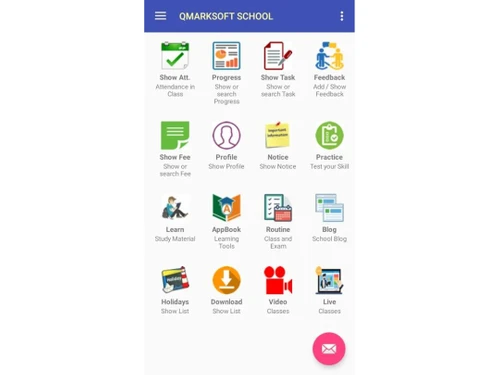
    Qmarksoft app helps manage different school-related activities remotely.  
  • icon_check Video Class Facility
    Using cloud, teachers can save their classes online so that children can go through them after school for revision
  • icon_check Online Classes
    The software allows students to attend classes from home through video conferencing and audio/video streaming.
  • icon_check Fee Management
    It enables a school to segregate how many students have paid the fee and what’s pending.
  • icon_check Transport Management
    It keeps a track if buses are coming and leaving on time, if the students are sitting in the right bus etc.
  • icon_check Scheduling
    The admin staff can schedule and prioritize their daily tasks. Also, your faculty’s classes can be scheduled. 
  • icon_check Exam Management
    Create exams and set various grading levels batch wise and observe the progress of each student.
  • icon_check SMS & Email Support
    Quick way to send messages to any user in the system. Effective communication between administration, teachers, students and
  • icon_check Dashboards
    Complete Administration Dashboard allow you to manage your school easily, quickly and efficiently.
  • icon_check Hostel Management
    Manage your hostel, hostel fee collection, expanses etc.
  • icon_check Reports
    Audit and manage a variety of reports and have them ready for a quick review whenever necessary.
Qmarksoft Online School Software Demo Video play icon

Get Qmarksoft Online School Software Demo

Watch the demo video to explore key features, real workflows, and how the software fits your business needs.

Understand
Key Features
Personal
Demo Insights
Interactive
Demo Support

Qmarksoft Online School Software Specification

Supported Platforms
Ubuntu Ubuntu Windows Windows iOS iOS Android Android Linux Linux
Devices
Desktop Desktop Mobile Mobile Tablet Tablet iPad iPad
Deployment
Web-Based Web-Based Perpetual Perpetual
Suitable For
Education
Business Specific
School/Colleges
Business Size
Small Business Medium Business Enterprises SMBs SMEs
Customer Support
Phone Email Live Chat
Language
English
Integration
API Integration
Training Resources
Live Online Documentation Videos
Technology
Next Generation

Explore the Best Alternative Solutions Similar to Your Business Size and Needs

Qmarksoft Online School Software Reviews

4.6

Out of 5

img

Overall Rating

Based on
24 Verified Reviews

Rating Breakdown

  • Features 4.6
  • Value for Money 4.6
  • Ease of Use 4.6
  • Customer Support 4.7

99% Recommend this Product

Add Review

Pros

  • "We can properly handle the data of presentations within the scheduling by using the programme."

    Pankaj Sharma Aug 5, 2022

  • "This ERP includes all the characteristics needed for a school to operate at the greatest level."

    Ashutosh Kumar Jul 26, 2022

  • "It's nice to have a 360-degree view of a pupil since it gives us all the information we need about them at once."

    KAPIL KJul 7, 2022

Cons

  • "All bases have been fulfilled in terms of staff, thus there is currently nothing to criticise."

    Kalleshwara May 5, 2022

  • "We receive proper service and assistance, therefore there are no concerns in that regard."

    Gaurav Borde Dec 3, 2021

  • "There are some new features that need to be incorporated in this system"

    Priyanka Bhatnagar Aug 15, 2021

KAPIL K

VP

Industry: Education User since: 1-2 years

4.6

Reviewed on: Jul 7, 2022

Techjockey Verified

“Effective for measuring student success and projecting graduation.”

Pros

It's nice to have a 360-degree view of a pupil since it gives us all the information we need about them at once.

Cons

there is nothing to dislike

Rao

Director

Industry: Education User since: 1-2 years

4.6

Reviewed on: Feb 4, 2022

Techjockey Verified

“Great Tool for Educators”

Pros

All of our criteria have been reduced, and we are now able to manage all employee and student data.

Cons

nothing to dislike

Tapan behera

Manager

Industry: Education User since: 1-2 years

4.6

Reviewed on: Jun 2, 2022

Techjockey Verified

“Great experience so far”

Pros

The management of data and the collection of fees has become considerably easier, and the number of errors has significantly decreased.

Cons

nothing to dislike in the software

See All Qmarksoft Online Reviews

Compare Qmarksoft Online School Software With other School Management Software

Products
Ratings
Pricing
Device Supported
Deployment
Supported Platforms
  • img

    Qmarksoft Online School Software

  • 4.6

  • ₹ 600.00 excl. GST

  • Desktop

    Mobile

  • Web based

    On Premises

  • Windows

    Mac OS

  • img

    Vedcool

  • 4.6

  • ₹ 11000

  • Desktop

    Mobile

  • Web based

    On Premises

  • Windows

    Mac OS

  • img

    School Magica

  • 4.7

  • ₹ 20000

  • Desktop

    Mobile

  • Web based

    On Premises

  • Windows

    Mac OS

  • img

    Edunext School ERP

  • 4.7

  • Price On Request

  • Desktop

    Mobile

  • Web based

    On Premises

  • Windows

    Mac OS

  • img

    E-School ERP

  • 4.6

  • ₹ 40000

  • Desktop

    Mobile

  • Web based

    On Premises

  • Windows

    Mac OS

  • img

    Edu Manage Plus

  • 4.9

  • ₹ 18

  • Desktop

    Mobile

  • Web based

    On Premises

  • Windows

    Mac OS

  • img

    Gati School ERP

  • 5

  • Price On Request

  • Desktop

    Mobile

  • Web based

    On Premises

  • Windows

    Mac OS

  • img

    EduOpus

  • 5

  • Price On Request

  • Desktop

    Mobile

  • Web based

    On Premises

  • Windows

    Mac OS

  • img

    SchoolEZY

  • 4.5

  • ₹ 25000

  • Desktop

    Mobile

  • Web based

    On Premises

  • Windows

    Mac OS

  • img

    MyAppClass

  • 5

  • ₹ 11999

  • Desktop

    Mobile

  • Web based

    On Premises

  • Windows

    Mac OS

(2) Product(s) selected

Qmarksoft Online School Software Alternatives

See All Qmarksoft Online School Software Alternatives

Available

Price on Request

Available

Price on Request

Starting Price:

₹5,000 /Year

Articles for Qmarksoft Online School Software

See All Related Articles

What is the procedure for installing Qmarksoft school management software?

Qmarksoft does not require any installation. The users can work with web-based Qmarksoft software using any computer with a high-speed internet connection. The only thing required is a valid user ID and a password.

Does Qmarksoft school management software help with reporting?

Qmarksoft software helps with creating and managing different types of financial and performance reports.

Do you provide Qmarksoft school management software demo?

Yes, you can request for an online demo by connecting with our team of expert. We will get in touch with you at the earliest.

Can Qmarksoft school management software be installed on multiple devices?

Since Qmarksoft does not require any installation, the users can access it from any location through the valid URL, User ID, and password.

Do we need to update Qmarksoft school management software manually?

You don’t have to update the software as it automatically gets updated from time to time.

How much does Qmarksoft Online School Software cost?

The pricing of Qmarksoft Online School Software starts at INR 600 per month for 100 students, available at techjockey.com.

20,000+ Software Listed

Best Price Guranteed

Free Expert Consultation

2M+ Happy Customers

Terms and Condtions

close

Users with registered businesses can purchase goods from merchants on the platform to satisfy their business needs. Users are not permitted to utilize any products acquired through the platform for resale, advertising, business, or further distribution.

For each purchase made, users will receive a Tax Invoice (or 'GST invoice') that includes specific details such as:

  • the GSTIN of the user associated with their registered business, and

  • the specified Entity Name for their business.

It should be noted that not all products are eligible for GST Invoice. Only the products displayed by participating sellers with the 'GST-based Invoice Available' callout on the product description page would qualify.

Certain goods and services are not eligible to get a GST Invoice, including items with VAS, i.e., Value Added Services (e.g., Total Mobile Protection/Assured Buyback) and those involving an exchange offer at the time of purchase.

Users must ensure the accuracy of the GSTIN, and business entity name provided for the GST Invoice. Requests for corrections into GST Invoice would not be accommodated by Techjockey.com or any Seller, and any issues arising from user-provided information are the sole responsibility of users.

Techjockey.com is not liable for the GST Invoice or any associated input tax credit. To efficiently claim an input tax credit, users should select the registered place of business address as per the GST authority's data and follow the provisions of the GST Act and rules.

To claim an input tax credit, the delivery and billing addresses must match. Furthermore, input tax credits will not be granted if the delivery address and GSTIN on the invoice are from different states. In case of incorrect GST details provided during the order placement, the order will be canceled automatically.