linkedin
Quinyx logo
play Quinyx Customer Case Study - Indigo
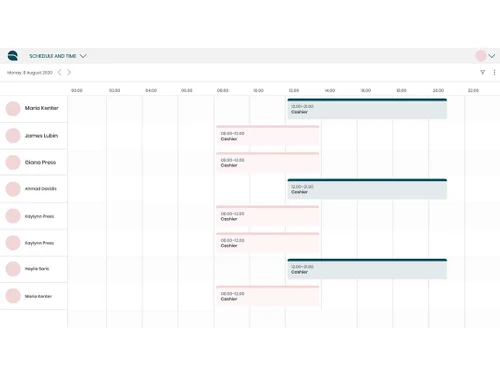
Quinyx schedule
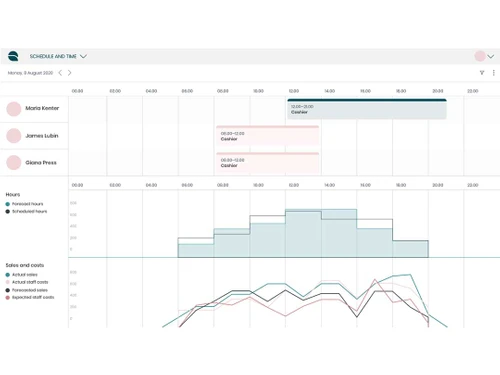
Quinyx Forecasting

Quinyx

Brand: Quinyx

  • 4.1

  • 3 Ratings

Boost productivity, streamline scheduling, and engage your team with an AI-powered platform that simplifies workforce management effortlessly!

See More

Have you used Quinyx before?

Share your insights for better experience

Add a Review

Price Available on Request

Questions about pricing or customization? We’re here to help, just a click away.

100% Genuine
Products
Best Price
Guaranteed
Safe & Secure
Payment
  • Description

  • Pricing

  • Features

  • Specification

  • Review

  • Compare

  • Alternatives

  • FAQ

  • Questions

Quinyx Software Overview

What is Quinyx Software?

Quinyx is a smart scheduling, payroll, and workforce management software to help manage frontline employees. This way it helps the firm to generate an efficient working schedule, control absence, and automate the payment of remunerations. Quinyx offers tools such as demand forecasting and auto-scheduling to help control labor costs and adhere to the relevant regulations. 

The multi-communication app enhances the effectiveness of the work of employees as per the assigned tasks, customer satisfaction, surveys, and reward systems to promote a motivated workforce among the employees. Accepted by worldwide organizations as a promoter of change, it enhances performance and happiness at the workplace. From shift workforce management to improving the coordination with the team, Quinyx software provides effective and easy-to-use tools to make your work and its outcomes beneficial for your business.

Key Features of Quinyx Software

  • AI-Powered Workforce Management: Quinyx workforce management software easily manages employees with tools tailored to your business needs, regardless of industry, location, or complexity.
  • Smart Demand Forecasting: Analyze data to predict busy and quiet times, ensuring you always have the right number of staff on duty.
  • Seamless Workforce Scheduling: Create schedules quickly while considering employee preferences, rules, and labor laws, ensuring no scheduling conflicts.
  • Labor Optimization: Avoid overstaffing or understaffing by scheduling just the right number of employees for every shift based on business goals.
  • Time and Attendance Simplified: Quinyx workforce management system tracks employee attendance, manages leave requests, and syncs payroll easily using Quinyx’s intuitive app.
  • Boost Employee Engagement: Improve team satisfaction with features for communication, rewards, and company-wide surveys to understand their needs better.
  • Advanced Analytics: Quinyx workforce management solution makes smart decisions using detailed workforce insights, comparing performance across locations, and sharing reports effortlessly.
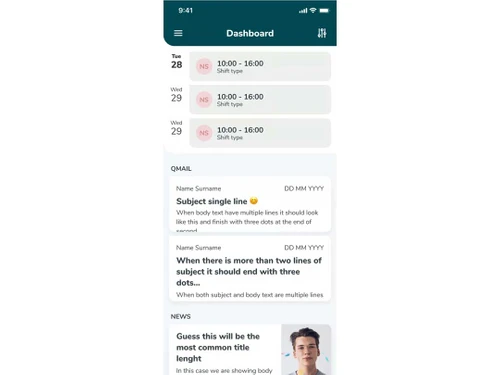
  • Mobile App Convenience: Employees can manage shifts, clock in/out, and communicate using a highly rated app that simplifies their work life.

Why Choose Quinyx Software?

  • All-in-One Solution: Quinyx is a workforce software that focuses on scheduling, attendance, and employee engagement of a workforce.
  • Proven ROI: Provides a return on investment of 376% by slashing overtime costs and administrative associated costs by half.
  • AI-Driven Insights: Quinyx workforce management system is also based on Artificial intelligence to predict demand and adjust staffing schedules as necessary.
  • Easy to Use: It also has a user-friendly interface which enables it to be easily adopted by both managers and the employees hence not requiring time-intensive training.
  • Scalable for Growth: Designed for small groups of employees to large companies as your company expands.
  • Compliance Simplified: Quinyx software makes the management of the employees’ policies and standards integrated and can never violate any legal provision.
  • Rapid Support and Updates: Correlates flexible customer support and timely software upgrades to help you stay a step ahead in workforce management.

Benefits of Quinyx Software

  • Time Savings: Quinyx workforce management software cut the time spent on scheduling to just 30 percent which means more time on core business.
  • Enhanced Employee Satisfaction: Optimise rostering, communication, and recognition programs to raise staff engagement by 10 percent.
  • Increased Productivity: Increase the efficiency of task management and people utilization by 30%.
  • Real-Time Adaptability: Quinyx software can flexibly rework schedules and respond to changes effectively to keep the business running and customers happy.
  • Data-Driven Decision-Making: The availability of detailed information allows using it in making correct decisions and improving the strategies for attracting the workforce.
  • Mobile-First Accessibility: By using an effective mobile application, employees are allowed to handle all timetables, demands, and messages in real time.
  • Reduced Costs: Avoid overstaffing and understaffing, this will reduce expenses paid for the employees and also reduce satisfaction by customers.
  • Global Compatibility: Quinyx workforce management solution caters to various industries and markets; it helps manage challenges that arise due to multiple locations.

Pricing of Quinyx Software

Quinyx pricing offers flexible plans according to your needs. Choose from stand-alone packages like Manage for scheduling, Optimize for AI-driven automation, or Engage for frontline communication. Each plan includes robust features, with add-ons available for advanced capabilities. Contact Techjockey.com for customized pricing and a free demo to explore options.

Read more

Quinyx Company Details

Founded Year:  2005

At Quinyx, we help you to optimize your business, manage your workforce, and engage your frontline workers in one single platform! Our all-in-one solution helps over one million workers keep track of their daily schedules for a better work-life balance.

Director/Founders Quinyx
Company Size 101-500 Employees

Quinyx Pricing & Plans

Looking for The Right Pricing?

Share your requirements and get a plan built around your business.

  • Define your business needs
  • Get customised pricing
  • Choose features that fit your workflow

Price Available on Request

Get personalised Quinyx pricing that fits your needs. Our team will connect with you.

Quinyx Features

  • icon_check Demand Forecasting
  • icon_check Workforce Scheduling
  • icon_check Time & Attendance Tracking
  • icon_check Labor Optimization
  • icon_check Engagement
  • icon_check Advanced Analytics
Quinyx Demo Video play icon

Get Quinyx Demo

Watch the demo video to explore key features, real workflows, and how the software fits your business needs.

Understand
Key Features
Personal
Demo Insights
Interactive
Demo Support

Quinyx Specifications

Supported Platforms
Windows Windows iOS iOS Android Android MacOS MacOS Linux Linux
Devices
Desktop Desktop Mobile Mobile
Deployment
Cloud-Based Cloud-Based
Suitable For
All Industries
Business Specific
All Businesses
Business Size
Small Business Startups Medium Business SMBs SMEs MSMBs
Customer Support
Email Forums
Language
English
Training Resources
Live Online Documentation Videos
AI Features
AI Integrated

Explore the Best Alternative Solutions Similar to Your Business Size and Needs

Quinyx Review

4.1

Out of 5

img

Overall Rating

Based on
3 Verified Ratings

Rating Breakdown

  • Features 4.5
  • Value for Money 4
  • Ease of Use 4
  • Customer Support 4.1

96% Recommend this Product

Add Review

Techjockey Trusted Reviews from Verified Users

No reviews are currently available for Quinyx. Discover similar Workforce Management Software reviews

  • Workstatus

    4.6

    Whats great - Workstatus can monitor your team's performance through screenshots and tracking their assigned tasks. Installation is simple ... read more

  • Cubiloon

    4.3

    Whats great - Scalable features and responsive support team. read more

  • Rippling

    4.4

    Whats great - Combines multiple HR functions, user-friendly interface, and good automation. read more

Compare Quinyx With other Workforce Management Software

Products
Ratings
Pricing
Device Supported
Deployment
Supported Platforms
  • img

    Quinyx

  • 4.1

  • Price On Request

  • Desktop

    Mobile

  • Web based

    On Premises

  • Windows

    Mac OS

  • img

    Workstatus

  • 4.5

  • ₹ 399

  • Desktop

    Mobile

  • Web based

    On Premises

  • Windows

    Mac OS

  • img

    Payoneer WFM

  • 4.1

  • Price On Request

  • Desktop

    Mobile

  • Web based

    On Premises

  • Windows

    Mac OS

  • img

    GoodDay

  • 4.4

  • Price On Request

  • Desktop

    Mobile

  • Web based

    On Premises

  • Windows

    Mac OS

  • img

    ProHance

  • 4.3

  • Price On Request

  • Desktop

    Mobile

  • Web based

    On Premises

  • Windows

    Mac OS

  • img

    Trackforce

  • 4.3

  • Price On Request

  • Desktop

    Mobile

  • Web based

    On Premises

  • Windows

    Mac OS

  • img

    Jolt

  • 4.6

  • Price On Request

  • Desktop

    Mobile

  • Web based

    On Premises

  • Windows

    Mac OS

  • img

    T3Workforce

  • 3.8

  • ₹ 80

  • Desktop

    Mobile

  • Web based

    On Premises

  • Windows

    Mac OS

  • img

    TeamWise

  • 4.5

  • Price On Request

  • Desktop

    Mobile

  • Web based

    On Premises

  • Windows

    Mac OS

  • img

    WorkMax

  • 4.4

  • Price On Request

  • Desktop

    Mobile

  • Web based

    On Premises

  • Windows

    Mac OS

(2) Product(s) selected

Quinyx Alternatives

See All Quinyx Alternatives

Starting Price:

$6

Available

Price on Request

Available

Price on Request

Jolt

4.6

Available

Price on Request

Starting Price:

₹30 /Month
Available

Price on Request

Available

Price on Request

Available

Price on Request

Starting Price:

$8 /Month

Available

Price on Request

What is Quinyx used for?

Quinyx streamlines workforce management with features like scheduling, payroll, and employee engagement to improve productivity and satisfaction.

How does Quinyx improve scheduling?

Quinyx uses AI-powered auto-scheduling and demand forecasting to create efficient, compliant, and cost-effective employee schedules.

Can employees use Quinyx?

Yes, Quinyx offers a user-friendly app for employees to check schedules, request leaves, and communicate with their teams.

Is Quinyx suitable for large businesses?

Yes, Quinyx is scalable, serving businesses of all sizes, from local stores to global enterprises.

How do I get into Quinyx?

Sign up on the Quinyx website or contact their team to set up access for your business.

How much does Quinyx software cost?

Quinyx pricing depends on your needs; contact Techjockey.com for customized plans that fit your business size and features.

Does Quinyx workforce management software offer a free demo?

Yes, Quinyx provides a free demo to help businesses explore its features and see how it works firsthand.

Quinyx Questions

Q:

Where can I see my schedule in Quinyx?

Anas Javed Jan 12, 2025
A:

To see your schedule in Quinyx, follow the steps given below:

  • Open your Quinyx account
  • Navigate to the 'My Schedule' section to view your upcoming shifts.
Rahul Raj Jan 15, 2025
A:

To punch in/out and attest your time in Quinyx, follow the steps given below:

  • Open your Quinyx account.
  • Use the 'Punch' feature at the start and end of your shift.
  • After your shift, review your hours
  • Approve them in the 'Time Reports' section
Ranjan Jan 12, 2025
Q:

How can I delete a leave application in Quinyx?

Amrendra Singh Jan 8, 2025
A:

To delete a leave application in Quinyx, follow the steps given below:

  • Open your Quinyx account
  • Navigate to 'My Schedule'
  • Click on the leave application you wish to delete
  • Choose the 'Delete' option
  • Hit confirm.
Magan Singh Jan 11, 2025
A:

To give away or swap a shift in Quinyx, follow the steps given below:

  • Open your Quinyx account
  • Go to 'My Schedule'
  • Choose the shift you wish to give away or swap
  • Use the 'Offer Shift' or 'Swap Shift' option
  • Select a colleague
  • Wait for your manager's approval.
Veerraju Pragadareddy Jan 13, 2025
Q:

How do I change or reset my password in Quinyx?

Rajpurohit Sameerr Jan 2, 2025
A:

To change or reset your password in Quinyx, follow the steps given below:

  • Navigate to the Quinyx login page
  • Click on the 'Forgot Password' link
  • Provide your registered email address
  • Check your email for a password reset link and follow the provided instructions.
RAJARSHI MAJUMDAR Jan 3, 2025
See All Quinyx Questions

20,000+ Software Listed

Best Price Guranteed

Free Expert Consultation

2M+ Happy Customers

Terms and Condtions

close

Users with registered businesses can purchase goods from merchants on the platform to satisfy their business needs. Users are not permitted to utilize any products acquired through the platform for resale, advertising, business, or further distribution.

For each purchase made, users will receive a Tax Invoice (or 'GST invoice') that includes specific details such as:

  • the GSTIN of the user associated with their registered business, and

  • the specified Entity Name for their business.

It should be noted that not all products are eligible for GST Invoice. Only the products displayed by participating sellers with the 'GST-based Invoice Available' callout on the product description page would qualify.

Certain goods and services are not eligible to get a GST Invoice, including items with VAS, i.e., Value Added Services (e.g., Total Mobile Protection/Assured Buyback) and those involving an exchange offer at the time of purchase.

Users must ensure the accuracy of the GSTIN, and business entity name provided for the GST Invoice. Requests for corrections into GST Invoice would not be accommodated by Techjockey.com or any Seller, and any issues arising from user-provided information are the sole responsibility of users.

Techjockey.com is not liable for the GST Invoice or any associated input tax credit. To efficiently claim an input tax credit, users should select the registered place of business address as per the GST authority's data and follow the provisions of the GST Act and rules.

To claim an input tax credit, the delivery and billing addresses must match. Furthermore, input tax credits will not be granted if the delivery address and GSTIN on the invoice are from different states. In case of incorrect GST details provided during the order placement, the order will be canceled automatically.