USA
USA UAE
UAESmall Business
Designed for startups and growing businesses


See More





Brand: Workstatus
Businesses can manage their entire workforce by tracking their working hours and productivity.
See MoreHave you used Workstatus before?
Share your insights for better experience
View plans
 Save upto 18%, Get GST Invoice on your business purchase T&C Buy Now & Pay Later, Check offer on payment page.
 Brand: Workstatus
Founded Year: 2019
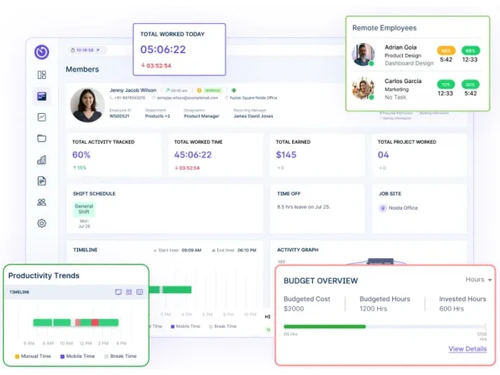
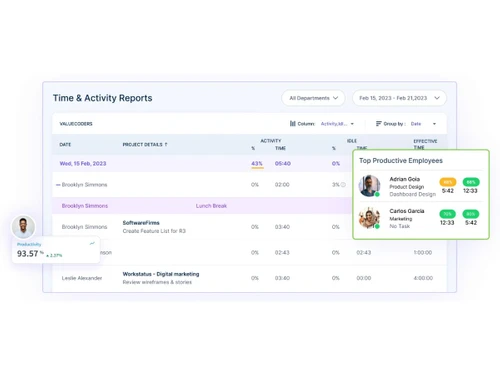
Workstatus is a workforce management software that enables you to track, monitor, and manage in-house, remote, and field employees.
 Time Tracking Online TimeSheets Employee Monitoring Project Budgeting Productivity Measurement Geofencing Attendance Management Online Employee Scheduling GPS Tracking Reporting Selfie Validation Online Invoicing

Watch the demo video to explore key features, real workflows, and how the software fits your business needs.
 Ubuntu
  Windows
  iOS
iOS  Android MacOS Windows(Phone)
  Desktop
  Mobile
  Cloud-Based
  Perpetual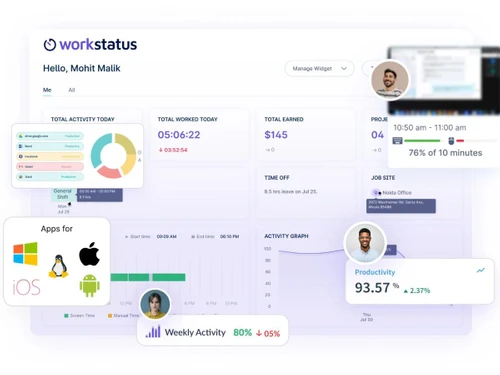
Small Business
Designed for startups and growing businesses
Medium Business
Built for business growth and flexibility
Enterprises
Designed for complex and large-scale business needs
4.6
Out of 5

Overall Rating
Based on
14 Verified Reviews
Rating Breakdown
89% Recommend this Product
Add ReviewOverall, customers express high satisfaction with Workstatus, particularly appreciating its user-friendly interface, comprehensive project management capabilities, and effective time tracking features. Users highlight the software's ability to streamline workflows and enhance team organization, making it especially beneficial for remote and hybrid teams. However, some concerns arise regarding the perceived invasiveness of certain monitoring features and limitations in integration with other tools. Additionally, a few users mention a learning curve associated with advanced functionalities, indicating room for improvement in user onboarding.
Pros
"Workstatus is easy to use, offers efficient workforce management, real-time analytics, and customizable features to suit various business needs."
"Easy to manage projects and tasks in one place not only this it Saves time with clear updates and automatic timesheets."
"The employee location tracking feature is particularly useful for teams that work remotely."
Cons
"There can be a learning curve when setting up some of the more advanced features and customizing the platform for specific workflows."
"The mobile app is useful but could benefit from more advanced functionality. Takes a little time to fully explore all the customization options in reports"
"interface is generally user-friendly, and some advanced features have a bit of a learning curve, especially for new users."

Jul 5, 2022
Techjockey Verified
“Best employee monitoring software for Employers”
Pros
Workstatus can monitor your team's performance through screenshots and tracking their assigned tasks. Installation is simple and can be done on either a website or from an app provided by Workstatus.
Cons
It does not come with remote access software monitoring. What I mean is, as far as I know, when we were using Workstatus, we could not monitor what kind of software the employees were opening and how long they spent on it.
Reason to switch
If you're searching for employee monitoring software that takes screenshots of what employees are up to and where clients can log in and check things out for themselves without bothering anyone else - this is the program for you.
Jul 6, 2022
Techjockey Verified
“Best time tracking software”
Pros
Workstatus employee time tracking app is a widely-used program with many advantages, some of which are easily accessible to its users, such as viewing how employees spend their time and how long they have worked.
Cons
The Workstatus Time Tracker service is good, but their trial needs to be 30-day instead of 14-day so that new users are tempted to try out the site and realize its potential benefits more quickly. I faced some issues with its face recognition attendance system.
Reason to switch
I used to have a problem working the hourly contract, but ever since I got in touch with Workstatus time Tracker, I haven't had any issues with getting my hours done on time.
Feb 22, 2023
Techjockey Verified
“Value for money !”
Pros
The Workstatus time tracking feature is fantastic. It helps me monitor how much time I spend on each task and is quite precise. I can easily log my hours while on the go because the mobile app is so user-friendly.
Cons
The limited choices for integration with other project management software is one thing I don't like. For the sake of making it simpler for me to manage my projects, I would adore to see Workstatus integrate with more platforms.
Reason to switch
Workstatus has been a game changer for our remote team. It has provided us with a level of transparency and accountability that was previously lacking in managing our projects

Workstatus
₹ 399.00 excl. GST
Desktop
Mobile
Web based
On Premises
Windows
Mac OS
Ascent Workforce Management
Price On Request
Desktop
Mobile
Web based
On Premises
Windows
Mac OS
Payoneer WFM
Price On Request
Desktop
Mobile
Web based
On Premises
Windows
Mac OS

GoodDay
Price On Request
Desktop
Mobile
Web based
On Premises
Windows
Mac OS

ProHance
Price On Request
Desktop
Mobile
Web based
On Premises
Windows
Mac OS

Trackforce
Price On Request
Desktop
Mobile
Web based
On Premises
Windows
Mac OS
Jolt
Price On Request
Desktop
Mobile
Web based
On Premises
Windows
Mac OS

TeamWise
Price On Request
Desktop
Mobile
Web based
On Premises
Windows
Mac OS

WorkMax
Price On Request
Desktop
Mobile
Web based
On Premises
Windows
Mac OS

Rippling
Price On Request
Desktop
Mobile
Web based
On Premises
Windows
Mac OS

T3Workforce
₹ 80
Desktop
Mobile
Web based
On Premises
Windows
Mac OS
(0) Product(s) selected
Available
Price on Request
Starting Price:
$6
Available
Price on Request
Available
Price on Request
Available
Price on Request
Starting Price:
₹30 /Month
Available
Price on Request
Available
Price on Request

Available
Price on Request

Starting Price:
$8 /Month

Available
Price on Request
The workforce management software is compatible with Windows and macOS operating system.
Workstatus app is available for Android mobile devices.
Workstatus supports cloud-based deployment type.
Workstatus pricing starts from INR 399 per month per user at techjockey.com.
Worksatus is typically used by small, medium, and large businesses that want to manage their workforce.
The workforce management solution’s demo is available for free with techjockey.com.
Workstatus offers a free trial. However, the premium plan with advanced features is available at techjockey.com with exciting deals.
Workstatus installation is not required, as it is web-based. Just open the Setup Wizard to get started.
Workstatus helps with time tracking, employee monitoring, and productivity measurement. It supports different time zones, allowing businesses with remote teams to keep track of employee work hours and schedules.
20,000+ Software Listed
Best Price Guranteed
Free Expert Consultation
2M+ Happy Customers
Terms and Condtions

Users with registered businesses can purchase goods from merchants on the platform to satisfy their business needs. Users are not permitted to utilize any products acquired through the platform for resale, advertising, business, or further distribution.
For each purchase made, users will receive a Tax Invoice (or 'GST invoice') that includes specific details such as:
the GSTIN of the user associated with their registered business, and
the specified Entity Name for their business.
It should be noted that not all products are eligible for GST Invoice. Only the products displayed by participating sellers with the 'GST-based Invoice Available' callout on the product description page would qualify.
Certain goods and services are not eligible to get a GST Invoice, including items with VAS, i.e., Value Added Services (e.g., Total Mobile Protection/Assured Buyback) and those involving an exchange offer at the time of purchase.
Users must ensure the accuracy of the GSTIN, and business entity name provided for the GST Invoice. Requests for corrections into GST Invoice would not be accommodated by Techjockey.com or any Seller, and any issues arising from user-provided information are the sole responsibility of users.
Techjockey.com is not liable for the GST Invoice or any associated input tax credit. To efficiently claim an input tax credit, users should select the registered place of business address as per the GST authority's data and follow the provisions of the GST Act and rules.
To claim an input tax credit, the delivery and billing addresses must match. Furthermore, input tax credits will not be granted if the delivery address and GSTIN on the invoice are from different states. In case of incorrect GST details provided during the order placement, the order will be canceled automatically.