linkedin
Refiner logo
refiner follow-up
refiner-satisfaction
refiner-users

Refiner

Brand: Refiner

  • No Ratings & Reviews

Refiner is an in-app and mobile survey platform for SaaS, fintech, and marketplace businesses that helps collect customer feedback and turn it into actionable insights.

See More

Have you used Refiner before?

Share your insights for better experience

Add a Review
Starting Price
$149

View plans

100% Genuine
Products
Best Price
Guaranteed
Safe & Secure
Payment
  • Description

  • Pricing

  • Features

  • Specification

  • Review

  • Compare

  • Alternatives

  • FAQ

Starting at $149

Refiner Software Overview

What is Refiner?

Refiner is a specialized customer feedback and in-app survey software designed for modern digital businesses, including SaaS, fintech, and marketplace companies. It moves beyond generic survey tools by providing a platform focused on gathering contextual feedback directly within a web or mobile application. The software enables teams to launch highly targeted surveys, analyze responses with powerful dashboards, and automate actions based on the feedback received. By integrating deeply with a company's product and data stack, Refiner helps transform raw customer feedback into actionable insights that drive product decisions and growth.

Why Choose Refiner?

  • Purpose-Built for Digital Products: Refiner eliminates the configuration overhead found in general-purpose tools. It is specifically designed for in-app and mobile use cases, ensuring features are relevant and streamlined for SaaS and tech companies.
  • True Native Mobile Experience: It provides native SDKs for iOS, Android, React Native, and Flutter. This ensures surveys feel like a seamless part of your mobile app, not a clunky, embedded web widget.
  • Deep Data Stack Integration: The platform connects directly with the tools you already use, offering bi-directional sync with Customer Data Platforms like Segment and RudderStack, and pushing data to product analytics tools like Amplitude and Mixpanel.
  • Actionable Insights, Not Spreadsheets: Refiner transforms response data into clear, actionable metrics. Its dashboards, segmentation capabilities, and AI-powered tagging help you understand user feedback without manual data manipulation in spreadsheets.
  • Simple Yet Powerful: The platform is designed for efficiency, allowing most teams to go from signup to a live survey in a single session. While simple to start, it offers advanced controls for precise targeting, customization, and automation when needed.

Advanced Features of Refiner

  • Advanced Audience Targeting: Precisely define who sees a survey and when. Target users based on custom attributes, in-app behavior, event triggers, page visits, country, language, and more to ensure feedback is always relevant.
  • AI-Powered Auto-Tagging: Automatically analyze and categorize open-text responses using AI. This feature saves countless hours of manual work and helps identify key themes and trends in qualitative feedback.
  • Dynamic Survey Logic: Utilize logic jumps to create interactive surveys that adapt based on a user's previous answers. This allows for a more personalized and efficient data collection experience.
  • Comprehensive Customization: Maintain brand consistency with full control over survey design, including colors, fonts, and layout. Enterprise plans offer complete white-labeling with custom CSS and custom survey link domains.
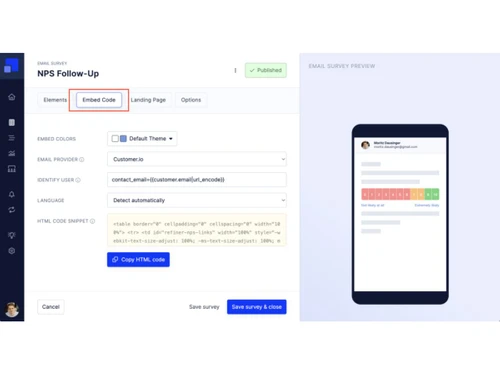
  • Multi-Channel Distribution: Reach users wherever they are. Deploy surveys within your web app, natively in your mobile app, via email with embedded questions, or through shareable links for any channel.
  • Workflow Automation & Alerts: Connect survey responses to your operational tools. Trigger follow-up actions, update user profiles in your CRM, and send real-time alerts for new feedback to Slack or Microsoft Teams.

Key Capabilities of Refiner

  • Reach Users Contextually: The first step is to engage users at the right moment. Refiner provides multiple channels to do this effectively.
    1. Launch surveys directly inside your web application using JavaScript, GTM, or NPM.
    2. Use native mobile SDKs for a fully integrated survey experience on iOS and Android.
    3. Send email surveys that capture initial responses directly from the inbox.
    4. Distribute surveys via shareable links for use in social media, support chats, or other channels.
  • Generate In-Depth Insights: Once data is collected, it flows into powerful, easy-to-understand dashboards.
    1. Track key metrics like NPS, CSAT, and CES with built-in charts and trend lines.
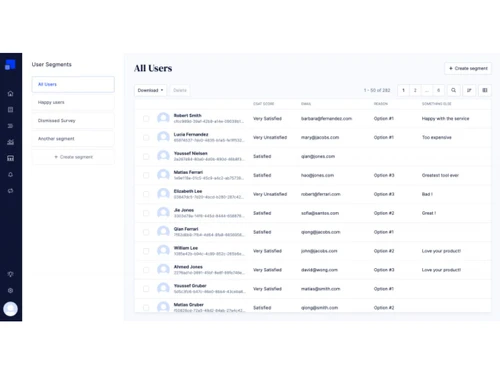
    2. Segment responses by user attributes, plan type, or behavioral cohorts to uncover deeper patterns.
    3. Leverage AI to automatically tag and make sense of qualitative, open-ended feedback.
  • Automate Follow-Up Actions: Close the feedback loop by connecting survey data to your existing workflows.
    1. Sync data bi-directionally with CDPs like Segment and RudderStack.
    2. Push response data to product analytics (Amplitude, Mixpanel) and CRMs (HubSpot, Salesforce).
    3. Trigger automated follow-ups, update user profiles, or create support tickets based on survey answers.

How to Use Refiner?

  1. Install the SDK: Begin by integrating the Refiner SDK into your web or mobile application. The setup is streamlined, often requiring just a single line of code to get started.
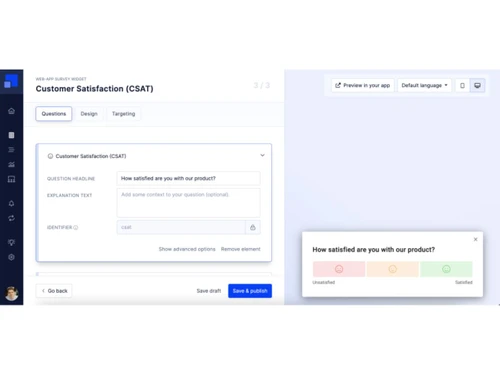
  2. Create Your Survey: Choose from ready-to-use templates for common use cases like NPS, CSAT, CES, and Product-Market Fit, or build a custom survey from scratch. The intuitive editor allows you to add various question types, apply logic jumps, and customize the design to match your brand.
  3. Define Your Audience and Triggers: Use the powerful segmentation engine to target specific user groups. You can trigger surveys based on user properties (e.g., "is a paying customer"), events (e.g., "completed onboarding"), or on-site behavior (e.g., "visited pricing page").
  4. Launch and Analyze: Once your survey is configured, launch it across your chosen channels. Responses will appear in your Refiner dashboard in real-time, where you can filter data, view trend reports, and analyze qualitative feedback with AI tagging.
  5. Automate and Act: Connect Refiner to your tech stack to automate actions. Send negative feedback directly to a Slack channel, add positive testimonials to a spreadsheet, or update a user's profile in your CRM based on their responses.

Refiner Pricing

Refiner price starts at USD 149 at techjockey.com.

The pricing model is based on different parameters, including extra features, deployment type, and the total number of users. For further queries related to the product, you can contact our product team and learn more about the pricing and offers.

Read more

Refiner Company Details

Founded Year:  2019

Highly customizable in-product surveys that yield high response rates coupled with advanced user targeting for segmented & specific insights.

Director/Founders Moritz Dausinger
Company Size 1-100 Employees

Refiner Pricing & Plans

Essentials
Starting at $149
    • Licenses

      Licenses
      Licenses
    • Monthly

      Monthly
      Monthly

Key Features

  • Monthly Active Users-5000

  • Unlimited survey responses

  • All survey types

  • Access to all survey features and question types

  • User Segmentation

  • AI Response Tagging

  • Reporting Dashboards

Growth
Starting at $279
    • Licenses

      Licenses
      Licenses
    • Monthly

      Monthly
      Monthly

Key Features

  • Monthly Active Users-5000

  • Everything from Essentials

  • Unlimited survey responses

  • Track user events

  • Translate with AI

  • CDP Integrations (Segment & Rudderstack)

  • CRM Integrations (HubSpot & Salesforce)

Refiner Features

  • icon_check Surveys & Feedback
    Builds surveys that collect customer feedback within web apps, mobile apps, email, or shared link pages.
  • icon_check Mobile SDK
    Integrates surveys into mobile platforms via iOS, Android, React Native, and Flutter SDKs.
  • icon_check Targeted triggering
    Launches surveys based on user behavior like page views, events, or time delays.
  • icon_check User Segmentation
    Creates user groups dynamically based on traits, events, and response history.
  • icon_check Response tagging
    Automatically categorizes survey answers with tags to help classify feedback patterns.
  • icon_check NPS measurement
    Calculates Net Promoter Score surveys to quantify user likelihood to recommend a product.
  • icon_check CSAT measurement
    Measures customer satisfaction via rating questions embedded in survey flows.
  • icon_check Multi channel distribution
    Sends surveys through web, in-app, email, and external shareable survey links.
  • icon_check Custom Branding
    Adjusts survey visual elements such as colors, images, and CSS for consistent design.
  • icon_check Templates
    Provides pre-built survey templates for common use cases like NPS, CSAT, and PMF.
  • icon_check Import/Export Management
    Exports survey response data for use outside the Refiner platform or in other tools.
  • icon_check Integration interfaces
    Connects with external services like analytics, CRM, and messaging platforms.
  • icon_check Webhook Integration
    Sends survey events and responses to external endpoints in real time.

Refiner Specifications

Supported Platforms
Ubuntu Ubuntu Windows Windows MacOS MacOS Linux Linux
Devices
Desktop Desktop
Deployment
Cloud-Based Cloud-Based
Suitable For
All Industries
Business Specific
All Businesses
Business Size
Small Business Startups Medium Business Enterprises SMBs SMEs MSMBs MSMEs
Customer Support
Email Communities
Language
English
Integration
API Integration
Training Resources
Documentation Videos
AI Features
AI Integrated
Compliance Regulation
HIPAA CCPA

Explore the Best Alternative Solutions Similar to Your Business Size and Needs

Refiner Review

Techjockey Trusted Reviews from Verified Users

No reviews are currently available for Refiner. Discover similar Survey Software reviews

  • QS Plus Quantity surveying software

    4.9

    Whats great - Jon from Techjockey was very in tune with our requirements, and after a good discussion recommended some good products/vendor... read more

  • SurveySparrow

    4.3

    Whats great - Perfectly planned front and back end. Exceptionally simple to set up a study, send it by means of email by their administrati... read more

  • Zoho Survey

    4.8

    Whats great - Zoho Survey is really clear to utilize in the event that you know about making studies. Some overviews can get very intricate... read more

Compare Refiner With other Survey Software

Products
Ratings
Pricing
Device Supported
Deployment
Supported Platforms
  • img

    Refiner

  • Price On Request

  • Desktop

    Mobile

  • Web based

    On Premises

  • Windows

    Mac OS

  • img

    Zoho Survey

  • 4.5

  • ₹ 4992

  • Desktop

    Mobile

  • Web based

    On Premises

  • Windows

    Mac OS

  • img

    Zoho Forms

  • 4.4

  • Price On Request

  • Desktop

    Mobile

  • Web based

    On Premises

  • Windows

    Mac OS

  • img

    Formsite

  • 4.4

  • Price On Request

  • Desktop

    Mobile

  • Web based

    On Premises

  • Windows

    Mac OS

  • img

    SogoCore

  • 4.3

  • Price On Request

  • Desktop

    Mobile

  • Web based

    On Premises

  • Windows

    Mac OS

  • img

    Alchemer

  • 4.2

  • Price On Request

  • Desktop

    Mobile

  • Web based

    On Premises

  • Windows

    Mac OS

  • img

    User Interviews

  • 4.2

  • Price On Request

  • Desktop

    Mobile

  • Web based

    On Premises

  • Windows

    Mac OS

  • img

    Formly

  • 4.3

  • Price On Request

  • Desktop

    Mobile

  • Web based

    On Premises

  • Windows

    Mac OS

  • img

    Microsoft Forms

  • 4.1

  • Price On Request

  • Desktop

    Mobile

  • Web based

    On Premises

  • Windows

    Mac OS

  • img

    SurveySparrow

  • 4.3

  • ₹ 2397

  • Desktop

    Mobile

  • Web based

    On Premises

  • Windows

    Mac OS

(0) Product(s) selected

Refiner Alternatives

See All Refiner Alternatives

Starting Price:

$25 /Month

Starting Price:

$55 /User/Month

Starting Price:

$19 /User/Month

Starting Price:

$19 /Month

Starting Price:

$10 /Month

Starting Price:

$83 /User/Month

Available

Price on Request

Starting Price:

$25 /Month

Articles for Refiner

See All Related Articles

What does Refiner do?

Refiner is customer feedback software designed for SaaS, fintech, and marketplace companies, specializing in contextual in-app and mobile surveys to gather insights directly from users.

How much does Refiner cost?

Refiner price starts at USD 149 at techjockey.com.

What are the main features of Refiner?

Refiner's main features include in-app and mobile-native surveys with SDKs for various platforms, AI-powered auto-tagging, advanced segmentation, comprehensive reporting dashboards for metrics like NPS, CSAT, and CES, and robust integrations with CDPs, CRMs, and product analytics tools for automated actions.

Is there a free trial for Refiner?

Yes, Refiner offers a free trial account, allowing users to start collecting customer insights before upgrading to a paid subscription.

Who can use Refiner?

Refiner is primarily designed for product-led teams within SaaS, fintech, and marketplace companies, ranging from fast-growing startups to global enterprises, who need advanced in-app and mobile survey capabilities.

What types of surveys can be launched with Refiner?

Refiner supports launching various survey types including in-app web surveys, mobile-native surveys via SDKs, email surveys with embedded questions, website popup surveys, and shareable survey links for any channel.

How does Refiner help with data analysis and action?

Refiner provides dashboards for in-depth insights with segmentation and AI auto-tagging, enabling users to filter responses and track metrics like NPS, CSAT, and CES, and it automates actions by integrating with existing tools for follow-ups, profile updates, and team alerts.

What integrations does Refiner offer?

Refiner offers robust integrations including bi-directional sync with CDPs like Segment and RudderStack, data push to product analytics tools like Amplitude and Mixpanel, CRM integrations with HubSpot and Salesforce, and workflow automation via Zapier, Make, Google Sheets, BigQuery, API, and webhooks.

Does Refiner support mobile-native surveys?

Yes, Refiner provides native mobile SDKs for iOS, Android, React Native, and Flutter, ensuring full feature parity and a seamless in-app survey experience without a third-party widget feel.

21,000+ Software Listed

Best Price Guranteed

Free Expert Consultation

5M+ Happy Customers

Terms and Condtions

close

Users with registered businesses can purchase goods from merchants on the platform to satisfy their business needs. Users are not permitted to utilize any products acquired through the platform for resale, advertising, business, or further distribution.

For each purchase made, users will receive a Tax Invoice (or 'GST invoice') that includes specific details such as:

  • the GSTIN of the user associated with their registered business, and

  • the specified Entity Name for their business.

It should be noted that not all products are eligible for GST Invoice. Only the products displayed by participating sellers with the 'GST-based Invoice Available' callout on the product description page would qualify.

Certain goods and services are not eligible to get a GST Invoice, including items with VAS, i.e., Value Added Services (e.g., Total Mobile Protection/Assured Buyback) and those involving an exchange offer at the time of purchase.

Users must ensure the accuracy of the GSTIN, and business entity name provided for the GST Invoice. Requests for corrections into GST Invoice would not be accommodated by Techjockey.com or any Seller, and any issues arising from user-provided information are the sole responsibility of users.

Techjockey.com is not liable for the GST Invoice or any associated input tax credit. To efficiently claim an input tax credit, users should select the registered place of business address as per the GST authority's data and follow the provisions of the GST Act and rules.

To claim an input tax credit, the delivery and billing addresses must match. Furthermore, input tax credits will not be granted if the delivery address and GSTIN on the invoice are from different states. In case of incorrect GST details provided during the order placement, the order will be canceled automatically.