linkedin
Remark Office OMR Software logo
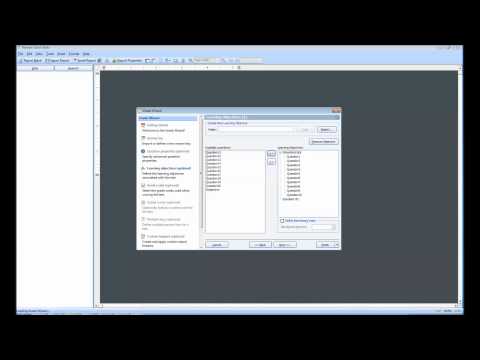
play Using Learning Objectives in Grading Tests with Remark Office OMR Software
Version 8 to Version 10 Updates
Survey Item Analysis

Remark Office OMR Software

Brand: Gravic

  • 5

  • 1 Rating & 1 Review

Have you used Remark Office OMR Software before?

Share your insights for better experience

Add a Review

Price Available on Request

Questions about pricing or customization? We’re here to help, just a click away.

100% Genuine
Products
Best Price
Guaranteed
Safe & Secure
Payment
  • Pricing

  • Features

  • Specification

  • Review

  • Compare

  • Alternatives

Remark Office OMR Software Pricing & Plans

Looking for The Right Pricing?

Share your requirements and get a plan built around your business.

  • Define your business needs
  • Get customised pricing
  • Choose features that fit your workflow

Price Available on Request

Get personalised Remark Office OMR Software pricing that fits your needs. Our team will connect with you.

Remark Office OMR Software Features

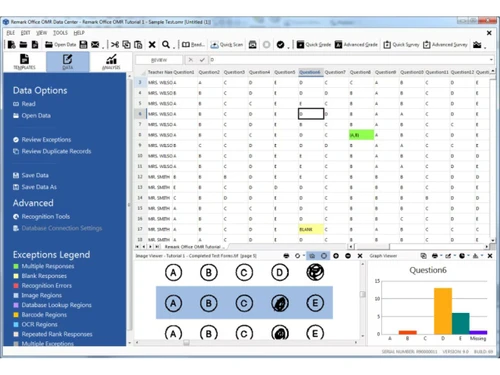
  • icon_check Database Lookup
    Validate respondent data in real-time by linking scanned IDs to external databases for instant name and info verification.
  • icon_check Email Reports
    Automatically distribute personalized grade reports or survey results to participants via email directly from the software.
  • icon_check Use your own forms
    Design and print your own plain paper surveys and tests using any word processor, eliminating the need for special forms.
  • icon_check Form Duplication
    Easily replicate existing form templates to maintain consistency across multiple versions of your data collection projects.
  • icon_check Multipage form Support
    Process multi-page surveys and tests seamlessly, automatically linking data from all pages back to a single respondent.
  • icon_check Mark, Barcode & Text Support
    Capture OMR bubbles, barcodes, and printed text simultaneously to gather diverse data types from a single scanned image.
  • icon_check Scanners
    Utilize any image-based TWAIN or WIA compatible scanner or multifunction printer to quickly digitize your paper documents.
  • icon_check Exceptional Form Recognition
    Ensure high accuracy with advanced recognition technology that identifies marks even on skewed or poorly photocopied pages.
  • icon_check Automatic Form Identification
    Automatically detect which template matches a scanned page, allowing you to process different form types in a single batch.
  • icon_check Capturing Handwriting
    Extract hand-printed text and comments from your forms using built-in ICR technology for more qualitative data insights.
  • icon_check Speech Recognition
    Review and correct data quickly by using voice commands to navigate through cells and enter text during the cleanup phase.
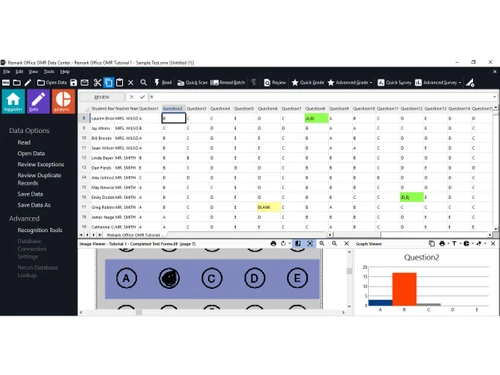
  • icon_check Easy Data Clean Up
  • icon_check Data Export
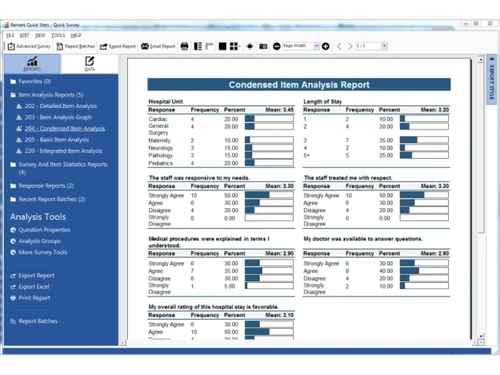
  • icon_check Data Analysis
  • icon_check Test Grading Highlights
    Automatically grade exams and generate detailed student reports, including item analysis and frequency distribution maps.
Remark Office OMR Software Demo Video play icon

Get Remark Office OMR Software Demo

Watch the demo video to explore key features, real workflows, and how the software fits your business needs.

Understand
Key Features
Personal
Demo Insights
Interactive
Demo Support

Remark Office OMR Software Specifications

Supported Platforms
Windows Windows Android Android Linux Linux
Devices
Desktop Desktop
Deployment
Cloud-Based Cloud-Based
Suitable For
All Industries
Business Specific
All Businesses
Business Size
Individual Small Business Startups Medium Business Enterprises
Customer Support
Phone Email Communities
Language
English
Integration
API Integration
Training Resources
Live Online Documentation

Remark Office OMR Software Review

5

Out of 5

img

Overall Rating

Based on
1 Verified Review

Rating Breakdown

  • Features 5
  • Value for Money 5
  • Ease of Use 5
  • Customer Support 5

90% Recommend this Product

Add Review

Rohit Gupta

Founder

Industry: Education User since: 2+ years

5

Reviewed on: Jul 26, 2023

Techjockey Verified

“This is original, rest all are cheap copies”

Pros

Remark Office OmR is the worlds leading software to accurately capture OMR Data from Plain paper forms. Yes you read it right, no need of any colour printing, even a black and white laser printed document can be read. Remark forms can be designed on anything, yes anything even on Ms Word

Cons

Price in some countries are higher due to taxes.

Switched from Addmen OMR Software

Reason to switch

Accuracy of the software and ease of use with flexiblity

Compare Remark Office OMR Software With other OMR Software

Products
Ratings
Pricing
Device Supported
Deployment
Supported Platforms
  • img

    Remark Office OMR Software

  • 5

  • Price On Request

  • Desktop

    Mobile

  • Web based

    On Premises

  • Windows

    Mac OS

  • img

    OSCAN OMR Software

  • 4.4

  • Price On Request

  • Desktop

    Mobile

  • Web based

    On Premises

  • Windows

    Mac OS

  • img

    OMR Guru

  • 4.1

  • Price On Request

  • Desktop

    Mobile

  • Web based

    On Premises

  • Windows

    Mac OS

(0) Product(s) selected

Remark Office OMR Software Alternatives

See All Remark Office OMR Software Alternatives

Available

Price on Request

20,000+ Software Listed

Best Price Guranteed

Free Expert Consultation

2M+ Happy Customers

Terms and Condtions

close

Users with registered businesses can purchase goods from merchants on the platform to satisfy their business needs. Users are not permitted to utilize any products acquired through the platform for resale, advertising, business, or further distribution.

For each purchase made, users will receive a Tax Invoice (or 'GST invoice') that includes specific details such as:

  • the GSTIN of the user associated with their registered business, and

  • the specified Entity Name for their business.

It should be noted that not all products are eligible for GST Invoice. Only the products displayed by participating sellers with the 'GST-based Invoice Available' callout on the product description page would qualify.

Certain goods and services are not eligible to get a GST Invoice, including items with VAS, i.e., Value Added Services (e.g., Total Mobile Protection/Assured Buyback) and those involving an exchange offer at the time of purchase.

Users must ensure the accuracy of the GSTIN, and business entity name provided for the GST Invoice. Requests for corrections into GST Invoice would not be accommodated by Techjockey.com or any Seller, and any issues arising from user-provided information are the sole responsibility of users.

Techjockey.com is not liable for the GST Invoice or any associated input tax credit. To efficiently claim an input tax credit, users should select the registered place of business address as per the GST authority's data and follow the provisions of the GST Act and rules.

To claim an input tax credit, the delivery and billing addresses must match. Furthermore, input tax credits will not be granted if the delivery address and GSTIN on the invoice are from different states. In case of incorrect GST details provided during the order placement, the order will be canceled automatically.