USA
USA UAE
UAE
Softomotive WinAutomation
Whats great - I've observed Winautomation to be exceptionally valuable. It is anything but difficult to just record errands. Yet in additio... read more


Brand: Neowise Software
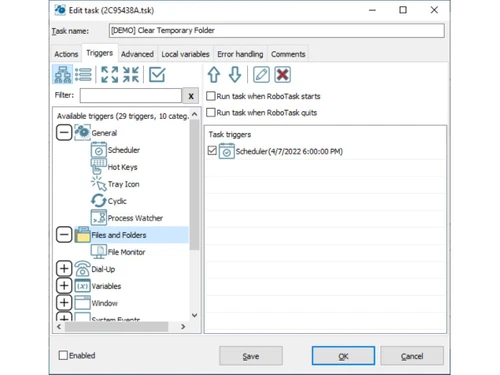
RoboTask takes routine computer work off your plate effortlessly! It quietly handles repetitive tasks while you focus on work that matters more.
See MoreHave you used RoboTask before?
Share your insights for better experience
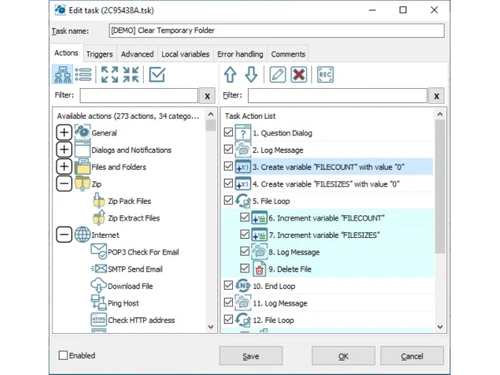
 Task Automation Visual Workflow Builder Macro Recorder Task Scheduler Event-Based Triggers Conditional Logic & Calculations Looping Mechanism File & Folder Automation Email Automation Web Automation Database Integration Script Integration Clipboard Automation Network Operations Advanced Error Handling
  Windows
  Desktop
  Perpetual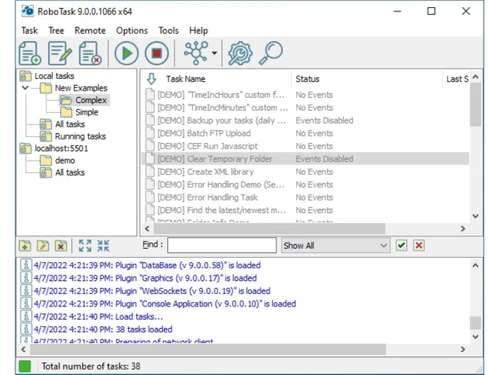
Techjockey Trusted Reviews from Verified Users
No reviews are currently available for RoboTask. Discover similar Robotic Process Automation Software reviews
Softomotive WinAutomation
Whats great - I've observed Winautomation to be exceptionally valuable. It is anything but difficult to just record errands. Yet in additio... read more

IQ Bot
Whats great - I was looking forward to software that will take care of my business by virtue of automation. After surfing the internet last... read more

AIQoD
Whats great - It is found to be a user-friendly no-code automation platform with all the sophisticated features required for any enterprise... read more
The price starts at USD 149.00 as a one-time charge at techjockey.com. That said, the final cost may vary based on added features, setup, and number of users.
It can be used by both beginners and professionals handling repetitive computer tasks. Individuals and businesses may use it to automate daily workflows.
No, there is no dedicated mobile app available for the software.
It is compatible with Windows operating systems only. The software is built specifically for Windows-based environments.
Yes, a free trial is available for interested users that allows testing the software before purchase.
It works by automating repetitive computer tasks using triggers and conditions. Tasks run automatically based on schedules, events, or user actions.
20,000+ Software Listed
Best Price Guranteed
Free Expert Consultation
2M+ Happy Customers
Terms and Condtions

Users with registered businesses can purchase goods from merchants on the platform to satisfy their business needs. Users are not permitted to utilize any products acquired through the platform for resale, advertising, business, or further distribution.
For each purchase made, users will receive a Tax Invoice (or 'GST invoice') that includes specific details such as:
the GSTIN of the user associated with their registered business, and
the specified Entity Name for their business.
It should be noted that not all products are eligible for GST Invoice. Only the products displayed by participating sellers with the 'GST-based Invoice Available' callout on the product description page would qualify.
Certain goods and services are not eligible to get a GST Invoice, including items with VAS, i.e., Value Added Services (e.g., Total Mobile Protection/Assured Buyback) and those involving an exchange offer at the time of purchase.
Users must ensure the accuracy of the GSTIN, and business entity name provided for the GST Invoice. Requests for corrections into GST Invoice would not be accommodated by Techjockey.com or any Seller, and any issues arising from user-provided information are the sole responsibility of users.
Techjockey.com is not liable for the GST Invoice or any associated input tax credit. To efficiently claim an input tax credit, users should select the registered place of business address as per the GST authority's data and follow the provisions of the GST Act and rules.
To claim an input tax credit, the delivery and billing addresses must match. Furthermore, input tax credits will not be granted if the delivery address and GSTIN on the invoice are from different states. In case of incorrect GST details provided during the order placement, the order will be canceled automatically.