linkedin
Sakon logo
play Sakon Explainer in 2 minutes
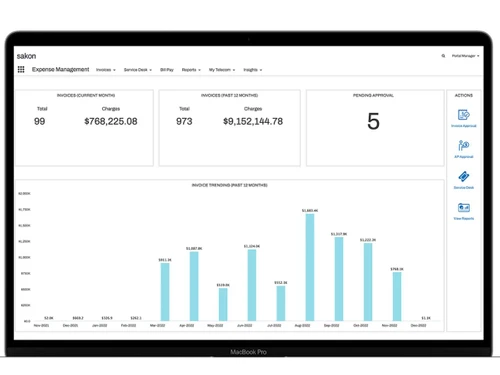
sakon-dashboard
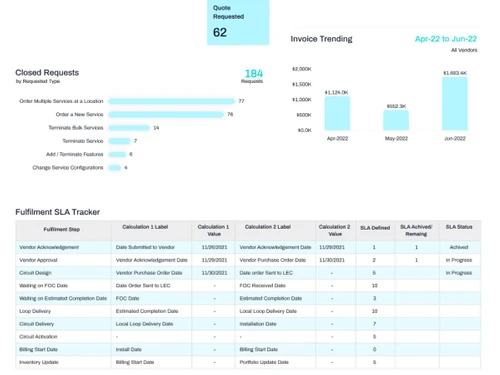
sakon-analytics

Sakon

Brand: Sakon

  • No Ratings & Reviews

Sakon helps businesses manage telecom expenses, mobile devices, and communication services efficiently.

See More

Have you used Sakon before?

Share your insights for better experience

Add a Review

Price Available on Request

Questions about pricing or customization? We’re here to help, just a click away.

100% Genuine
Products
Best Price
Guaranteed
Safe & Secure
Payment
  • Description

  • Pricing

  • Features

  • Specification

  • Review

  • FAQ

Sakon Software Overview

What is Sakon?

Sakon expense management software is a cloud-based telecom and technology expense management platform that helps businesses control, track, and optimize their communication and IT expenses.

It helps companies manage telecom services, mobile devices, cloud spending, invoices, and network costs from one centralized platform. Sakon automates invoice processing, payment workflows, and expense tracking to reduce manual work and improve accuracy. The software gives organizations better visibility into telecom and cloud spending across different carriers, vendors, and locations. It also helps businesses identify billing errors, reduce overspending, and improve financial control.

Sakon supports telecom lifecycle management, device management, and network service management for enterprises. The platform includes AI-powered insights and automation tools to simplify operations and improve decision-making. It integrates with enterprise systems like ERP, ServiceNow, Salesforce, and other business platforms. Sakon is widely used by IT, finance, procurement, and operations teams to improve efficiency and reduce telecom and technology costs.

Why Choose Sakon Software?

  • Telecom Expense Management: Helps businesses monitor and control telecom expenses efficiently.
  • Centralized Platform: Manages telecom services, devices, and expenses from one dashboard.
  • AI-Powered Insights: Uses AI and analytics to improve decision-making and cost optimization.
  • Mobility Management: Simplifies the management of mobile devices and enterprise mobility services.
  • Cost Reduction: Identifies unnecessary spending and helps reduce telecom costs.
  • Automated Workflows: Automates approvals, billing, and telecom management processes.
  • Real-Time Visibility: Provides real-time tracking of telecom assets and usage.
  • Global Support: Supports telecom operations across multiple countries and regions.
  • Easy Integration: Integrates with ERP, HR, and other enterprise systems smoothly.
  • Enhanced Security: Offers secure management of telecom networks and mobile devices.
  • Vendor Management: Helps businesses manage telecom vendors and contracts effectively.

Benefits of Sakon Software

  • Cloud-Based Solution: Accessible from anywhere with a secure cloud infrastructure.
  • Network Lifecycle Management: Helps manage telecom networks from procurement to retirement.
  • Detailed Reporting: Provides advanced reports and analytics for better visibility.
  • Improved Productivity: Reduces manual work and increases operational efficiency.
  • User-Friendly Interface: Offers an easy-to-use and intuitive dashboard.
  • Compliance Management: Helps organizations maintain telecom and regulatory compliance.
  • Better Asset Tracking: Tracks devices, SIM cards, and telecom assets accurately.
  • Enterprise-Grade Solution: Trusted by large enterprises and Fortune 500 companies worldwide.

Sakon Pricing

Sakon price details are available on request at techjockey.com.

The pricing model is based on different parameters, including extra features, deployment type, and the total number of users. For further queries related to the product, you can contact our product team and learn more about the pricing and offers.

Read more

Sakon Company Details

Founded Year:  2003

Sakon helps enterprise clients in a wide range of industries control telecom spend and manage end-user devices more efficiently.

Director/Founders Amine Doukkali, Andy Goorno, Sudhir Bapat
Company Size 501-1000 Employees

Sakon Pricing & Plans

Looking for The Right Pricing?

Share your requirements and get a plan built around your business.

  • Define your business needs
  • Get customised pricing
  • Choose features that fit your workflow

Price Available on Request

Get personalised Sakon pricing that fits your needs. Our team will connect with you.

Sakon Features

  • icon_check Asset Lifecycle Reporting
    Produces lifecycle reports to document history, service records, and transitions of devices from procurement to retirement.
  • icon_check Telecom Spend Analytics
    Aggregates usage and cost data to generate structured insights on telecommunications expense patterns across vendors and services.
  • icon_check Cost Allocation Management
    Allocates telecommunication expenses to defined cost centers based on rules, facilitating internal billing and financial
  • icon_check Inventory Lifecycle Tracking
    Maintains real-time device status and history to monitor availability, deployment, transit, and end-of-life activities.
  • icon_check Automated Workflow Engine
    Triggers defined actions for device lifecycle events and expense processes based on data events or business rules.
  • icon_check Usage Monitoring Dashboard
    Displays aggregated telecom usage metrics to support analysis and decision-making for telecom and connectivity services.
  • icon_check Chargeback Reporting Tools
    Generates reports required to assign telecom or device charges back to internal departments or business units.
  • icon_check Inventory Optimization
    Helps reduce redundant devices and unused services by analyzing active inventory and usage rates.
  • icon_check Cost Reporting
    Tracks and reports expenses related to fixed telecom circuits and wired telephony infrastructure.
  • icon_check License Management
    Stores and tracks provider agreements, license terms, and renewal dates for service compliance and planning.
  • icon_check Procurement Workflow Integration
    Connects order placement, vendor provisioning, and inventory data to streamline service acquisition processes.
  • icon_check Self-Service System
    Permits end users to request devices, plan changes, or service updates within defined enterprise policies.
  • icon_check Mobile App Management
    Offers mobile access for users to view device information and manage service requests and lifecycle events.
  • icon_check Unified Telecom Dashboard
    Presents consolidated spend, vendor, and inventory data across multiple communications platforms in a central view.
  • icon_check Vendor Contract Compliance Checks
    Compares billed charges to contracted rates to highlight deviations and possible overcharges.
Sakon Demo Video play icon

Get Sakon Demo

Watch the demo video to explore key features, real workflows, and how the software fits your business needs.

Understand
Key Features
Personal
Demo Insights
Interactive
Demo Support

Sakon Specifications

Supported Platforms
Ubuntu Ubuntu Windows Windows MacOS MacOS Linux Linux
Devices
Desktop Desktop
Deployment
Cloud-Based Cloud-Based
Suitable For
ITES
Business Specific
All Businesses
Business Size
Medium Business Enterprises
Customer Support
Email Communities
Language
English
Training Resources
Videos

Sakon Review

Techjockey Trusted Reviews from Verified Users

No reviews are currently available for Sakon. Discover similar Expense Management Software reviews

  • Zaggle EMS

    4.2

    Whats great - Quick approvals, simple interface. read more

  • Zoho Expense

    4.8

    Whats great - zoho-cost I had the option to explore different avenues regarding the Zoho Expense the board instrument in our association. W... read more

  • EasyForm Expense Management

    4.5

    Whats great - easyform-cost programming anticipated that it should come as a Cd to download. Well I did and the downloading procedure was a... read more

Articles for Sakon

See All Related Articles

How much does Sakon Software cost?

Sakon pricing information is available on request at techjockey.

Is there a mobile app available for Sakon Software?

No, Sakon does not offer mobile-app.

Which operating systems are compatible with Sakon Software?

Sakon is a cloud-based platform compatible with Windows, MacOS, Linux, and Ubuntu.

Does Sakon Software offer a free trial?

No, Sakon does not offer a free trial.

How does Sakon Software function?

Sakon helps businesses manage telecom expenses, mobile devices, and communication services through automation and analytics.

Who uses Sakon Software?

Large enterprises, global organizations, and IT teams use Sakon Software.

Is a free demo available for Sakon Software?

Yes, Sakon offers a free demo upon request.

Is Sakon Software available for free?

No, Sakon is a paid enterprise software solution.

20,000+ Software Listed

Best Price Guranteed

Free Expert Consultation

2M+ Happy Customers

Terms and Condtions

close

Users with registered businesses can purchase goods from merchants on the platform to satisfy their business needs. Users are not permitted to utilize any products acquired through the platform for resale, advertising, business, or further distribution.

For each purchase made, users will receive a Tax Invoice (or 'GST invoice') that includes specific details such as:

  • the GSTIN of the user associated with their registered business, and

  • the specified Entity Name for their business.

It should be noted that not all products are eligible for GST Invoice. Only the products displayed by participating sellers with the 'GST-based Invoice Available' callout on the product description page would qualify.

Certain goods and services are not eligible to get a GST Invoice, including items with VAS, i.e., Value Added Services (e.g., Total Mobile Protection/Assured Buyback) and those involving an exchange offer at the time of purchase.

Users must ensure the accuracy of the GSTIN, and business entity name provided for the GST Invoice. Requests for corrections into GST Invoice would not be accommodated by Techjockey.com or any Seller, and any issues arising from user-provided information are the sole responsibility of users.

Techjockey.com is not liable for the GST Invoice or any associated input tax credit. To efficiently claim an input tax credit, users should select the registered place of business address as per the GST authority's data and follow the provisions of the GST Act and rules.

To claim an input tax credit, the delivery and billing addresses must match. Furthermore, input tax credits will not be granted if the delivery address and GSTIN on the invoice are from different states. In case of incorrect GST details provided during the order placement, the order will be canceled automatically.